
syitren R300
Syitren R300 CD-soittimen käyttöohje
Malli: R300
Merkki: Syitren
1. Johdanto
The syitren R300 is a portable desktop retro CD player designed for home use. It features Bluetooth connectivity and fiber optic output, allowing users to connect to various external audio systems. This manual provides detailed instructions for setting up, operating, maintaining, and troubleshooting your R300 CD player.

Figure 1: syitren R300 CD Player - Front View
2. Mitä laatikossa on
Tarkista pakkauksen sisältö varmistaaksesi, että kaikki osat ovat mukana:
- syitren R300 CD Player
- Type-C virtajohto
- 1 AAA-paristo (mukana)
3. Asennus
3.1 Virran kytkeminen ja lataaminen
The R300 CD player is powered via a Type-C cable. It includes a built-in 2000mAh battery, providing over 6 hours of playback on a full charge. Connect the provided Type-C power cable to the DC IN 5V port on the back of the unit and plug the other end into a compatible USB power adapter (not included).

Figure 2: Rear Ports (DC IN 5V and SPDIF)
3.2 Äänilaitteiden kytkeminen
The R300 CD player does not have a built-in speaker. It requires connection to external audio devices for sound output. This design helps reduce the impact of audio vibration on the CD player, allowing users to choose their preferred speakers and power ampkestävämpiä laitteita.
3.2.1 Bluetooth-yhteys
The R300 CD player can connect wirelessly to Bluetooth headphones or speakers.
- Ensure your external Bluetooth audio device is in discovery mode.
- On the R300, activate Bluetooth pairing mode by holding the designated Bluetooth button (refer to controls section for button identification).
- Once connected, a solid Bluetooth icon will appear on the R300's display.
Video 1: Demonstrates how to connect the R300 CD Player to an external stereo system using Bluetooth. The video shows activating Bluetooth on the R300 and pairing it with a separate speaker, confirming connection via the display icon.
3.2.2 Fiber Optic (SPDIF) Output
For high-quality digital audio output, connect the R300 to an audio receiver or amplifier using a fiber optic cable (not included) via the SPDIF port on the back of the unit.
3.2.3 AUX-lähtö
The R300 also features an AUX output for analog audio connection to compatible devices using a 3.5mm audio cable (not included).
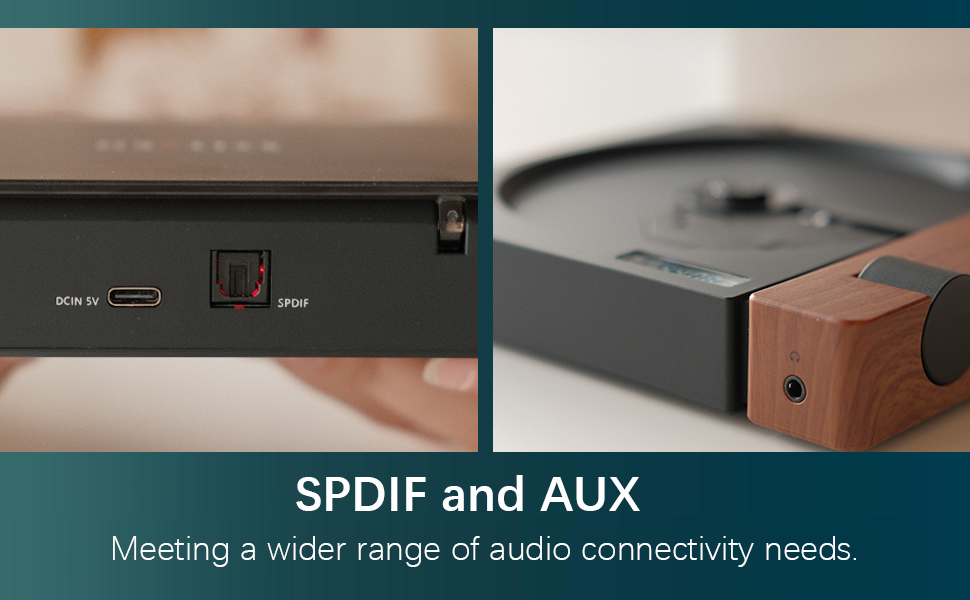
Figure 3: SPDIF and AUX Connectivity Options
4. Käyttöohjeet
4.1 CD-levyjen toisto
- Gently open the disc cover.
- Place a CD onto the spindle, ensuring it is seated correctly.
- Sulje levyn kansi.
- Press the Play/Pause button (orange button) to begin playback.
- Use the Skip Forward and Skip Backward buttons to navigate between tracks.
- Säädä äänenvoimakkuus äänenvoimakkuuden säätönupilla.

Figure 4: Opening the Disc Cover

Kuva 5: Ohjauspaneeli ja näyttö
4.2 Ohjaimet ohiview
The R300 features a minimalist control panel on the right side of the unit:
- Virtakytkin: Located on the back/side of the unit (refer to Figure 2).
- Äänenvoimakkuuden säädin: Rotates to adjust audio output level.
- Toisto/tauko-painike: Orange button to start or pause CD playback.
- Ohituspainikkeet: Black buttons for skipping tracks forward or backward.
- Bluetooth Activation Button: (Likely one of the black buttons, or the top one, as shown in video) Used to initiate Bluetooth pairing.
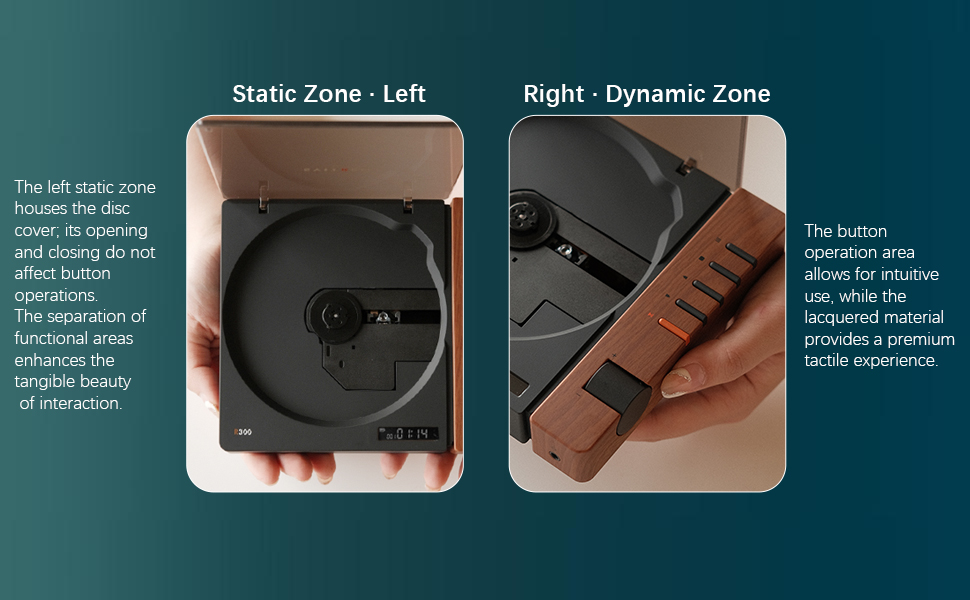
Figure 6: Functional Zones of the R300
5. Huolto
- Pidä laite puhtaana pyyhkimällä se pehmeällä, kuivalla liinalla. Vältä hankaavia puhdistusaineita tai liuottimia.
- Ensure the disc tray is free of dust and debris to prevent playback issues.
- Kun CD-soitinta ei käytetä, säilytä sitä viileässä, kuivassa paikassa, poissa suorasta auringonvalosta ja äärimmäisistä lämpötiloista.
- Käsittele CD-levyjä reunoista välttääksesi sormenjälkiä ja naarmuja.
6. Vianmääritys
| Ongelma | Mahdollinen syy | Ratkaisu |
|---|---|---|
| Soitin ei käynnisty. | Akku on tyhjä tai virtajohtoa ei ole kytketty. | Charge the unit using the Type-C power cable. Ensure the power cable is securely connected. |
| "NO CD" message displayed. | No CD inserted, CD is dirty/scratched, or CD is not properly seated. | Insert a CD. Clean the CD with a soft cloth. Ensure the CD is placed correctly on the spindle. |
| Ei äänilähtöä. | No external speaker connected, volume too low, or incorrect output mode selected. | Connect an external speaker via Bluetooth, SPDIF, or AUX. Increase the volume. Ensure the external device is properly configured for input. |
| Bluetooth-yhteysongelmat. | Laite ei ole pariliitostilassa, on kantaman ulkopuolella tai siinä on häiriöitä. | Varmista, että molemmat laitteet ovat pariliitostilassa. Siirrä laitteita lähemmäs. Vähennä muiden langattomien laitteiden aiheuttamia häiriöitä. |
| Player randomly shuts off. | Akun varaus on heikko tai sisäinen toimintahäiriö. | Varmista, että akku on ladattu täyteen. Jos ongelma jatkuu, ota yhteyttä asiakastukeen. |
7. Tekniset tiedot
- Mallin nimi: R300
- Merkki: syitren
- Tuotteen mitat: 6.38 x 5.79 x 1.28 tuumaa
- Tuotteen paino: 14.1 unssia
- Akut: Vaatii 1 AAA-paristoa (mukana)
- Yhteystekniikka: Bluetooth, SPDIF, AUX
- Erikoisominaisuus: Kannettava
- Valmistaja: syitren/Guangdong Kaiping Electronics Co., Ltd
- Akun kapasiteetti: Built-in 2000mAh (more than 6 hours playback)
8. Takuu ja tuki
For warranty information and customer support, please refer to the product's official Amazon listing page or visit the syitren official websivusto. Säilytä ostokuittisi mahdollisten takuuvaatimusten varalta.
Valmistaja: syitren/Guangdong Kaiping Electronics Co., Ltd
Merkkikauppa: Visit the syitren Store on Amazon
Asiaan liittyvät asiakirjatR300


Ask a question about this manual
Ask about setup, troubleshooting, compatibility, parts, safety, or missing instructions. Manuals+ will review the question and use this page’s manual context to help answer it.