
SPI 31-040-9
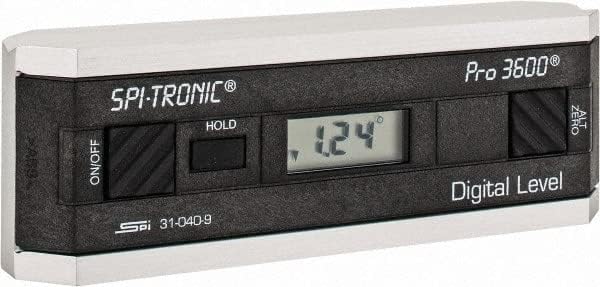
SPI 31-040-9 Digitaalinen astemitta PRO3600 Käyttöohje
Model: 31-040-9 | Brand: SPI
1. Johdanto
The SPI 31-040-9 Digital Protractor PRO3600 is a revolutionary tool designed to provide immediate digital indications of level, plumb, and angles. It features a light, rigid, and ultra-precise platform, utilizing a state-of-the-art sensor and microprocessor circuit for accurate readings. This instrument is built for durability, precision, and reliability, making it an essential tool for various metalworking and laboratory applications.
Tärkeimmät ominaisuudet:
- Floating zero provides zero selection anywhere within its 360° range.
- PRO 3600 features SPC output and excellent accuracy.
- Instant LCD Display with resolution of 0.1° up to +/-10°.
- Deviation from the true plane is measurable through full 360° (4x90°).
- Supplied in a protective plastic case.
- Top plate has a V-groove for accurate registration on curved or cylindrical surfaces.

2. Tuote ohiview
Familiarize yourself with the main components and controls of your SPI PRO3600 Digital Protractor.


3. Asennus
3.1 Akun asennus
The SPI PRO3600 is battery powered. To install or replace batteries:
- Locate the battery compartment cover, typically on the underside or side of the unit.
- Open the cover using a small screwdriver or coin if necessary.
- Insert the required batteries (refer to the battery type indicated inside the compartment, usually AAA or button cell) ensuring correct polarity (+/-).
- Sulje paristolokeron kansi kunnolla.
3.2 Ensimmäinen käynnistys
After battery installation, press the ON/OFF button to power on the device. The LCD display should illuminate and show a reading.
4. Käyttöohjeet
4.1 Virta päälle/pois
- Laitteen kääntämiseksi ON, paina ON/OFF -painiketta.
- Laitteen kääntämiseksi POIS, paina ON/OFF painiketta uudelleen.
- The unit will automatically shut off after 6 minutes of non-use to conserve battery life.
4.2 Zeroing (ALT ZERO)
The floating zero feature allows you to set a reference point anywhere within the 360° range.
- Place the unit on your chosen reference surface.
- Wait approximately 5 seconds for the reading to stabilize.
- Paina ALT ZERO button. The display will reset to 0.0°, establishing this as your new reference.
- To return to the original absolute reference (factory zero), press the ALT ZERO painiketta uudelleen.
4.3 Holding a Reading
Nykyisen lukeman jäädyttäminen näytössä:
- Paina PIDÄ button. The displayed reading will be frozen.
- To unfreeze the display and resume live readings, press the PIDÄ painiketta uudelleen.
4.4 SPC Output
The PRO3600 features an SPC (Statistical Process Control) output port. This allows for data transfer to external devices for analysis. Refer to the manual for your specific SPC data collection system for connection and usage instructions.
4.5 Measuring Angles
Place the base of the protractor firmly on the surface you wish to measure. The digital display will show the angle relative to the last set zero point. For absolute measurements, ensure the unit is zeroed on a true horizontal surface.
4.6 Using the V-Groove
The top plate of the protractor features a V-groove. This design allows for accurate registration and measurement on curved or cylindrical surfaces, such as pipes or shafts. Simply align the V-groove with the cylindrical object to obtain a stable and accurate reading.
5. Huolto
5.1 Puhdistus
- Pyyhi laite pehmeällä, kuivalla liinalla.
- Pinttyneeseen likaan, hieman damp Voidaan käyttää miedolla saippualla kostutettua liinaa, jonka jälkeen pinta kuivataan välittömästi.
- Älä käytä hankaavia puhdistusaineita, liuottimia äläkä upota laitetta veteen.
5.2 Varastointi
- Store the protractor in its supplied plastic case when not in use to protect it from dust, dirt, and physical damage.
- Store in a dry environment, away from extreme temperatures and direct sunlight.
- Jos säilytät laitetta pitkään, poista paristot vuotojen estämiseksi.
6. Vianmääritys
- Laite ei käynnisty: Tarkista paristojen asennus ja varmista, että paristot eivät ole tyhjentyneet. Vaihda tarvittaessa.
- Epätarkat lukemat: Ensure the measurement surface is clean and stable. Perform an ALT ZERO calibration on a known true reference surface.
- Laite sammuu odottamatta: The unit has an automatic shut-off feature after 6 minutes of non-use. This is normal operation. If it shuts off during active use, check battery levels.
- Näyttö on himmeä tai vilkkuu: Paristojen varaus voi olla heikko. Vaihda ne.
7. Tekniset tiedot
| Attribuutti | Arvo |
|---|---|
| Valmistaja | MSC Industrial |
| Osanumero | 03883782 |
| Tuotteen paino | 6.5 kiloa |
| Tuotteen mitat | 6 x 1.2 x 2.3 tuumaa |
| Tuotteen mallinumero | 31-040-9 |
| Koko | Yksi koko |
| Väri | Musta |
| Materiaali | Komposiitti |
| Virtalähde | Paristokäyttöinen |
| Tuote Paketin määrä | 1 |
| Mukana olevat komponentit | Fitted Case |
8. Takuu ja tuki
8.1 Takuutiedot
SPI measuring instruments are backed by an industry-leading 2-Year warranty, ensuring their durability, precision, and reliability. Please retain your proof of purchase for warranty claims.
8.2 Asiakastuki
For technical assistance, warranty service, or inquiries regarding your SPI PRO3600 Digital Protractor, please contact SPI customer support through their official websivustolta tai jälleenmyyjältä, jolta ostit tuotteen.
Ask a question about this manual
Ask about setup, troubleshooting, compatibility, parts, safety, or missing instructions. Manuals+ will review the question and use this page’s manual context to help answer it.