
Johdanto
This manual provides detailed instructions for the installation, operation, maintenance, and troubleshooting of your wisecoco 12.6 Inch Bar LCD Screen HDMI Display Monitor. This monitor is specifically designed to integrate seamlessly with the Hyte Y60 PC case, serving as an excellent secondary display for monitoring system performance, displaying custom visuals, or extending your desktop.

Figure 1: The 12.6-inch bar LCD screen displaying real-time system performance data.
Asennus ja asennus
The wisecoco 12.6 Inch Bar LCD Screen is designed for easy installation, particularly within the Hyte Y60 PC case. The package includes all necessary components for a straightforward setup.
Pakkauksen sisältö
Before beginning installation, please verify that all items are present in the package:
- 12.6-inch Bar LCD Screen
- 3.5mm DC Power Cable
- HDMI - Mini HDMI -kaapeli
- Ristiruuvimeisseli

Figure 2: Included accessories: DC power cable, HDMI to Mini HDMI cable, and a screwdriver.
Installation Steps (for Hyte Y60 PC Case)
- Valmistele tietokoneen kotelo: Ensure your Hyte Y60 PC case is powered off and unplugged. Carefully remove the side panel where the monitor will be installed.
- Mount the Screen: The screen features a bracket specifically designed to fit the Y60 case panel. Align the screen with the designated slot on the case. Use the provided screwdriver to secure the screen in place. No additional screws are typically required.
- Liitä videokaapeli: Connect one end of the HDMI to Mini HDMI cable to the Mini HDMI port on the monitor. Connect the other end to an available HDMI port on your graphics card (GPU) or motherboard.
- Liitä virtajohto:
- Connect the 3.5mm DC power cable to the DC 3.5mm port on the monitor. The other end of this cable typically connects to a power source within your PC.
- Alternatively, the screen can be powered via a Micro USB A cable (not included). If using Micro USB A, ensure the input is 5V500mA. If using the DC cable, the input should be 5V2A.
- Kaapelin hallinta: Route the cables neatly within your PC case to avoid interference with fans or other components.
- Virta päälle: Once all connections are secure, replace the PC case panel, plug in your PC, and power it on. The monitor should be detected as a secondary display.

Figure 3: Visual guide for installing the secondary monitor into the Hyte Y60 PC case.

Figure 4: The monitor seamlessly integrated into a Hyte Y60 PC case, displaying custom visuals.

Figure 5: Dimensions and port layout of the 12.6-inch bar LCD screen.
Käyttöohjeet
The wisecoco 12.6 Inch Bar LCD Screen functions as a standard secondary display, compatible with PCs and laptops. It offers versatile display options and user-friendly controls.
Näytön ominaisuudet
- Resoluutio: 1920x515 IPS panel for clear and vibrant visuals.
- Vastausaika: 3-5ms for smooth motion.
- Viewkulma: 178 ° leveä viewkuvakulma varmistaa tasaisen kuvanlaadun eri kuvakulmista.
- Päivitystaajuus: 60Hz standard refresh rate.
- Kontrastisuhde: 1000:1 syvämustalle ja kirkkaalle valkoiselle.
- Sisäänrakennetut kaiuttimet: Integrated dual speakers provide audio output.

Figure 6: The monitor features a 178° full viewing angle and IPS technology for superior image quality.
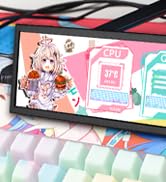
Figure 7: The Wisecoco monitor includes built-in speakers for convenience.
Näyttötilat
The monitor supports both landscape and portrait modes, allowing for flexible integration into your setup. You can adjust the display orientation through your operating system's display settings.

Figure 8: The monitor supports both portrait and landscape display orientations.
Näyttövalikon (OSD) säätimet
The monitor features physical buttons on the back for accessing the OSD menu and controlling basic functions:
- Lähde: Switches between available video inputs (e.g., Mini HDMI 1, Mini HDMI 2).
- Äänenvoimakkuus +/-: Adjusts the audio output level of the built-in speakers.
- Menu: Accesses the OSD menu for advanced settings (brightness, contrast, color, etc.).
- Teho: Kytkee näytön päälle tai pois päältä.
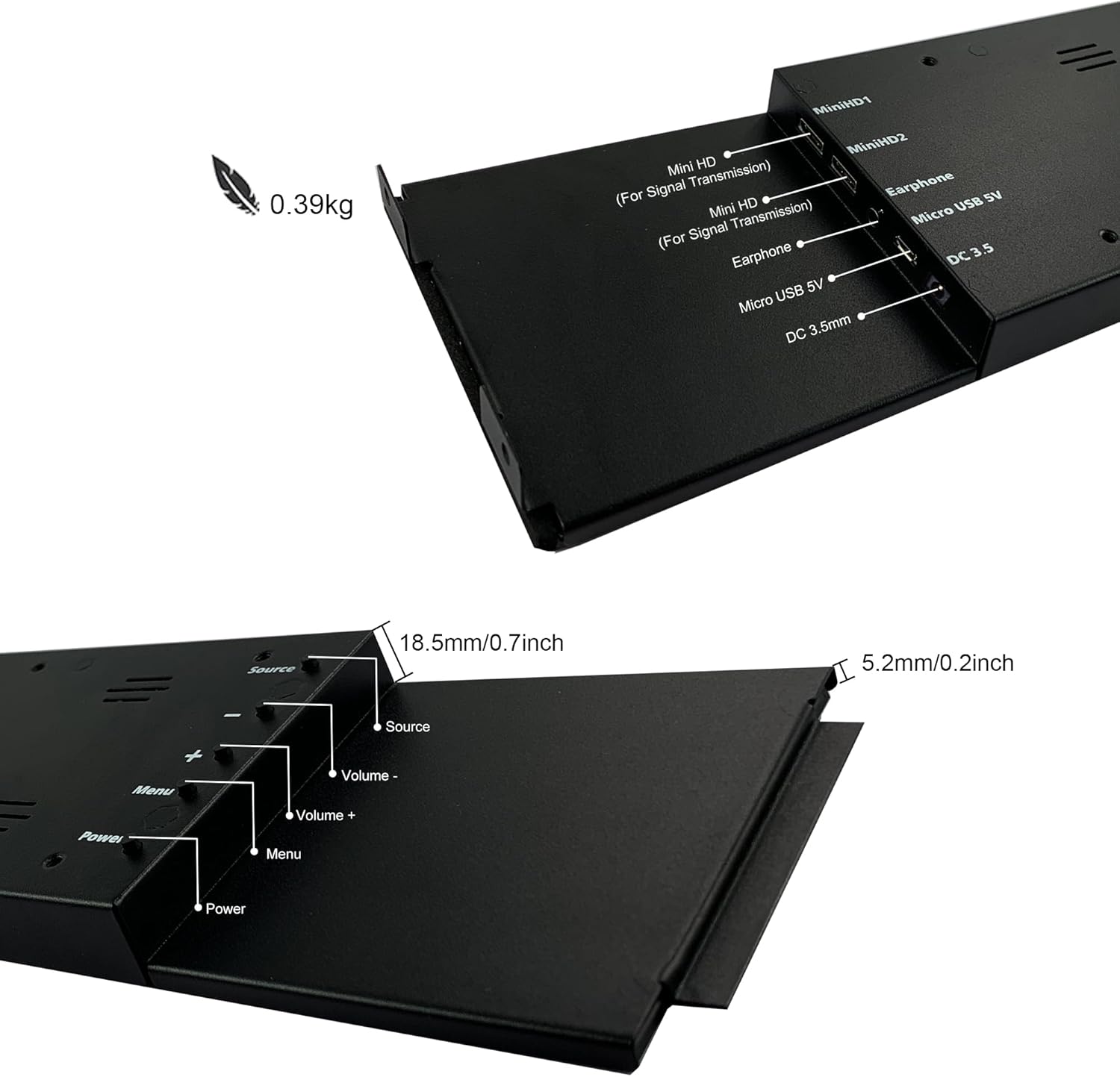
Figure 9: Location of control buttons and ports on the side of the monitor.
Huolto
Asianmukainen huolto varmistaa näyttösi pitkän käyttöiän ja optimaalisen suorituskyvyn.
- Näytön puhdistaminen: Käytä pehmeää, nukkaamatonta liinaa, joka on suunniteltu erityisesti elektroniikkalaitteille. Pinttyneisiin tahroihin hankaa kevyestiampen the cloth with water or a screen-cleaning solution. Avoid harsh chemicals, abrasive materials, or spraying liquid directly onto the screen.
- Yleinen puhdistus: Pyyhi näytön casing pehmeällä, kuivalla liinalla.
- Ilmanvaihto: Varmista, että näytön tuuletusaukot eivät ole tukossa ylikuumenemisen estämiseksi.
- Ympäristöolosuhteet: Vältä näytön altistamista äärimmäisille lämpötiloille, korkealle kosteudelle tai suoralle auringonvalolle.
- Katkaise virta, kun sitä ei käytetä: For extended periods of inactivity, it is recommended to power off the monitor.
Vianetsintä
If you encounter issues with your wisecoco monitor, refer to the following common problems and solutions:
| Ongelma | Mahdollinen syy | Ratkaisu |
|---|---|---|
| Ei näyttöä / "Ei signaalia" -viesti |
|
|
| Screen flashes red, blue, or green when PC sleeps | Specific display settings or driver interaction. | Access the monitor's OSD menu and navigate through settings. Sometimes simply accessing and exiting the menu can resolve this. Ensure GPU drivers are updated. |
| Ei ääntä sisäänrakennetuista kaiuttimista |
|
|
| Half of the screen not working | Hardware defect or severe connection issue. |
|
Tuotteen tekniset tiedot
Detailed technical specifications for the wisecoco 12.6 Inch Bar LCD Screen HDMI Display Monitor:
| Ominaisuus | Erittely |
|---|---|
| Tuotteen mitat | 1 x 4 x 13 tuumaa |
| Tuotteen paino | 1.74 kiloa |
| Valmistaja | Wisecoco |
| Tuotteen mallinumero | R126F01-HB |
| Seisova näytön koko | 12.6 tuumaa |
| Kuvasuhde | 32:9 |
| Voitage | 5 volttia (DC) |
| Resoluutio | 1920 x 515 |
| Merkki | wisecoco |
| Näytön koko | 12.6 tuumaa |
| Näytön pinnan kuvaus | Kiiltävä |
Takuu ja tuki
Wisecoco is committed to providing high-quality products and customer satisfaction.
- Takuu: Tällä tuotteella on 12 kuukauden takuu ostopäivästä lukien.
- Rahat takaisin -takuu: Tarjolla on 30 päivän rahat takaisin -takuu.
- Asiakastuki: 24-hour customer support is available for any inquiries or assistance.
For warranty claims, technical support, or any other questions, please contact Wisecoco customer service through the official channels provided at the point of purchase or on the Wisecoco brand websivusto.

Figure 10: Wisecoco's commitment to customer satisfaction.