
1. Johdanto
Thank you for choosing the Brinyte HC01 Rechargeable Headlamp. This manual provides detailed instructions for the safe and efficient operation, maintenance, and troubleshooting of your new headlampLue tämä käyttöohje huolellisesti ennen käyttöä ja säilytä se myöhempää tarvetta varten.
Tärkeimmät ominaisuudet:
- Triple Light System: 1000-lumen main white light, close-range white/red auxiliary lights.
- Säädettävä kirkkaus: Low, Medium, High, Turbo modes.
- Erikoistilat: Strobe, SOS, Signal modes for various scenarios.
- Kaksi tehovaihtoehtoa: Rechargeable via USB-C and compatible with AAA batteries for backup.
- Patented Anti-Tangle Headband: Breathable, easily adjustable with a side knob, and detachable for handheld use.
- Punaisen valon tila: Ideal for night hunting, fishing, maintaining night vision, and emergency signaling.
- Kestävä rakenne: IP66 waterproof rate and 1-meter drop-resistant.
- Kevyt muotoilu: Weighs only 2.29 oz for comfortable use.
2. Pakkauksen sisältö
Kun avaat paketin, tarkista, että kaikki seuraavat osat ovat mukana:
- 1 x Brinyte HC01 Headlamp
- 1 x päähihna
- 1 x kiinnike
- 1 x Type-C latauskaapeli
- 1 x BR1200 Rechargeable Battery
- 1 x Käyttöohje (tämä asiakirja)
- 1 x Value-added Card

Image: Contents of the Brinyte HC01 Headlamp package, showing the headlamp, head strap, USB-C charging cable, and rechargeable battery.
3. Asennus ja ensimmäinen käyttökerta
3.1 Pääpannan kiinnittäminen
- Aseta päällinenamp unit into the bracket on the head strap. Ensure it clicks securely into place.
- Adjust the head strap to fit comfortably around your head. The patented anti-tangle headband can be adjusted using the side knob:
- To extend the strap: Press the knob and pull the buckle.
- To retract the strap: Rotate the knob to draw back the head strap.

Image: Step-by-step guide on adjusting the patented anti-tangle headband of the HC01 headlamp.
3.2 Akun lataaminen
The Brinyte HC01 headlamp is equipped with a rechargeable BR1200 battery. For optimal performance, fully charge the battery before first use.
- Paikanna USB-C-latausportti kuulokkeistaamp.
- Connect the provided Type-C charging cable to the headlamp and a compatible USB power source (e.g., laptop, power bank, AC adapter, car charger).
- The battery status indicator lights will illuminate during charging. A full charge typically takes approximately 1.5 hours.
- Kun lataus on täynnä, irrota latauskaapeli.

Image: The Brinyte HC01 headlamp being charged via USB-C, with an illustration of the 1200mAh battery capacity, 1.5 hours full charge time, and 45 hours usage.
3.3 Installing AAA Batteries (Optional Backup)
In situations where recharging is not possible, the HC01 can be powered by AAA batteries.
- Open the battery compartment of the headlamp.
- Aseta 3 AAA-paristoa paikoilleen varmistaen oikea napaisuus (+/-).
- Sulje paristolokero kunnolla.

Image: Illustration of the dual power options for the Brinyte HC01 headlamp, highlighting both USB-C charging and the use of AAA batteries as a backup.
4. Käyttö
The HC01 headlamp features two main buttons for control: one for white light and one for red light.
4.1 White Light Operation
- Kytke päälle/pois päältä: Press the white light button once to turn on the main white light. Press again to turn off.
- Säädä kirkkautta: While the white light is on, press and hold the white light button to cycle through brightness modes: Low, Medium, High, Turbo. Release the button at your desired brightness.
- Special Modes (Strobe/SOS/Signal): Double-click the white light button to activate Strobe mode. Double-click again to cycle through SOS and Signal modes. Single-click to return to the previous brightness mode or turn off.
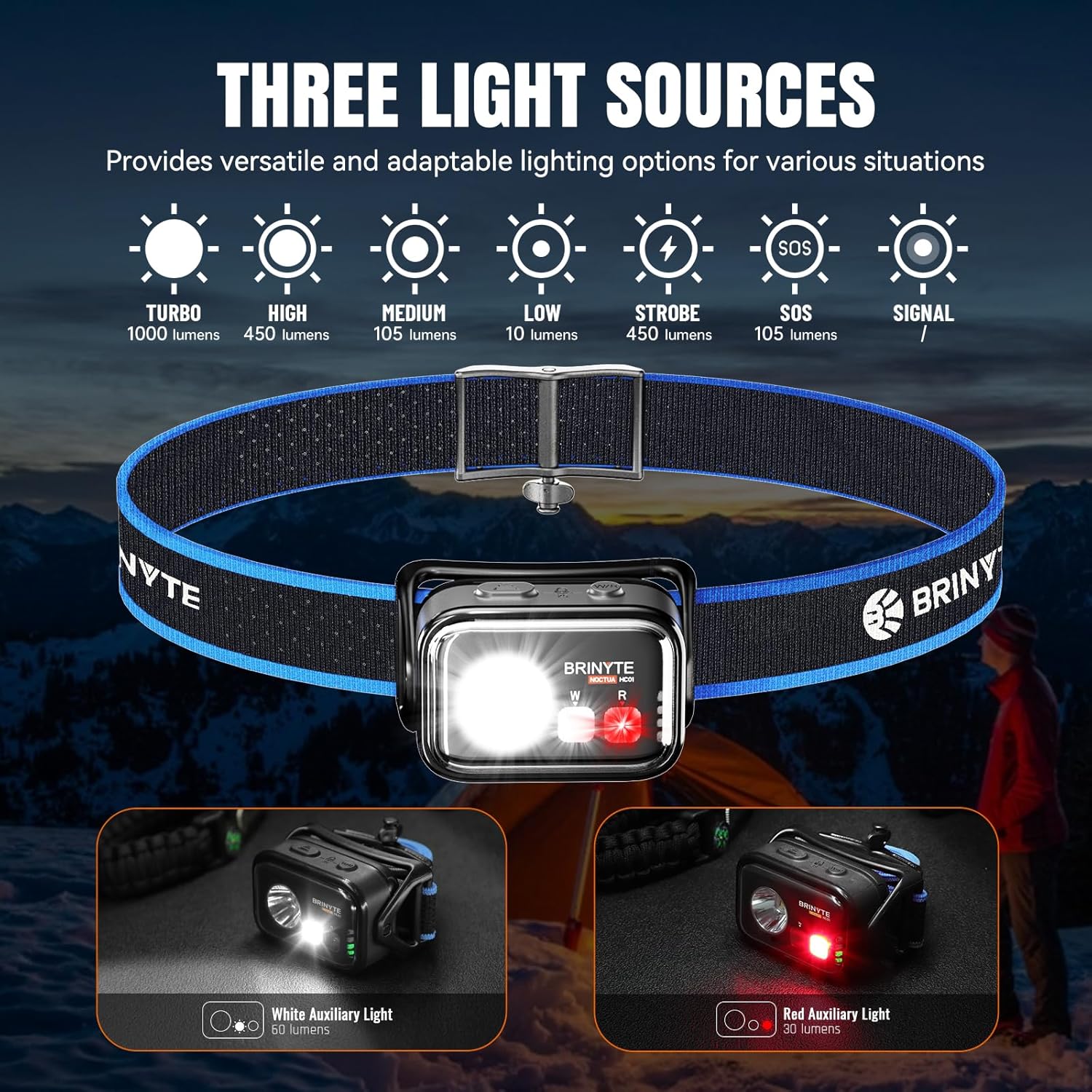
Image: The Brinyte HC01 headlamp näyttelyasing its three light sources and various modes including Turbo, High, Medium, Low, Strobe, SOS, and Signal.
4.2 Red Light Operation
- Kytke päälle/pois päältä: Press the red light button once to turn on the red auxiliary light. Press again to turn off.
- Säädä kirkkautta: While the red light is on, press and hold the red light button to cycle through brightness modes.
- Red Signal Mode: Double-click the red light button to activate the red signal mode.
The red light mode is particularly useful for preserving night vision during activities like hunting, fishing, or astronomical observation, and can also serve as an emergency warning signal.

Image: Practical applications of the red light mode, including hunting, camping, flashing safety light, astronomical observation, fishing, photography, and reading.
4.3 Simultaneous Light Use
The white and red lights can be operated simultaneously for combined illumination.
4.4 Lock/Unlock Function
Vahingossa tapahtuvan aktivoinnin estämiseksi päänamp features a lock function.
- Lukita: Simultaneously press both the main white light and red light switches for 3 seconds. The main light will flash twice to indicate successful locking.
- Lukituksen avaaminen: Simultaneously press both switches for 3 seconds again. The main light will flash twice to indicate successful unlocking.

Image: Instructions for locking and unlocking the headlamp by pressing both the main and auxiliary light switches simultaneously for 3 seconds.
4.5 Säädettävä valaistuskulma
Pääamp unit can pivot 360 degrees, allowing you to direct the light precisely where needed.

Image: The Brinyte HC01 headlamp demonstrating its 360-degree pivotable head for adjustable lighting angle.
5. Huolto
5.1 Puhdistus
- Pyyhi pääamp vartalo pehmeällä, d:lläamp kangas.
- Älä käytä hankaavia puhdistusaineita tai liuottimia, koska ne voivat vahingoittaa pintaa.
- Clean the lens gently with a lens cloth to maintain optimal light output.
5.2 Akun hoito
- Recharge the battery regularly, even if not in frequent use, to prolong its lifespan.
- Jos käytät AAA-paristoja, poista ne, jos pääamp ei käytetä pitkään vuotojen estämiseksi.
5.3 Varastointi
- Säilytä pääamp viileässä, kuivassa paikassa suojassa suoralta auringonvalolta ja äärimmäisiltä lämpötiloilta.
- Varmista pääamp is locked before storing to prevent accidental activation and battery drain.
6. Vianmääritys
| Ongelma | Mahdollinen syy | Ratkaisu |
|---|---|---|
| Headlamp ei käynnisty. | Akku on tyhjä tai se ei ole asennettu oikein. Headlamp is in lock mode. | Recharge the battery or replace AAA batteries. Ensure correct polarity. Avaa etukannen lukitusamp by pressing both buttons simultaneously for 3 seconds. |
| Valoteho on himmeä. | Akku vähissä. Linssi on likainen. | Lataa akku uudelleen. Puhdista linssi pehmeällä liinalla. |
| Headlamp välkkyy. | Löysä akkuliitäntä. Battery nearly depleted. | Tarkista akun asennus. Lataa akku uudelleen. |
| Headband feels uncomfortable or tangles. | Virheellinen säätö. | Adjust the headband using the side knob for a comfortable, secure fit. |
If the problem persists after attempting these solutions, please contact Brinyte customer service for assistance.
7. Tekniset tiedot
| Ominaisuus | Yksityiskohta |
|---|---|
| Mallin nimi | HC01 |
| Main White Light Brightness | Up to 1000 Lumens (Turbo Mode) |
| Auxiliary White Light Brightness | 60 lumenia |
| Auxiliary Red Light Brightness | 30 lumenia |
| Max Runtime (Low Mode) | 45 tuntia (2700 minuuttia) |
| Suurin säteen etäisyys | 126 metriä |
| Virtalähde | Rechargeable BR1200 Battery (included) or 3x AAA Batteries (not included) |
| Latausportti | USB Type-C |
| Latausaika | Noin 1.5 tuntia |
| Vedenkestävyys | IP66 (pölytiivis, vedenkestävä) |
| Iskunkestävyys | 1 metriä |
| Paino | 2.29 Ounces (65g, battery included) |
| Mitat (PxLxK) | 60.3 mm x 42.3 mm x 28.7 mm (2.37" x 1.66" x 1.12") |
| Materiaali | ABS, Polykarbonaatti |

Image: Detailed technical specifications table for the Brinyte HC01 headlamp, including ANSI/NEMA FL1 standards for various light modes.
8. Takuu ja asiakastuki
8.1 Takuutiedot
Brinyte offers the following warranty for the HC01 Headlamp:
- 30 päivän ilmainen vaihto: For any manufacturing defects within 30 days of purchase.
- 2 vuoden ilmainen korjaus: For functional issues under normal use within 2 years of purchase.
- Rajoitettu elinikäinen takuu: For certain components beyond the 2-year repair period.
Säilytä ostokuitti takuuvaatimuksia varten.
8.2 Asiakastuki
If you have any questions, concerns, or require assistance with your Brinyte HC01 Headlamp, please do not hesitate to contact Brinyte customer service. We are committed to providing professional and friendly support, with responses typically within 24 hours.
For more information, visit the official Brinyte Store: Brinyte Store on Amazon

Image: Brinyte's commitment to customer service, highlighting 24-hour support, dedicated customer care, and a limited lifetime warranty.
9. Turvallisuustiedot
- Älä katso suoraan valonsäteeseen välttääksesi tilapäisen näköheikkenemisen.
- Pidä poissa lasten ulottuvilta.
- Älä pura päätäamp; this will void the warranty.
- Hävitä paristot vastuullisesti paikallisten määräysten mukaisesti.