
1. Johdanto
This manual provides detailed instructions for the operation and maintenance of the LAUNCH CRP129E Plus OBD2 Scanner. Please read this manual thoroughly before using the device to ensure proper and safe operation. The CRP129E Plus is a comprehensive diagnostic tool designed for automotive professionals and enthusiasts, offering full system diagnostics and various service reset functions.
2. Tuote ohiview
2.1. Laitteen osat
The LAUNCH CRP129E Plus features a user-friendly interface with a 5-inch touchscreen and physical buttons for navigation.

Kuva 2.1: The LAUNCH CRP129E Plus OBD2 Scanner and its protective carrying case.
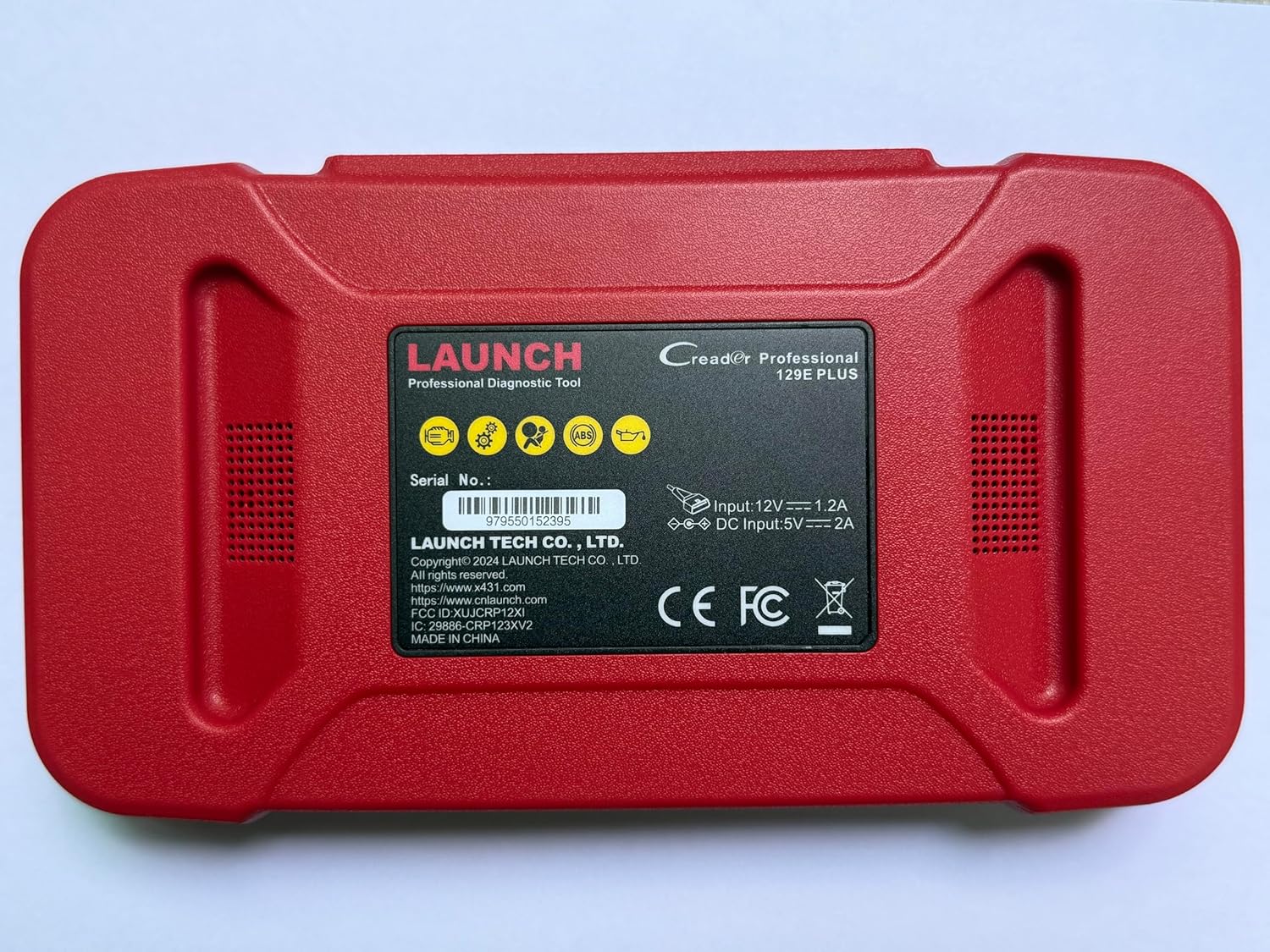
Kuva 2.2: Takaosa view of the CRP129E Plus, displaying input voltage, current specifications, and serial number (e.g., 979550152395).
2.2. Pakkauksen sisältö
Pura laatikkoa ja tarkista, että kaikki alla luetellut osat ovat mukana:
- CRP129E PLUS OBD2 Scanner (x1)
- OBDII Cable (x1)
- 5V DC Charging Cable (x1)
- Käyttöopas (x1)
- Pikaopas (x1)
- Kantolaukku (x1)

Kuva 2.3: Visual representation of the CRP129E Plus package contents.
3. Asennus ja käyttöönotto
3.1. Laitteen lataaminen
Before first use, ensure the device is fully charged using the provided 5V DC charging cable. Connect the cable to the device and a suitable power source.
3.2. Virta päälle / pois
- Virta päälle: Paina virtapainiketta ja pidä sitä painettuna, kunnes näyttö syttyy.
- Virta pois: Press and hold the power button, then select "Power Off" from the options.
3.3. Yhdistäminen ajoneuvoon
Locate the vehicle's OBDII port, typically under the dashboard on the driver's side. Connect the provided OBDII cable from the CRP129E Plus to the vehicle's OBDII port. Ensure the vehicle's ignition is in the ON position (engine off or running, depending on the diagnostic task).
3.4. Wi-Fi Connection and Updates
The CRP129E Plus supports one-click Wi-Fi updates. Connect the device to a stable Wi-Fi network to download the latest software and vehicle data. Regular updates ensure compatibility with new vehicle models and improved diagnostic functions.
- Napauta päävalikosta "Asetukset".
- Select "WLAN" and connect to an available network.
- Return to the main menu and tap "Upgrade".
- Select the desired software updates and tap "Update".

Kuva 3.1: The device interface showing options for updates, DTC lookup, live data stream, and battery test.
4. Käyttöohjeet
4.1. Automaattinen VIN-skannaus
The device can automatically identify vehicle information. After connecting to the vehicle, select "Diagnose" and the device will attempt an Auto VIN scan to quickly identify the vehicle's make, model, and year.

Kuva 4.1: Visual representation of the Auto VIN scan process and systems covered by diagnosis.
4.2. Täydellinen järjestelmän diagnostiikka
The CRP129E Plus can access and diagnose all available vehicle systems. This includes, but is not limited to, Engine, ABS, SRS, SAS, TCM, TPMS, Body, Chassis, Powertrain, Fuel System, and Lighting System.
- Valitse päävalikosta "Diagnosoi".
- Choose "Health Report" or select specific systems for diagnosis.
- The device will scan for Diagnostic Trouble Codes (DTCs) and display results.
- You can read fault codes, clear fault codes, and view reaaliaikaisia datastriimejä.

Kuva 4.2: Yliview of the comprehensive system diagnostic capabilities.
4.3. OBD2-toiminnot
The device supports all 10 modes of OBDII testing for emissions-related issues.
- Lue/tyhjennä vikakoodit: Retrieve and erase diagnostic trouble codes.
- Live-datavirta: View real-time data from the vehicle's sensors.
- I/M -valmius: Tarkista päästöihin liittyvien valvontalaitteiden tila.
- Pysäytyskehystiedot: View tilannekuva ajoneuvon kunnosta vikakoodin asettamishetkellä.
- O2-anturikoe: Hae O2-anturin monitorin testitulokset.
- Sisäänrakennetun näytön testi: Retrieve results for emission-related powertrain components.
- Höyrystymisjärjestelmän testi: Aloita haihtumispäästöjärjestelmän testi.
- Ajoneuvon tiedot: Hae ajoneuvon tunnistenumero (VIN), kalibrointitunnus ja kalibroinnin tarkistusnumero (CVN).
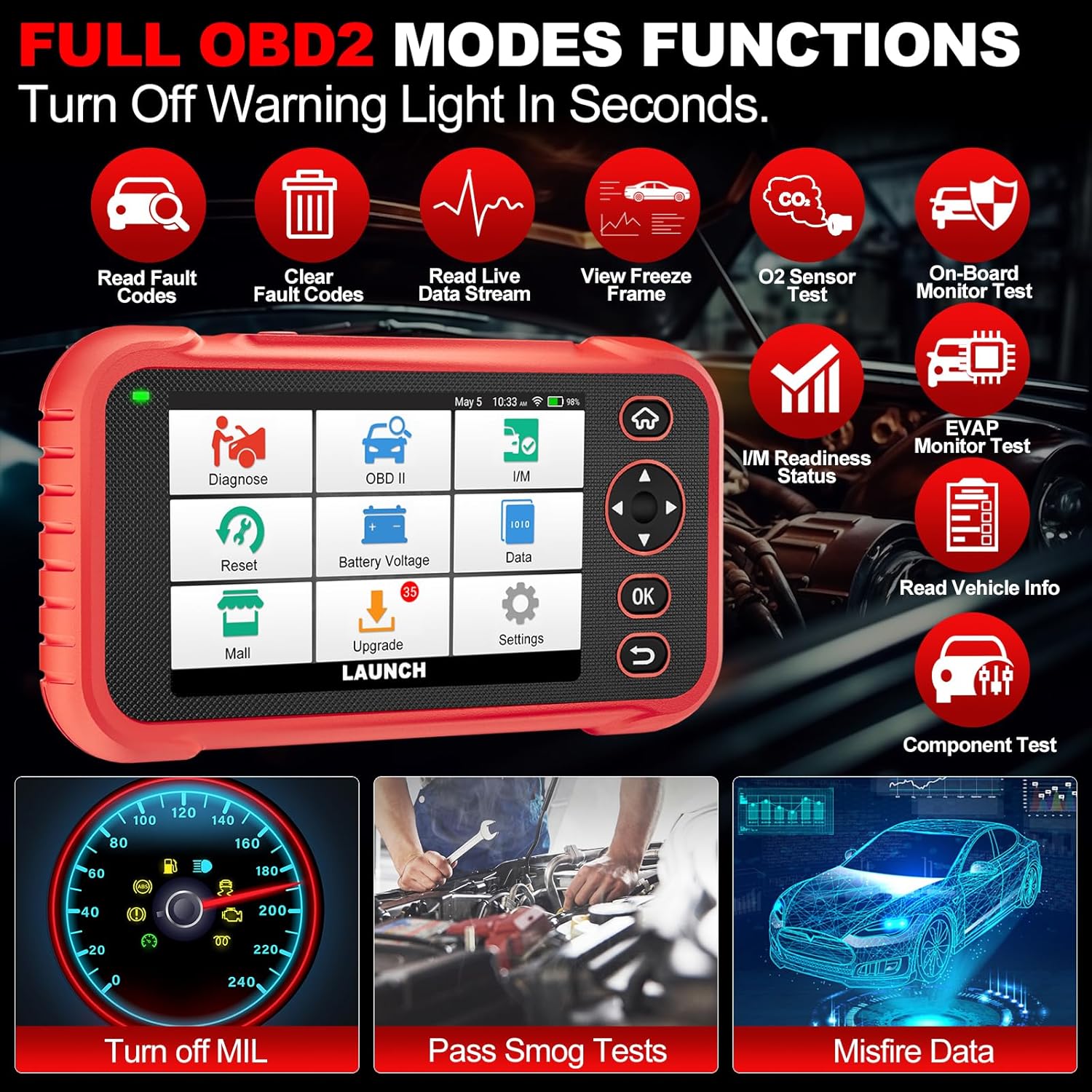
Kuva 4.3: Main menu options for OBD2 functions.
4.4. Service Reset Functions
The CRP129E Plus offers 12+ essential service reset functions for common maintenance tasks.
- Öljyn nollaus: Nollaa öljynvaihtojärjestelmän öljynvaihdon jälkeen.
- Kaasun mukautus: Alustaa kaasuvivun toimilaitteet oletustilaan.
- Adblue Reset: Resets the urea after the diesel exhaust fluid (AdBlue) is replaced or refilled.
- Headlamp Vastaavuus: Calibrates the adaptive front lighting system.
- TPMS-nollaus: Nollaa rengaspaineiden valvontajärjestelmän anturit.
- SAS-nollaus: Kalibroi ohjauskulman anturin.
- Akun sovitus (BMS-nollaus): Registers new battery replacement.
- Ilmastointilaitteen nollaus: Säätää polttoaine-ilmaseoksen parametreja.
- D-P-F Regeneration: Poistaa hiukkasia DPF-suodattimesta.
- Suuttimen koodaus: Koodaa uudet suuttimien numerot ECU:lle.
- EPB-nollaus: Resets the electronic parking brake pads after replacement.
- ABS-verenvuoto: Performs bleeding of the brake system.

Kuva 4.4: Yliview of available service reset functions.
4.5. Live Data Graphing and Recording
The device can display live data streams in merged quadrant graphs, allowing for comprehensive analysis of up to four parameters simultaneously. Data can also be recorded and played back for further review.

Kuva 4.5: Example of 4-in-1 live data graphing and diagnostic report generation.
4.6. Battery Voltage Testi
Seuraa ajoneuvon akun varaustatage in real-time to assess its status and identify potential issues.

Kuva 4.6: Akun tilavuustage test interface and other diagnostic support features.
5. Huolto
- Puhdistus: Puhdista laite pehmeällä, kuivalla liinalla. Vältä hankaavia puhdistusaineita tai liuottimia.
- Varastointi: Säilytä laitetta kantolaukussaan viileässä ja kuivassa paikassa, kun sitä ei käytetä.
- Ohjelmistopäivitykset: Regularly check for and install software updates via Wi-Fi to ensure optimal performance and vehicle compatibility.
- Akun hoito: Avoid fully discharging the battery frequently. Charge the device regularly, even if not in active use, to maintain battery health.
6. Vianmääritys
| Ongelma | Mahdollinen syy | Ratkaisu |
|---|---|---|
| Laite ei käynnisty. | Akku vähissä; viallinen virtapainike. | Charge the device for at least 30 minutes. If issue persists, contact support. |
| Viestintävirhe ajoneuvon kanssa. | Loose OBDII connection; vehicle ignition off; incompatible vehicle protocol. | Ensure cable is securely connected. Turn ignition to ON. Verify vehicle compatibility. |
| Unable to update software. | No Wi-Fi connection; unstable internet; insufficient storage. | Check Wi-Fi connection. Ensure stable internet. Free up storage if necessary. |
| Näyttö ei reagoi. | Ohjelmistohäiriö; fyysinen vaurio. | Käynnistä laite uudelleen. Jos ongelma jatkuu, ota yhteyttä tukeen. |
7. Tekniset tiedot
- Malli: CRP129E PLUS
- Käyttöjärjestelmä: Android 7.0
- Näyttö: 5 tuuman kosketusnäyttö
- Muisti: 16GB
- Akku: 6100 mAh
- Liitettävyys: Wi-Fi
- Mitat: 7.09 x 6.3 x 2.36 tuumaa
- Tuotteen paino: 2.27 kiloa
- Tuetut protokollat: OBDII/EOBD
- Ajoneuvon kattavuus: Over 85 brands (1996-2025)
- UPC: 884508007774
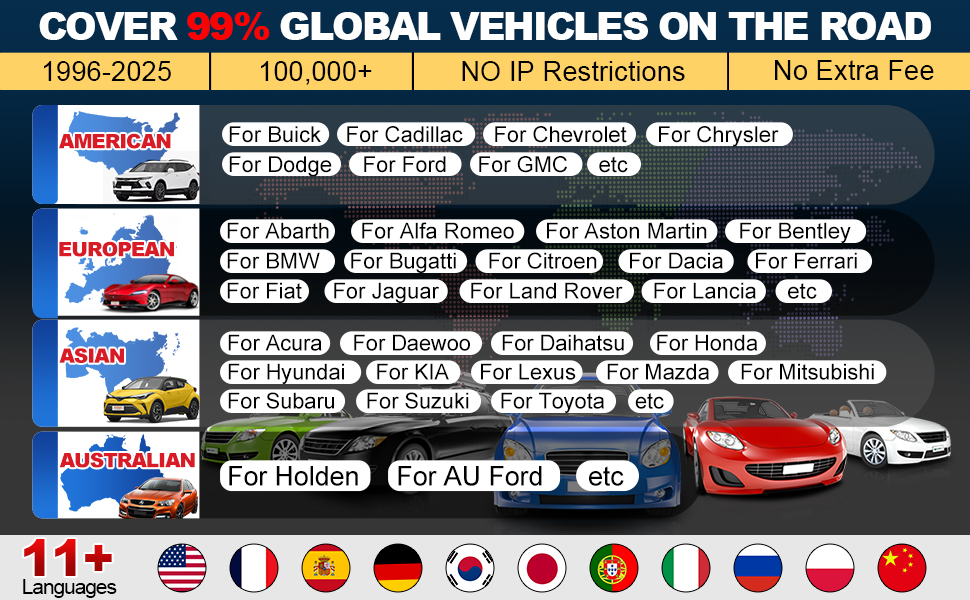
Kuva 7.1: Summary of key hardware and software specifications.

Kuva 7.2: Extensive vehicle brand coverage and multi-language support.
8. Takuu ja tuki
The LAUNCH CRP129E Plus comes with a manufacturer's warranty. Please refer to the official LAUNCH webtarkemmat takuuehdot löytyvät verkkosivustolta tai ostodokumentaatiostasi.
- Takuu: 5 Years (as per product information)
- Return/Replace Policy: 90 Days (as per product information)
- Tekninen tuki: 24/7 technical support is available. For assistance, please contact LAUNCH customer service.
- Verkkopalaute: The device supports online feedback for quick resolution of diagnostic issues.
For further assistance or to provide feedback, please visit the official LAUNCH support channels.