
1. Johdanto
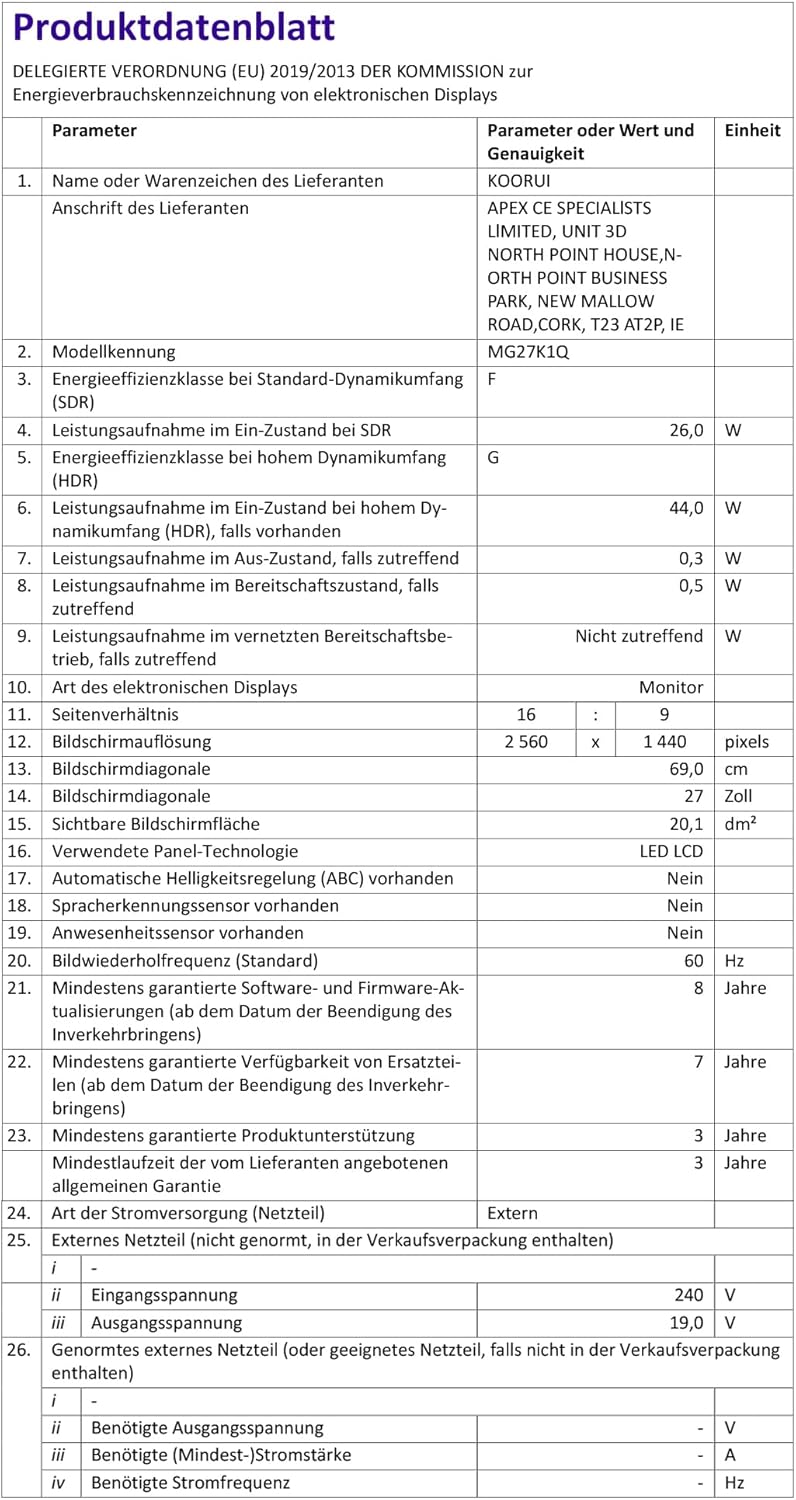
This manual provides detailed instructions for the setup, operation, and maintenance of your KOORUI MG27K1Q 27-inch QHD 240Hz VA Mini LED Gaming Monitor. Please read this manual thoroughly before using the product to ensure proper functionality and to prevent damage.
2. Pakkauksen sisältö
Verify that all items listed below are included in your product package. If any items are missing or damaged, please contact KOORUI customer support.
- KOORUI MG27K1Q 27-inch Gaming Monitor
- Monitor Stand (Base and Support)
- Virtalähde
- DisplayPort (DP) -kaapeli
3. Asennus
3.1 Jalustan kokoaminen
- Poista näytön ja jalustan osat varovasti pakkauksesta.
- Attach the stand support to the monitor panel. Ensure it clicks securely into place or is fastened with screws if provided.
- Connect the stand base to the stand support. Tighten any screws to secure the assembly.
- Aseta koottu näyttö vakaalle ja tasaiselle alustalle.
3.2 Laitteisiin yhdistäminen
The monitor offers multiple connectivity options for various devices. Ensure the monitor is powered off before making any connections.
- DisplayPort (DP 1.4): Connect the included DisplayPort cable from your computer's graphics card to the DisplayPort input on the monitor for optimal performance, including 240Hz refresh rate and Adaptive Sync.
- HDMI (HDMI 2.0): Connect an HDMI cable from your device (PC, gaming console) to one of the two HDMI 2.0 inputs on the monitor.
- Ääni ulos: Käytä 3.5 mm:n ääniliitäntää ulkoisten kaiuttimien tai kuulokkeiden liittämiseen.
Kuva: Takaosa view of the monitor illustrating the available connection ports (DisplayPort 1.4, 2x HDMI 2.0, Audio Out) and VESA mount points. Examples of compatible devices like PS5, Xbox, Laptop, and Nintendo Switch are shown.
3.3 Virtaliitäntä
- Liitä virtalähde näytön virransyöttöön.
- Liitä verkkolaite pistorasiaan.
4. Näytön käyttö
4.1 Peruskäyttö
- Virta päälle/pois: Paina virtapainiketta, joka sijaitsee yleensä näytön takana tai oikeassa alakulmassa, kytkeäksesi näytön päälle tai pois päältä.
- Tulon valinta: Use the On-Screen Display (OSD) menu to select the desired input source (DP, HDMI 1, HDMI 2).
4.2 Näytön ominaisuudet
The KOORUI MG27K1Q monitor is equipped with advanced display technologies for an enhanced visual experience.
- QHD-resoluutio (2560x1440): Tarjoaa teräviä ja yksityiskohtaisia kuvia.
- VA Mini LED Panel: Offers deep blacks, high contrast, and vibrant colors.
- HDR 1000: High Dynamic Range support for brighter whites and darker blacks, enhancing visual depth and realism.

Image: Visual comparison demonstrating the enhanced contrast and detail provided by HDR 1000 technology compared to a standard display.
4.3 Pelien suorituskyky
Designed for gaming, this monitor delivers smooth and responsive gameplay.
- 240Hz virkistystaajuus: Ensures ultra-smooth motion and reduced input lag.
- 1 ms:n vasteaika: Minimizes motion blur and ghosting for clear, fast-paced action.
- Adaptive Sync (G-SYNC Compatible): Synkronoi näytön virkistystaajuuden näytönohjaimen kuvataajuuden kanssa poistaakseen näytön repeämisen ja nykimisen.
- Exclusive Game Display Modes: Features like Crosshair, Timer, and FPS Counter can be enabled via the OSD for an advantage pelaamisessa.

Image: The monitor displaying a high-speed racing game, emphasizing its 240Hz refresh rate and 1ms response time for a fluid gaming experience.
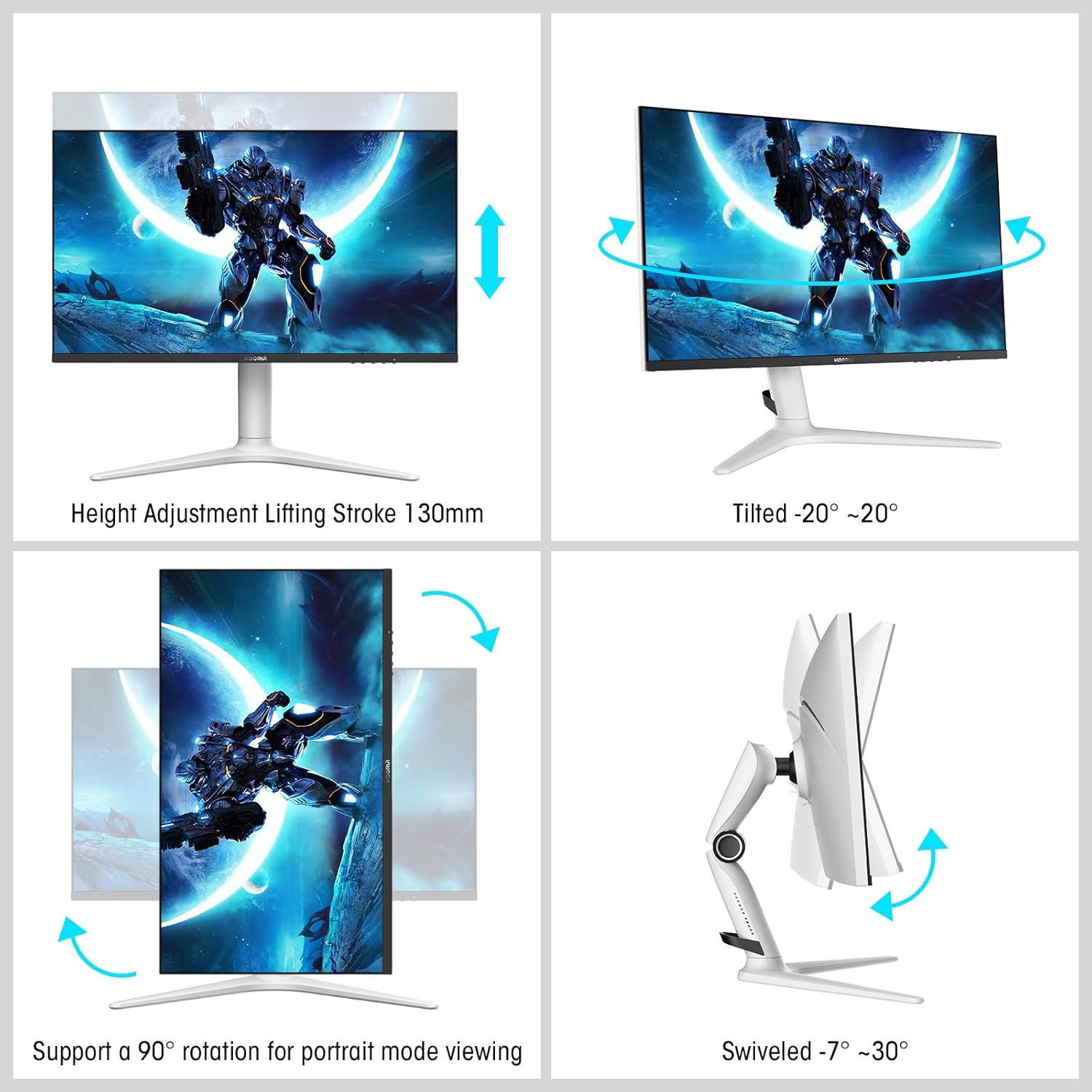
Image: A gaming scenario on the monitor, illustrating the 'Exclusive Game Display Mode' features such as Crosshair, Timer, FPS Counter, and RTS Counter, alongside Adaptive Sync functionality.
4.4 Silmienhoito-ominaisuudet
The monitor includes features to reduce eye strain during prolonged use.
- Sinisen valon suodatin: Reduces harmful blue light emissions. This can be adjusted or enabled/disabled through the OSD menu.
5. Säädöt
Näytön jalusta mahdollistaa useita ergonomisia säätöjä, jotka optimoivat käyttökokemuksesi. viewmukavuutta.
- Korkeuden säätö: Adjust the monitor height up to 130mm.
- Kallistaa: Tilt the screen from -7° (downward) to 30° (upward).
- Kääntyvä: Rotate the monitor horizontally from -20° to 20°.
- Pivot: Käännä näyttöä 90° pystyasentoon viewing.
- VESA -kiinnike: Compatible with VESA 75x75mm mounting solutions for alternative setups.

Image: Diagrams demonstrating the monitor's ergonomic adjustments, including height, tilt, swivel, and pivot for portrait mode.
6. Tekniset tiedot
| Ominaisuus | Erittely |
|---|---|
| Mallinumero | MG27K1Q |
| Näytön koko | 27 tuumaa |
| Paneelin tyyppi | VA Mini-LED |
| Resoluutio | QHD (2560 x 1440) |
| Kuvasuhde | 16:9 |
| Päivitystaajuus | 240 Hz |
| Vastausaika | 1 ms |
| Kontrastisuhde (staattinen) | 3000:1 |
| Kontrastisuhde (dynaaminen) | 20,000,000:1 |
| Kirkkaus | 275 nittiä |
| Viewkulma | 178 astetta |
| HDR-tuki | HDR 1000 |
| Mukautuva synkronointi | Compatible with NVIDIA G-SYNC |
| Yhteydet | 2 x HDMI 2.0, 1 x DisplayPort 1.4, äänilähtö |
| VESA-teline | 75x75mm |
| Virrankulutus | 90 wattia |
| Mitat (S x L x K) | 32 x 61.3 x 52.3 cm |
| Paino | 9.34 kiloa |
| Erikoisominaisuudet | Blue Light Filter, Gaming Modes (Crosshair, Timer, FPS Counter) |
7. Vianmääritys
Jos kohtaat ongelmia näytön kanssa, katso seuraavat yleiset vianmääritysvaiheet:
- Ei virtaa: Ensure the power adapter is securely connected to both the monitor and a working power outlet. Check if the power indicator light on the monitor is on.
- Ei signaalia: Verify that the video cable (DP or HDMI) is correctly connected to both the monitor and your computer/device. Ensure the correct input source is selected in the monitor's OSD menu. Try a different video cable or port.
- Välkkyvä/vääristynyt kuva: Check the video cable connections. Ensure your graphics card drivers are up to date. Try reducing the refresh rate in your display settings to see if the issue persists.
- Adaptiivinen synkronointi ei toimi: Ensure Adaptive Sync (G-SYNC Compatible) is enabled in both the monitor's OSD settings and your graphics card control panel. Use a DisplayPort cable for optimal performance.
- Kuolleet pikselit: While rare, a small number of dead pixels may be considered within manufacturing tolerances. Refer to the warranty policy for specific details regarding pixel defects.
8. Takuu ja tuki
KOORUI provides comprehensive support for your product.
- Takuu: This monitor comes with a 3-year warranty from the date of purchase.
- Korvauspalvelu: A 1-year replacement service is offered for qualifying issues.
- Asiakastuki: If you encounter any damages, malfunctions, or find missing accessories, please do not hesitate to contact KOORUI customer support for assistance.