
1. Johdanto ja loppuview
The Epson PowerLite 97H is a versatile XGA conference room projector designed for clear and vibrant presentations. Utilizing 3LCD technology, it delivers bright, true-to-life images with excellent color brightness and a wide color gamut. This projector offers a native resolution of 1024x768 (XGA) and a brightness of 2,700 ANSI Lumens, making it suitable for various environments.
Keskeisiä ominaisuuksia ovat:
- Kirkkaus: 2,700 ANSI-lumenia
- Resoluutio: 1024x768 (XGA)
- Kuvasuhde: 4:3
- Kontrasti: 10,000:1
- Näyttötekniikka: 3LCD for vibrant colors
- Liitettävyys: Multiple options including HDMI, USB, LAN, VGA, S-Video, Composite, and Audio inputs/outputs.
2. Turvallisuustiedot
Please read all safety instructions before using the projector to ensure safe operation and to prevent damage to the unit. Keep this manual for future reference.
- Lämpövaroitus: Projektori lamp and surrounding areas can become extremely hot during operation and immediately after shutdown. Avoid touching these areas.
- Ilmanvaihto: Ensure adequate ventilation around the projector. Do not block ventilation openings, as this can lead to overheating and potential damage.
- Lamp Korvaus: Always turn off the projector and allow the lamp to cool completely before attempting to replace it. Refer to the lamp replacement instructions in the Maintenance section.
- Virtalähde: Use only the specified power supply and cable. Do not overload power outlets.
- Neste ja kosteus: Do not expose the projector to rain, moisture, or excessive humidity. Do not place objects filled with liquids on or near the projector.
- Puhdistus: Irrota virtajohto pistorasiasta ennen puhdistamista. Käytä pehmeää, kuivaa liinaa. Älä käytä nestemäisiä tai aerosolipuhdistusaineita.
3. Pakkauksen sisältö
Varmista, että pakkauksessasi on kaikki tarvittavat osat:
- Epson PowerLite 97H Projector
- Kaukosäädin
- Virtakaapeli
- HDMI kaapeli
4. Asennus
4.1 Fyysinen sijoittelu
Place the projector on a stable, flat surface. Ensure there is sufficient space around the projector for proper ventilation. Avoid placing it in direct sunlight or near heat sources. The projector is designed to be portable and can be used for tabletop projection.
4.2 Laitteiden liittäminen
The PowerLite 97H offers a wide range of connectivity options. Refer to the image below for port identification.

Figure 1: Rear panel of the Epson PowerLite 97H Projector showing various input and output ports.
- USB-A: Connect USB storage devices or a document camera.
- USB-B: Connect to a computer for USB display or control.
- Lähiverkko (RJ-45): Connect to a network for control and monitoring.
- HDMI 1 & HDMI 2/MHL: Connect to devices with HDMI output (e.g., laptops, Blu-ray players, gaming consoles). HDMI 2 also supports MHL for compatible mobile devices.
- Computer1 (VGA) & Computer2 (VGA): Connect to computers using a VGA cable.
- Audio1 (Mini Jack) & Audio2 (Mini Jack): Connect audio from computers or other devices.
- S-video: Connect to devices with S-Video output.
- Video (RCA): Connect to devices with composite video output.
- Audio In (RCA R/L): Connect stereo audio from devices with RCA audio output.
- MIC: Liitä mikrofoni.
- RS-232C: Projektorin sarjaporttiohjaukseen.
- Näytön ulostulo (VGA): Connect an external monitor to display the projector's input signal.
- Äänilähtö (miniliitin): Connect external speakers or an audio system.
4.3 Virta päälle
- Kytke virtajohto projektorin verkkovirtalähteeseen ja sitten pistorasiaan.
- Paina Tehoa button on the projector's control panel or the remote control. The power light will illuminate, and the projector will begin its startup sequence.
5. Käyttö
5.1 Perusohjaimet
The projector can be operated using the control panel on the top of the unit or the included remote control. The top panel provides essential functions.

Figure 2: Top control panel of the Epson PowerLite 97H Projector.
- Virtapainike: Kytkee projektorin päälle tai pois päältä.
- Lähdehaku: Selaa käytettävissä olevia tulolähteitä.
- Menu: Avaa näyttövalikon (OSD).
- H/V (Horizontal/Vertical Keystone): Säätää kuvan muotoa korjatakseen trapetsimuotoisen vääristymän.
- Esc: Poistuu nykyisestä valikosta tai toiminnosta.
- Kirjoita: Vahvistaa valinnan valikosta.
- Nuolinäppäimet: Selaa valikkovaihtoehtoja ja säädä asetuksia.
- Äänenvoimakkuuspainikkeet: Säädä äänen lähtötasoa.
- Auttaa: Tarjoaa apua näytöllä.
- Tilavalo: Indicates projector status (e.g., power on, standby, error).
- Lamp Temp Light: Indicates lamp temperature status.
5.2 Kuvan säätäminen
To achieve a clear and properly sized image:
- Tarkennusrengas: Rotate the focus ring located near the lens to sharpen the image.
- Zoomausvipu: Use the zoom lever (if present, typically near the lens) to adjust the image size without moving the projector.
- Keystone-korjaus: If the image appears trapezoidal, use the H/V keystone buttons on the control panel or remote to correct the shape.

Figure 3: Front/side view showing the projector lens and ventilation.
5.3 Tulon valinta
Paina Lähdehaku button on the control panel or remote control to cycle through the connected input sources (e.g., HDMI 1, Computer1, USB-A). The projector will automatically detect and display the active input.
6. Huolto
Säännöllinen huolto varmistaa optimaalisen suorituskyvyn ja pidentää projektorin käyttöikää.
6.1Lamp Vaihto
Projektori lamp on rajallinen käyttöikä. Kun lamp saavuttaa elämänsä lopun, Lamp Temp indicator may light up, or the image brightness may decrease significantly. Always use genuine Epson replacement lamps.

Kuva 4: Sivu view of the projector, showing a caution label regarding hot surfaces.
WARNING: Turn off the projector and wait until the lamp has cooled down completely before attempting replacement. Failure to do so can result in severe burns or damage to the projector. Refer to the specific lamp replacement instructions provided in the full Epson service manual for your model.
6.2 Ilmansuodattimen puhdistus/vaihto
The air filter prevents dust from entering the projector and affecting performance. Clean the air filter regularly (e.g., every 100 hours of use) or when prompted by the projector. If the filter is damaged or excessively dirty, replace it.
- Turn off the projector and disconnect the power cable.
- Locate the air filter cover (refer to your full service manual for exact location).
- Remove the cover and carefully extract the filter.
- Use a small vacuum cleaner or soft brush to remove dust from the filter. If replacing, insert a new filter.
- Kiinnitä suodattimen kansi tukevasti takaisin.
6.3 Yleishoito
- Linssien puhdistus: Gently wipe the lens with a soft, non-abrasive lens cleaning cloth. Do not use harsh chemicals.
- Ulkopuolen puhdistus: Pyyhi projektorin ulkopinta pehmeällä, kuivalla liinalla. Pinttyneeseen likaan käytä hieman kostutettuaamp liinalla ja miedolla pesuaineella, pyyhi sitten kuivaksi.
- Varastointi: Kun projektoria ei käytetä pitkään aikaan, säilytä sitä viileässä ja kuivassa paikassa, mieluiten alkuperäispakkauksessaan tai suojakotelossa.
7. Vianmääritys
If you encounter issues with your projector, try the following solutions:
- Ei kuvaa:
- Varmista, että projektori on päällä ja virran merkkivalo palaa tasaisesti.
- Check all cable connections (HDMI, VGA, etc.) are secure at both the projector and the source device.
- Paina Lähdehaku -painiketta selataksesi syötteitä.
- Varmista, että lähdelaite on päällä ja että se lähettää signaalia.
- Adjust the focus and zoom.
- Ei ääntä:
- Increase the projector's volume using the volume buttons.
- Check audio cable connections (if using separate audio cables).
- Ensure the audio output on your source device is enabled and turned up.
- Kaukosäädin ei toimi:
- Ensure there are no obstructions between the remote and the projector's remote sensor.
- Vaihda kaukosäätimen paristot.
- Ylikuumenemisvaroitus:
- Ensure all ventilation openings are clear and not blocked.
- Puhdista ilmansuodatin Huolto-osiossa kuvatulla tavalla.
- Käytä projektoria hyvin ilmastoidussa tilassa.
8. Tekniset tiedot
| Ominaisuus | Erittely |
|---|---|
| Valmistaja | Epson |
| Malli | PowerLite 97H |
| Näytön tyyppi | 3LCD |
| Alkuperäinen resoluutio | 1024 x 768 (XGA) |
| Kirkkaus | 2700 ANSI-lumenia |
| Kontrastisuhde | 10000:1 |
| Kuvasuhde | 4:3 |
| Yhteystekniikka | HDMI, USB, LAN, VGA, S-Video, Composite |
| Äänitulot | Mini Jack x 2, RCA (L/R), Mic |
| Äänilähtö | Mini Jack |
| Ohjausportti | RS-232C |
| Suositellut käyttötavat | Business |
| Erikoisominaisuus | Kannettava |
| Tuotteen paino | 6 puntaa |
9. Takuutiedot
For specific warranty details regarding your Epson PowerLite 97H projector, please refer to the warranty card included with your product or contact the seller/manufacturer directly. Warranty terms typically cover manufacturing defects for a specified period from the date of purchase.
10. Tukea
For technical support, service, or additional assistance with your Epson PowerLite 97H projector, please use the contact information below:
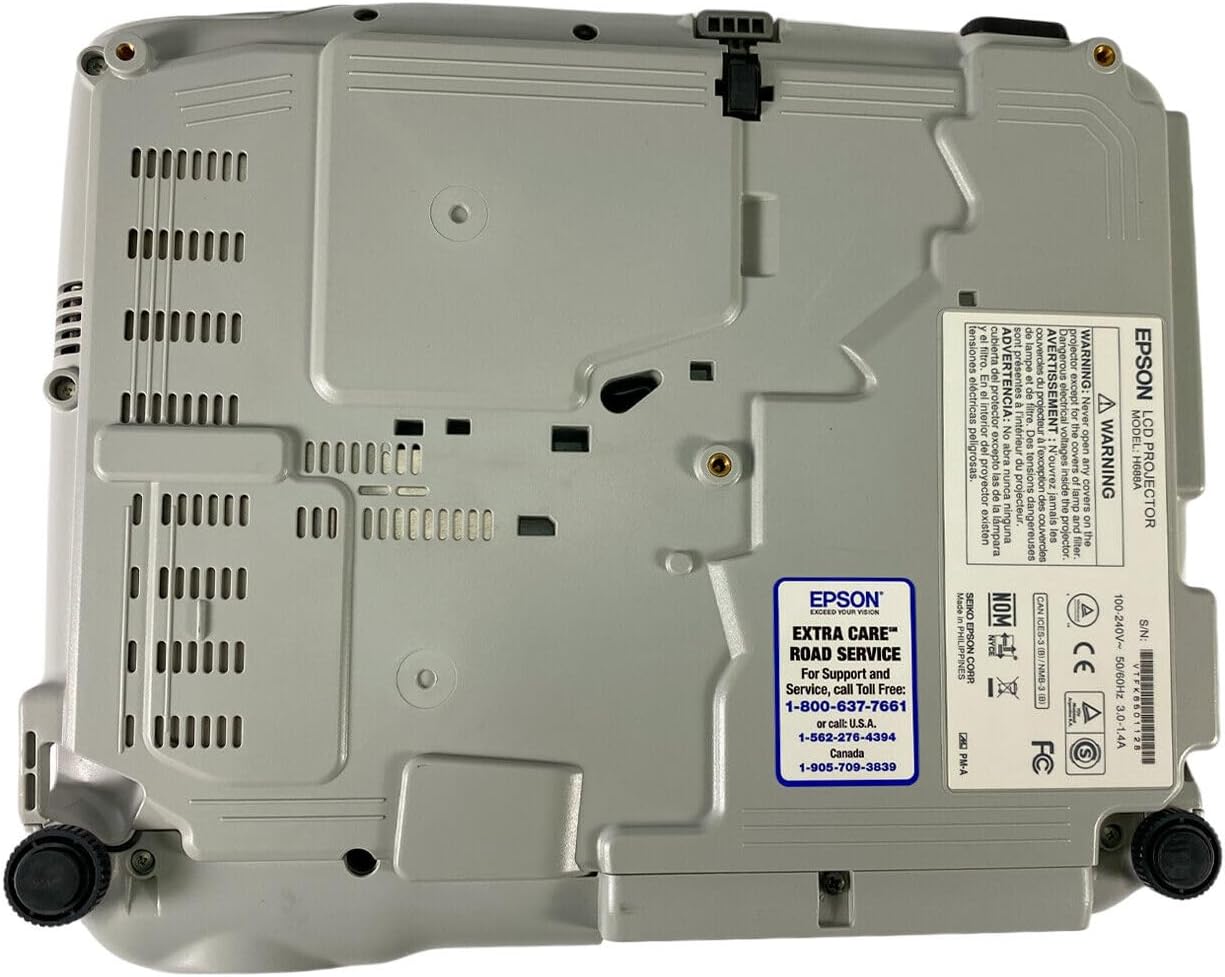
Figure 5: Bottom panel of the projector showing support contact details.
Epson Extra Care Road Service
- For support and service, call:
- USA: 1-800-637-7661
- USA: 1-866-276-4394
- Kanada: 1-905-709-3839