
Johdanto
Tuote loppuview
The INSTAR IN-8415 2K+ is an advanced indoor surveillance camera designed for comprehensive home monitoring. It features a Sony STARVIS 2K+ image sensor, AI-based object detection, and flexible connectivity options including LAN, PoE, and dual-band Wi-Fi (2.4 GHz and 5 GHz with WPA3 encryption). The camera offers pan-tilt-zoom (PTZ) capabilities, a built-in PIR sensor, two-way audio, and night vision for reliable security. It also supports smart home integrations like HomeKit and MQTT.
Tietoturva
INSTAR prioritizes your data privacy and security. The camera operates without requiring an account for basic use, and all data is stored locally on the device. Secure transmission protocols like HTTPS, FTPS, and SFTP are supported. Optional cloud services are hosted on German servers and are fully compliant with data protection regulations. All cloud services can be optionally disabled.
Image: Graphic illustrating data security features: German servers, secure against theft, encrypted data, AI object recognition, facial recognition, and license plate recognition. This emphasizes the robust security measures in place.

Asennus
Pakkauksen sisältö
Ennen asennuksen aloittamista tarkista, että pakkauksessa on kaikki tarvittavat osat:
- INSTAR IN-8415 2K+ Camera
- Asennusteline
- Power adapter (3m, 5V/1.5A)
- Verkkokaapeli (3 m)
- Asennuslaitteisto
- Käyttöopas
Fyysinen asennus
The INSTAR IN-8415 2K+ camera is designed for indoor use and can be mounted on a wall or placed freestanding.
Kuva: Edessä view of the INSTAR IN-8415 2K+ camera, showing its sleek black design with the INSTAR logo on the base. The camera head is positioned centrally, with the lens and infrared LEDs visible.

Kuva: Sivu view of the INSTAR IN-8415 2K+ camera, highlighting its curved profile and the white accent line separating the camera head from the base. This view shows the camera's compact form factor.

Kuva: Takaosa view of the INSTAR IN-8415 2K+ camera, displaying all connection ports and buttons. These include the network port, antenna connector, alarm input/output, WPS/Reset button, and DC 5V power input.

Image: Technical diagram of the INSTAR IN-8415 2K+ camera, labeling its various components such as the photosensor, lens, infrared LEDs, status LEDs, PIR detector, loudspeaker, microSD card slot, microphone, power connector, WPS/Reset, alarm in/out, antenna connector, network port, audio output, mount, and camera label. This diagram provides a clear overview of the camera's physical features.

Asennusvaihtoehdot
The camera can be mounted on a wall using the provided mounting hardware. Ensure the mounting surface is stable and can support the camera's weight. For freestanding placement, ensure the camera is on a flat, stable surface to prevent accidental falls.
Yhteydet
The INSTAR IN-8415 2K+ offers multiple connectivity options:
- LAN (Ethernet): Connect the camera directly to your router or network switch using the provided Ethernet cable for a stable wired connection.
- PoE (Power over Ethernet): If your network switch supports PoE, you can power the camera and transmit data through a single Ethernet cable.
- WLAN (Wi-Fi): The camera supports dual-band Wi-Fi (2.4 GHz and 5 GHz) with WPA3 encryption for wireless connectivity. Refer to the quick start guide for initial Wi-Fi setup via the mobile app or web käyttöliittymä.
Image: Diagram illustrating PoE connectivity. A network cable connects an IN-POE SWITCH to the camera, showing how power and data are supplied through a single cable. This highlights the simplicity of PoE installation.

Image: Graphic showing dual-band Wi-Fi connectivity. The image displays a house with Wi-Fi signals emanating from the camera, indicating support for both 2.4 GHz and 5 GHz frequencies with WPA3 encryption. This illustrates the camera's flexible wireless options.

Käyttöohjeet
Kameran perustoiminnot
Panoroida ja kallistaa
The camera features pan and tilt functionality, allowing for a wide surveillance area. You can remotely control the camera's viewing angle through the mobile application or web käyttöliittymä.
Image: Illustration of the camera's pan and tilt capabilities. An arrow indicates a 355-degree horizontal pan and a 90-degree vertical tilt, demonstrating the camera's extensive coverage. The image also shows the camera in a living room setting.

2K+ Video Quality with Sony STARVIS Sensor
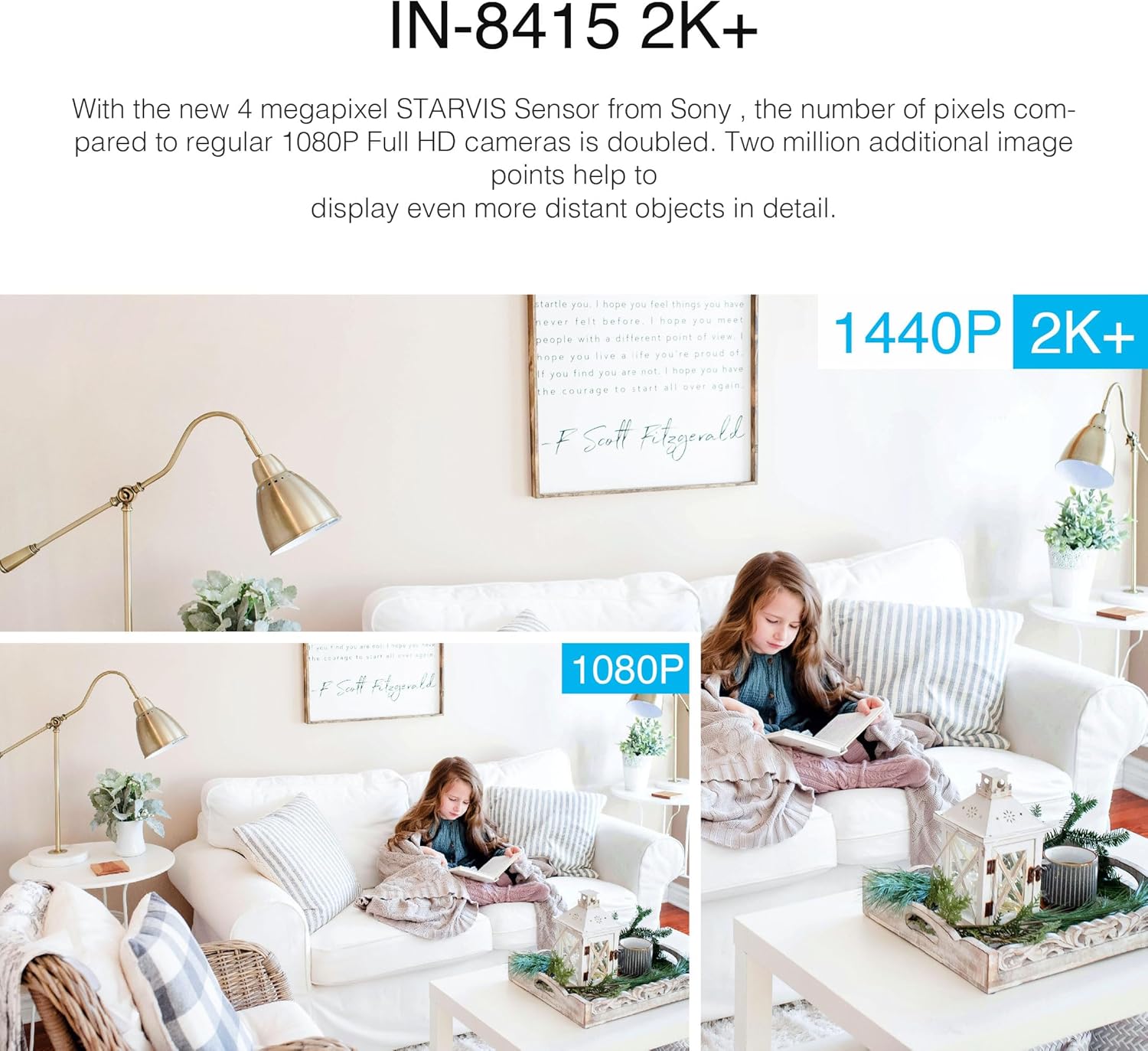
The IN-8415 2K+ camera is equipped with a Sony STARVIS 2K+ image sensor, providing a resolution of 2560 x 1440p. This sensor, combined with HDR technology, ensures sharp images even in challenging lighting conditions, offering superior detail compared to standard 1080p cameras.
Image: Comparison of 2K+ (1440p) and 1080p video quality. The 2K+ image shows significantly more detail in a living room scene with a child reading, demonstrating the enhanced clarity provided by the Sony STARVIS sensor.

Image: Comparison of image quality between an INSTAR camera with a Sony STARVIS sensor and other cameras. The INSTAR camera image appears clearer and more detailed, especially in areas with varying light, showcasing the benefits of STARVIS and HDR technology.

Infrapuna Night Vision
The camera features infrared LEDs for clear night vision up to 12 meters. An automatic IR-CUT filter ensures natural colors during the day and effective black-and-white surveillance at night.
Image: Day and night vision comparison. The left panel shows a baby sleeping in a well-lit room (day vision), while the right panel shows the same scene in black and white (night vision), demonstrating the camera's ability to capture clear images in low-light conditions.

Kaksisuuntainen ääniviestintä
With an integrated microphone and loudspeaker, the camera supports two-way audio, allowing you to communicate with individuals near the camera. This feature can also be used as a baby monitor.
Image: Illustration of two-way audio communication. One panel shows a baby near the camera, and the other shows a smartphone displaying the camera feed with audio controls, indicating real-time communication.
AI-Based Object Detection
The camera utilizes advanced AI technology to detect and differentiate between humans, vehicles, and animals, reducing false alarms and providing intelligent monitoring.
Image: Graphic demonstrating AI object detection. A woman and a dog are on a couch, with bounding boxes and icons identifying them as a human and an animal, respectively. This illustrates the camera's intelligent detection capabilities.

Scheduled Photo Series (Time-Lapse)
The camera can capture scheduled photo series, enabling time-lapse recordings. These images can be stored on an SD card or uploaded via FTP to an external server.
Kuva: esimample of a scheduled photo series (time-lapse). Three sequential images show a mountain landscape with the sun moving across the sky, demonstrating the camera's ability to capture changes over time.

Sovellus ja Web Käyttöliittymä
The INSTAR IN-8415 2K+ camera can be managed and monitored through a dedicated mobile application (InstarVision) and a web-based interface. These platforms allow for live viewing, playback, settings configuration, and alarm management.
- Mobiilisovellus: Available for iOS and Android devices. Provides remote access and control.
- Web Käyttöliittymä: Accessible via a web browser on computers (Windows, macOS, Linux) and tablets.
Image: Screenshot of the INSTAR camera's web interface on a desktop monitor and mobile app on a smartphone. Both screens display live video feeds and control options, illustrating multi-platform access.

Image: Various devices (tablet, Android PC/Mac, iPhone) displaying the INSTAR camera interface, along with logos for Android, iOS, BlackBerry, Kindle, and Windows Phone/8/10, indicating broad platform compatibility.

Älykkään kodin integrointi
The INSTAR IN-8415 2K+ camera supports integration with various smart home systems:
- Apple HomeKit Secure Video (HKSV): For secure video storage and smart home automation within the Apple ecosystem.
- Amazon Alexa ja Google Assistant: Control your camera with voice commands and integrate it into your smart home routines.
- MQTT: Supports MQTT protocol for advanced integration into custom smart home setups.
Image: A woman in a kitchen interacting with an Amazon Echo Show device, which displays a camera feed. Text bubbles indicate voice commands like "Ok" and "...show all alarms with vehicles," demonstrating integration with Amazon Alexa and Google Assistant.

Image: A tablet and smartphone displaying the Apple HomeKit interface, with a text bubble showing "Hey Siri, show the camera entrance." This illustrates the camera's compatibility with Apple HomeKit and voice control via Siri.

Image: Diagram showing INSTAR camera as part of a Smart Home MQTT network, connecting various smart devices like door sensors, motion detectors, lights, and alarms. This highlights the camera's role in a comprehensive smart home ecosystem.

Video Compression (H.265)
The camera supports H.265 video compression, which offers improved efficiency over H.264. This allows for smaller file sizes and reduced bandwidth usage while maintaining high video quality.
Image: Comparison of H.265 and H.264 video compression bandwidth usage. A bar graph shows H.265 requiring less bandwidth than H.264 for similar video quality, illustrated by two images of a house with varying clarity.

Huolto
Yleinen hoito
To ensure optimal performance and longevity of your INSTAR IN-8415 2K+ camera, follow these general care guidelines:
- Keep the camera lens clean using a soft, lint-free cloth. Avoid abrasive cleaners.
- Ensure the camera is placed in a dry environment, away from direct sunlight and extreme temperatures.
- Regularly check for any obstructions around the camera that might block its view tai ilmanvaihtoa.
Firmware-päivitykset
INSTAR regularly provides firmware updates to improve camera performance, add new features, and enhance security. It is recommended to check for and install available updates through the camera's web interface or mobile application to ensure your camera operates with the latest functionalities and security patches.
Vianetsintä
Yleisiä ongelmia ja ratkaisuja
| Antaa | Mahdollinen syy | Ratkaisu |
|---|---|---|
| Ei Virtaa | Virtasovitin ei ole kytketty tai on viallinen. | Ensure the power adapter is securely plugged into the camera and a working power outlet. If using PoE, verify the PoE switch is active. |
| No Network Connection (Wired) | Ethernet cable disconnected or faulty; router issue. | Check the Ethernet cable connection to both the camera and the router/switch. Try a different cable or port. Restart your router. |
| No Network Connection (Wi-Fi) | Incorrect Wi-Fi password; camera too far from router; Wi-Fi interference. | Verify the Wi-Fi password. Move the camera closer to the router. Check for strong interference sources. Ensure you are connecting to the correct 2.4 GHz or 5 GHz network. |
| Huono kuvanlaatu | Likainen linssi; riittämätön valaistus; verkon kaistanleveysongelmat. | Clean the camera lens. Ensure adequate lighting or verify night vision is active. Check your network speed and reduce other network traffic if necessary. |
| Liiketunnistus ei toimi | PIR sensor blocked; sensitivity settings too low; detection zones not configured. | Ensure the PIR sensor is clear. Adjust motion detection sensitivity in the camera settings. Configure detection zones in the app/web käyttöliittymä. |
| Cannot Access Camera Remotely | Network configuration issues (firewall, port forwarding); incorrect DDNS/P2P settings. | Check your router's firewall settings. Ensure DDNS or P2P services are correctly configured and active. Refer to the advanced network setup guide on the INSTAR support websivusto. |
Image: Diagram illustrating remote access via DDNS/P2P. A camera (IPC) is connected to the internet, allowing access from a PC and a phone, symbolizing remote monitoring capabilities.

Security Features and Access
Salasanan palautus
If you forget your camera's password, follow the password reset procedure outlined in the camera's advanced settings or refer to the INSTAR support websivustolta tarkat ohjeet.
Image: Graphic depicting a "Forgot Password?" interface with fields for username and password, and a "Reset Password" button. An envelope icon with a sad face indicates a forgotten password scenario.

Kaksitekijäinen todennus (2FA)
For enhanced security, enable Two-Factor Authentication (2FA) for accessing your camera. This adds an extra layer of protection by requiring a second verification step in addition to your password.
Image: Graphic illustrating Two-Factor Authentication (2FA). A computer screen shows a login page, and a smartphone displays a 2FA code, indicating the two-step verification process for secure access.

Tekniset tiedot
INSTAR IN-8415 2K+ Indoor Surveillance Camera
| Ominaisuus | Yksityiskohta |
|---|---|
| Mallin nimi | IN-8415 2K+ |
| Merkki | INSTAR |
| Anturi | Sony STARVIS 2K+ |
| Videon resoluutio | 2560 x 1440p (2K+) |
| Kuvataajuus | 30 fps |
| Viewkulma | 90 astetta |
| Panorointi/kallistusalue | Pan: 355 degrees, Tilt: 90 degrees |
| Yhteydet | LAN (Ethernet), PoE, Wi-Fi (2.4 GHz & 5 GHz, WPA3) |
| Yönäköalue | 12 Meters (Infrared) |
| Erikoisominaisuudet | Two-way audio, PIR sensor, AI object detection (humans, vehicles, animals), HomeKit, MQTT, Remote control via motors |
| Sisä-/ulkokäyttö | Sisätiloissa |
| Virtalähde | Cable Electric (5V, 1.5A adapter included) |
| Virrankulutus | 8 wattia |
| Materiaali | Muovi |
| Mitat (P x L x K) | 12.4 x 11 x 11 cm |
| Paino | 355 grammaa |
| Tallennustuki | MicroSD card (up to 256 GB), FTPS, SFTP, INSTAR Cloud (optional) |
| Yhteensopivat laitteet | Computer, Laptop, Smartphone, Tablet, Television |
Takuu ja tuki
Takuutiedot
INSTAR provides a 2-year availability of spare parts for the IN-8415 2K+ camera. For specific warranty terms and conditions, please refer to the official INSTAR websivustolla tai ota yhteyttä asiakaspalveluun.
Asiakastuki
INSTAR offers free professional support for its products. For technical assistance, troubleshooting, or any inquiries regarding your camera, please visit the official INSTAR support website or contact their customer service team. Regular firmware and software updates are also provided to ensure optimal performance.
Image: INSTAR company logo with the tagline "Hochwertig. Smart. Sicher." (High-quality. Smart. Secure.). This represents the brand's commitment to quality and security.

Image: Icon representing privacy and data security, with the text "Privatsphäre" (Privacy). This highlights INSTAR's focus on user data protection.
