
MEGATEK CP27BR
MEGATEK kannettavan CD-soittimen käyttöohje
Model: CP27BR
Johdanto
Thank you for choosing the MEGATEK Portable CD Player. This device is designed to provide a versatile and high-quality audio experience, supporting various media formats and offering multiple connectivity options. Please read this manual carefully to ensure proper use and maintenance of your new CD player.

Image: The MEGATEK Portable CD Player, showcasing its compact design, integrated speakers, control buttons, and included accessories like headphones and USB-C charging cables.
Turvallisuustiedot
Turvallisen käytön varmistamiseksi ja vaurioiden välttämiseksi noudata seuraavia varotoimia:
- Älä altista laitetta äärimmäisille lämpötiloille, kosteudelle tai suoralle auringonvalolle.
- Vältä laitteen pudottamista tai altistamista voimakkaille iskuille.
- Älä pura tai yritä korjata laitetta itse. Jätä kaikki huoltotyöt pätevän henkilöstön tehtäväksi.
- Käytä ainoastaan mukana toimitettua latauskaapelia ja yhteensopivaa virtalähdettä.
- Pidä laite poissa vedestä ja muista nesteistä.
- Puhdista laite pehmeällä, kuivalla liinalla. Älä käytä hankaavia puhdistusaineita tai liuottimia.
- Pitkäaikainen kuuntelu suurella äänenvoimakkuudella voi aiheuttaa kuulovaurioita. Säädä äänenvoimakkuus turvalliselle tasolle.
Pakkauksen sisältö
Varmista, että pakkauksessa on kaikki tarvittavat osat:
- MEGATEK Portable CD Player - Black
- Langalliset kuulokkeet
- USB-C latauskaapeli
- Käyttöopas

Image: A visual representation of the package contents, including the CD player, headphones, USB-C cable, and user manual.
Tuote loppuview
Familiarize yourself with the various parts and controls of your MEGATEK Portable CD Player.
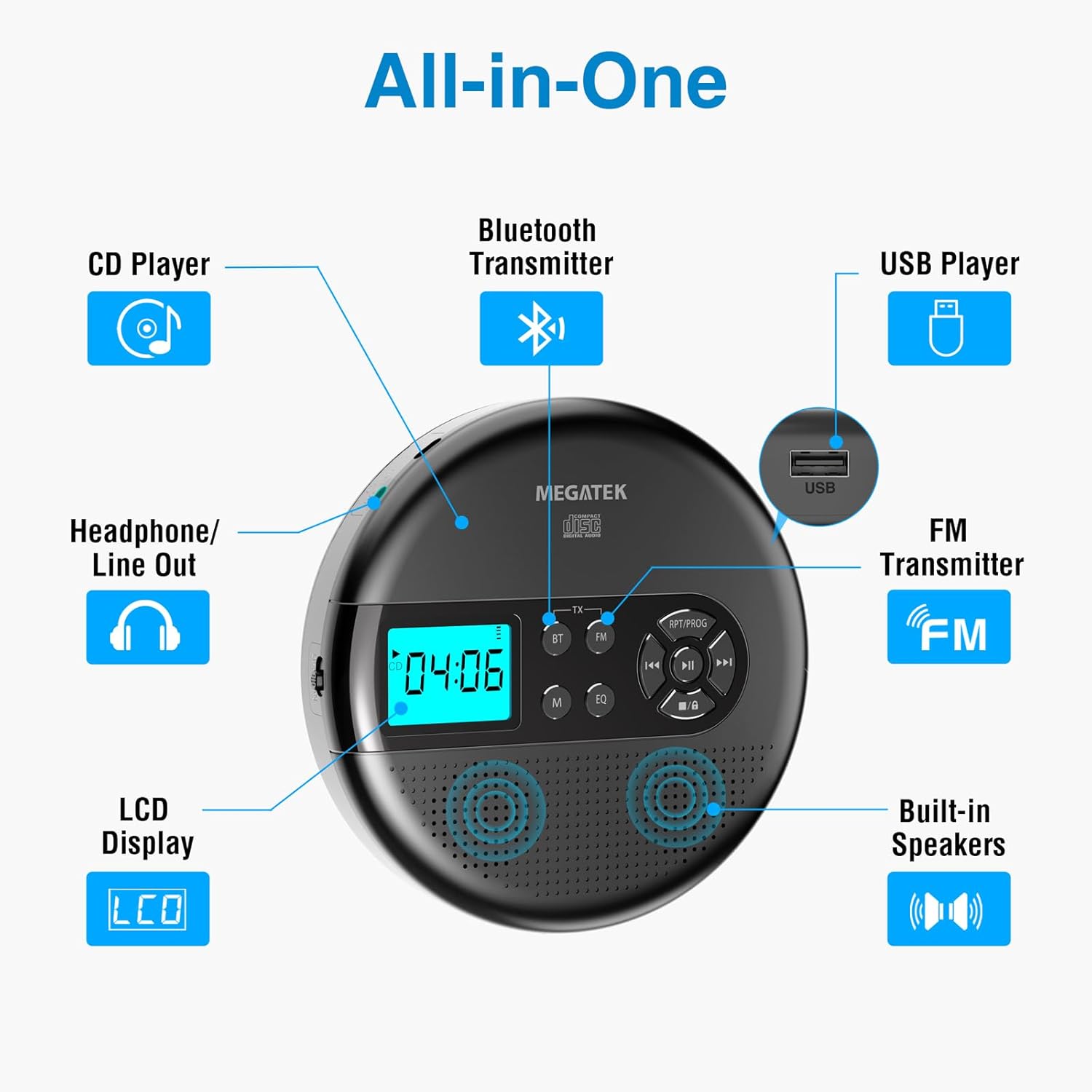
Image: An "All-in-One" diagram highlighting key features such as the CD Player, Bluetooth Transmitter, USB Player, FM Transmitter, Built-in Speakers, LCD Display, and Headphone/Line Out port.
Ohjaimet ja portit:
- LCD-näyttö: Shows track number, time, mode, and battery status.
- Toisto/tauko-painike: Aloittaa tai keskeyttää toiston.
- Edellinen/Seuraava-painikkeet: Skips tracks or fast-forwards/rewinds.
- Stop-painike: Pysäyttää toiston.
- RPT/PROG Button: Controls repeat modes and programming tracks.
- BT-painike: Activates Bluetooth transmission mode.
- FM-painike: Activates FM transmission mode.
- M (tila) -painike: Switches between CD, USB, Bluetooth, and FM modes.
- EQ-painike: Selaa taajuuskorjaimen esiasetuksia.
- Äänenvoimakkuuden säätö: Säätää äänen lähtötasoa.
- USB-portti: Äänen toistamiseen files USB-asemalta.
- Type-C latausportti: Sisäisen akun lataamiseen.
- 3.5mm Audio Out Jack: Kuulokkeiden tai ulkoisten kaiuttimien kytkemiseen.
- Sisäänrakennetut stereokaiuttimet: Suoraan äänen toistoon.
Asennus
Akun lataaminen:
The device is equipped with a built-in 2000mAh rechargeable Li-ion battery. Before first use, fully charge the player.
- Connect the provided USB-C charging cable to the Type-C charging port on the player.
- Liitä USB-C-kaapelin toinen pää USB-virtalähteeseen (ei sisälly toimitukseen) tai tietokoneen USB-porttiin.
- The battery indicator on the LCD display will show charging status. A full charge provides up to 15 hours of playtime at medium volume.

Image: The portable CD player connected to a power source via its USB-C cable, resting on a nightstand next to a bed.
CD-levyn asettaminen:
- Locate the CD compartment latch/button on the side of the player and slide/press it to open the lid.
- Carefully place the CD onto the center spindle with the label side facing up.
- Paina CD-levyä varovasti alaspäin, kunnes se napsahtaa paikalleen.
- Sulje CD-lokeron kansi tiiviisti, kunnes se napsahtaa kiinni.

Image: The portable CD player with its lid open, showing a blue CD disc inserted into the compartment, ready for playback.
Käyttöohjeet
CD-toisto:
- Aseta CD-levy asemaan Asennus-osiossa kuvatulla tavalla.
- Paina Toista/Tauko -painiketta aloittaaksesi toiston.
- Käytä Edellinen/Seuraava buttons to navigate between tracks. Hold to fast-forward or rewind.
- Paina RPT/PROG button to cycle through repeat modes (repeat one, repeat all, random) or to program a custom playback order.
- Paina Stop -painiketta toiston lopettamiseksi.
- Adjust volume using the dedicated volume control.
USB-toisto:
The player supports MP3, WMA, and WAV audio files USB-asemalta.
- Aseta USB-muistitikku USB-porttiin.
- Paina M (tila) -painiketta vaihtaaksesi USB-tilaan.
- Käytä Toista/Tauko, Edellinen/Seuraava, ja RPT/PROG painikkeita samalla tavalla kuin CD-levyn toistoa varten.
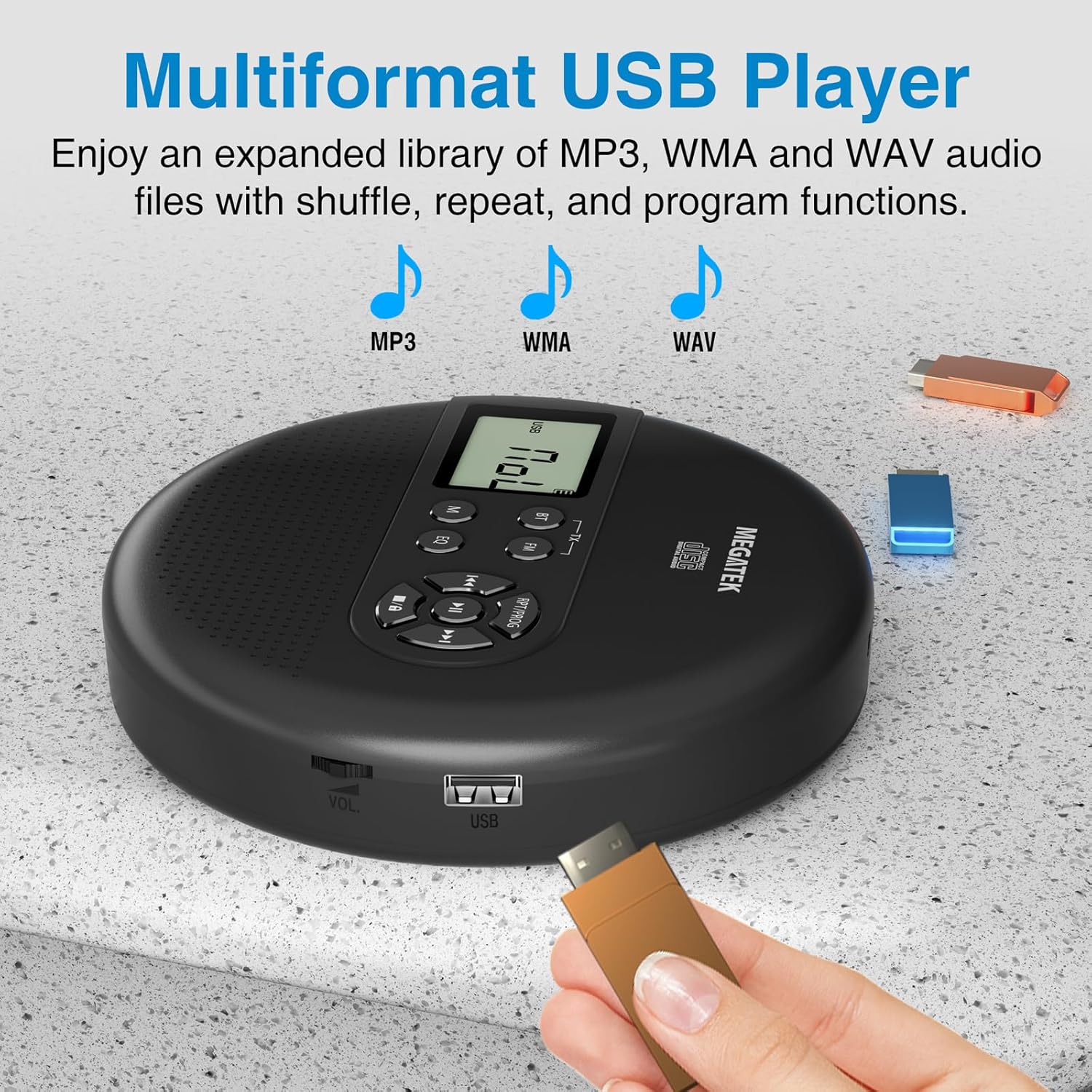
Image: The portable CD player with a USB flash drive inserted into its side port, illustrating its multi-format USB playback capability.
Bluetooth-lähetys:
Stream audio wirelessly to Bluetooth-enabled headphones or speakers. Note: This feature does not support connections to car stereo systems.
- Varmista, että Bluetooth-kuulokkeet tai -kaiutin ovat pariliitostilassa.
- On the CD player, press the BT button. The Bluetooth indicator on the display will flash.
- The player will automatically search for and connect to nearby Bluetooth devices. Once connected, the indicator will stop flashing.

Image: The portable CD player wirelessly transmitting audio to two external Bluetooth speakers, demonstrating its Bluetooth transmission capability.
FM-lähetys:
Transmit audio signals to nearby FM radios, including car FM stereos and home stereo systems.
- Paina FM button on the CD player. The display will show an FM frequency.
- Tune your FM radio (car stereo, home stereo) to the same frequency displayed on the CD player.
- Adjust the frequency on the CD player using the Edellinen/Seuraava buttons if interference occurs or to find a clearer channel.

Image: The portable CD player placed on a car dashboard, transmitting audio to the car's FM stereo system, indicated by an FM frequency on the car's display.
Using Headphones/External Speakers:
For private listening or connecting to wired audio systems:
- Plug the included wired headphones into the 3.5mm audio out jack.
- Alternatively, connect an audio cable (not included) from the 3.5mm audio out jack to the AUX input of external speakers or an audio system.
- The built-in speakers will automatically mute when headphones or external speakers are connected.

Image: A close-up of the portable CD player, visually representing sound waves emitting from its dual stereo speakers, emphasizing the built-in audio capability.
Huolto
- Puhdistus: Use a soft, dry, lint-free cloth to clean the exterior of the player. For the CD lens, use a specialized CD lens cleaner. Do not use liquids or aerosol cleaners directly on the device.
- Varastointi: Kun soitinta ei käytetä pitkään aikaan, säilytä sitä viileässä, kuivassa paikassa, poissa suorasta auringonvalosta ja äärimmäisistä lämpötiloista.
- Akun hoito: Akun käyttöiän pidentämiseksi vältä akun usein tapahtuvaa täydellistä purkamista. Lataa laite säännöllisesti, vaikka sitä ei käytettäisi aktiivisesti.
Vianetsintä
| Ongelma | Mahdollinen syy | Ratkaisu |
|---|---|---|
| Soitin ei käynnisty. | Akku on tyhjä. | Charge the player using the USB-C cable. |
| Ei ääntä kaiuttimista/kuulokkeista. | Volume is too low; headphones not fully plugged in; incorrect mode selected. | Increase volume; ensure headphones are securely connected; press the M (tila) -painiketta valitaksesi oikean lähteen. |
| CD-levy hyppii tai ei soi. | CD is dirty, scratched, or inserted incorrectly; anti-skip function overwhelmed. | Clean the CD; ensure CD is properly seated; avoid strong vibrations. |
| Bluetooth-yhteysongelmat. | Laite ei ole pariliitostilassa; liian kaukana soittimesta; häiriöitä. | Ensure receiving device is in pairing mode; move closer to the player; restart both devices. |
| FM-lähetys staattinen/huono laatu. | Interference; incorrect frequency. | Adjust the FM frequency on the player and receiver to find a clear channel. |
Tekniset tiedot
| Ominaisuus | Yksityiskohta |
|---|---|
| Mallinumero | CP27BR |
| Tuotteen mitat | 5.91 x 5.91 x 1.32 tuumaa |
| Tuotteen paino | 10.9 unssia |
| Akku | 2000 mAh:n litiumioniakku (ladattava) |
| Peliaika | Jopa 15 tuntia (keskimääräisellä äänenvoimakkuudella) |
| Tuetut CD-formaatit | CD, CD-R/RW, MP3 CD, Audio Book CD |
| Tuetut USB-formaatit | MP3, WMA, WAV |
| Skip-suojaus | 60 sekuntia |
| Yhteydet | USB, Bluetooth Transmitter, FM Transmitter, 3.5mm Audio Out |
| Erikoisominaisuudet | Built-in Stereo Speakers, Resume Play, Shuffle, Repeat, Program Functions, 5 EQ Options |
Takuu ja tuki
MEGATEK offers comprehensive support for its products:
- 12 kuukauden vaihto: In case of product defects or issues within 12 months of purchase.
- Elinikäinen tekninen tuki: Assistance with product usage, troubleshooting, and general inquiries.
- 24/7 asiakaspalvelu: Available through Amazon buyer-seller messaging.
For any questions or problems, please contact MEGATEK customer service via the Amazon platform or refer to the contact information provided in the product packaging.
Image: A graphic detailing MEGATEK's customer support, including 12-month replacement, lifetime technical support, and 24/7 Amazon buyer-seller messaging, alongside an image of customer service representatives.
Ask a question about this manual
Ask about setup, troubleshooting, compatibility, parts, safety, or missing instructions. Manuals+ will review the question and use this page’s manual context to help answer it.