
1. Johdanto
The Emerson EMT-1200 Multimedia Recorder is designed to effortlessly digitize and preserve your cherished memories by converting various media formats into modern digital files. This manual provides comprehensive instructions for setting up, operating, and maintaining your device.
2. Mitä laatikossa on
- Emerson EMT-1200 Multimedia Recorder
- Verkkolaite
- Pika-aloitusopas
- AV-kaapeli
- Käyttöopas
3. Tuote ohiview
The Emerson EMT-1200 is a versatile multimedia recorder featuring a 4.3-inch LCD screen, multiple input/output options, and app integration for seamless media conversion and playback.

Image: The Emerson EMT-1200 Multimedia Recorder shown with various media sources like phones, DVDs, and USB drives, highlighting its multi-functionality.
Tärkeimmät ominaisuudet ja komponentit:
- 4.3 tuuman LCD-näyttö: Ennakkoonviewing recordings and navigating menus.
- Äänitulo (RCA): Red and white ports for stereo audio input.
- Video In (RCA): Yellow port for composite video input.
- HD Out (HDMI): Ulkoisten näyttöjen liittämistä varten.
- USB-portti: USB-asemien liittämiseen.
- Korttipaikka: SD-korttien asettamiseen.
- DVD/CD Drive: For disc media.
- Virtapainike: Laitteen kytkeminen päälle/pois.
- Poistopainike: To open/close the disc tray.
- Tallennuspainike: To start/stop recording.
- Navigation Buttons (ENTER, RETURN, UP/DOWN/LEFT/RIGHT): For menu control.

Kuva: Yläosa view of the Emerson EMT-1200, highlighting the 4.3-inch LCD screen and the central control panel with navigation and function buttons.

Kuva: Edessä view of the Emerson EMT-1200, showing the Audio In, Video In, HD Out, and USB ports on the left side.

Kuva: Sivu view of the Emerson EMT-1200 with the DVD/CD tray open, ready for disc insertion.
4. Asennus
- Place the Recorder: Position the EMT-1200 on a clean, stable surface.
- Liitä virta: Connect the AC power adapter to the DC IN 5V port on the recorder and plug the adapter into a wall outlet or surge protector.
- Virta päälle: Press the Power button on the device. The Emerson logo will appear on the screen.
Video: This video demonstrates the basic setup process for the Emerson EMT-1200 Multimedia Recorder, including connecting power and initial boot-up.
5. Käyttöohjeet
5.1 Recording from VHS
- Connect VHS Player: Use the AV cable to connect the LINE OUT ports of your VHS player to the AUDIO IN (Red/White) and VIDEO IN (Yellow) ports on the EMT-1200.
- VHS-kasetin asettaminen: Place the VHS tape you wish to record into your VHS player.
- Valitse lähde: On the EMT-1200, navigate to the main menu and select "Video -> USB/Card" or "Video -> DVD" depending on your desired output.
- Aloita tallennus: Begin playback on your VHS player, then press the REC button on the EMT-1200 to start recording. Press REC again to stop.

Image: The Emerson EMT-1200 connected to a VHS player via AV cables, illustrating the process of converting VHS tapes to digital formats.
Video: This video demonstrates how to record content from a VHS player to the Emerson EMT-1200 Multimedia Recorder.
5.2 Recording from DVD/CD
- Insert Source Disc: Eject the disc tray and insert the DVD or CD you wish to record from. Close the tray.
- Valitse lähde: From the main menu, select "CD/DVD -> USB/Card" or "CD/DVD -> Memory" based on your desired storage.
- Aloita tallennus: Play the content on the disc, then press the REC button on the EMT-1200 to start recording. Press REC again to stop.
Video: This video guides you through the process of recording content from a DVD to the Emerson EMT-1200 Multimedia Recorder.
Video: This video demonstrates how to record audio from a CD to the Emerson EMT-1200 Multimedia Recorder.
5.3 Recording from USB/SD Card
- Säilytystila: Insert a USB drive into the USB port or an SD card into the CARD slot.
- Valitse lähde: From the main menu, select "USB/Card -> DVD" or "USB/Card -> CD" to transfer files from your USB/SD to a disc.
- Aloita tallennus: Valitse noudattamalla näytön ohjeita files and initiate the transfer.
Video: This video explains how to record files from a USB drive to a DVD using the Emerson EMT-1200 Multimedia Recorder.
5.4 Siirto Files from iOS/Android App
- Lataa sovellus: Download the "Friendly Memories" app from the App Store (iOS) or Google Play Store (Android).
- Yhdistä Wi-Fi-verkkoon: Power on the EMT-1200. On your smartphone/tablet, go to Wi-Fi settings and connect to the device's Wi-Fi network (e.g., "DVD_SERVER_XXXX"). Enter the password found in your user manual.
- Myönnä käyttöoikeus: In your phone's settings, ensure the "Friendly Memories" app has access to the photos and videos you wish to transfer.
- Lataa Files: Open the "Friendly Memories" app, select the files you want to transfer, and choose your desired destination (USB, SD Card, or DVD) on the EMT-1200.

Image: An iPhone displaying the "Friendly Memories" app interface, connected wirelessly to the Emerson EMT-1200 for file siirtää.
Video: This video demonstrates how to use the iOS app to transfer files to the Emerson EMT-1200 Multimedia Recorder.
5.5 Media Playback & HD Output
- Yhdistä näyttöön: Connect an HDMI cable from the HD OUT port on the EMT-1200 to your TV or monitor's HDMI input.
- Valitse syöttö: On your TV/monitor, select the corresponding HDMI input source.
- Select Media Player: On the EMT-1200, navigate to the main menu and select "Media Player".
- Choose Source: Select the source (USB, Card, or CD/DVD) where your media files tallennetaan.
- Toista mediaa: Selaa ja valitse haluamasi file pelata.

Image: The Emerson EMT-1200 connected to a larger TV screen via HDMI, allowing users to view their digitized media on an external display.
Video: This video demonstrates the media player functionality and HD output capabilities of the Emerson EMT-1200 Multimedia Recorder.
6. Asetukset
Access the "Setup" menu from the main menu to configure various device settings:
- Tallennusmuoto: Choose between MPG (for Blu-ray players) or MP4 (for computers and DVD players).
- DVD Burn Type: Select "Data" for data-only files or "Video" for video format compatible with DVD/Blu-ray players.
- Levyn laatu: Adjust the recording quality to High, Medium, or Low. Note that higher quality results in larger file sizes and longer recording times.
- Auto Stop Timer: Set a preset time (e.g., 30 minutes, 60 minutes, 2 hours) for the recording to stop automatically.
- Auto Chapter: Enable this feature to automatically break recordings into chapters at specified intervals (e.g., 5, 10, or 15 minutes).
- Värijärjestelmä: Set the video color system (e.g., NTSC).
- OSD-kieli: Select the On-Screen Display language (English, Deutsch, Français, Nederlands, Español).
- Päivämäärän asetus: Adjust the current date.
- Ajan asetus: Säädä nykyinen aika.
- Oletusasetukset: Palauta kaikki asetukset tehdasasetuksiin.
7. Vianmääritys
If you encounter issues with your Emerson EMT-1200, please refer to the following common troubleshooting tips:
- Ei virtaa: Ensure the AC power adapter is securely connected to both the device and a working power outlet.
- Ei signaalia näytössä: Verify all AV or HDMI cables are correctly connected to both the recorder and the external display. Ensure the correct input source is selected on your TV/monitor.
- Tallennusongelmat: Check that the source media (VHS, DVD, etc.) is playing correctly. Ensure the destination media (USB, SD card, blank DVD) has sufficient space and is compatible with the device.
- Sovelluksen yhteysongelmat: Confirm your smartphone/tablet is connected to the EMT-1200's Wi-Fi network and the correct password has been entered. Check app permissions for media access.
- Disc Ejection Issues: If a disc does not eject, ensure the device is powered on and press the Eject button firmly. Do not force the disc tray.
For more detailed troubleshooting, please consult the full user manual or visit the Emerson support websivusto.
8. Tekniset tiedot
| Ominaisuus | Yksityiskohta |
|---|---|
| Merkki | Emerson |
| Mallin nimi | EMT-1200 |
| Erikoisominaisuus | USB Recording (DVR) |
| Resoluutio | 1280×720 |
| Liittimen tyyppi | Micro USB |
| Yhteystekniikka | USB |
| Tuotteen paino | 1 puntaa |
| Tuotteen mitat | 6.1 cm P x 1.85 cm L x 6.1 cm K |
| Videolähdön tarkkuus | 1080p |
| Yhteensopivat laitteet | Televisio, älypuhelin |
| Ohjaimen tyyppi | Painikkeiden ohjaus |
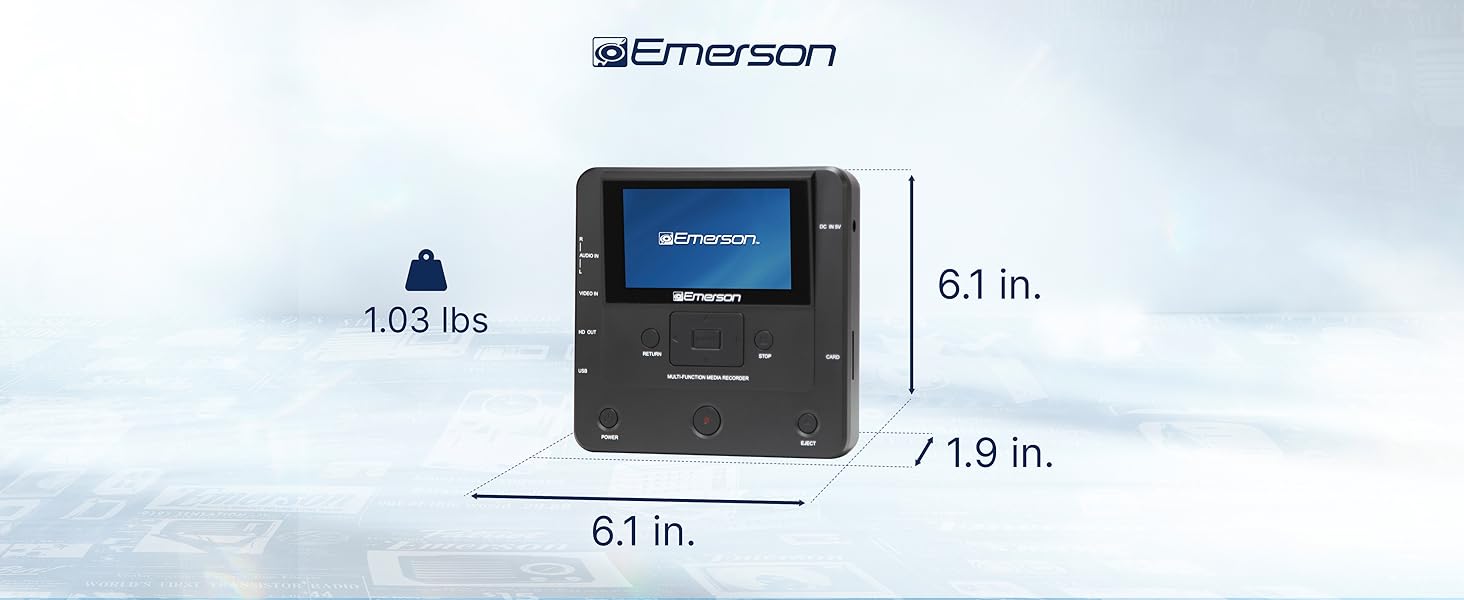
Image: The Emerson EMT-1200 Multimedia Recorder with its dimensions labeled: 6.1 inches Length, 1.9 inches Width, 6.1 inches Height, and a weight of 1.03 pounds.
9. Huolto
To ensure the longevity and optimal performance of your Emerson EMT-1200 Multimedia Recorder, follow these maintenance guidelines:
- Puhdistus: Use a soft, dry cloth to clean the exterior of the device. Avoid using liquid cleaners, aerosols, or solvents.
- Varastointi: Säilytä laitetta viileässä, kuivassa paikassa, poissa suorasta auringonvalosta ja äärimmäisistä lämpötiloista.
- Levyn hoito: Handle discs by their edges to avoid fingerprints and scratches. Keep discs in their protective sleeves when not in use.
- Ilmanvaihto: Varmista, että laitteen tuuletusaukot eivät ole tukossa ylikuumenemisen estämiseksi.
10. Takuu ja tuki
Your Emerson EMT-1200 Multimedia Recorder comes with a limited warranty to ensure your satisfaction.
- Takuuaika: 1 Year Parts, 90 Days Labor.
- Valmistaja: Naxa Electronics, Inc.
For warranty claims, product updates, extended support documentation, or frequently asked questions, please visit the official Emerson Audio websivustolla tai ota yhteyttä asiakastukeen.