
1. Tuote ohiview
The UNI-T UT372 is a non-contact digital laser tachometer designed for measuring the rotational speed (RPM) and count of objects. It utilizes a laser pointer and reflective tape to provide accurate and stable measurements without physical contact. This device is suitable for various industrial and scientific applications.
Tärkeimmät ominaisuudet:
- 5-digit LCD screen with RPM/count and time dual display.
- Measurement modes: MAX (Maximum), MIN (Minimum), AVG (Average), and Normal.
- Säädettävä sampling rate (0.5-255 seconds).
- Automatic power-off function (cancelable).
- Selectable laser pointer (on/off).
- Clock and time setting capabilities.
- Tiedonpitotoiminto.
- Low power consumption, allowing for approximately 40 hours of continuous operation.
- Equipped with a USB interface for data transfer (UT372 only).
- Certified with CE and UKCA standards.
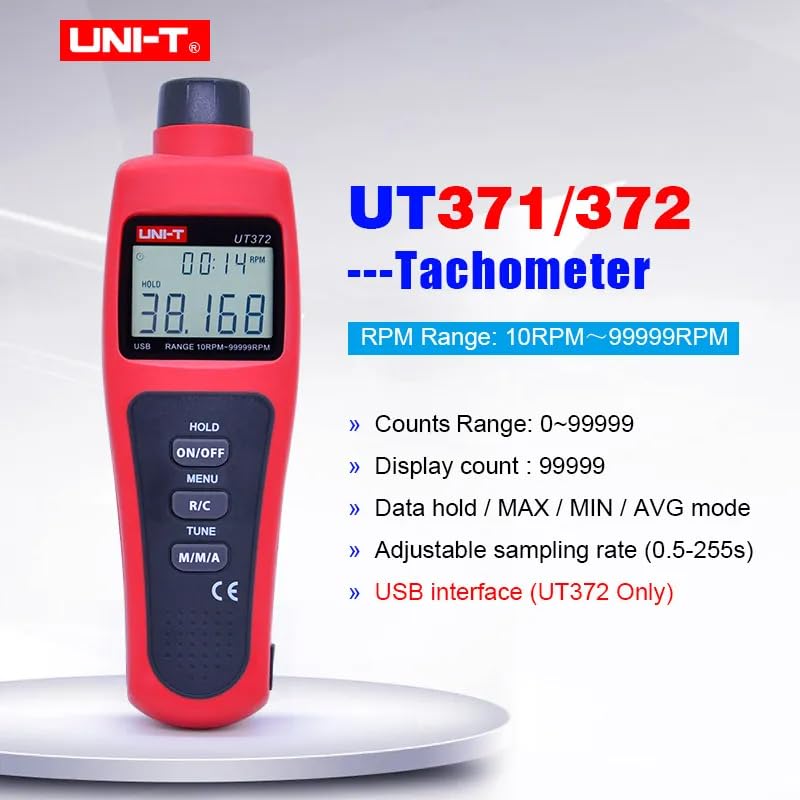
Image 1.1: The UNI-T UT372 tachometer displaying its main features and specifications.
2. Turvallisuustiedot
Lue ja ymmärrä kaikki turvallisuusohjeet ennen laitteen käyttöä. Näiden ohjeiden noudattamatta jättäminen voi johtaa loukkaantumiseen tai laitteen vaurioitumiseen.
- Do not look directly into the laser beam. The laser is a Class 2 laser product.
- Do not attempt to modify or disassemble the device. Repairs should only be performed by qualified personnel.
- Varmista, että paristolokero on suljettu tiiviisti ennen käyttöä.
- Poista paristot vuotojen estämiseksi, jos laitetta ei käytetä pitkään aikaan.
- Keep the device away from water, dust, and extreme temperatures.
3. Pakkauksen sisältö
Carefully unpack the box and check if all items are present and undamaged. If any item is missing or damaged, contact your supplier.
- UNI-T UT372 Digital Laser Tachometer
- heijastava nauha
- USB Interface Cable (for UT372 only)
- PC Software CD (for UT372 only)
- Englanninkielinen käyttöopas
- Batteries (1.5V LR6 x 4)

Image 3.1: The UNI-T UT372 tachometer and its standard accessories as packaged.
4. Product Layout and Panel Introduction
Familiarize yourself with the components and controls of your UT372 tachometer.

Kuva 4.1: Edestä ja sivulta view of the UT372 tachometer with labeled components.
- Kierroslukumittarin valonlähde: Lähettää lasersäteen mittausta varten.
- LCD-näyttö: Shows measurement readings, modes, and other indicators.
- HOLD / ON/OFF Button: Press to power on/off the device. Short press to activate/deactivate data hold.
- MENU-painike: Accesses the menu for settings adjustments.
- R/C (RPM / Counts) Button: Toggles between RPM and Count measurement modes.
- TUNE-painike: Used for adjusting settings within the menu.
- M/M/A (MAX/MIN/AVG) Button: Cycles through Maximum, Minimum, and Average measurement modes.
- USB-portti (vain UT372): For connecting to a computer for data transfer.
5. Asennus ja akun asennus
5.1 Akun asennus
- Paikanna laitteen takaosassa oleva paristolokeron kansi.
- Avaa kansi liu'uttamalla tai ruuvaamalla sitä auki.
- Insert four 1.5V LR6 (AA) batteries, ensuring correct polarity (+/-).
- Sulje paristolokeron kansi kunnolla.
5.2 Heijastinnauhan kiinnittäminen
For accurate non-contact measurement, apply a piece of reflective tape to the rotating object whose speed or count you wish to measure. Ensure the tape is clean and securely attached.
6. Käyttöohjeet
6.1 Virta päälle/pois
Paina HOLD / ON/OFF button to turn the tachometer on or off.
6.2 Kierrosluvun mittaus
- Ensure the device is in RPM measurement mode (indicated on the LCD). If not, press the R/C painiketta vaihtaaksesi.
- Point the laser beam at the reflective tape on the rotating object.
- Maintain a measurement distance between 50mm and 200mm (2 to 8 inches) from the target.
- The RPM reading will be displayed on the LCD.
- Huomautus: If no signal is detected within 7 seconds, the LCD will display "0.0000". If the RPM exceeds 99999, the LCD will display "OL" (Overload).

Image 6.1: Illustrates the correct distance and method for RPM measurement.
6.3 Counts Measurement
- Paina R/C button to switch to Count measurement mode.
- Point the laser beam at the reflective tape on the object.
- The device will count the number of times the laser beam reflects off the tape.
6.4 Mode Selection (MAX/MIN/AVG)
Paina M/M/A button repeatedly to cycle through the following display modes:
- MAX: Näyttää mitatun suurimman arvon.
- MIN: Displays the minimum measured value.
- AVG: Displays the average measured value.
- Normaali: Displays the current real-time measurement.
6.5 Tietojen säilytys
During measurement, a short press of the HOLD / ON/OFF button will freeze the current reading on the display. Press it again to release the data hold and resume live measurement.
6.6 Sampling-nopeuden säätö
Sampling rate can be adjusted from 0.5 to 255 seconds. Refer to the detailed user manual for specific steps on how to access and change this setting via the MENU ja VIRITTÄÄ painikkeita.
6.7 USB Interface (UT372 Only)
The UT372 model features a USB port for connecting to a computer. Use the provided USB cable and PC software CD to transfer measurement data for analysis and logging. Follow the instructions provided with the software for installation and operation.
7. Huolto
- Puhdistus: Puhdista laite pehmeällä, kuivalla liinalla. Älä käytä hankaavia puhdistusaineita tai liuottimia.
- Varastointi: Store the tachometer in a cool, dry place away from direct sunlight and extreme temperatures. Remove batteries if storing for extended periods.
- Reflective Tape: Ensure the reflective tape is clean and free from damage for accurate readings. Replace as needed.
8. Vianmääritys
- Laite ei käynnisty: Tarkista paristojen asennus ja varmista, että paristot eivät ole tyhjentyneet. Vaihda tarvittaessa.
- "0.0000" displayed during RPM measurement: Ensure the laser is correctly aimed at the reflective tape and the measurement distance is within 50-200mm. Check if the reflective tape is properly applied and clean.
- "OL" näytöllä: The measured RPM exceeds the device's maximum range (99999 RPM).
- Epätarkat lukemat: Verify the reflective tape is securely attached and clean. Ensure the target object is stable during measurement. Check for any obstructions in the laser path.
- Akun heikon ilmaisin: Replace batteries promptly when the low battery icon appears on the display.
9. Tekniset tiedot
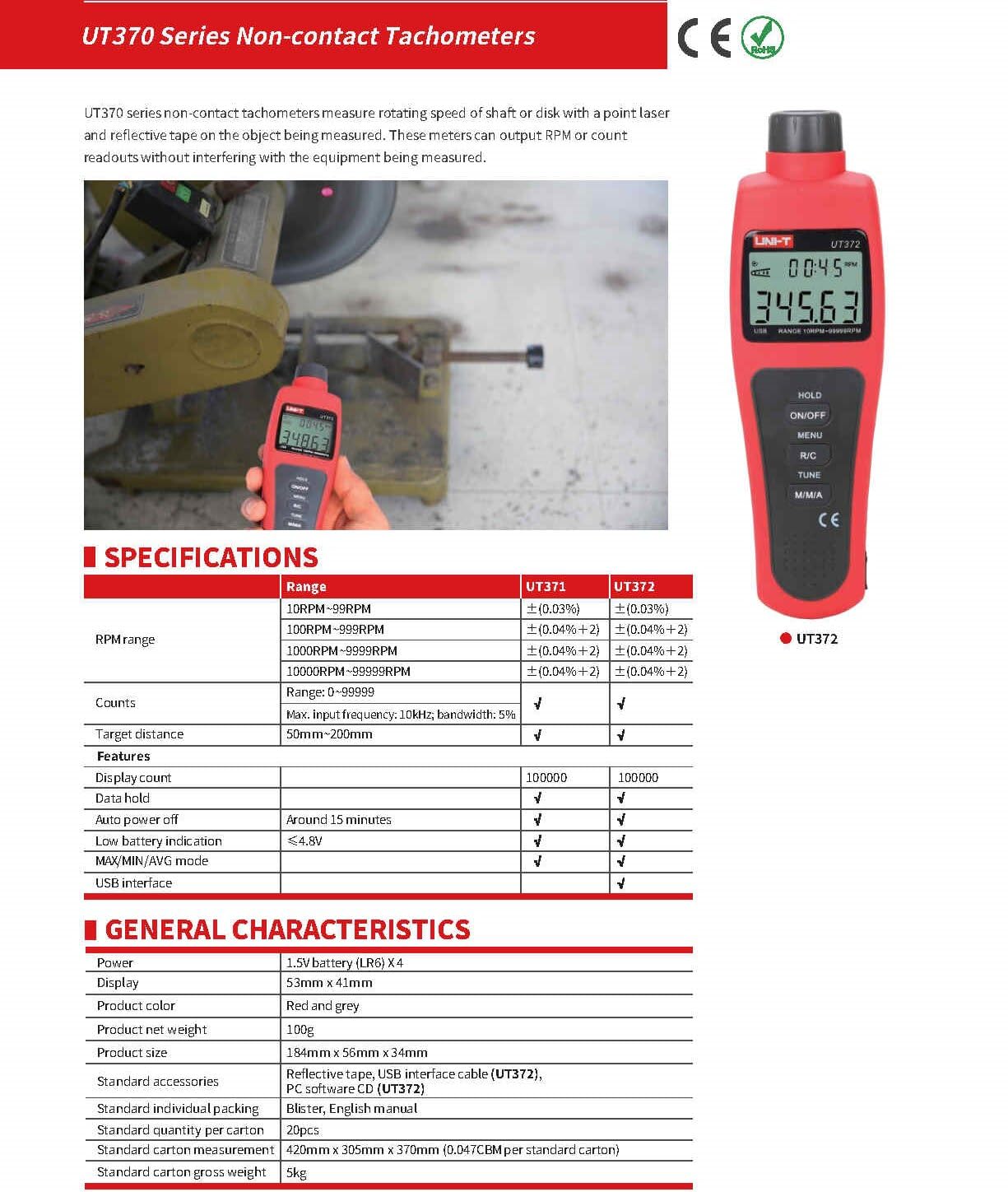
Image 9.1: Detailed specifications for the UT370 series tachometers.
| Parametri | UT372 Specification |
|---|---|
| Kierroslukualue | 10 RPM ~ 99999 RPM (Accuracy: ±(0.04%+2)) |
| Määräalue | 0-99999 |
| Näytön määrä | 99999 |
| Tavoiteetäisyys | 50mm ~ 200mm |
| Suurin tulotaajuus | 10kHz, bandwidth: 5% |
| Tehoa | 1.5 V:n paristo (LR6) x 4 |
| Näyttö | 53 mm x 41 mm LCD |
| Tuotteen väri | Punainen ja harmaa |
| Tuotteen nettopaino | 100 g |
| Tuotteen koko | 184mm x 56mm x 34mm |
| Automaattinen virrankatkaisu | Around 15 minutes (cancelable) |
| Alhaisen akun ilmoitus | <4.8V |
| USB-liitäntä | Kyllä |
| Käyttölämpötila | 0 °C - 50 °C (32 °F - 122 °F) |
| Varastointilämpötila | -20 °C - 60 °C (-4 °F - 140 °F) |
| Kosteus | <80% RH (ei tiivistyvä) |
10. Takuu ja tuki
UNI-T products are designed and manufactured to high quality standards. For warranty information, technical support, or service, please refer to the warranty card included with your product or contact your local UNI-T distributor or customer service center. Please have your product model number (UT372) and purchase date available when contacting support.


