
1. Tuote ohiview
The GOLOZA LA-C337 is a versatile digital alarm clock featuring a 180° rotatable projection, a large curved LED display, and a convenient USB charging port. It is designed for clear time display and easy operation.

Image 1.1: The GOLOZA Digital Projection Alarm Clock, showcasing its curved display and compact design, placed on a nightstand.
2. Pakkauksen sisältö
Tarkista pakkauksesta seuraavat tuotteet:
- GOLOZA Digital Projection Alarm Clock (LA-C337)
- Micro USB kaapeli
- Virtalähde
- Käyttöopas
3. Tuotteen ominaisuudet
- Curved LED Display: Large, clear digital time display with adjustable brightness.
- 180° projektio: Projects time onto a wall or ceiling with adjustable brightness and rotation.
- Kaksoishälytys: Set two independent alarms with progressive volume.
- Torkkutoiminto: Allows for extra sleep time after the alarm sounds.
- USB-latausportti: Lataa mobiililaitteesi kätevästi.
- Muistin akku: Built-in button battery maintains time settings during power outages.
Kuva 3.1: Lähikuva view of the GOLOZA Digital Projection Alarm Clock's clear, blue LED display, showing the time.
4. Alkuasetukset
4.1 Virtaliitäntä
- Connect the Micro USB cable to the power input port on the back of the alarm clock.
- Kytke USB-kaapelin toinen pää mukana toimitettuun virtalähteeseen.
- Insert the power adapter into a standard electrical outlet. The clock display will light up.
Huomautus: The built-in button battery serves as a backup for time and alarm settings during a power interruption. It does not power the main display or projection.
4.2 Kellonajan ja päivämäärän asettaminen
Specific button names are not provided, but typically these clocks have 'TIME SET', 'MODE', or similar buttons. Refer to the physical unit for exact button labels.
- Paina ja pidä painettuna Aika asetettu -painiketta (tai vastaavaa) siirtyäksesi ajan asetustilaan. Tunnit vilkkuvat.
- Käytä +/- or Ylös/alas painikkeita säätääksesi tuntia.
- Paina Aika asetettu -painiketta uudelleen vahvistaaksesi tunnit ja siirtyäksesi minuuttien asetukseen. Minuuttinumerot vilkkuvat.
- Käytä +/- or Ylös/alas painikkeita minuuttien säätämiseksi.
- Paina Aika asetettu button again to confirm minutes and exit time setting mode.
- Follow similar steps to set the date if your model supports it (usually by pressing the Time Set button multiple times to cycle through year, month, day).
5. Käyttöohjeet
5.1 Hälytysten asettaminen
The clock supports two independent alarms (Alarm 1 and Alarm 2).
- Paina ja pidä painettuna Hälytys 1 button (or similar) to enter Alarm 1 setting mode. The alarm hour digits will flash.
- Käytä +/- or Ylös/alas painikkeita säätääksesi herätysaikaa.
- Paina Hälytys 1 button again to confirm the hour and move to minute setting. The alarm minute digits will flash.
- Käytä +/- or Ylös/alas painikkeita hälytyksen minuuttien säätämiseksi.
- Paina Hälytys 1 button again to confirm minutes and select the alarm sound (e.g., Beep, Chord, Bird Song).
- Paina Hälytys 1 button one more time to activate/deactivate Alarm 1 and exit setting mode. An alarm icon will appear on the display when active.
- Toista prosessi Hälytys 2 käyttämällä vastaavaa painiketta.
5.2 Näytön kirkkauden säätäminen
The main LED display typically has multiple brightness levels.
- Paina Kirkkaus button (or a dedicated dimmer button) repeatedly to cycle through the available brightness levels (e.g., High, Medium, Low, Off).
5.3 Using Projection Feature
The projection feature allows you to view the time on a wall or ceiling.
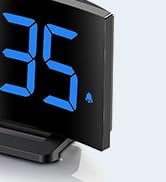
Image 5.1: The GOLOZA Digital Projection Alarm Clock actively projecting the time onto a surface, demonstrating its projection capability.
- Activating/Deactivating Projection: Paina Projektori button (or similar) to turn the projection on or off.
- Adjusting Projection Brightness: While the projector is on, press the Projektorin kirkkaus button (or the same Projector button repeatedly) to cycle through brightness levels (e.g., High, Medium, Low).
- Pyörivä projektio: The projector lens can be physically rotated 180° to adjust the projection angle. Some models may also have a button to flip the projected image.
5.4 USB Charging Port Usage
The integrated USB port allows you to charge external devices.
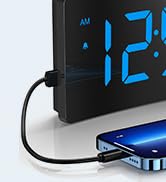
Image 5.2: The GOLOZA Digital Projection Alarm Clock with a smartphone connected to its USB charging port, illustrating its charging capability.
- Liitä laitteen USB-latauskaapeli herätyskellon USB-lähtöporttiin.
- Varmista, että herätyskello on päällä.
- The clock's USB port provides power to charge your device.
5.5 Torkku -toiminto
Kun hälytys soi, paina Torkku button (often a large button on top) to temporarily silence the alarm. The alarm will sound again after a preset interval (e.g., 9 minutes).
5.6 Hälytyksen äänenvoimakkuuden säätö
The alarm volume is progressive, meaning it starts soft and gradually increases. Some models may offer adjustable volume levels.
- Jos mahdollista, paina Äänenvoimakkuus button (or a dedicated switch) to adjust the alarm volume to your preferred level.
6. Huolto
- Puhdistus: Pyyhi kello pehmeällä, kuivalla liinalla. Älä käytä hankaavia puhdistusaineita tai liuottimia.
- Sijoitus: Place the clock on a stable, flat surface away from direct sunlight, heat sources, and moisture.
- Akku: The internal button battery is for memory backup. If the clock consistently loses settings after a power outage, the battery may need replacement by a qualified technician.
7. Vianmääritys
| Ongelma | Mahdollinen syy | Ratkaisu |
|---|---|---|
| Kellon näyttö on pois päältä. | Ei virtaliitäntää. | Ensure the power adapter is securely plugged into the clock and a working electrical outlet. |
| Projektio on himmeä tai epäselvä. | Incorrect brightness setting; dirty lens; too much ambient light. | Adjust projection brightness. Clean the projector lens with a soft cloth. Reduce ambient light in the room. |
| Hälytys ei soi. | Alarm is not activated; alarm volume is too low. | Ensure the alarm icon is visible on the display. Check and adjust alarm volume. |
| Aika-asetukset katoavat virrankatkaisun jälkeentage. | Internal backup battery is depleted or faulty. | The internal button battery may need replacement. Contact customer support. |
| USB-lataus ei toimi. | Clock not powered; faulty USB cable; device not compatible. | Ensure the clock is powered. Try a different USB cable. Check device compatibility. |
8. Tekniset tiedot
| Ominaisuus | Yksityiskohta |
|---|---|
| Mallinumero | LA-C337 |
| Mitat (P x L x K) | 17.7 x 3.81 x 7.8 cm |
| Paino | 310 grammaa |
| Merkki | GOLOZA |
| Väri | Sininen |
| Tyyli | Modern/Elegant/Minimalist |
| Erikoisominaisuudet | Integrated Design, Built-in Button Battery (for memory), USB Charging Port, Super Clear Projection, Progressive Volume, Curved Display |
| Virtalähde | Electrical (USB Powered) |
| Muoto | Rectangular, Curved Screen |
| Mukana paristot | No (Internal button battery for memory backup is pre-installed but not user-replaceable) |
| UPC/GTIN | 647697054284 |
9. Takuu ja tuki
GOLOZA is committed to providing quality products and customer satisfaction.
- Palautuskäytäntö: 6 Months Return period.
- Takuu: 24 kuukauden takuu ostopäivästä lukien.
- Tukea: Lifetime Support is provided for this product.
For any questions, technical assistance, or warranty claims, please contact GOLOZA customer service through your purchase platform or the official GOLOZA websivusto.