
1. Johdanto
This user manual provides comprehensive instructions for the setup, operation, and maintenance of your FULLJA 17-inch Dual-WiFi Digital Picture Frame. This device allows you to instantly share photos and videos with loved ones from anywhere using the VPhoto app or email, supporting both 2.4 GHz and 5 GHz Wi-Fi networks. With its large display, ample storage, and versatile features, it is designed to preserve and display your precious memories with ease.
2. Turvallisuustiedot
Please read all safety instructions carefully before using the device to ensure proper operation and to prevent damage or injury. Keep this manual for future reference.
- Älä altista laitetta vedelle tai liialliselle kosteudelle.
- Vältä laitteen sijoittamista lämmönlähteiden, kuten pattereiden, lämmönlähteiden, liesien tai muiden laitteiden (mukaan lukien ampnostimet), jotka tuottavat lämpöä.
- Käytä vain laitteen mukana toimitettua virtalähdettä.
- Älä tuki tuuletusaukkoja. Asenna valmistajan ohjeiden mukaisesti.
- Suojaa virtajohtoa kävelemiseltä tai puristumiselta, erityisesti pistokkeiden, pistorasian kohdalta ja kohdasta, jossa ne tulevat ulos laitteesta.
- Irrota laite pistorasiasta ukkosmyrskyjen aikana tai kun sitä ei käytetä pitkään aikaan.
- Anna kaikki huoltotoimenpiteet pätevän huoltohenkilöstön tehtäväksi. Huolto on tarpeen, jos laite on jollain tavalla vaurioitunut, kuten virtajohto tai pistoke on vaurioitunut, nestettä on roiskunut tai esineitä on pudonnut laitteen sisään, laite on altistunut sateelle tai kosteudelle, ei toimi normaalisti , tai se on pudonnut.
- Puhdista vain kuivalla liinalla.
3. Pakkauksen sisältö
Varmista, että pakkauksessa on kaikki tarvittavat osat:
- 1x FULLJA 17-inch Digital Picture Frame
- 1x käyttöopas
- 1x virtalähde
- 1x Bracket (for stand)
- 1x kaukosäädin
- 1x Micro USB -kaapeli

Image: FULLJA Brand Logo
This image displays the official FULLJA brand logo, typically found on product packaging and documentation.

Image: FULLJA 17-inch Digital Picture Frame
This image shows the 17-inch FULLJA Digital Picture Frame in a vertical orientation, resting on a surface.
4. Tuote ohiview
4.1. Komponentit ja hallintalaitteet
Familiarize yourself with the various parts of your digital picture frame:
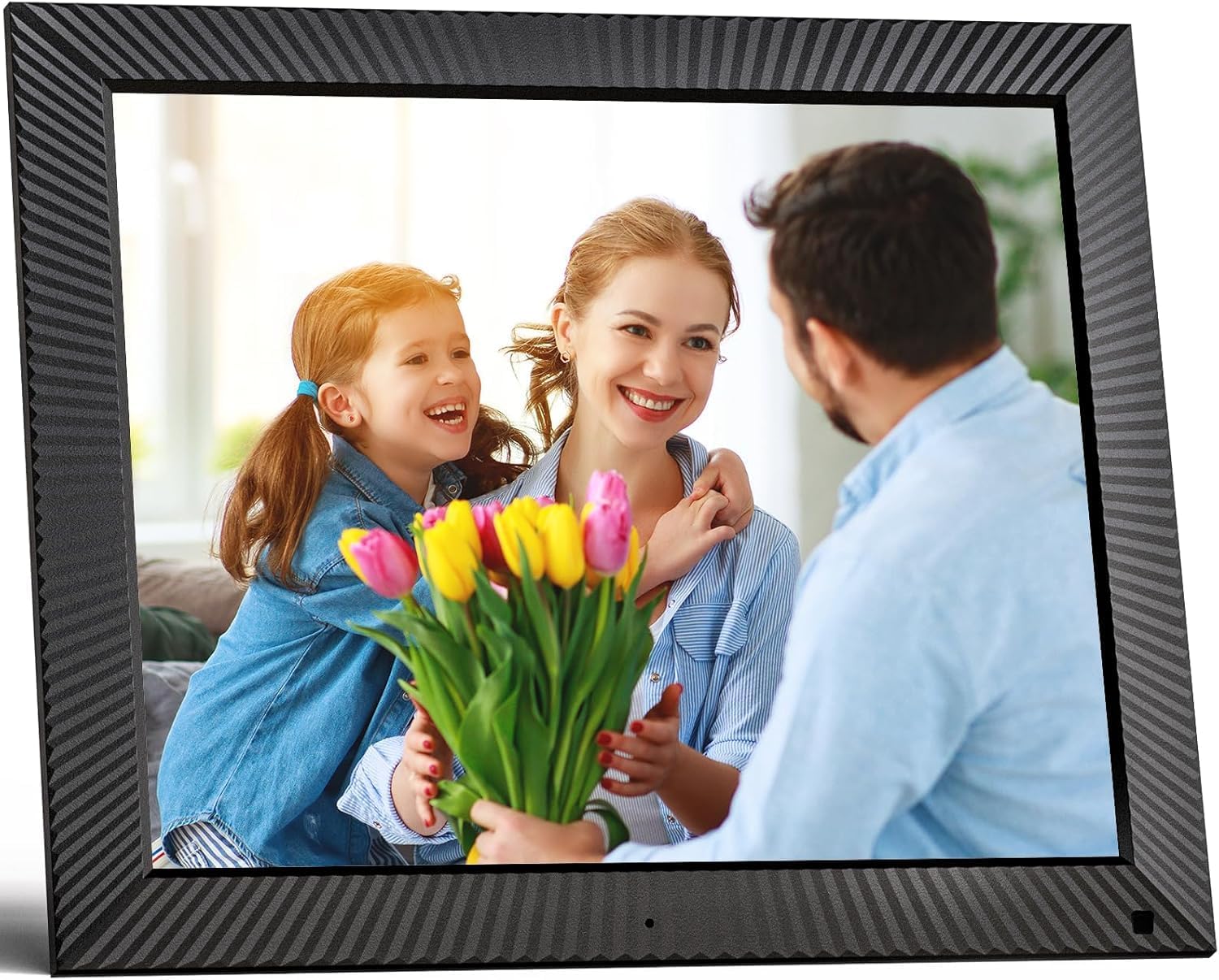
Kuva: Edessä view of the FULLJA 17-inch Digital Picture Frame
This image displays the front of the digital picture frame, showcasing its large screen with a family photo displayed. The frame has a textured black border.

Image: Features of the FULLJA 17-inch Digital Picture Frame
This image highlights key features of the 17-inch digital picture frame, including its touch screen, HD 1280x1024 pixel resolution, 4:3 aspect ratio, and remote control functionality. It shows the frame in both landscape and portrait orientations, with a view of the back panel and stand.
- Näyttö: 17-inch IPS display with 1280x1024 resolution. Touch-enabled for direct interaction.
- Virtapainike: Located on the back or side, used to turn the frame on/off or put it into standby.
- USB-portti: For connecting USB sticks to transfer photos/videos.
- TF-korttipaikka: For inserting TF (MicroSD) cards (up to 64GB) to expand storage or transfer media.
- Micro USB -portti: For connecting to a computer for data transfer or firmware updates.
- DC-virransyöttö: Virtalähteen liittämiseen.
- Liiketunnistin: Detects presence to automatically turn the screen on/off, saving energy.
- Sisäänrakennettu kaiutin: For audio playback with videos or background music.
- Seinäkiinnitysreiät: VESA compatible holes on the back for wall mounting.
- Stand Bracket: Attachable bracket for desktop placement in portrait or landscape orientation.
4.2. Kaukosäädin
The included remote control provides convenient access to various functions without touching the screen.
- Teho: Turn the frame on/off.
- Valikko/Asetukset: Access the main menu and settings.
- Navigointipainikkeet (ylös/alas/vasemmalle/oikealle): Selaa valikoissa ja vaihtoehdoissa.
- OK/Syötä: Vahvista valinnat.
- Takaisin/poistuminen: Palaa edelliselle näytölle tai poistu valikosta.
- Äänenvoimakkuus +/-: Säädä äänenvoimakkuutta.
- Toista/tauko: Ohjaa median toistoa.
- Seuraava/edellinen: Skip to the next or previous photo/video.
5. Asennus
5.1. Ensimmäinen käynnistys
- Unpack the digital picture frame and all accessories.
- Attach the stand bracket to the back of the frame if you intend to place it on a desk or shelf. Ensure it is securely fastened.
- Connect the power adapter to the DC power input port on the frame, then plug the adapter into a wall outlet.
- The frame will automatically power on or you may need to press the power button.
- Valitse kieli ja aikavyöhyke näytön ohjeiden mukaisesti.
5.2. Wi-Fi-yhteyden muodostaminen
A Wi-Fi connection is essential for sharing photos via the app or email.
- Siirry päävalikosta kohtaan Asetukset.
- Valitse Wi-Fi.
- The frame will scan for available networks. Select your desired 2.4 GHz or 5 GHz network from the list.
- Anna Wi-Fi-salasanasi näyttönäppäimistöllä.
- Napauta Yhdistä. Once connected, a Wi-Fi icon will appear on the screen.

Image: Digital Picture Frame with Wi-Fi Sharing
This image illustrates the capability of the digital picture frame to share photos and videos wirelessly via Wi-Fi. It shows the frame displaying a family photo, with a smartphone in the foreground indicating app-based sharing.
5.3. Installing the VPhoto App
The VPhoto app is available for both iOS and Android devices and is the primary method for sharing content remotely.
- Etsi "VPhoto" in the Apple App Store (for iOS) or Google Play Store (for Android).
- Lataa ja asenna sovellus älypuhelimeen tai tablet-laitteeseen.
- Open the VPhoto app and create an account or log in.
- To connect your frame, go to the Asetukset menu on your digital picture frame and find the unique binding code.
- In the VPhoto app, select Lisää laite and enter the binding code displayed on your frame.
- Once connected, you can start sending photos and videos to your frame. Up to 30 app accounts can be bound to one frame.

Image: Sharing Options for Digital Picture Frame
This image demonstrates the various ways to share content with the digital picture frame, including the free VPhoto app for iOS and Android, unlimited cloud storage with 32GB built-in, and the ability to invite multiple family members to share. It shows the frame displaying a photo and a smartphone screen with the VPhoto app interface.
6. Käyttöohjeet
6.1. Valokuvien ja videoiden lähettäminen
There are multiple ways to send media to your FULLJA digital picture frame:
- Via VPhoto App: Open the VPhoto app, select the photos/videos you wish to send (up to 50 at a time), choose your connected frame, and tap send.
- Sähköpostin kautta: Each frame has a unique email address. You can send photos and short videos as attachments to this email address. The frame will automatically receive and display them.
- Via USB Stick/TF Card: Insert a USB stick or TF card into the respective port. Navigate to the Valokuvakansio or Video section on the frame, select the external storage, and copy files to the internal memory if desired.

Image: Digital Picture Frame with 32GB Internal Storage
This image highlights the frame's built-in 32GB internal storage, capable of storing approximately 80,000+ photos. The main frame displays a photo of a mother and child, surrounded by smaller circular images representing the vast number of memories that can be stored.
6.2. Perustoiminnot
- Slideshow Playback: Photos and videos will automatically play in a slideshow. You can adjust the display interval and transition effects in the settings.
- Photo/Video Browsing: Tap the screen or use the remote to manually browse through your media.
- Äänenvoimakkuuden säätö: Adjust the volume for videos or background music using the touch screen controls or the remote.
- Automaattinen kääntö: The frame automatically adjusts the display orientation (portrait or landscape) based on how it is positioned.
6.3. Lisätoiminnot
- Liiketunnistin: Enable this feature in settings to have the frame automatically turn on when motion is detected and off when no motion is detected for a set period, saving energy.
- Auto Screen On/Off: Set specific times for the frame to automatically turn on and off daily.
- Kello ja kalenteri: Access the built-in clock and calendar functions from the main menu.
- Hälytys: Aseta hälytykset muistutuksille.
- Jaettu näyttö: Display multiple photos simultaneously (check settings for layout options).
- Text Captions: Add captions to your photos via the VPhoto app.
- Musiikin toisto: Play background music during slideshows (ensure music files are on the frame's internal storage or connected USB/TF card).

Image: Digital Picture Frame with Function Icons
This image showcases the multi-functional capabilities of the digital picture frame, including Wi-Fi connectivity, weather display, clock, calendar, photo and video playback, music, and slideshow features. Two frames are shown, one on a wall and one on a cabinet, with icons representing these functions below.
7. Huolto
7.1. Kehyksen puhdistaminen
- Irrota kehyksen virtajohto aina pistorasiasta ennen puhdistamista.
- Pyyhi näyttö ja kehys varovasti pehmeällä, kuivalla ja nukkaamattomalla liinalla.
- Pinttyneisiin tahroihin näytöllä, hankaa kevyestiampen the cloth with water or a screen-cleaning solution (specifically designed for electronics) and wipe carefully. Do not spray liquid directly onto the screen.
- Vältä hankaavien puhdistusaineiden, vahojen tai liuottimien käyttöä, sillä ne voivat vahingoittaa pintaa.
7.2. Ohjelmistopäivitykset
Periodically check for software updates in the frame's settings menu to ensure optimal performance and access to new features. Updates are typically downloaded and installed over Wi-Fi.
7.3. Tallennuksen hallinta
While the frame has 32GB of internal storage and unlimited cloud storage, you may occasionally want to manage local files:
- Käytä Valokuvakansio or File Manager asetuksista view, delete, or organize stored media.
- Voit siirtää files to/from a USB stick or TF card to manage internal storage.
8. Vianmääritys
Jos digitaalisen valokuvakehyksen kanssa ilmenee ongelmia, katso seuraavat yleiset ongelmat ja ratkaisut:
| Ongelma | Mahdollinen syy / Ratkaisu |
|---|---|
| Kehys ei käynnisty. |
|
| Ei voi muodostaa yhteyttä Wi-Fi-verkkoon. |
|
| Kuvat/videot eivät näy kehyksessä. |
|
| Näyttö jumiutuu tai ei reagoi. |
|
| Liiketunnistin ei toimi. |
|
9. Tekniset tiedot
| Ominaisuus | Yksityiskohta |
|---|---|
| Mallinumero | B0CCVBSM87 |
| Merkki | FULLJA |
| Näytön koko | 17 tuumaa |
| Näytön resoluutio | 1280 x 1024 pikseliä (IPS) |
| Kuvasuhde | 4:3 |
| Sisäinen tallennustila | 32GB |
| Ulkoisen tallennustilan tuki | USB stick, TF card (MicroSD) up to 64GB |
| Wi-Fi-yhteys | 2.4 GHz / 5 GHz Dual-Band |
| Valvontamenetelmä | Touch Screen, Remote Control, VPhoto App |
| Liiketunnistin | Kyllä |
| Automaattinen kierto | Kyllä |
| Seinäasennus | Kyllä |
| Tuotteen mitat | 29.67 x 43.51 x 2.51 cm |
| Tuotteen paino | 2.52 kg |
| Väri | Musta |
10. Takuu ja tuki
10.1. Rajoitettu takuu
The FULLJA 17-inch Dual-WiFi Digital Picture Frame comes with a yhden vuoden rajoitettu takuu from the date of purchase. This warranty covers defects in materials and workmanship under normal use. It does not cover damage caused by accident, misuse, abuse, neglect, unauthorized modification, or improper installation.
To make a warranty claim, please retain your proof of purchase and contact FULLJA customer support.
10.2. Asiakastuki
For any questions, technical assistance, or support inquiries, please contact FULLJA customer service. We offer lifetime support and aim to provide a prompt response within 24 hours.
Please refer to the contact information provided on the product packaging or the official FULLJA websivusto ajantasaisimmille tukikanaville.