
1. Tuote ohiview
The Mcdodo USB C Cable CA-1100 is a 4ft (1.2m) Type-C to Type-C cable designed for fast charging and data transfer. It features a digital wattage meter to display real-time charging power and is constructed with a durable nylon braided cord.
Tärkeimmät ominaisuudet:
- 100W Power Delivery (PD) fast charging support.
- Integrated LED digital display for real-time wattage seuranta.
- Durable nylon braided exterior.
- Up to 480Mbps data transfer speed.

Figure 1: Mcdodo USB C Cable CA-1100 with digital display.
2. Asennusohjeet
Using the Mcdodo USB C Cable CA-1100 is straightforward. No complex setup is required.
- Yhdistä virtalähteeseen: Insert one end of the USB-C cable into a compatible USB-C power adapter or port on a computer/power bank. Ensure the power source supports Power Delivery (PD) for optimal fast charging.
- Yhdistä laitteeseen: Insert the other end of the USB-C cable into the USB-C charging port of your compatible device (e.g., smartphone, tablet, laptop, gaming console).
- Tarkista yhteys: Once connected, the digital display on the cable connector will illuminate, showing the real-time charging wattage.

Figure 2: Cable connected to a device and power source, displaying wattage.
3. Käyttöohjeet
The Mcdodo USB C Cable CA-1100 is designed for both charging and data transfer.
3.1 Laitteen lataaminen
Connect the cable as described in the Setup section. The LED display will show the current charging wattage. This allows you to confirm if your device is fast charging (higher wattage) or trickle charging (lower wattagja).

Figure 3: LED display indicating fast charging (left) and trickle charging (right).
The displayed wattage may vary depending on the connected device's battery level, charging protocol, and the power adapter's output capabilities. For example, a device with a low battery will typically draw higher wattage for fast charging, while a nearly full battery will draw lower wattage for trickle charging.

Kuva 4: Esimample of charging speed comparison.
3.2 Tiedonsiirto
To transfer data, connect the cable between two compatible USB-C devices (e.g., a smartphone and a laptop). The cable supports data transfer speeds up to 480Mbps (USB 2.0 standard).

Figure 5: Data transfer between devices.
4. Huolto
To ensure the longevity and optimal performance of your Mcdodo USB C Cable CA-1100, follow these maintenance guidelines:
- Varastointi: Säilytä kaapelia viileässä, kuivassa paikassa, poissa suorasta auringonvalosta ja äärimmäisistä lämpötiloista. Vältä kaapelin tiukkaa kelaamista tai taivuttamista teräviin kulmiin.
- Puhdistus: Pyyhi kaapeli ja liittimet varovasti pehmeällä, kuivalla liinalla. Älä käytä nestemäisiä puhdistusaineita tai hankaavia aineita.
- Käsittely: Tartu aina liittimen päähän kytkettäessä tai irrotettaessa kaapelia. Vältä vetämistä suoraan itse kaapelista, sillä se voi vahingoittaa sisäisiä johtoja.
- Tarkastus: Tarkista kaapeli säännöllisesti kulumisen, rispaantumisen tai liittimien vaurioiden varalta. Lopeta käyttö, jos havaitset vaurioita.
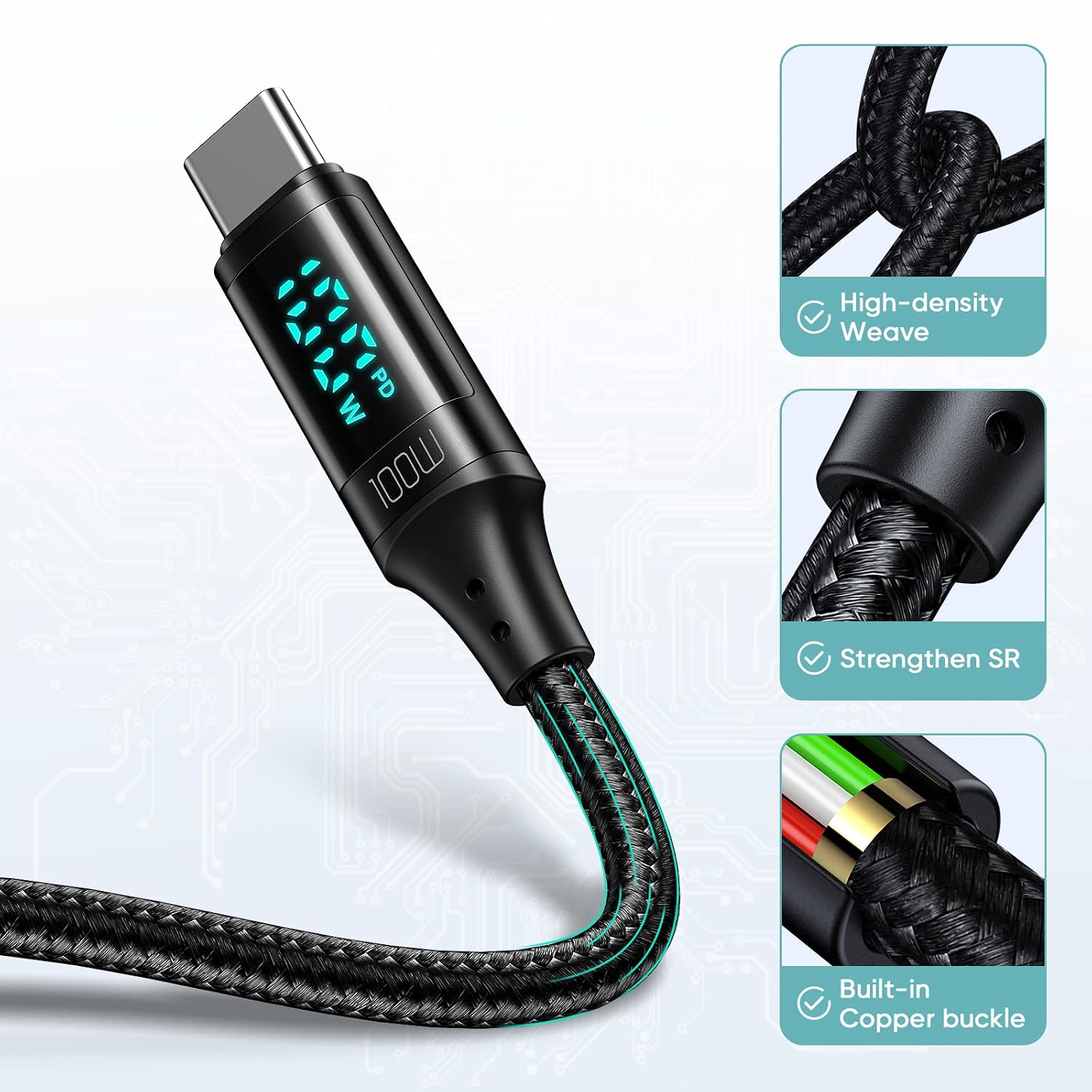
Figure 6: Cable construction for durability.
5. Vianmääritys
If you encounter issues with your Mcdodo USB C Cable CA-1100, refer to the following common problems and solutions:
| Ongelma | Mahdollinen syy | Ratkaisu |
|---|---|---|
| Laite ei lataudu. | Loose connection, incompatible power adapter, faulty device port. | Ensure both ends of the cable are securely connected. Try a different power adapter or device port. Verify the power adapter supports your device's charging requirements. |
| Hidas latausnopeus. | Power adapter does not support fast charging, device not compatible with PD, high background app usage. | Use a power adapter that supports 100W Power Delivery. Close unnecessary background applications on your device. Ensure your device supports fast charging protocols. |
| Digitaalinen näyttö ei toimi. | Cable not connected, display malfunction. | Ensure the cable is properly connected to both a power source and a device. If the issue persists, the display may be faulty. |
| Tiedonsiirto ei toimi. | Incorrect connection, device settings, incompatible ports. | Ensure both devices are properly connected and configured for data transfer. Check device settings for USB connection mode (e.g., File Siirtää). |
6. Tekniset tiedot
Detailed specifications for the Mcdodo USB C Cable CA-1100:
- Merkki: mcdodo
- Mallin nimi: CA-1100
- Liittimen tyyppi: USB Type C (uros-uros)
- Kaapelin tyyppi: USB
- Pituus: 4 jalkaa (noin 1.2 metriä)
- Suurin wattitage: 100W
- Suurin virta: 5 Amps
- Suurin tilavuustage: 20 volttia
- Tiedonsiirtonopeus: 0.48 Gigabits Per Second (480 Mbps)
- Ulkomateriaali: Nailon punottu
- Erikoisominaisuus: LED Digital Wattage Display, Fast Charging
- Yhteensopivat laitteet:
- Puhelimet: iPhone 15/15Pro/15Plus/15ProMax, Samsung Galaxy S23/S22/S21/S20 Series, Note20/10/9, A90/A80/A72/A60/A51/A50/A12/A11, Google Pixel series, Motorola Moto Z/G series, LG G/V series.
- Tabletit: iPad Pro 12.9" (2018/2020), iPad Pro 11" (2018/2020), iPad Air 10.9".
- Kannettavat tietokoneet: Apple MacBook (2015-2023), Huawei Matebook, Xiaomi Air/Pro, Lenovo Yoga/ThinkPad, Microsoft Surface Pro/Go, Dell XPS, HP Elitebook.
- Pelikonsolit: Nintendo Switch.

Figure 7: Wide compatibility with Type-C interface devices.
7. Tuotevideo
Watch the official product video for a visual guide on the Mcdodo USB C Cable's features and usage.
Video 1: PD 100W USB C to USB C Cable overview. This video demonstrates the cable's fast charging capabilities and digital display in action.
8. Takuu ja tuki
For warranty information or technical support, please refer to the product packaging or contact Mcdodo customer service directly. Contact details can typically be found on the manufacturer's official websivustoltasi tai jälleenmyyjän kautta.