
JTEMAN JT-L36
JTEMAN Cell Phone Stand with Wireless Bluetooth Speaker and Alarm Clock - User Manual
Model: JT-L36
Johdanto
Kiitos ostoksestasiasing the JTEMAN Cell Phone Stand with Wireless Bluetooth Speaker and Alarm Clock. This multi-functional device is designed to enhance your daily routine by combining essential features into one compact and stylish unit. It serves as a high-quality Bluetooth speaker, a reliable alarm clock with a clear display, and a stable, adjustable stand for your mobile devices. Please read this manual carefully to ensure proper use and optimal performance.
Turvallisuustiedot
- Älä altista laitetta äärimmäisille lämpötiloille, suoralle auringonvalolle tai korkealle kosteudelle.
- Vältä laitteen pudottamista tai altistamista voimakkaille iskuille.
- Keep away from water and other liquids. If the device comes into contact with liquid, disconnect it immediately and allow it to dry completely before reuse.
- Älä yritä purkaa, korjata tai muokata laitetta itse. Jätä kaikki huoltotyöt pätevän henkilöstön tehtäväksi.
- Käytä ainoastaan laitteen mukana toimitettua latauskaapelia tai vastaavaa sertifioitua kaapelia.
- Pidä poissa lasten ulottuvilta.
Pakkauksen sisältö
- JTEMAN Cell Phone Stand with Wireless Bluetooth Speaker and Alarm Clock (Model: JT-L36)
- Type-C-latauskaapeli
- Käyttöopas
Tuote loppuview
Familiarize yourself with the components and controls of your JTEMAN device:
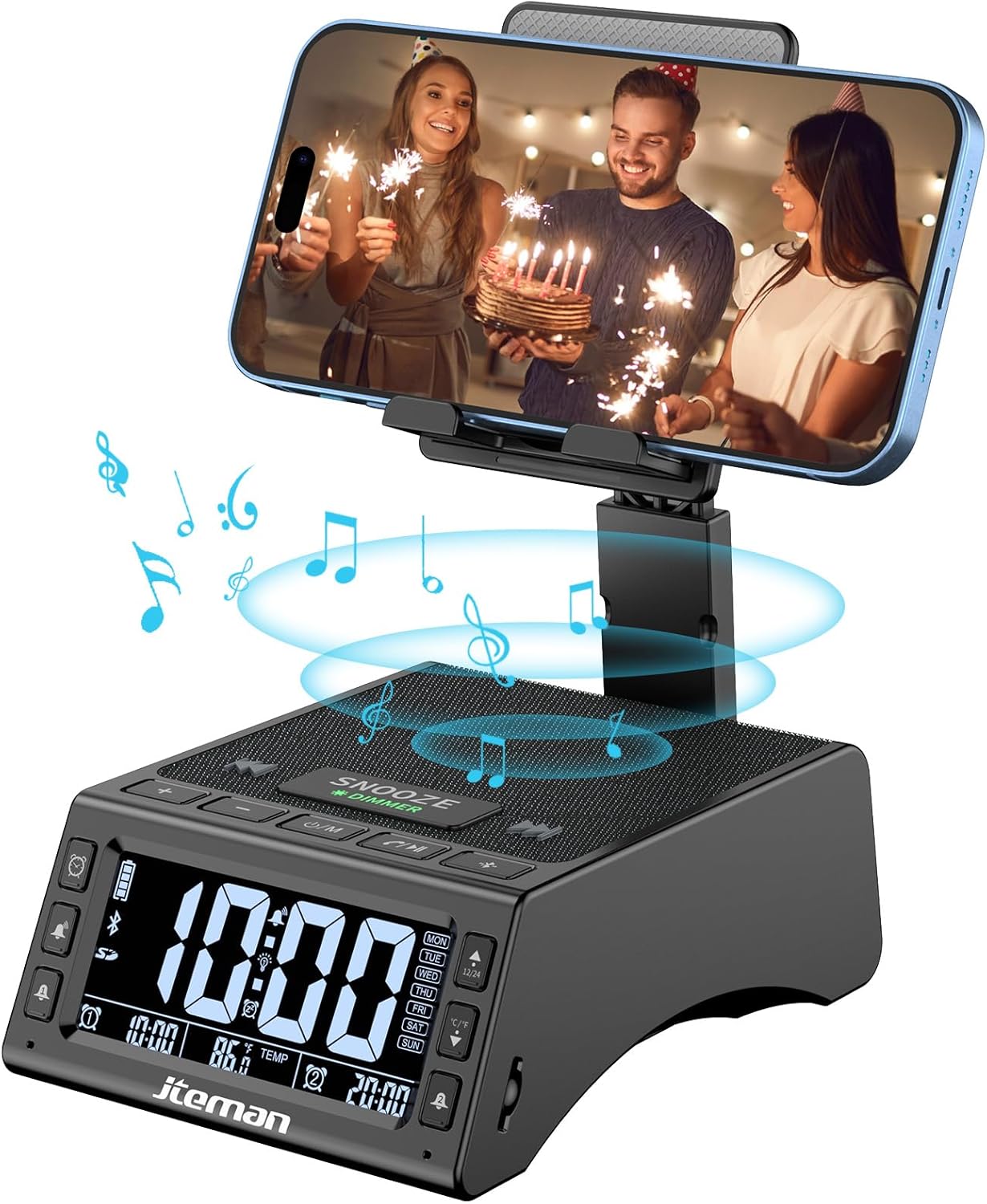
Kuva 1: Etuosa view of the JTEMAN device with a smartphone on the adjustable stand, displaying the time and temperature.

Kuva 2: Päättynytview highlighting the multi-functional aspects including Bluetooth speaker, 12/24H time display, temperature display, foldable phone stand, TF card support, microphone, charging station, dual alarm clocks, and 9 ringtones.
Ohjaimet ja portit:
- Näyttö: Shows time, temperature, day of the week, and alarm indicators.
- TORKKU/HIMMENNYS-painike: Press to snooze an active alarm (5 minutes); long press to adjust display brightness (4 levels).
- Power On/Off/Mode Button: Long press to power on/off; short press to cycle through modes (Bluetooth, TF Card).
- Play/Pause/Answer Button: Controls music playback; answers/ends calls.
- Äänenvoimakkuuden lisäys-/seuraava kappale -painike: Increases volume; short press for next track.
- Äänenvoimakkuuden vähennys-/edellinen kappale -painike: Decreases volume; short press for previous track.
- Bluetooth-parinmuodostuspainike: Käynnistää Bluetooth-pariliitostilan.
- Alarm 1 & Alarm 2 Buttons: For setting and managing dual alarms.
- Mikrofoni: Handsfree-puheluita varten.
- Type-C-tuloportti: Laitteen lataamiseen.
- Type-C lähtöportti: Ulkoisten laitteiden lataamiseen.
- TF-korttipaikka: Musiikin toistamiseen suoraan TF-kortilta.
- Säädettävä puhelinteline: Foldable and extendable for various viewing angles. Features anti-slip pads and base for stability.
Asennus
1. Alkulataus
- Connect the provided Type-C charging cable to the Type-C -tuloportti laitteessa.
- Connect the other end of the cable to a compatible USB power adapter (not included) and plug it into a wall outlet.
- The display will indicate charging status. Fully charge the device before first use.

Figure 3: The device connected via Type-C for charging itself and an external phone.
2. Kellonajan ja päivämäärän asettaminen
- Upon powering on, the device should automatically synchronize the current time.
- If manual adjustment is needed, refer to the detailed instructions in the full user manual (included in the package).
- To switch between 12/24 hour format or °F/°C temperature display, use the dedicated buttons or refer to the full manual.

Figure 4: The HD display showing time, temperature, and alarm settings with brightness adjustment levels.
Käyttöohjeet
1. Puhelintelineen käyttö
- The integrated phone stand can be pulled up from the back of the unit.
- Säädä jalustan korkeus ja kulma mieleiseksesi viewing position. The stand is designed to be stable and strong, accommodating devices from 4.0 to 13 inches.
- When not in use, the stand can be folded back into the unit for a compact form factor.

Figure 5: Demonstrates the adjustable height and angle of the phone stand, along with its anti-slip features and foldable design.
2. Bluetooth-kaiutintoiminto
- Virta päälle: Long press the Power On/Off/Mode button. The device will enter Bluetooth pairing mode, indicated by a flashing Bluetooth icon on the display.
- Pariliitos: On your smartphone or other Bluetooth-enabled device, search for “JT-L36” in the Bluetooth settings and select it to pair. A confirmation sound will indicate successful pairing.
- Musiikin toisto: Once paired, you can play audio from your device through the JTEMAN speaker. Use the Play/Pause, Volume Up/Next Track, and Volume Down/Previous Track buttons to control playback.
3. TF-kortin toisto
- Insert a TF card (not included) with audio files into the TF Card Slot.
- The device will automatically switch to TF Card mode and begin playing music. If not, short press the Mode button to select TF Card mode.
4. Alarm Clock Features
- Hälytysten asettaminen: Use the Alarm 1 and Alarm 2 buttons to set up to two independent alarms. Follow the on-screen prompts to set the time and alarm frequency (e.g., Mon-Fri, Sat-Sun, Mon-Sun).
- Torkkutoiminto: When an alarm sounds, press the large SNOOZE button on top to activate a 5-minute snooze.
- Kirkkauden säätö: Long press the SNOOZE/DIMMER button to cycle through four levels of display brightness, including an off setting for minimal light disturbance.
5. Handsfree-puhelut
- When a call comes in while your phone is connected via Bluetooth, press the Play/Pause/Answer button to answer the call.
- Käytä sisäänrakennettua mikrofonia selkeään viestintään.
- Press the Play/Pause/Answer button again to end the call.
6. Ulkoisten laitteiden lataaminen
- Connect your external device (e.g., smartphone, tablet) to the Type-C lähtöportti on the JTEMAN unit using a compatible charging cable.
- The JTEMAN device will provide power to charge your external device.
Huolto
- Puhdista laite pehmeällä, kuivalla liinalla. Älä käytä hankaavia puhdistusaineita tai liuottimia.
- Varmista, että kaikki portit ovat pölyttömiä ja puhtaita.
- Säilytä laitetta viileässä ja kuivassa paikassa, kun sitä ei käytetä pitkään aikaan.
Vianetsintä
| Ongelma | Mahdollinen syy | Ratkaisu |
|---|---|---|
| Laite ei käynnisty. | Low battery; power adapter/cable issue. | Charge the device fully. Check power adapter and cable connections. |
| Kaiuttimesta ei kuulu ääntä. | Volume too low; not paired correctly; wrong mode. | Increase volume on both device and connected phone. Re-pair Bluetooth. Ensure correct mode (Bluetooth/TF Card). |
| Bluetooth-pariliitos epäonnistuu. | Laite liian kaukana; pariliitostila ei ole aktiivinen; häiriö. | Ensure device is in pairing mode and within 10 meters. Turn off other Bluetooth devices. Try restarting both devices. |
| Hälytys ei soi. | Alarm not set; alarm volume too low; alarm disabled. | Verify alarm settings and ensure it's enabled. Increase alarm volume. |
| Phone not charging via output port. | Cable issue; device battery low; incompatible device. | Ensure the JTEMAN device is charged. Try a different charging cable. Confirm your phone is compatible with Type-C charging. |
Tekniset tiedot
| Merkki | JTEMAN |
| Mallinumero | JT-L36 |
| Tuotteen mitat | 6.1 x 4.3 x 2.1 tuumaa |
| Tuotteen paino | 1.26 kiloa |
| Väri | Musta |
| Laitteistorajapinta | USB 2.0 |
| USB-portteja yhteensä | 2 (Type-C Input, Type-C Output) |
| Yhteensopivuus | 4.0-13 inch devices |
Takuu ja tuki
JTEMAN products are manufactured with high standards of quality. For specific warranty information, please refer to the warranty card included in your product packaging or visit the official JTEMAN website. If you encounter any issues or have questions not covered in this manual, please contact JTEMAN customer support through the contact information provided on the product packaging or websivusto.
Säilytä ostokuitti takuuvaatimuksia varten.
Ask a question about this manual
Ask about setup, troubleshooting, compatibility, parts, safety, or missing instructions. Manuals+ will review the question and use this page’s manual context to help answer it.