
1. Johdanto
Thank you for choosing BUGANI Open Ear Headphones, Model MH22109. These headphones are designed to provide a comfortable, open-ear listening experience with advanced Bluetooth 5.3 technology, immersive stereo sound, and clear call functionality. This manual will guide you through the setup, operation, and maintenance of your new headphones.
2. Turvallisuustiedot
- Do not expose the headphones or charging case to extreme temperatures, direct sunlight, or fire.
- Avoid using the headphones at excessively high volumes for prolonged periods to prevent hearing damage.
- Keep the device away from water and liquids, although it is IPX5 rated for sweat and light splashes, it is not designed for submersion.
- Älä yritä purkaa tai muokata laitetta. Tämä mitätöi takuun.
- Käytä lataamiseen vain mukana toimitettua latauskaapelia tai sertifioitua Type-C-kaapelia.
- Ole tietoinen ympäristöstäsi käyttäessäsi avoimia kuulokkeita, erityisesti liikenteessä tai vaarallisissa ympäristöissä.
3. Pakkauksen sisältö
The BUGANI Open Ear Headphones package includes the following items:
- BUGANI Open Ear Headphones (Left and Right)
- Latauskotelo
- USB Type-C -latauskaapeli (ei erikseen mainittu, mutta vakiona)
- Käyttöopas (tämä asiakirja)

Image: The BUGANI Open Ear Headphones and their transparent charging case.
4. Tuote ohiview
The BUGANI Open Ear Headphones feature a unique design that rests gently on your ears without entering the ear canal, providing comfort and situational awareness. The charging case protects the earbuds and provides extended battery life.

Image: A woman wearing the BUGANI Open Ear Headphones, illustrating the open-ear design and comfortable fit.

Image: A man relaxing and listening to music with the headphones, highlighting the immersive stereo sound.
5. Asennus
5.1 Kuulokkeiden ja kotelon lataaminen
Lataa kuulokkeet ja latauskotelo täyteen ennen ensimmäistä käyttökertaa.
- Aseta nappikuulokkeet latauskoteloon. Varmista, että ne ovat oikein paikallaan.
- Connect the Type-C charging cable to the charging port on the case and plug the other end into a USB power adapter (not included) or a computer's USB port.
- The LED indicator on the charging case will show the charging status. A full charge for the case typically takes 1-2 hours.
- The earbuds provide up to 6 hours of playtime on a single charge, and the charging case extends total playtime to approximately 30 hours.

Image: The charging case with earbuds, displaying the battery level, next to a smartphone playing music, illustrating the 30-hour playtime.
5.2 Bluetooth -pariliitos
The headphones feature one-step auto-pairing for convenience.
- Avaa latauskotelo. Kuulokkeet käynnistyvät automaattisesti ja siirtyvät pariliitostilaan.
- Ota Bluetooth käyttöön laitteellasi (älypuhelin, tabletti, tietokone).
- Etsi available Bluetooth devices and select "BUGANI OpenFit" from the list.
- Kun yhteys on muodostettu, kuulet äänimerkin ja laitteessa näkyy teksti "Yhdistetty".
- Kuulokkeet muodostavat automaattisesti yhteyden viimeksi pariliitettyyn laitteeseen, kun ne otetaan pois kotelosta, jos Bluetooth on käytössä laitteessa.

Image: A smartphone screen displaying the Bluetooth settings, with "BUGANI OpenFit" listed as a connected device, demonstrating the one-step auto-pairing process.
6. Käyttöohjeet
6.1 Kuulokkeiden käyttäminen
The open-ear design ensures a secure and comfortable fit without blocking your ear canal.
- Tunnista vasen (L) ja oikea (R) nappikuuloke.
- Aseta korvanapit varovasti korvasi päälle varmistaen, että kaiutinosa on lähellä korvakäytävääsi menemättä siihen.
- Säädä napakan ja mukavan istuvuuden saavuttamiseksi.
6.2 Älykkäät kosketusohjaimet
The headphones feature touch-sensitive areas for controlling various functions:
| Toiminta | Kuulokkeet | Toiminto |
|---|---|---|
| Napauta x1 | R/L | Toista/keskeytä musiikki, vastaa puheluun |
| Napauta x2 | R | Äänenvoimakkuuden lisääminen |
| Napauta x2 | L | Äänenvoimakkuuden vähentäminen |
| Napauta x3 | R | Seuraava kappale |
| Napauta x3 | L | Edellinen kappale |
| Paina pitkään (2 s) | R/L | Lopeta puhelu, hylkää puhelu |
| Paina pitkään (2 s) | L | Aktivoi Voice Assistant |
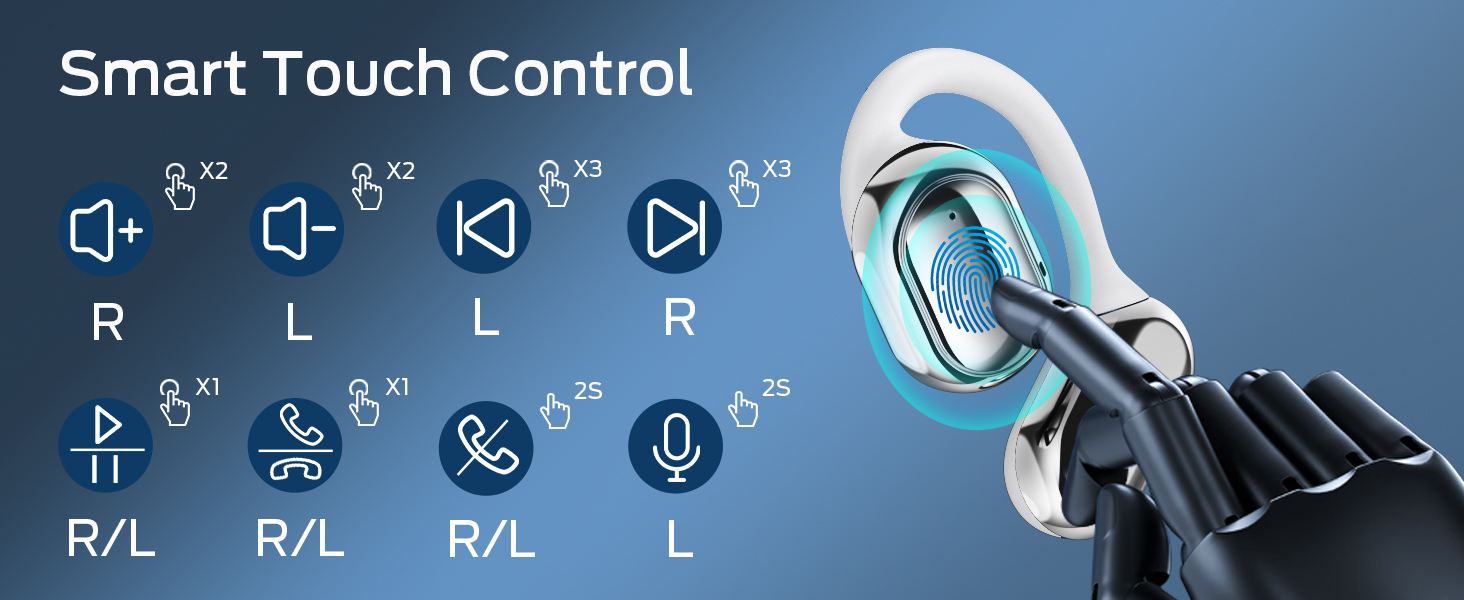
Image: A visual guide to the smart touch controls on the BUGANI Open Ear Headphones, detailing single, double, triple taps, and long presses for various functions.
6.3 Puheluiden soittaminen ja vastaanottaminen
The built-in dual microphones with environmental noise reduction technology ensure clear calls.
- Vastaa puheluun: Napauta jompaakumpaa kuuloketta kerran.
- Lopeta puhelu: Paina ja pidä painettuna jompaakumpaa kuuloketta 2 sekunnin ajan.
- Hylkää puhelu: Paina ja pidä painettuna jompaakumpaa kuuloketta 2 sekunnin ajan.

Image: A man using the BUGANI Open Ear Headphones to make a phone call, emphasizing the clear call feature.
7. Huolto
7.1 Puhdistus
- Pyyhi nappikuulokkeet ja latauskotelo pehmeällä, kuivalla ja nukkaamattomalla liinalla.
- Älä käytä hankaavia puhdistusaineita, alkoholia tai kemiallisia liuottimia.
- Varmista, että latauskoskettimet ovat puhtaat ja kuivat.
7.2 Varastointi
- Säilytä kuulokkeita latauskotelossa, kun niitä ei käytetä, jotta ne ovat suojassa ja pysyvät ladattuina.
- Säilytä viileässä, kuivassa paikassa, poissa äärimmäisistä lämpötiloista.
7.3 Vedenkestävyys (IPX5)
The headphones are rated IPX5, meaning they are protected against low-pressure water jets from any direction. This makes them suitable for sports and running, protecting against sweat and light rain. They are not designed for swimming or submersion in water.
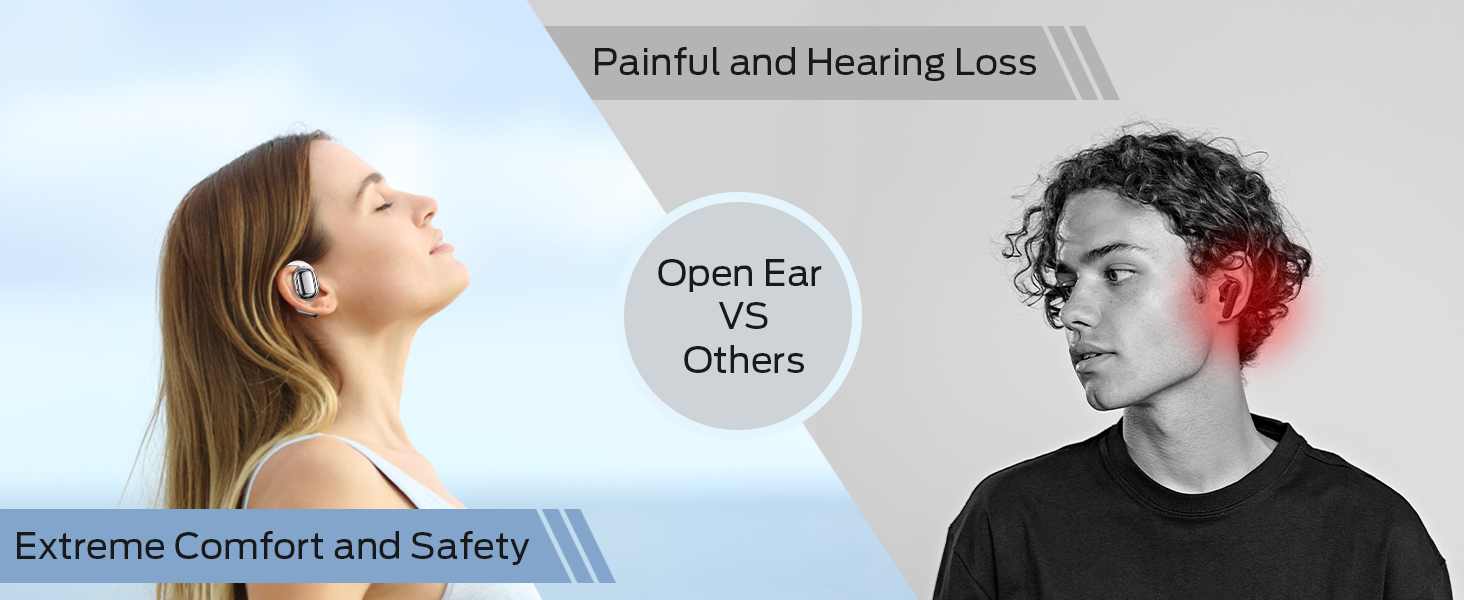
Image: A man running with water splashing on him, demonstrating the IPX5 waterproof feature of the headphones, suitable for active use.
8. Vianmääritys
If you encounter issues with your BUGANI Open Ear Headphones, please refer to the following common solutions:
- Ei ääntä: Varmista, että kuulokkeet on ladattu, paritettu oikein ja että sekä kuulokkeiden että laitteesi äänenvoimakkuus on säädetty riittävälle.
- Pariliitosongelmat: Turn off Bluetooth on your device, then turn it back on. Place the earbuds back in the case, close it, then open it again to re-enter pairing mode. Try pairing again.
- Ajoittainen yhteys: Ensure you are within the Bluetooth range (up to 10 meters) and there are no significant obstacles between the headphones and your device. Avoid strong electromagnetic interference.
- Kuulokkeet eivät lataudu: Check that the charging cable is securely connected and the charging contacts on the earbuds and case are clean. Ensure the charging case itself has power.
- Yksi kuuloke ei toimi: Try placing both earbuds back in the case, closing it, and then taking them out again to reset the connection. If the issue persists, try re-pairing.
9. Tekniset tiedot
| Ominaisuus | Erittely |
|---|---|
| Mallin nimi | BUGANI OpenFit |
| Mallinumero | MH22109 |
| Yhteystekniikka | Langaton (Bluetooth) |
| Bluetooth-versio | 5.3 |
| Bluetooth-alue | 10 metriä |
| Korvien sijoitus | Avaa korva |
| Kuljettajan koko | 16mm (Dual Large Driver) |
| Akunkesto (yksi lataus) | Jopa 6 tuntia |
| Kokonaispeliaika (latauskotelon kanssa) | Jopa 30 tuntia |
| Latausportti | Tyyppi-C |
| Vedenkestävyysluokitus | IPX5 |
| Mikrofonit | Built-in Dual Microphones with Environmental Noise Reduction |
| Yhteensopivat laitteet | Bluetooth-enabled devices (smartphones, computers, TVs) |
| Materiaali | Muovi |
| Tuotteen paino | 6.4 unssia |
10. Takuu ja tuki
BUGANI products are designed for reliability and performance. For warranty information, please refer to the warranty card included with your purchase or visit the official BUGANI website. If you require technical support or have questions not covered in this manual, please contact BUGANI customer service through their official channels.
You can often find support contact information on the BUGANI brand store page: BUGANI Store on Amazon