
docooler V8 Finder 2
docooler V8 Finder 2 TV Signal Finder Meter User Manual
Model: V8 Finder 2
1. Johdanto
The docooler V8 Finder 2 is a professional digital satellite signal finder meter designed for efficient and accurate installation and adjustment of satellite dishes. It features a high-definition LCD display, supports various DVB standards, and includes advanced functions like spectrum analysis and automatic angle calculation. This manual provides comprehensive instructions for operating and maintaining your device.
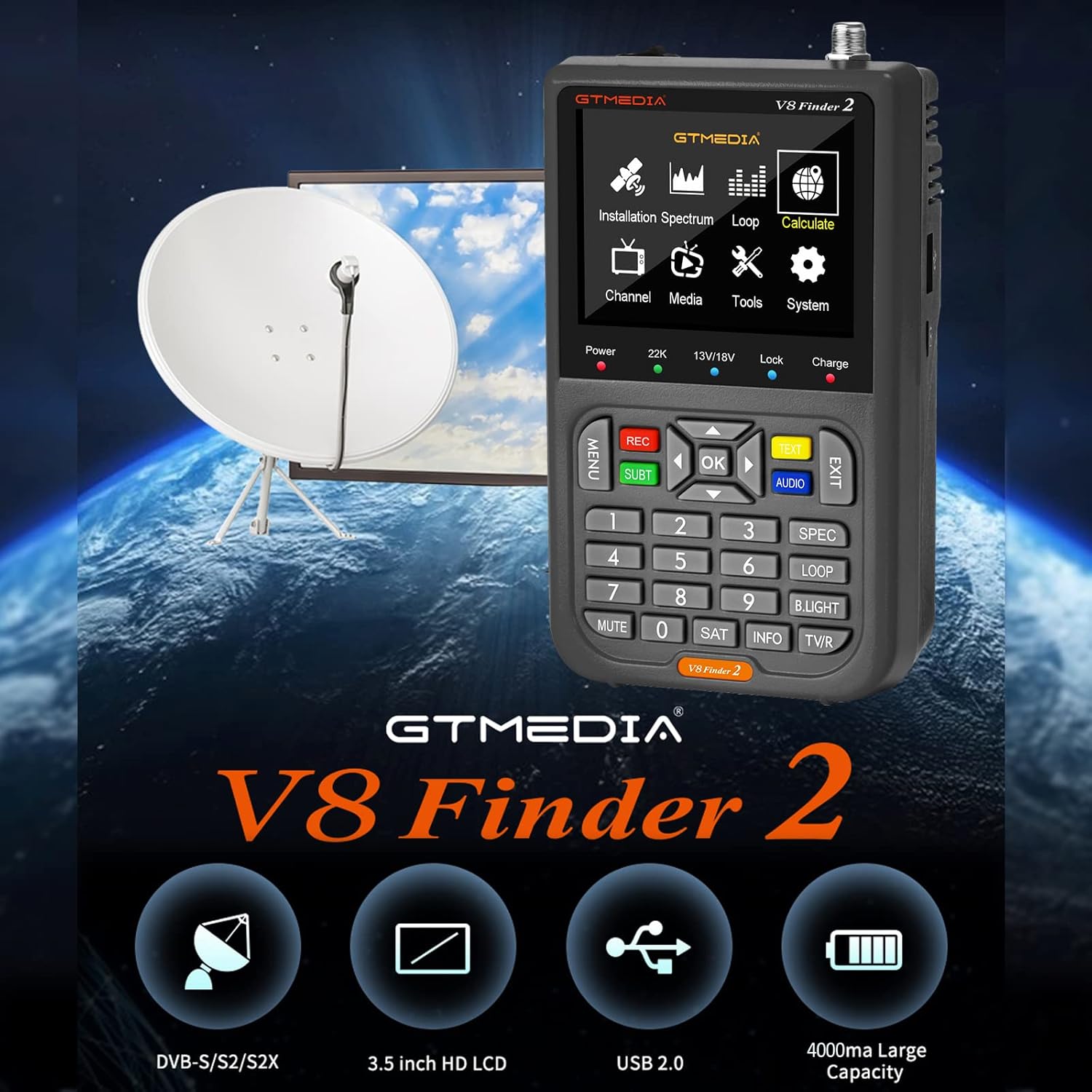
Figure 1: docooler V8 Finder 2 in use with a satellite dish, highlighting its core function.
2. Turvallisuustiedot
Lue kaikki turvallisuusvaroitukset ja ohjeet huolellisesti ennen tuotteen käyttöä varmistaaksesi turvallisen käytön ja estääksesi vaurioita.
- Älä altista laitetta sateelle tai kosteudelle.
- Avoid extreme temperatures. Operate the device within recommended environmental conditions.
- Älä pura tai yritä korjata laitetta itse. Jätä kaikki huoltotyöt pätevän henkilöstön tehtäväksi.
- Käytä ainoastaan laitteen mukana toimitettuja tai suositeltuja latauslisävarusteita.
- Varmista riittävä ilmanvaihto laitetta käytettäessä.
- Pidä laite poissa vahvoista magneettikentistä.
3. Tuote ohiview
The V8 Finder 2 is a compact and powerful tool for satellite signal detection. Familiarize yourself with its components and features.
3.1 Laitteen asettelu

Kuva 2: Etuosa view of the V8 Finder 2, showing the LCD display and control panel.
The front panel features a 3.5-inch high-definition LCD screen for displaying signal information, menus, and media. Below the screen are navigation buttons, numeric keypad, and function keys for various operations.
3.2 Portit ja liitännät
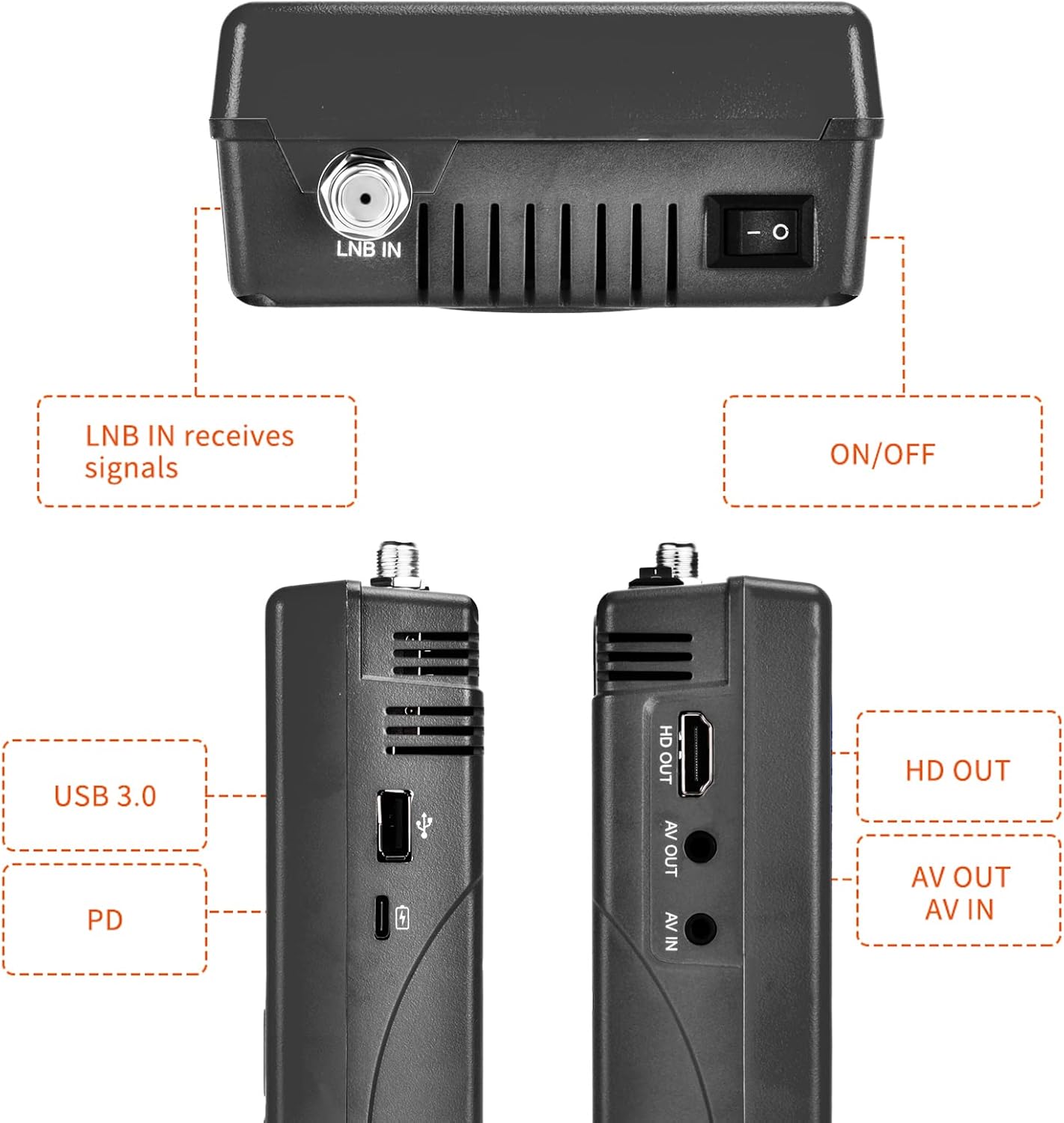
Kuva 3: Sivu ja yläosa views illustrating the various input and output ports.
- LNB IN: Connects to the LNB of your satellite dish for signal reception.
- On / off kytkin: Käynnistää tai sammuttaa laitteen.
- USB-portti (USB 3.0): For software updates and connecting a 2.4G USB Wi-Fi dongle for YouTube functionality.
- PD (Power Delivery) / Type-C Charging Port: For charging the device and supports reverse charging.
- HD OUT: High-Definition Multimedia Interface output for connecting to an external display.
- AV OUT: Analog Video output for connecting to older displays.
- AV IN: Analog Video input for connecting external video sources.
3.3 Tärkeimmät ominaisuudet
- 3.5-inch High-Definition LCD Display.
- Full compatibility with DVB-S2X/S2/S, MPEG-2/MPEG-4.
- H.264 (8-bit) hardware decoding support.
- Digital measurement for signal strength and quality.
- Spectrum Analyzer and Loop Search functions.
- Supports Auto, Blind, Manual, or NIT scanning.
- Audible tone for signal lock.
- Automatic calculation of AZ, EL angles.
- DISEQC 1.0/1.1/1.2, Unicable, 0/22kHz tone support.
- Sisäänrakennettu kaiutin.
- 7.4V/4000mAh Li-ion battery with Type-C fast charging and reverse charging.
- Software upgrade via USB port.

Figure 4: Visual representation of the V8 Finder 2's main features.
4. Asennus
Before first use, ensure the device is fully charged and familiarize yourself with the package contents.
4.1 Pakkauksen sisältö

Figure 5: Items included in the V8 Finder 2 product package.
Varmista, että kaikki esineet ovat mukana:
- docooler V8 Finder 2 Device
- Käyttöopas
- USB-kaapeli (C-tyyppi)
- Power Adapter (if included, not explicitly listed in JSON but implied by charging)
- F-connector adapter (if included)
4.2 Laitteen lataaminen
The device is equipped with a 7.4V/4000mAh Li-ion battery. For optimal performance, fully charge the device before first use.
- Connect the provided USB Type-C cable to the PD/Type-C charging port on the device.
- Connect the other end of the USB cable to a compatible USB power adapter (not explicitly listed as included, but standard for Type-C charging) or a powered USB port.
- The charging indicator on the device will illuminate. Charging is complete when the indicator changes color or turns off (refer to device screen for battery status).
The device supports multi-protocol fast charging and Type-C reverse charging, allowing it to act as a power bank for other devices.
5. Käyttöohjeet
This section details the steps for using the V8 Finder 2 to locate and optimize satellite signals.
5.1 Virran kytkeminen päälle/pois
- To power on, slide the ON/OFF switch located on the top of the device to the 'ON' position.
- Sammuta virta liu'uttamalla ON/OFF-kytkin 'OFF'-asentoon.
5.2 Connecting to a Satellite Dish
- Varmista, että V8 Finder 2 on sammutettu.
- Connect the coaxial cable from your satellite dish's LNB (Low Noise Block) to the LNB IN port on the V8 Finder 2.
- If connecting to a receiver or TV, use the HD OUT or AV OUT portit.
5.3 Signal Finding and Optimization
The V8 Finder 2 provides various modes for signal acquisition and analysis.
- Valitse satelliitti: From the main menu, navigate to the "Installation" or "Satellite Setup" section. Select the desired satellite from the pre-programmed list or add a new one.
- Adjust Dish: Slowly adjust the azimuth (horizontal) and elevation (vertical) of your satellite dish. Observe the signal strength and quality indicators on the V8 Finder 2's display. The device will emit an audible tone when a signal is locked.
- Spektrianalysaattori: Use the "Spectrum" function to visualize the signal spectrum, which can help identify interference or weak signals.
- Kulman laskeminen: The device can automatically calculate the AZ (Azimuth) and EL (Elevation) angles for your location, assisting in precise dish alignment.
- Kanavan skannaus: Once a strong signal is acquired, perform an "Auto Scan," "Blind Scan," "Manual Scan," or "NIT Scan" to find available channels.

Figure 6: The V8 Finder 2 display showing signal decoding capabilities.
5.4 Median toisto ja muut toiminnot
- Media: The device supports media playback. Connect a USB drive to the USB port to access compatible audio or video files.
- YouTube (via Wi-Fi): Connect a 2.4G USB Wi-Fi dongle to the USB port to enable YouTube functionality.
- AV IN/OUT: Use the AV IN port to display video from an external source on the V8 Finder 2 screen. Use AV OUT or HD OUT to display the V8 Finder 2's screen on an external monitor or TV.

Figure 7: Illustration of AV IN and AV OUT functionality, connecting the device to a television.
6. Huolto
Proper maintenance ensures the longevity and optimal performance of your V8 Finder 2.
- Puhdistus: Puhdista laite pehmeällä, kuivalla liinalla. Älä käytä nestemäisiä puhdistusaineita tai aerosoleja.
- Varastointi: Säilytä laitetta viileässä, kuivassa paikassa, poissa suorasta auringonvalosta ja äärimmäisistä lämpötiloista.
- Akun hoito: Akun käyttöiän pidentämiseksi vältä akun usein tapahtuvaa täydellistä purkamista. Jos säilytät akkua pitkään, lataa se noin 50 %:iin muutaman kuukauden välein.
- Ohjelmistopäivitykset: Tarkista säännöllisesti ohjelmistopäivitykset valmistajan sivustolta website. Updates can improve performance and add new features. Use the USB port for software upgrades.
7. Vianmääritys
If you encounter issues with your V8 Finder 2, refer to the following common problems and solutions.
| Ongelma | Mahdollinen syy | Ratkaisu |
|---|---|---|
| Laite ei käynnisty. | Akku vähissä; Virta pois päältä kytkimestä. | Lataa laite täyteen. Varmista, että virtakytkin on ON-asennossa. |
| Signaalia ei havaittu. | Incorrect LNB connection; Dish misalignment; Incorrect satellite selected. | Check LNB cable connection. Re-align the satellite dish. Verify the correct satellite is selected in the device settings. |
| Weak or unstable signal. | Fine-tuning needed; Obstruction; LNB issue. | Make small adjustments to the dish. Check for any physical obstructions. Inspect LNB for damage. |
| Ei voi muodostaa yhteyttä Wi-Fi-verkkoon. | No 2.4G USB Wi-Fi dongle connected; Incorrect Wi-Fi settings. | Ensure a compatible 2.4G USB Wi-Fi dongle is inserted. Verify Wi-Fi network settings and password. |
| Display issues. | Software glitch; Hardware fault. | Restart the device. If the problem persists, consider a software update or contact support. |
8. Tekniset tiedot
Technical specifications for the docooler V8 Finder 2.
- Näyttö: 3.5 tuuman teräväpiirto-LCD-näyttö
- Yhteensopivuus: DVB-S2X/S2/S, MPEG-2/MPEG-4
- Videon dekoodaus: H.264 (8-bit)
- Akku: 7.4 V / 4000 mAh Li-ioni
- Latausportti: Type-C (supports fast charging, reverse charging)
- Liitettävyys: USB (for software update, 2.4G Wi-Fi dongle), HD OUT, AV OUT, AV IN
- Mitat: Noin 155 mm x 95 mm x 45 mm
- Paino: 530 g
- DISEQC-tuki: 1.0/1.1/1.2, Unicable
- Tone Support: 0/22 kHz
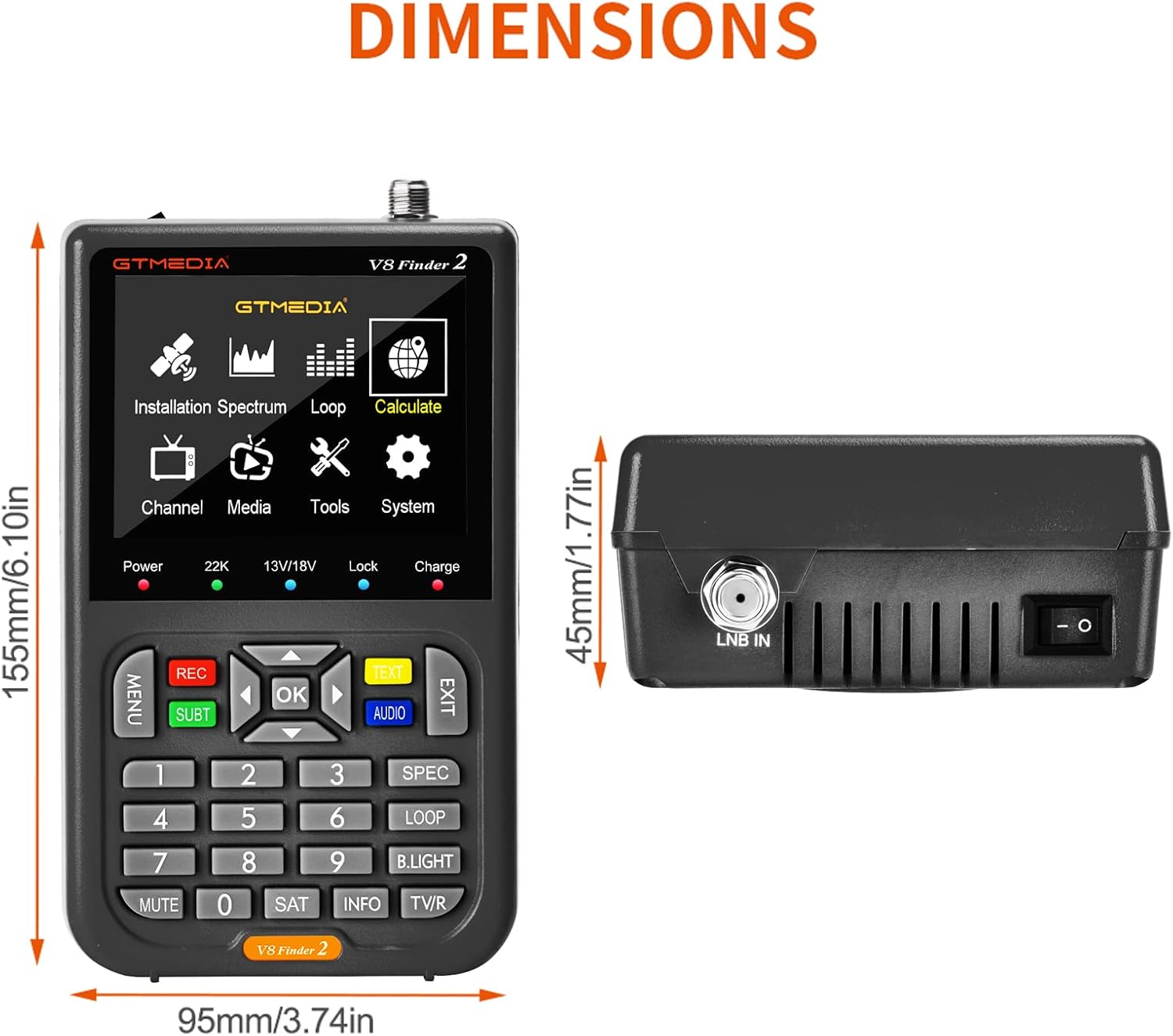
Figure 8: Physical dimensions of the V8 Finder 2.
9. Takuu ja tuki
For warranty information and technical support, please refer to the product warranty card included in your package or visit the official docooler websivusto. Säilytä ostokuitti ostotodistuksena takuuvaatimuksia varten.
Valmistaja: Docooler
Merkki: jäähdytin
For further assistance, please contact docooler customer service.