
Tecno LH8n (256+8)
TECNO Pova 5 Pro 5G käyttöohje
Model: LH8n (256+8)
Johdanto
This manual provides essential information for the safe and efficient operation of your TECNO Pova 5 Pro 5G smartphone. Please read it thoroughly before using your device to ensure optimal performance and longevity.

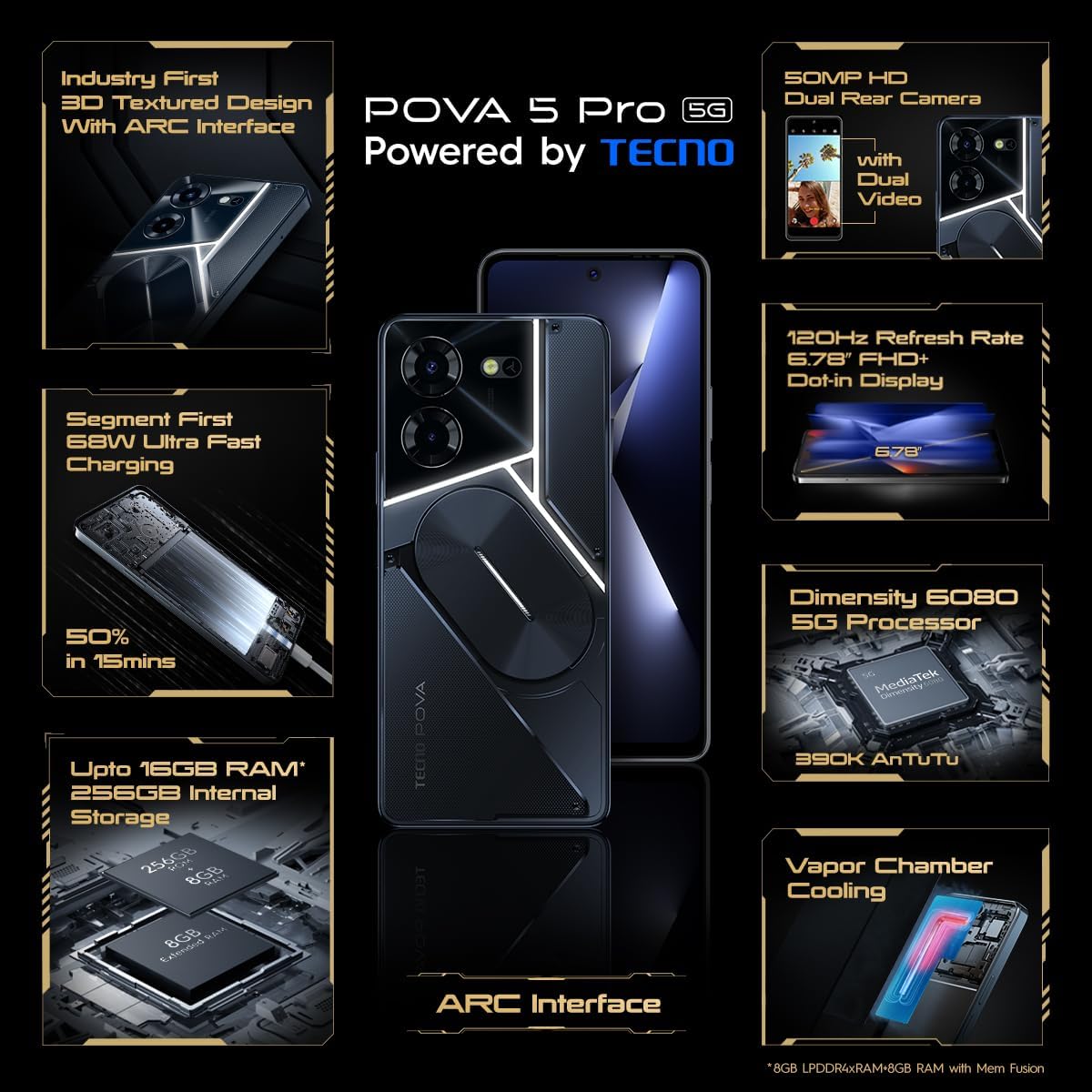
Image: The TECNO Pova 5 Pro 5G smartphone, showcasing its design and key feature of 68W Ultra Fast Charging.
Mitä laatikossa on
Varmista, että pakkauksessa on kaikki tarvittavat osat:
- Älypuhelin
- 68 W: n virtalähde
- Type-C kaapeli
- TPU Cover
- SIM-poistotyökalu

Image: A flat lay of the TECNO Pova 5 Pro 5G packaging contents, showing the smartphone, 68W power adapter, USB-C cable, TPU protective cover, and the SIM ejector tool.
Asennus
Alkuasetukset
- SIM-/SD-kortin asettaminen: Locate the SIM tray on the side of the device. Use the provided SIM ejector tool to open the tray. Insert your Nano-SIM card(s) and/or microSD card into the designated slots. Ensure the tray is fully reinserted.
- Virta päälle: Press and hold the Power button (located on the right side) until the TECNO logo appears.
- Noudata näytön ohjeita: The device will guide you through initial setup, including language selection, Wi-Fi connection, Google account setup, and security settings.
Laitteen lataaminen
The TECNO Pova 5 Pro 5G supports 68W Ultra Fast Charging.
- Liitä Type-C-kaapeli puhelimen pohjassa olevaan latausporttiin.
- Liitä kaapelin toinen pää 68 W:n virtalähteeseen.
- Liitä verkkolaite pistorasiaan.
- A full charge typically takes approximately 45 minutes, with 50% charge achievable in about 15 minutes.
Kuva: Selkeä rintama view of the TECNO Pova 5 Pro 5G smartphone, highlighting its display and front camera.
Laitteen käyttö
Perusnavigointi
- Kosketusnäyttö: Napauta valitaksesi, pyyhkäise vierittääksesi ja nipistämällä zoomataksesi.
- Virtapainike: Paina herättääksesi näytön/laittaaksesi sen lepotilaan. Paina ja pidä pohjassa sammuttaaksesi virran tai käynnistääksesi laitteen uudelleen.
- Äänenvoimakkuuspainikkeet: Säädä median äänenvoimakkuutta, puhelun äänenvoimakkuutta tai soittoäänen äänenvoimakkuutta.
Kameran käyttö
The device features a 50MP AI Dual Rear Camera and a 16MP Selfie Camera.
- Avaa Kamera-sovellus aloitusnäytöltä tai sovellusvalikosta.
- Valitse haluamasi tila (valokuvaus, video, muotokuva jne.).
- Napauta laukaisinta ottaaksesi valokuvia tai aloittaaksesi/lopettaaksesi videotallennuksen.
- Utilize AI enhancements for optimized scene recognition and image quality.
ARC Interface and Notifications
The TECNO Pova 5 Pro 5G features a unique multi-color ARC interface with backlighting.
- The ARC interface provides customizable light effects for notifications, incoming calls, gaming, and music playback.
- Access settings to personalize the light patterns and colors for different alerts.

Kuva: Takaosa view of the TECNO Pova 5 Pro 5G, showcasing its distinctive 3D textured design and the illuminated ARC interface.

Kuva: Yksityiskohtainen view of the TECNO Pova 5 Pro 5G's ARC interface, illustrating the multi-color backlighting feature.
Huolto
- Akun hoito: To prolong battery life, avoid exposing the device to extreme temperatures. Do not fully discharge the battery regularly.
- Puhdistus: Use a soft, lint-free cloth to clean the screen and body. Avoid using harsh chemicals or abrasive materials.
- Ohjelmistopäivitykset: Regularly check for and install system updates to ensure optimal performance, security, and access to new features. Navigate to Settings > System > System update.
- Tallennuksen hallinta: Poista tarpeettomat säännöllisesti fileja sovelluksia riittävän tallennustilan ja laitteen nopeuden ylläpitämiseksi.
Vianetsintä
- Laite ei käynnisty: Ensure the battery is charged. Connect the device to the charger for at least 15 minutes before attempting to power on again. If the issue persists, perform a forced restart by holding the Power button for 10-15 seconds.
- Latausongelmat: Verify that the charging cable and adapter are securely connected and undamaged. Try using a different outlet.
- Sovelluksen kaatuminen/jäätyminen: Close the problematic app and reopen it. If the issue continues, clear the app's cache and data in Settings > Apps. As a last resort, uninstall and reinstall the app.
- Huono verkkoyhteys: Check if Airplane Mode is off. Restart the device. If using mobile data, ensure your SIM card is properly inserted and your data plan is active.
- Ylikuumeneminen: Avoid using the device in direct sunlight or during intensive tasks for extended periods. Close background applications.
Tekniset tiedot
| Ominaisuus | Erittely |
|---|---|
| Mallin nimi | Pova 5 Pro 5G |
| Käyttöjärjestelmä | Android 13.0 |
| Prosessori | Dimensity 6080 (2.4 GHz Octa-Core) |
| RAM | 8 GB (expandable up to 16 GB with Memory Fusion) |
| Sisäinen tallennustila | 256 GB (UMCP) |
| Näyttö | 6.78-inch FHD+ Dot-in Display |
| Päivitystaajuus | 120 Hz |
| Takakamera | 50 megapikselin tekoälyllä varustettu kaksoiskamera |
| Etukamera | 16 MP Selfie Camera |
| Akku | 5000 mAh Litium-polymeeri |
| Lataus | 68W Ultra Fast Charging |
| Mitat | 16.9 x 7.7 x 16.9 cm |
| Paino | 214 grammaa |
| Yhteydet | 5G (10 bands supported), NFC, Bluetooth 5.1 |

Image: An internal diagram or view of the TECNO Pova 5 Pro 5G, illustrating its vapor chamber cooling system for efficient heat dissipation.
Takuu ja tuki
Your TECNO Pova 5 Pro 5G comes with a manufacturer's warranty. Please refer to the warranty card included in your product packaging for specific terms and conditions.
For technical support, service, or warranty claims, please contact TECNO customer service. TECNO maintains a large service network with over 1200 service centers in India.
You can find more information and support resources by visiting the official Tecno store on Amazon: Tecno Store
Ask a question about this manual
Ask about setup, troubleshooting, compatibility, parts, safety, or missing instructions. Manuals+ will review the question and use this page’s manual context to help answer it.