
1. Tärkeitä turvallisuustietoja
- Ensure all bolts and fasteners are securely tightened before use. Regularly check for loose connections.
- Do not exceed the maximum weight capacity for the frame (300 lbs / 136 kg) or the monitor mount (35 kg).
- Pidä kädet ja sormet poissa liikkuvista osista säädön aikana puristuksiin jäämisen estämiseksi.
- Aseta ohjaamo vakaalle ja tasaiselle alustalle kaatumisen estämiseksi.
- Keep children and pets away from the cockpit during assembly and use.
- This product is designed for simulation racing. Do not use it for any other purpose.
2. Pakkauksen sisältö
The Dardoo G923 Racing Simulator Cockpit is shipped in three separate boxes. Please verify all components are present before beginning assembly.
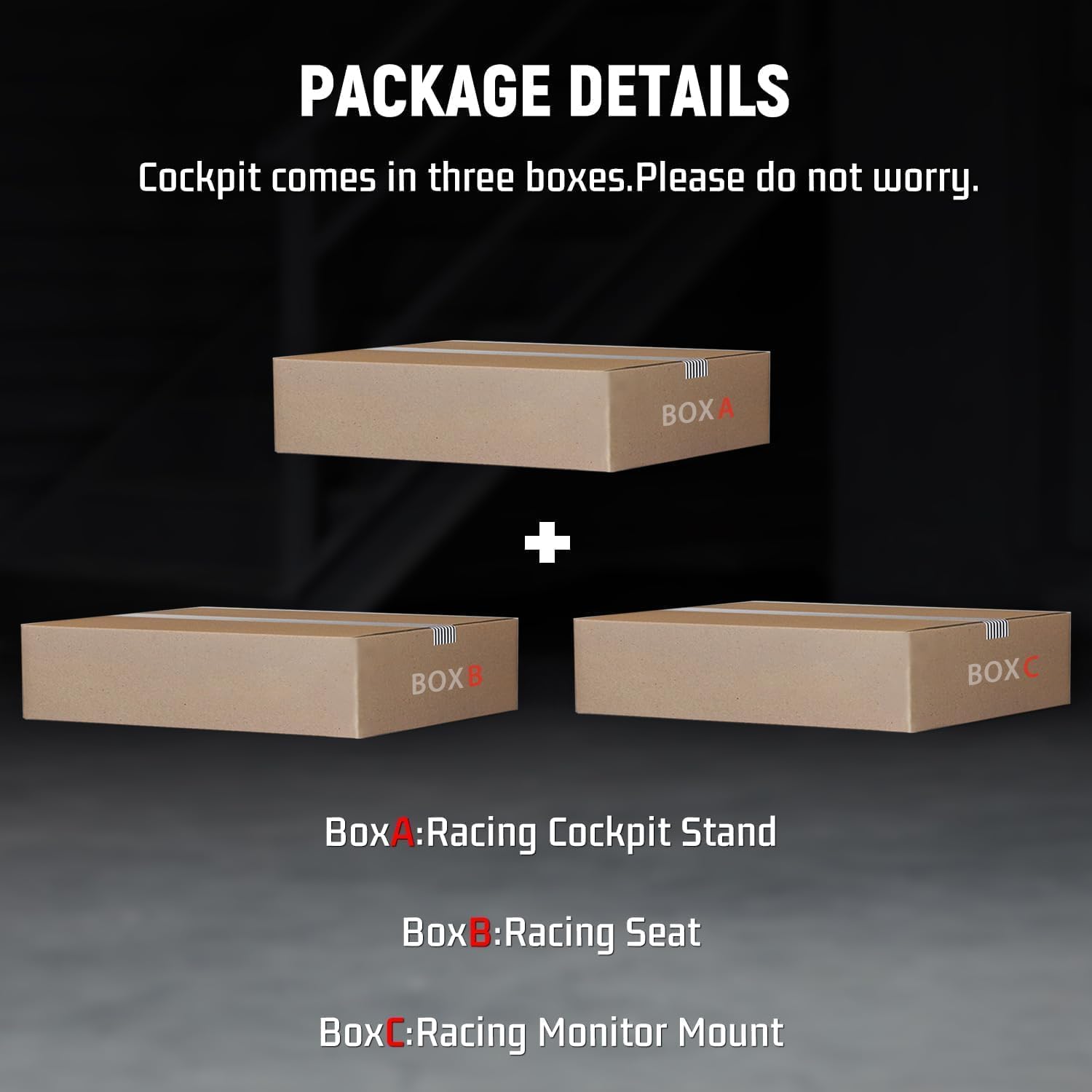
Image: Package details showing the cockpit components are shipped in three boxes: Racing Cockpit Stand, Racing Seat, and Racing Monitor Mount.
- Racing Cockpit Stand (Box A)
- Racing Seat (Box B)
- Racing Monitor Mount (Box C)
- Kokoonpanotarvikkeet (pultit, mutterit, aluslevyt, työkalut)
- Kaapelisiteet
- Anti-slip rubber foot pads
3. Ominaisuudet
- Modulaarinen suunnittelu: Cockpit components are modular for easy adjustment. Steering wheel height/angle, pedal position, and shifter (front/back/left/right) are all adjustable.
- Player Adaptability: The seat, with dual-lock and dual-slide rails, allows for front-to-back adjustment. Its spliced bracket enables three-level height adjustment. The 70°-180° adjustable backrest suits players of different heights and ages.
- Quality Material Selection: The bracket is made of high-strength alloy steel with a black powder coating, looking elegant and easy to clean. The seat, using textile flannel and high-density sponge, ensures comfort, breathability, and shape retention.
- Humanisoitu suunnittelu: Cable tie magic tapes neatly organize cables. Eight anti-slip rubber foot pads stabilize the bracket and protect the floor.
- Adjustable Monitor Bracket: Easily installed and removed without extra space. Height-adjustable. Fits 24-50-inch monitors and supports VESA Patterns 75x75, 100x100, 200x100, 200x200, 300x200, 400x200.
- Laitteen yhteensopivuus: Fits most racing sim devices, fit for Logitech G29 G920 G923, for Thrustmaster T300 T248 etc. Install with M6 bolts (included) or clamps. Note: Steering wheel, shifter, pedals, monitor not included.
4. Asennus ja kokoonpano
4.1. Istuimen asennus
Follow these steps to properly install the racing seat onto the cockpit frame.
Video: Detailed installation guide for the Dardoo black racing seat with mount.
- Lift the adjusting lever on the seat upwards and pull the slide rail out to expose the front mounting holes.
- Align the front holes of the seat's slide rails with the corresponding holes on the cockpit frame. Secure with the provided screws.
- Nosta säätövipua uudelleen ylöspäin ja siirrä liukukiskoa ja istuimen kiinnikettä taaksepäin paljastaaksesi takimmaiset kiinnitysreiät.
- Secure the rear holes with the remaining screws. Ensure all screws are tightened for stability.

Image: Seat slide rail and mounting points for secure installation.
4.2. Wheel, Pedal, and Shifter Mount Installation
Attach your racing wheel, pedals, and shifter to their designated mounts on the cockpit.
Video: Demonstration of the racing simulation cockpit with display bracket, showing various components.
- Wheel Mount: Place your racing wheel onto the wheel plate. Use M6 bolts (included) or clamps provided with your racing wheel to secure it.
- Polkimen kiinnitys: Position your pedals on the pedal plate. Secure them using the appropriate bolts or clamps. The pedal plate angle is adjustable.
- Vaihteensiirtimen kiinnitys: Attach the shifter bracket to the side of the cockpit frame. Mount your shifter onto the bracket. The shifter mount is adjustable for front/back/left/right positioning.

Image: Gear shifter mount for optimal placement.

Image: Pedal bracket for securing racing pedals.
4.3. Monitor Mount Installation
Install the monitor bracket to the front of the cockpit frame.
Video: Dardoo Racing Simulator Cockpit with TV Mount, demonstrating monitor attachment.
- Attach the vertical monitor support bars to the front of the cockpit frame using the provided hardware.
- Mount the horizontal VESA plate to your monitor (supports VESA Patterns 75x75, 100x100, 200x100, 200x200, 300x200, 400x200).
- Attach the monitor with the VESA plate to the vertical support bars. Adjust the height as needed and secure.

Image: Screen display function and VESA patterns supported by the monitor mount.

Image: Monitor mount panel with various adjustment points.

Image: Monitor mount panel showing vertical adjustment.
5. Säädöt
The Dardoo G923 cockpit offers multiple adjustment points for a personalized racing experience.
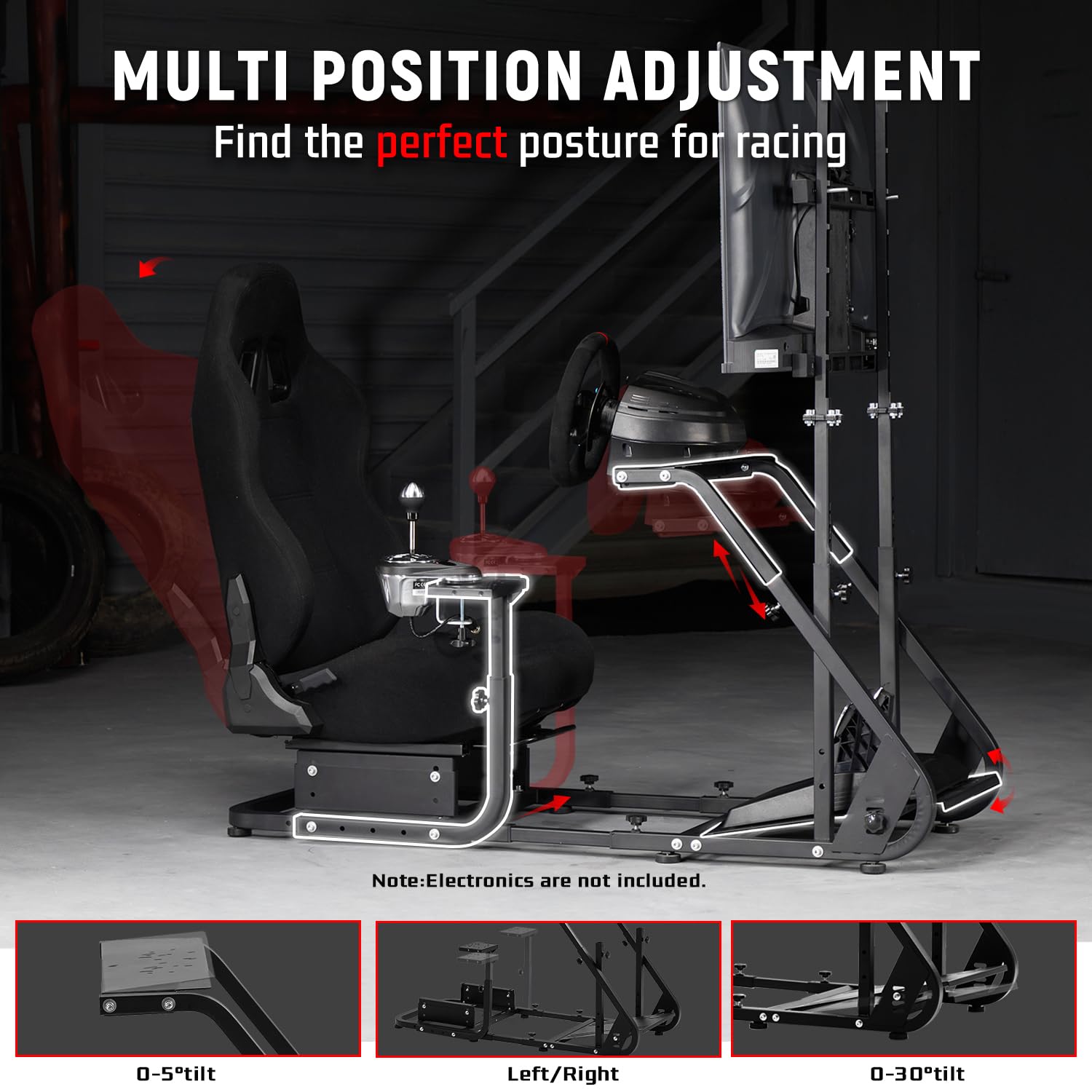
Image: Multi-position adjustment options for the cockpit.
- Istuimen asento: Use the dual-lock and dual-slide rails to adjust the seat forward or backward. The spliced bracket allows for three-level height adjustment. The backrest can be reclined from 70° to 180°.
- Ohjauspyörä: Adjust the height and angle of the steering wheel mount for optimal comfort and control.
- Polkimen asento: The pedal plate can be adjusted to suit your preferred distance and angle.
- Vaihteenvalitsimen asento: The shifter mount can be moved front, back, left, or right to find your ideal ergonomic setup.
- Näytön korkeus: The monitor bracket allows for vertical height adjustment to align your screen perfectly with your eye level.
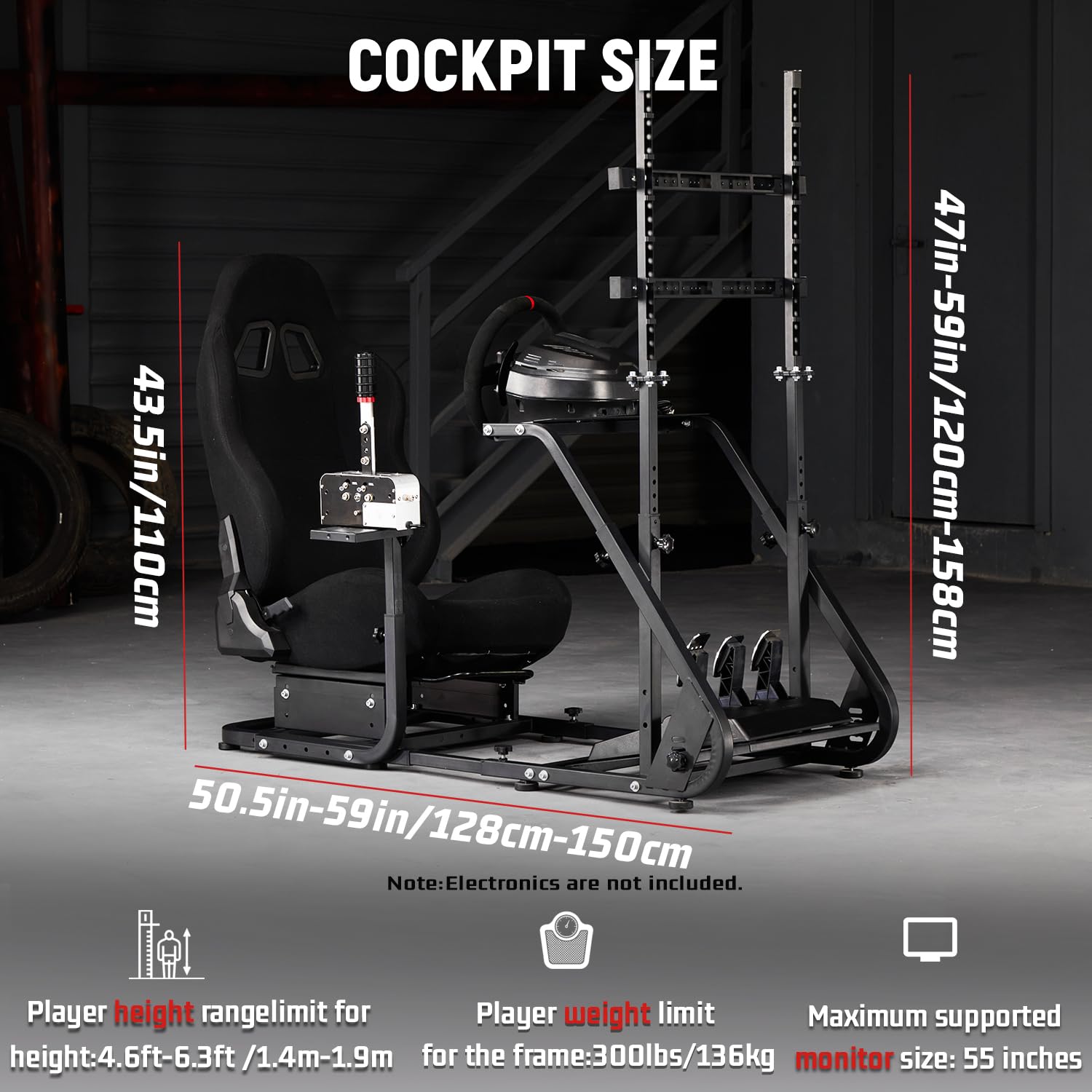
Image: Cockpit size and adjustment ranges for various components.
6. Käyttöohjeet
- Once assembled and adjusted, connect your racing wheel, pedals, and shifter to your PC or console according to their respective manufacturer's instructions.
- Ensure all cables are neatly organized using the provided cable ties to prevent interference and damage.
- Power on your monitor and gaming equipment.
- Launch your preferred racing simulation game and enjoy the immersive experience.
7. Huolto
- Puhdistus: Pyyhi metallirunko mainoksellaamp cloth. For the fabric seat, use a mild fabric cleaner as needed. Avoid harsh chemicals.
- Tarkastus: Periodically check all bolts, nuts, and adjustment knobs to ensure they are tight. Re-tighten any loose fasteners.
- Voitelu: If seat slide rails become stiff, apply a small amount of silicone-based lubricant.
- Varastointi: If storing for an extended period, ensure the cockpit is clean and dry.
8. Vianmääritys
| Ongelma | Mahdollinen syy | Ratkaisu |
|---|---|---|
| Ohjaamo tuntuu epävakaalta tai heiluvalta. | Löysät kiinnikkeet; epätasainen lattia. | Check and tighten all bolts and adjustment knobs. Ensure the cockpit is on a flat surface. Adjust the anti-slip rubber foot pads if necessary. |
| Difficulty adjusting seat or mounts. | Mechanism is stiff; fasteners too tight. | Loosen adjustment knobs slightly. Apply a small amount of lubricant to sliding mechanisms if needed. |
| Monitor not securely attached. | Incorrect VESA pattern; loose screws. | Verify your monitor's VESA pattern matches supported sizes. Ensure all monitor mount screws are securely tightened. |
| Electronic accessories (wheel, pedals, shifter) not working. | Not a cockpit issue. | Refer to the instruction manuals for your specific electronic accessories for troubleshooting. Ensure they are properly connected to your PC/console. |
9. Tekniset tiedot
- Yhteensopivat laitteet: Fanatec Racing Wheel, Logitech Racing Wheel (G29, G920, G923), Moza Racing Wheel, PXN Racing Wheel, Thrustmaster Racing Wheel (T300, T248)
- Ohjaimen tyyppi: Supports Paddle Shifters, Racing Wheel, Steering wheel, pedals, transmission, handbrake (accessories not included)
- Yhteystekniikka: Manual (for cockpit adjustments)
- Lisäominaisuudet: Direct drive steering wheel supporting torque ≤ 8N.m, Ergonomic, Multi-functional adjustable, Seat back adjustable from 65-180 degrees, Supports 24-50 inch display
- Laitteisto Platform: PC (and compatible consoles with appropriate accessories)
- Tuotteen paino: 85.44 paunaa (noin 38.75 kg)
- Tuotteen mitat (S x L x K): 56"S x 28.6"L x 47.6"K (noin 142.2 cm S x 72.6 cm L x 120.9 cm K)
- Tuotemerkki: Dardoo
- Valmistaja: Dardoo
- Väri: Black racing cockpit with seat and TV stand
10. Takuu ja tuki
- Takuu: 3 kuukauden takuu.
- Tekninen tuki: Permanent online technical support is available.
- Palautukset: 30 päivän helppo palautusoikeus.
- For further assistance, please contact Dardoo customer support.