
Johdanto
This manual provides detailed instructions for the installation, operation, and maintenance of your EBTOOLS 4.3-inch 1080P Mirror Dash Cam. This device is designed to record video footage from both the front and rear of your vehicle, offering features such as parking monitoring and loop recording for enhanced driving safety and evidence collection. Please read this manual thoroughly before using the product to ensure proper functionality and to avoid any damage.
Tuotteen ominaisuudet
- Kestävä rakenne: Manufactured from high-quality ABS material for robustness and extended durability.
- Laajakulmaobjektiivit: Equipped with wide-angle lenses to minimize blind spots and capture comprehensive road details.
- Loop-tallennus: Ensures continuous recording by automatically overwriting the oldest video files, kun muistikortti on täynnä.
- Suorituskyky joka säässä: Capable of recording clear video footage even in adverse weather conditions such as rain or fog.
- Käyttäjäystävällinen muotoilu: Features a straightforward installation process and intuitive controls for ease of use.
Pakkauksen sisältö
Varmista, että pakkauksessasi on kaikki seuraavat tuotteet:
- EBTOOLS 4.3-inch Mirror Dash Cam Unit
- Takaosaview Kamera
- Auton laturi
- Takakameran liitäntäkaapeli
- Mounting Straps/Adhesive
- Käyttöopas (tämä asiakirja)

Asennus
1. Dash Camin asentaminen
Secure the mirror dash cam over your vehicle's existing rearview mirror using the provided mounting straps. Ensure it is firmly attached and does not obstruct your view.
2. Peruutuskameran kytkeminen
Route the rear camera cable from the dash cam to the desired mounting location at the rear of your vehicle. Connect the rear camera to the AV IN port on the main dash cam unit. For optimal performance, ensure the cable is neatly tucked away and secured.


3. Virtaliitäntä
Connect the provided car charger to the dash cam's power input port and then plug the other end into your vehicle's 12V power outlet (cigarette lighter socket). The device will typically power on automatically with the vehicle's ignition.
4. Aseta muistikortti
Insert a compatible Micro SD card (not included) into the TF CARD slot on the dash cam. Ensure the card is inserted correctly until it clicks into place. A high-speed Class 10 or higher card is recommended for reliable recording.

Käyttöohjeet
Virta päälle/pois
- Automaattinen: The dash cam will power on and begin recording automatically when your vehicle's ignition is turned on.
- Manuaalinen: Press and hold the Power button (usually marked with a power symbol) to manually turn the device on or off.
Valikkonavigointi
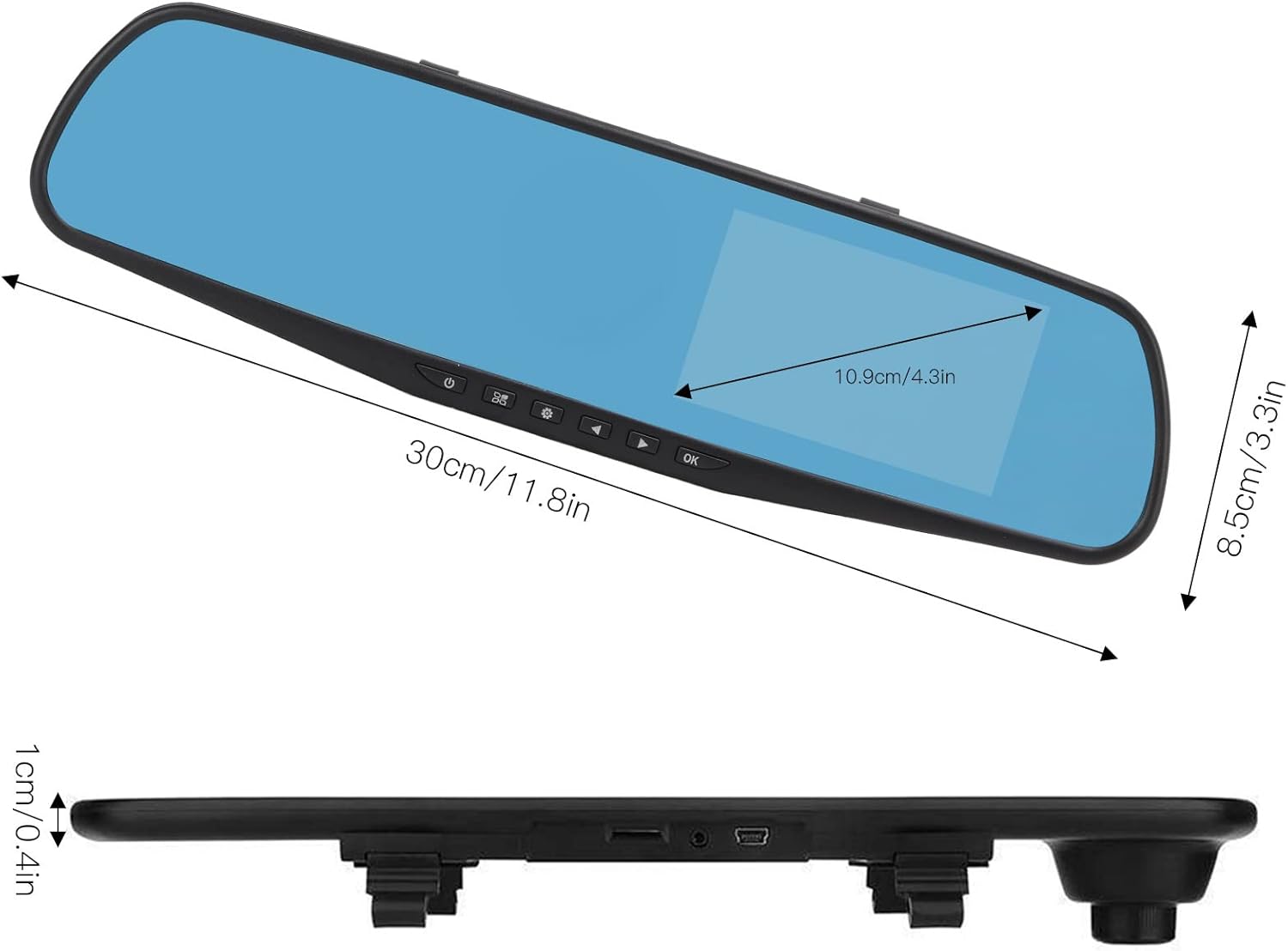
Use the physical buttons located on the bottom of the mirror unit to navigate through the menu options:
- Valikkopainike: Paina päästäksesi asetusvalikkoon.
- Ylös/alas -painikkeet: Käytä selataksesi valikkovaihtoehtoja.
- OK -painike: Press to confirm a selection or setting.
Tallennustilat
- Loop-tallennus: This feature records video in continuous segments (e.g., 1, 2, 3, or 5 minutes). When the memory card is full, the oldest filetiedostot korvataan automaattisesti, jotta tilaa uusille tallenteille on.
- Liiketunnistus: When enabled, the dash cam will automatically start recording if it detects movement in front of the vehicle while parked. This feature is useful for parking surveillance.
Videon resoluutioasetukset
You can adjust the video resolution for both front and rear cameras in the settings menu:
- Etukamera: Select between 1080P (FHD 1400x1080) or 720P (HD 1280x720).
- Takakamera: Records at 720P resolution.
Kieliasetukset
The device supports multiple languages. Navigate to the language settings in the menu to select your preferred language, including English, German, French, Italian, Japanese, Korean, and Simplified Chinese.

Huolto
- Puhdistus: Puhdista kojelautakameran näyttö ja linssit pehmeällä, kuivalla liinalla. Vältä hankaavien puhdistusaineiden tai liuottimien käyttöä.
- Muistikortti: Alusta Micro SD -kortti säännöllisesti (vähintään kerran kuukaudessa) varmistaaksesi optimaalisen suorituskyvyn ja estääksesi tietojen vioittumisen. Varmuuskopioi kaikki tärkeät tiedostot.tage ennen muotoilua.
- Lämpötila: Avoid exposing the device to extreme temperatures, both hot and cold, as this can affect battery life and component integrity.
Vianetsintä
- Laite ei käynnisty:
- Ensure the car charger is properly connected to both the dash cam and the vehicle's 12V power outlet. Check if the vehicle's ignition is on. Test the charger in another port or with another device if possible.
- Tallennusongelmat (esim. tallennus pysähtyy, vioittuu) files):
- Verify that a compatible, high-speed Micro SD card (Class 10 or higher) is inserted correctly. Format the memory card through the dash cam's settings menu. If issues persist, try a different memory card.
- Screen display problems (e.g., black screen, distorted image):
- Check all cable connections, especially for the rear camera. Try resetting the device to factory settings via the menu. If the problem continues, contact customer support.
- Takakamera ei näytä:
- Ensure the rear camera cable is securely connected to both the rear camera and the AV IN port on the main unit. Check for any damage to the cable or connectors.
Tekniset tiedot
| Kohteen tyyppi | 4.3 tuuman peilillinen kojelautakamera |
| Materiaali | ABS |
| Näytön koko | 4.3 tuumaa |
| Näytön tyyppi | TFT LCD |
| Etukameran kulma | 110 astetta |
| Takakameran kulma | 90-110 degrees (Adjustable) |
| Etuvideon resoluutio | 1080P (FHD 1400x1080), 720P (HD 1280x720) |
| Takavideon resoluutio | 720p |
| Loop Recording Intervals | 1 minuutti, 2 minuuttia, 3 minuuttia, 5 minuuttia |
| Liiketunnistus | Tuettu |
| Kuvan resoluutio | 12 MP, 10 MP, 5 MP, 3 MP, 2 MP, 1.3 MP |
| Videomuoto | AVI |
| Kuvan muoto | JPEG |
| Linssin tyyppi | F2.78 glass resolution multi-layer filter wide-angle lens |
| Tuetut kielet | English, German, French, Italian, Japanese, Korean, Simplified Chinese |
| Videolähtö | USB-kortinlukija |
| Asennusmenetelmä | Liimatyyppi |
| Tuotteen mitat | Approx. 30cm (11.8in) L x 8.5cm (3.3in) W x 1cm (0.4in) T |
| Pakkauksen mitat | 34 x 12 x 6 cm; 512 g |
Takuu ja tuki
For warranty information or technical assistance, please refer to the warranty card included with your product or contact EBTOOLS customer support through the retailer's platform where the product was purchased. Our support team is available to help with any questions or issues you may encounter.