
GENMAX GM4000XiD-NFT
GENMAX GM4000XiD-NFT Dual Fuel Inverter Generator User Manual
Comprehensive instructions for the safe and efficient operation, maintenance, and setup of your GENMAX GM4000XiD-NFT Dual Fuel Inverter Generator.
1. Turvallisuustiedot
Lue ja ymmärrä tämä käyttöohje aina ennen generaattorin käyttöä. Ohjeiden noudattamatta jättäminen voi johtaa vakavaan loukkaantumiseen tai kuolemaan.
- Operate the generator outdoors in a well-ventilated area to prevent carbon monoxide poisoning. The generator is equipped with a CO Alert sensor for added safety.
- Pidä lapset ja lemmikit poissa generaattorin läheltä käytön aikana.
- Ensure proper grounding of the generator before use.
- Do not refuel while the engine is running or hot. Allow the generator to cool down before adding fuel.
- Säilytä polttoainetta hyväksytyssä astiassa hyvin ilmastoidussa tilassa, kaukana sytytyslähteistä.
2. Tuote ohiview ja Ominaisuudet
The GENMAX GM4000XiD-NFT is an open-frame dual fuel inverter generator designed for versatility and power. It features a rugged aluminum alloy frame and offers multiple expansion capabilities.
- Rugged and Sturdy Frame: Constructed with aluminum alloy European standard 3030 profile, offering high strength and rust resistance for outdoor use.
- DIY-suunnittelu: Allows for customization and stacking of multiple units for increased power output.
- Kaksoispolttoaineominaisuus: Operates on both gasoline and LPG (Liquid Propane Gas), providing flexibility during fuel shortages.
- Powerful Control Panel: Equipped with various outlets including 120V AC 30A L14-30R, DC Cigarette Lighter 12V 8.3A, and 2x 120V AC 20A 5-20R outlets. Features a CO sensor, parallel connectors, overload reset switch, and indicator LED lights.
- Vahva kuormituskyky: Delivers 3200 running watts and 4000 starting watts on gasoline; 3000 running watts and 2800 starting watts on LPG. Produces clean power with THD less than 3%, safe for sensitive electronics.
- Parallel & Series Connection: Two GENMAX 120V ONLY generators can be combined into a 240V generator using a dedicated series parallel box (sold separately).

Kuva 2.1: Etuosa view of the GENMAX GM4000XiD-NFT generator, highlighting the control panel and fuel inlets.

Kuva 2.2: Yksityiskohtainen view of the generator's control panel, showing various outlets, switches, and indicators.
3. Asennus
Before first use, ensure the generator is properly set up.
3.1 Moottoriöljyn lisääminen
The generator is shipped without engine oil. Add the recommended type and amount of oil before starting. Use the magnetic dipstick for checking oil levels.
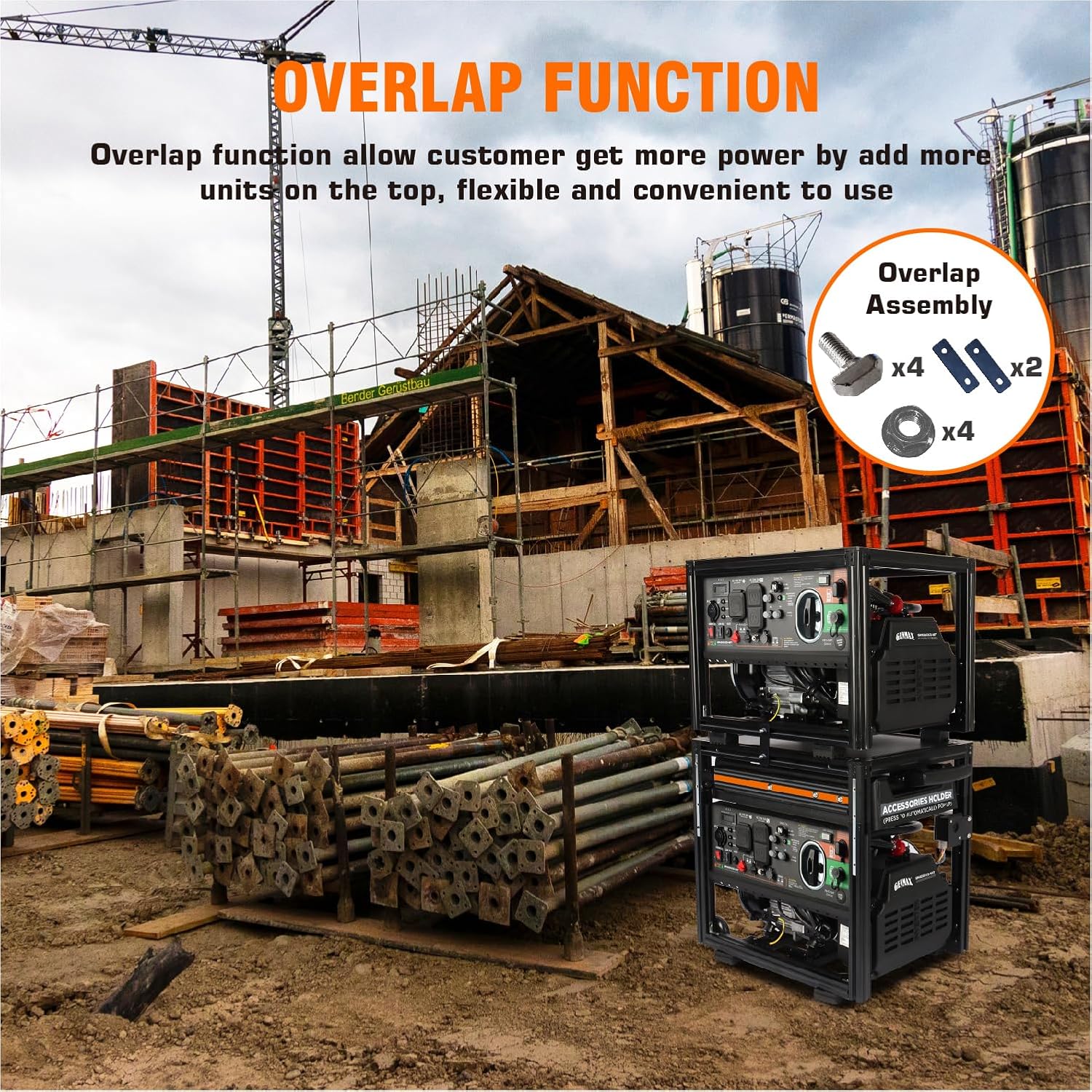
Figure 3.1: Illustration of the magnetic oil dipstick, designed to absorb iron filings from the oil.
3.2 Connecting Fuel Source
This generator is designed to be used with an external fuel tank (not included). It supports both gasoline and LPG. Ensure the fuel hose is securely connected to the appropriate inlet on the generator.
Video 3.1: Instructional video demonstrating how to connect an external fuel tank to the GENMAX GM4000XiD-NFT generator, showing different connection options.
3.3 DIY and Expansion Functions
The open-frame design allows for various DIY modifications and expansions, such as adding wheels, armrests, or external fuel tanks. Multiple units can be stacked for increased power.

Kuva 3.2: Esimample of the generator's DIY design, showing how it can be customized with external fuel tanks or other accessories.

Figure 3.3: Illustration of the overlap function, demonstrating how multiple GENMAX generators can be stacked to form a larger power unit.
4. Käyttöohjeet
4.1 Generaattorin käynnistäminen
Follow the quick start instructions on the generator's control panel. Ensure the correct fuel type (gasoline or LPG) is selected using the fuel choice knob.
4.2 Rinnakkais- ja sarjakytkentä
For increased power output or 240V operation, two GENMAX 120V ONLY generators can be connected using a dedicated series parallel box (sold separately). This allows for combined running watts of up to 6000W.

Figure 4.1: Diagram illustrating how two generators can be connected in parallel or series for increased voltage tai wattage.
Video 4.1: Detailed video guide on setting up and utilizing the parallel and series connection capabilities of the GM4000XiD-NFT generator.
5. Huolto
Säännöllinen huolto varmistaa generaattorisi pitkän käyttöiän ja optimaalisen suorituskyvyn.
- Check engine oil level before each use and change it regularly as per the maintenance schedule in the full manual.
- Inspect the air filter and clean or replace as needed.
- Pidä generaattori puhtaana ja puhtaana roskista.
- Store the generator in a dry, well-ventilated area when not in use.
6. Vianmääritys
If you encounter issues with your generator, refer to the following common troubleshooting tips. For more complex problems, consult the full product manual or contact customer support.
- Generator not starting: Check fuel level, oil level, spark plug, and ensure the engine switch is in the correct position.
- Ei tehontuottoa: Verify circuit breakers are not tripped, check for overload indicators, and ensure connections are secure.
- Epätavallinen ääni tai tärinä: Turn off the generator immediately and inspect for loose parts or obstructions.
7. Tekniset tiedot
| Ominaisuus | Yksityiskohta |
|---|---|
| Merkki | GENMAX |
| Mallin nimi | GM4000XiD-NFT |
| Wattage (bensiini) | 4000 Lähtötehoa / 3200 Käyntitehoa |
| Wattage (LPG) | 3000 Running Watts / 2800 Starting Watts |
| Polttoainetyyppi | Dual Fuel (Gasoline, LPG) |
| Moottorin iskutilavuus | 145 kuutiosenttimetriä |
| Tuotteen paino | 58.4 puntaa |
| Tuotteen mitat | 24.2 cm P x 19.5 cm L x 21.9 cm K |
| Pistorasiat yhteensä | 4 |
| Mukana olevat komponentit | Spark Plug Socket Wrench (1), Dual-Purpose Screwdriver (1), Hexagonal Wrench (1), User Manual (1), Warranty Information (1) |
8. Takuu ja tuki
The GENMAX GM4000XiD-NFT generator includes a 1-year warranty with FREE lifetime technical support from experts. For any inquiries or assistance, please refer to the contact information provided in your warranty documentation or visit the official GENMAX websivusto.
Ask a question about this manual
Ask about setup, troubleshooting, compatibility, parts, safety, or missing instructions. Manuals+ will review the question and use this page’s manual context to help answer it.