
1. Johdanto
This manual provides comprehensive instructions for the installation, operation, maintenance, and troubleshooting of the Vivotek FE9391-EHV-V2 12MP Outdoor Fisheye IR Illumination Camera. Please read this manual thoroughly before using the product to ensure proper setup and functionality. Retain this manual for future reference.
2. Tuote ohiview
2.1 Tärkeimmät ominaisuudet
- 12 Megapixel Effective Still Resolution for high-quality imaging.
- Fisheye Lens with 1.2mm focal length for wide-area surveillance.
- Integrated IR Illumination for clear night vision up to 20 meters.
- WDR Pro technology for optimal image visibility in high contrast lighting.
- H.265/H.264/MJPEG compression for efficient video streaming.
- IP66-rated weather-resistant enclosure for outdoor use.
- Motion-only alert type for event detection.
- Wi-Fi Connectivity Protocol for flexible network integration.
2.2 Pakkauksen sisältö
Varmista, että pakkauksessa on kaikki tarvittavat osat:
- Vivotek FE9391-EHV-V2 Camera Unit
- Kiinnityssarja (ruuvit, ankkurit)
- Vesitiivis liitin
- Pika-asennusopas
- Software CD (or download link information)
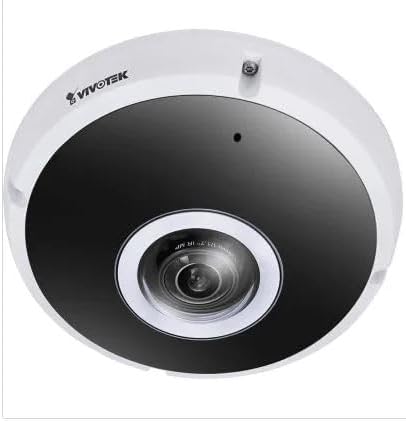
Kuva 2.1: Etuosa view of the Vivotek FE9391-EHV-V2 12MP Outdoor Fisheye IR Illumination Camera, showing the lens and IR illuminators.
3. Turvallisuustiedot
- Lue kaikki ohjeet huolellisesti ennen asennusta ja käyttöä.
- Ensure the power source matches the camera's requirements (Corded Electric).
- Älä yritä purkaa tai muokata kameraa. Tämä mitätöi takuun.
- Avoid pointing the camera directly at strong light sources for extended periods.
- Asennuksen saa suorittaa vain pätevä henkilöstö paikallisten sähkömääräysten mukaisesti.
- Protect cables from being walked on or pinched.
4. Asennus ja asennus
4.1 Asennuspaikka
Select a suitable outdoor location for mounting. Consider the desired surveillance area, proximity to power, and network connectivity (Wi-Fi or wired Ethernet). The camera is IP66 rated for outdoor use.

Figure 4.1: Dimensional drawing of the Vivotek FE9391-EHV-V2 camera, showing a diameter of 150mm and height of 68.2mm.
4.2 Fyysinen asennus
- Valmistele asennuspinta: Käytä toimitettua kiinnitysmallia (jos sellainen on) porareikien merkitsemiseen.
- Poraa reikiä: Poraa ohjausreiät ja aseta tarvittaessa seinäankkurit.
- Suojaa kamera: Kiinnitä kameran jalusta tukevasti kiinnityspintaan mukana toimitetuilla ruuveilla.
- Kytke kaapelit:
- Teho: Liitä virtajohto sopivaan virtalähteeseen.
- Verkko: Connect an Ethernet cable for wired network access, or ensure Wi-Fi signal strength is adequate for wireless connection. Use the waterproof connector for outdoor Ethernet connections.
- Säädä kameran kulmaa: Loosen the adjustment screws (if applicable) to position the fisheye lens for optimal coverage. Tighten screws once adjusted.

Figure 4.2: An Ethernet cable with an RJ45 connector, used for wired network connectivity.
4.3 Verkkoasetukset
After physical installation and power-up, the camera needs to be configured on your network.
- Tutustu kameraan: Use the Vivotek IP Utility software (available on the manufacturer's website) to discover the camera on your network.
- Anna IP-osoite: Assign a static IP address or ensure it obtains an IP address via DHCP.
- Pääsy Web Käyttöliittymä: Avaa a web selaimessa ja anna kameran IP-osoite päästäksesi siihen web-pohjainen konfigurointiliittymä.
- Kirjaudu sisään: Enter the default username and password (refer to the Quick Installation Guide for defaults). Change the default password immediately for security.
- Wi-Fi Setup (if applicable): Navigate to the network settings and configure the Wi-Fi connection if you are using wireless connectivity.
5. Käyttöohjeet
5.1 Livenä View
Once configured, you can access the live video feed through the web interface or compatible Vivotek surveillance software.
- Web Selain: Kirjaudu sisään kameraan web interface and navigate to the "Live View"-osio.
- Surveillance Software: Add the camera to your Vivotek NVR or VMS (Video Management Software) for centralized monitoring.
- Mobiilisovellus: Download the Vivotek mobile app and add your camera for remote viewing.

Kuva 5.1: Esimample of surveillance footage from multiple cameras displayed on a tablet device, demonstrating remote monitoring capabilities.

Figure 5.2: A monitor displaying a split-screen view of four camera feeds, labeled CAM1 through CAM4, illustrating a typical surveillance setup.
5.2 Tallennus ja tallennus
Kamera tukee useita tallennusvaihtoehtoja:
- Paikallinen tallennustila: Insert a microSD card (not included) into the camera's slot for edge recording. Configure recording schedules and event triggers (e.g., motion detection).
- Verkkovideotallennin (NVR): Connect the camera to a compatible NVR for continuous or event-based recording.
- Pilvitallennus: Some Vivotek models or third-party services may offer cloud storage integration. Refer to the camera's web interface for specific options.
5.3 Liiketunnistus ja hälytykset
Configure motion detection zones and sensitivity settings in the camera's web interface. When motion is detected, the camera can trigger actions such as:
- Recording video to local storage or NVR.
- Sending email notifications with snapshots.
- Uploading footage to an FTP server.
6. Huolto
- Linssien puhdistus: Gently wipe the camera lens with a soft, clean cloth. For stubborn dirt, use a lens cleaning solution designed for optical surfaces. Do not use abrasive cleaners.
- Asuntojen siivous: Puhdista kameran kotelo mainoksellaamp liinalla. Vältä voimakkaiden pesuaineiden tai liuottimien käyttöä.
- Laiteohjelmistopäivitykset: Regularly check the Vivotek websivusto laiteohjelmistopäivityksiä varten. Laiteohjelmiston päivittäminen voi parantaa suorituskykyä, lisätä ominaisuuksia ja tehostaa tietoturvaa.
- Kaapelin tarkastus: Tarkista kaikki kaapelit säännöllisesti kulumisen tai vaurioiden varalta, erityisesti ulkoasennuksissa.
- Ympäristötarkastus: Varmista, että kameran käyttöympäristö pysyy määritetyissä lämpötila- ja kosteusrajoissa.
7. Vianmääritys
7.1 Ei videosyötettä
- Tarkista teho: Ensure the camera is receiving power. Verify power adapter and cable connections.
- Verkkoyhteys: Confirm the Ethernet cable is securely connected or that the Wi-Fi signal is strong and the camera is connected to the correct network.
- IP-osoite: Verify the camera's IP address and ensure it is not conflicting with another device on the network.
- Palomuuri: Check if any firewall settings on your network or computer are blocking access to the camera.
7.2 Huono kuvanlaatu
- Puhdas linssi: Varmista, että kameran linssi on puhdas eikä siinä ole pölyä tai tahroja.
- Valaistusolosuhteet: Adjust camera settings for optimal exposure in varying light conditions. Ensure IR illuminators are functioning at night.
- Resoluutioasetukset: Verify that the video resolution and quality settings are configured appropriately in the camera's web käyttöliittymä.
- Verkon kaistanleveys: Insufficient network bandwidth can lead to choppy or low-quality video. Check network load.
7.3 Liiketunnistus ei toimi
- Ota liiketunnistus käyttöön: Ensure motion detection is enabled in the camera's settings.
- Sensitivity and Zones: Adjust motion detection sensitivity and define detection zones correctly.
- Tallennusaikataulu: Verify that the recording schedule is active for motion-triggered events.
8. Tekniset tiedot
| Ominaisuus | Yksityiskohta |
|---|---|
| Mallinumero | FE9391-EHV-V2 |
| Tehokas Still-resoluutio | 12 MP |
| Linssi | 1.2mm Fisheye Lens |
| IR-valaistuksen alue | 20 m |
| WDR-tekniikka | WDR Pro |
| Videon pakkaus | H.265 / H.264 / MJPEG |
| Yhteysprotokolla | Wi-Fi |
| Kansainvälinen turva-arviointi | IP66 |
| Virtalähde | Johdollinen sähkö |
| Tuotteen mitat (P x L x K) | 5.9 x 5.9 x 2.68 tuumaa (150 x 150 x 68.2 mm) |
| Valmistaja | Vivotek Inc. |
| Suositellut käyttötavat | Ulkoinen turvallisuus |
9. Takuu ja tuki
For warranty information, technical support, and additional resources, please visit the official Vivotek websivustolla tai ota yhteyttä asiakaspalveluun.
- Valmistaja: Vivotek Inc.
- Websivusto: www.vivotek.com (Esimamplinkki, todellinen linkki voi vaihdella)
- Ota yhteyttä: Katso webalueellisen tuen yhteystietojen sivustolta.
Please have your model number (FE9391-EHV-V2) and purchase date available when contacting support.