
1. Johdanto
This manual provides comprehensive instructions for the installation, operation, and maintenance of the EVURU Digital Single Phase Energy Meter, model DDS662 Backlight (110V variant). This device is designed to accurately measure and display various electrical parameters including total energy (kWh), temporary energy (kWh), real voltage, real current, and real power consumption in single-phase AC circuits. Please read this manual thoroughly before installation and use to ensure safe and efficient operation.
2. Turvallisuustiedot
VAROITUS: Electrical installation and wiring should only be performed by qualified personnel. Failure to follow these safety guidelines may result in electric shock, fire, or damage to the device and property.
- Katkaise aina virta piiristä ennen mittarin asentamista tai huoltoa.
- Varmista, että kaikki liitännät ovat tukevat ja asianmukaisesti eristettyjä.
- Älä käytä mittaria märässä tai kylmässä paikassaamp ehdot.
- Älä ylitä 80 A:n enimmäisvirtaa.
- Tarkista voltage rating of the meter (110V AC for this model) matches your electrical system.
- Pidä laite poissa lasten ulottuvilta.
3. Tuote ohiview
The EVURU DDS662 Backlight energy meter is a compact, DIN rail-mountable device featuring an LCD display for clear readings. It is designed for single-phase, two-wire AC systems.
Tärkeimmät ominaisuudet:
- Measures total Energy (kWh) and temporary Energy (kWh).
- Displays real-time Voltage (V), virta (A) ja teho (W).
- LCD display with backlight for enhanced visibility.
- Pulse LED indicator for active energy measurement.
- 35mm DIN rail installation.
- Manual button for cycling through display parameters and resetting temporary kWh.
Mallin vertailu:
The EVURU series includes several models with varying features. The DDS662 Backlight model offers essential energy measurement with a clear backlit display.

Image 3.1: This image displays three different models of EVURU energy meters: DDS662, DDS667, and DDS668. Each meter shows its respective display interface, highlighting the variations in information presented and button configurations across the models.

Image 3.2: This table provides a detailed feature comparison between the DDS662 (with and without backlight), DDS667, and DDS668 models. It indicates which features, such as LCD display, electricity consumption, voltage, power, current, backlight, temporary power, manual switching, power factor, frequency, and zeroable temporary kWh, are present in each model.
Mitat:
The meter is designed for standard DIN rail mounting. Refer to the image below for detailed dimensions.

Image 3.3: This image illustrates the physical dimensions of the single-phase energy meter. Key measurements shown are 45mm width at the top, 79mm total width at the base, 66mm total height, and 43mm depth from the mounting surface.
4. Asennus ja asennus
The EVURU DDS662 meter is designed for 35mm DIN rail installation. Ensure the power supply is disconnected before proceeding with installation.
Asennusvaiheet:
- Mount the meter onto a standard 35mm DIN rail in your electrical panel.
- Identify the Live (L) and Neutral (N) wires of your single-phase AC supply.
- Connect the wires according to the wiring diagram provided below. The meter supports two wiring modes: upper input/lower output and lower input/upper output. Ensure correct polarity.
- Secure all wire connections firmly using appropriate tools.
- Kun johdotus on valmis ja tarkistettu, kytke virta takaisin piiriin.
Wiring Diagram (DDS662):

Image 4.1: This diagram illustrates the wiring connections for the DDS662 energy meter. It shows the Live (L) and Neutral (N) input connections at the top and corresponding output connections at the bottom, indicating the direction of current flow through the meter.
Wiring Diagram (DDS667):

Image 4.2: This diagram shows the wiring for the DDS667 energy meter integrated with circuit breakers. It details the connections of Live (L) and Neutral (N) wires from the main supply, through a circuit breaker, into the meter, and then out to another circuit breaker before reaching the load.
Wiring Diagram (DDS668):
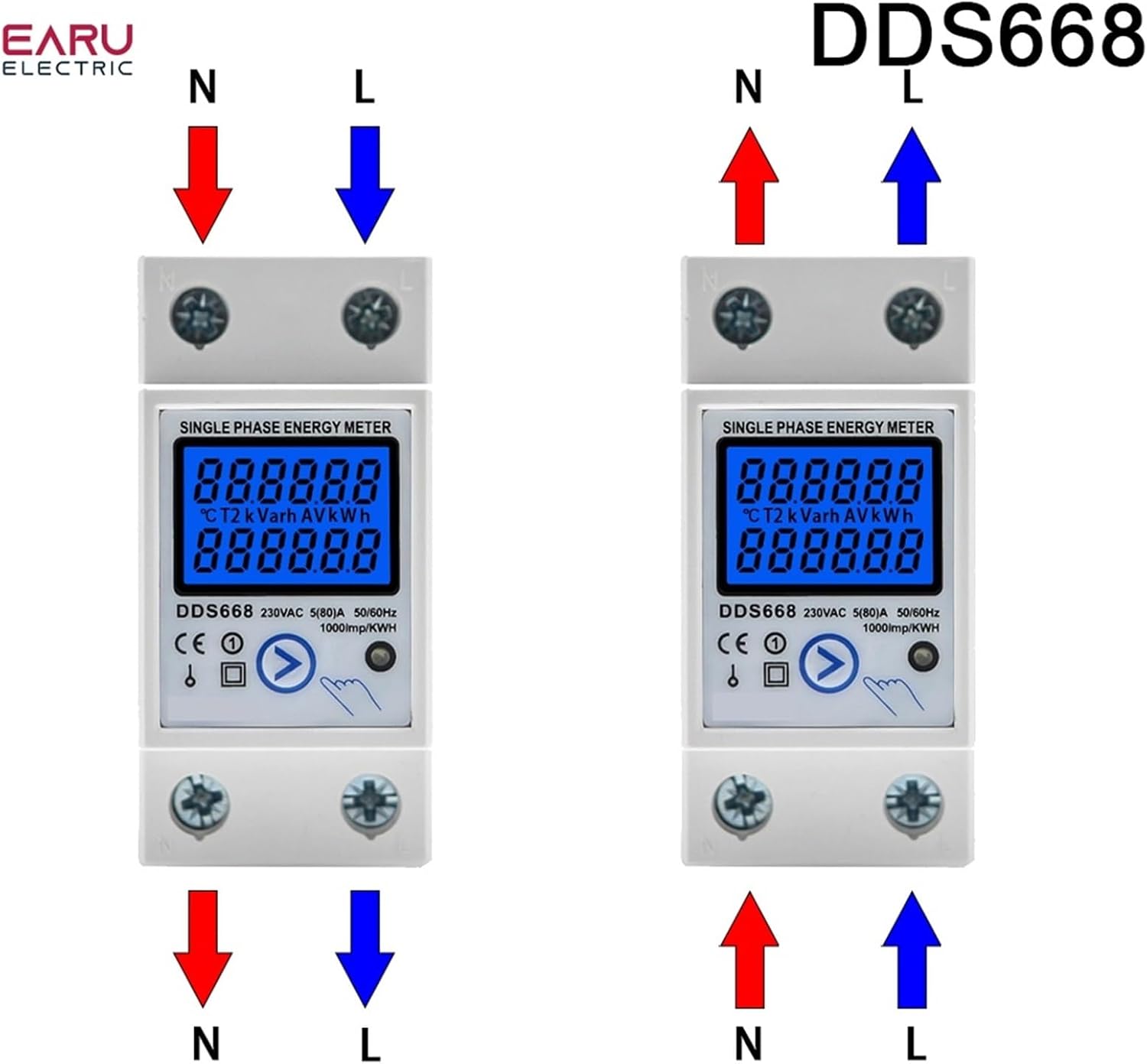
Image 4.3: This image presents two wiring configurations for the DDS668 energy meter. The left diagram shows the standard upper input (N, L) and lower output (N, L) connections. The right diagram illustrates an alternative configuration with lower input (N, L) and upper output (N, L) connections.
5. Käyttöohjeet
Once installed and powered, the meter will automatically begin measuring. The LCD display will show various parameters, which can be cycled through using the manual button.
Näytön toiminnot:
- Kokonaisenergia (kWh): This value represents the cumulative energy consumption and cannot be reset.
- Tilapäinen energia (kWh): This value represents energy consumption since the last reset. It can be reset to zero.
- Real Voltage (V): Displays the instantaneous voltage piiristä.
- Real Current (A): Displays the instantaneous current flowing through the circuit.
- Todellinen teho (W): Displays the instantaneous active power consumption.
Painikkeen toiminta:
- Lyhyt painallus: Press the button briefly to cycle through the different display parameters (Total kWh, Temporary kWh, Voltage, Current, Power).
- Pitkä painallus (6 sekuntia): Press and hold the button for approximately 6 seconds to reset the Temporary Energy (kWh) to zero. The Total Energy (kWh) cannot be reset.
Pulse LED Indicator:
The pulse LED on the meter indicates active energy measurement. It will flash at a rate of 1000 pulses per kWh, providing a visual confirmation of energy consumption.
6. Tekniset tiedot
| Parametri | Arvo |
|---|---|
| Malli | DDS662 Backlight |
| Rated Voltage | 110V AC |
| Maksimivirta | 80A |
| Pulssin taajuus | 1000 imp / kWh |
| Näyttö | LCD-näyttö taustavalolla |
| Asennus | 35 mm DIN-kisko |
| Wiring Modes | Upper input lower output / Lower input upper output |
| Tuotteen paino | 0.035 unssia |
7. Huolto
The EVURU DDS662 energy meter requires minimal maintenance.
- Pidä mittari puhtaana ja pölyttömänä. Käytä puhdistamiseen pehmeää, kuivaa liinaa.
- Avoid exposing the meter to excessive moisture, direct sunlight, or extreme temperatures.
- Tarkista säännöllisesti johtojen liitännät varmistaaksesi, että ne pysyvät kunnossa.
- Älä yritä avata tai korjata mittaria itse, sillä se voi mitätöidä takuun ja aiheuttaa turvallisuusriskin.
8. Vianmääritys
If you encounter issues with your EVURU DDS662 energy meter, consider the following basic troubleshooting steps:
- Ei näyttöä/ei virtaa: Ensure the power supply to the circuit is active and all wiring connections are correct and secure. Check for tripped circuit breakers.
- Väärät lukemat: Verify that the meter is correctly wired according to the diagram for your specific model and voltage. Ensure the load is within the meter's specified current range.
- Temporary kWh Not Resetting: Ensure you are holding the button for the full 6 seconds required to reset the temporary kWh.
- Pulse LED Not Flashing: Confirm that there is an active load connected and consuming power. If no load is present, the LED will not flash.
Jos ongelmat jatkuvat näiden vaiheiden kokeilemisen jälkeen, ota yhteyttä asiakastukeen saadaksesi lisäapua.
9. Takuu ja tuki
For information regarding the product warranty, return policy, or technical support, please refer to the documentation provided at the time of purchase or contact your seller directly. EVURU is committed to providing reliable products and customer satisfaction.