
Della 048-OPAC-6H
Della 10000 BTU Portable Air Conditioner User Manual
Model: 048-OPAC-6H | Brand: Della
1. Tärkeitä turvallisuustietoja
Please read this manual carefully before operating your portable air conditioner. Keep this manual for future reference. Always follow basic safety precautions to reduce the risk of fire, electric shock, or injury.
- Varmista, että laite on asetettu tasaiselle ja vakaalle alustalle kaatumisen estämiseksi.
- Älä käytä laitetta, jos johto tai pistoke on vaurioitunut.
- Älä työnnä sormia tai esineitä ilmanotto- tai poistoaukkoon.
- Pidä laite poissa syttyvistä materiaaleista ja avotulesta.
- Irrota laite aina pistorasiasta ennen puhdistusta tai huoltoa.
- Tätä laitetta ei ole tarkoitettu henkilöiden (mukaan lukien lapset) käytettäväksi, joilla on alentuneet fyysiset, sensoriset tai henkiset kyvyt tai joilla ei ole kokemusta ja tietoa, ellei heidän turvallisuudestaan vastaava henkilö ole valvonut tai opastanut laitteen käyttöä.
2. Tuote ohiview
The Della 10000 BTU Portable Air Conditioner is a versatile unit designed to provide cooling, heating, dehumidification, and fan functions for spaces up to 450 sq. ft. It features smart WiFi connectivity for convenient control via a mobile app, a remote control, and an intuitive soft-touch control panel.

Image: Della Portable Air Conditioner unit, remote control, and smartphone displaying the control app.
Key components include the main unit with integrated handle, exhaust hose, window installation kit, and remote control.

Image: Diagram showing the dimensions of the portable air conditioner: 12.2 inches (width) x 12.2 inches (depth) x 27.6 inches (height).
3. Asennus
3.1 Pakkauksesta purkaminen
Carefully remove the unit and all accessories from the packaging. Retain the original packaging for future storage or transport. Allow the unit to stand upright for at least 24 hours before initial use to allow the refrigerant to settle.
3.2 Sijoitus
Place the air conditioner on a firm, level surface in a location that allows for proper air circulation. Ensure there is at least 20 inches (50 cm) of space from walls or other objects to allow for adequate airflow around the unit.
3.3 Ikkunasarjan asennus
The included window kit is designed for easy installation in both horizontal and vertical sliding windows. No drilling is required.

Image: Diagrams illustrating the installation of the window kit in both horizontal and vertical sliding windows, showing compatibility with window openings from 25.5 to 64.1 inches.
- Assemble the window slider kit by sliding the adjustable panels together to fit your window opening. The kit is compatible with window sizes from 25.5 to 64.1 inches.
- Secure the panels with the provided screws.
- Open the window and place the assembled window kit into the window frame. Extend the panels to fit snugly and close the window against the kit to secure it.
- Ensure the window kit is sealed properly to prevent air leakage. Use foam seals if necessary.
3.4 Pakoputken liitäntä
- Attach the exhaust hose connector to one end of the exhaust hose.
- Kiinnitä ikkunasarjan sovitin pakokaasuletkun toiseen päähän.
- Insert the exhaust hose connector into the exhaust outlet on the back of the air conditioner unit.
- Insert the window kit adapter into the opening on the window slider kit.
- Varmista, että kaikki liitännät ovat tiukasti kiinni, jotta kuuma ilma ei pääse takaisin huoneeseen.
3.5 Virtaliitäntä
Plug the power cord into a grounded 115V/60Hz electrical outlet. Do not use extension cords or power strips.
4. Käyttöohjeet
4.1 Ohjauspaneeli
The unit features an intuitive soft-touch control panel on the top of the unit.
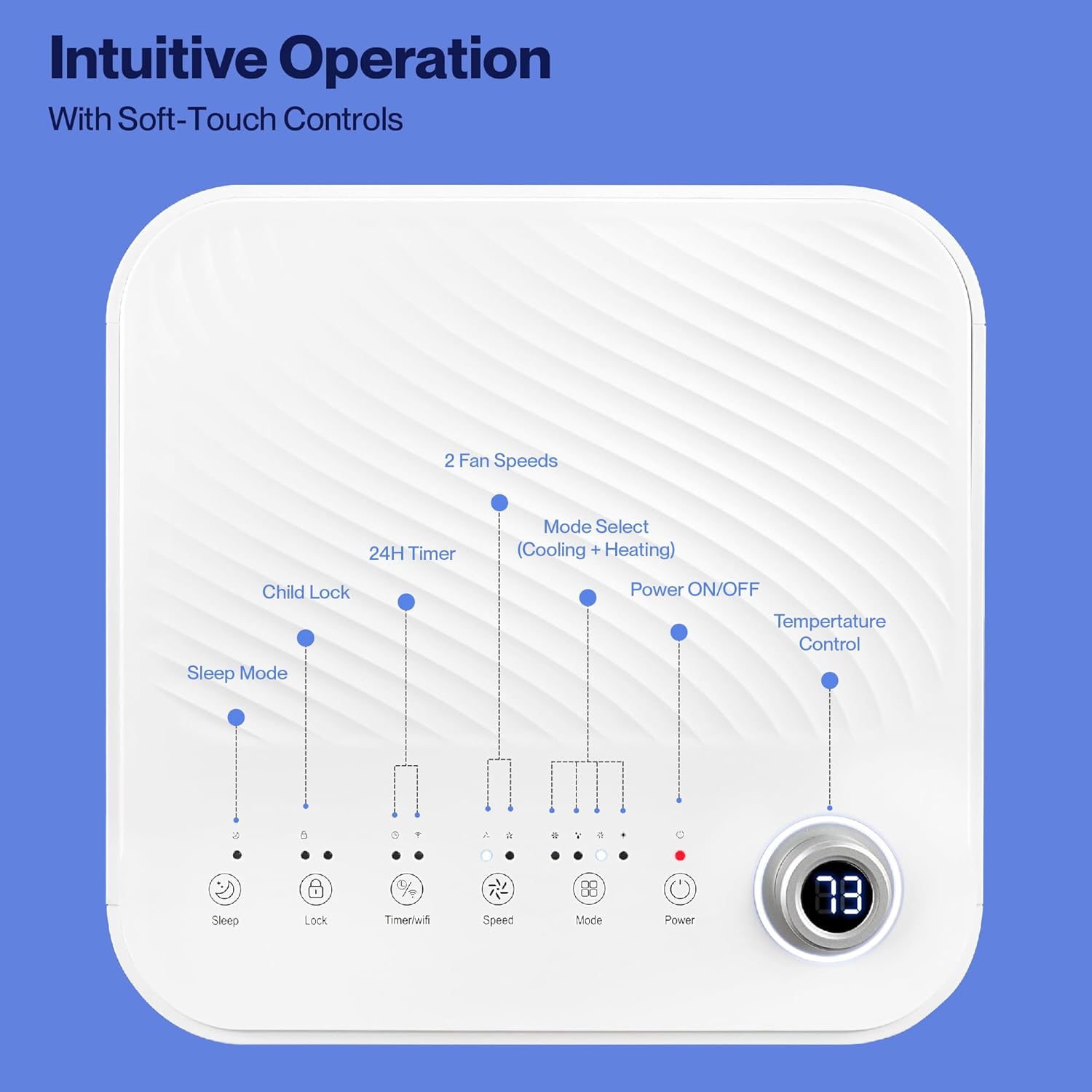
Image: Detailed diagram of the control panel with labels for each button: Sleep, Child Lock, Timer/WiFi, Fan Speed, Mode Select (Cooling + Heating), Power ON/OFF, and Temperature Control with digital display.
- Virta päälle/pois: Paina kytkeäksesi laitteen päälle tai pois päältä.
- Tilan valinta: Cycle through Cooling, Heating, Dehumidification, Ventilation (Fan), and Sleep modes.
- Lämpötilan säätö: Säädä haluttua lämpötilaa ylös/alas-nuolinäppäimillä.
- Tuulettimen nopeus: Select between 2 fan speeds (Low, High).
- Ajastin: Aseta 24 tunnin ajastin automaattista päälle/pois-toimintoa varten.
- Lapsilukko: Aktivoi tai deaktivoi lapsilukkotoiminnon.
- Nukkumismoodi: Aktivoi unitilan hiljaisempaa käyntiä ja asteittaista lämpötilan säätöä varten.
4.2 Kaukosäädin
Laitteen mukana toimitetaan kaukosäädin, jolla laitetta voi käyttää kätevästi etänä. Kaikkia ohjauspaneelin toimintoja voi käyttää kaukosäätimellä.
4.3 WiFi/Smart App Control
Control your Della Portable Air Conditioner from anywhere using the free DELLA+ app on your smartphone. The unit is compatible with Google Assistant and Amazon Alexa for voice control.

Image: A person relaxing on a couch, using a smartphone to control the air conditioner, with text indicating compatibility with Google Assistant and Amazon Alexa.
- Download the DELLA+ app from your smartphone's app store.
- Follow the in-app instructions to connect your air conditioner to your home WiFi network.
- Once connected, you can control modes, temperature, fan speed, and set schedules remotely.
The app also supports Smart Geo Location, allowing the unit to automatically turn on or off based on your proximity to home.

Image: A smartphone screen showing a map with a car icon and a notification indicating the AC unit automatically turned on due to Smart Geo Location.
5. Huolto
Regular maintenance ensures optimal performance and extends the lifespan of your unit. Always unplug the unit before cleaning.
5.1 Ilmansuodattimen puhdistus
Ilmansuodatin on puhdistettava kahden viikon välein tai useammin käytöstä ja ilmanlaadusta riippuen.
- Paikanna ilmansuodatinpaneeli (yleensä laitteen takaa tai sivulta).
- Irrota suodatin.
- Pese suodatin lämpimällä saippuavedellä. Huuhtele huolellisesti ja anna sen kuivua kokonaan ennen takaisin asettamista.
5.2 Veden tyhjennys
The unit has a self-evaporating system, but in high humidity conditions, water may accumulate. The "Water-full indicator" will illuminate when the water tank needs draining.
- Aseta matala astia tai tarjotin tyhjennysaukon alle (yksikkö sijaitsee takaosan alaosassa).
- Irrota tyhjennystulppa.
- Allow all accumulated water to drain out.
- Kiinnitä tyhjennystulppa tiukasti takaisin.
5.3 Varastointi
Jos laitetta säilytetään pitkään:
- Tyhjennä kaikki kertynyt vesi.
- Puhdista ilmansuodatin.
- Run the unit in fan-only mode for a few hours to dry the interior.
- Irrota virtajohto pistorasiasta ja kieputa se siististi.
- Säilytä laitetta viileässä, kuivassa paikassa, mieluiten alkuperäispakkauksessaan.
6. Vianmääritys
Katso tästä osiosta yleisiä ongelmia ja niiden ratkaisuja.
| Ongelma | Mahdollinen syy | Ratkaisu |
|---|---|---|
| Yksikkö ei käynnisty | No power; Power cord unplugged; Circuit breaker tripped; Water tank full | Check power outlet; Plug in power cord; Reset circuit breaker; Drain water tank |
| Laite ei jäähdytä tehokkaasti | Air filter dirty; Exhaust hose not properly installed; Room too large; Doors/windows open; Temperature setting too high | Clean air filter; Ensure exhaust hose is sealed; Close doors/windows; Lower temperature setting |
| Yksikkö on meluisa | Unit not on level surface; Air filter dirty; Obstruction in fan | Place unit on level surface; Clean air filter; Check for obstructions |
| Vesivuoto | Drain plug loose or missing; Unit tilted | Secure drain plug; Ensure unit is level |
| WiFi-yhteysongelmat | Incorrect WiFi password; Unit too far from router; Router issues | Vahvista salasana; Siirrä yksikkö lähemmäs reititintä; Käynnistä reititin uudelleen |
Jos ongelma jatkuu näiden ratkaisujen kokeilemisen jälkeen, ota yhteyttä asiakastukeen.
7. Tekniset tiedot
| Ominaisuus | Erittely |
|---|---|
| Mallinumero | 048-OPAC-6H |
| Jäähdytyskapasiteetti | 10000 BTU |
| Peittoalue | Jopa 450 neliömetriä. Ft. |
| Toiminnot | Cooling, Heating, Dehumidifier, Fan, Sleep Mode |
| Voitage | 115 volttia |
| Melutaso | 54 dB |
| Kylmäaine | R 410A |
| Mitat (P x L x K) | 12.2 x 12.2 x 27.6 tuumaa |
| Materiaali | ABS muovia |
| Erikoisominaisuudet | Portable, Dehumidifier, WiFi Enabled, Remote Control, Built-in Handle, 24-hour timer, Child Lock |
8. Takuu ja asiakastuki
For warranty information or technical assistance, please refer to the warranty card included with your product or visit the official Della website. You may also contact Della customer support directly for further assistance with troubleshooting or parts replacement.
Ask a question about this manual
Ask about setup, troubleshooting, compatibility, parts, safety, or missing instructions. Manuals+ will review the question and use this page’s manual context to help answer it.