
1. Johdanto
Thank you for choosing the SPLITSKY NZFS Kids Alarm Clock. This device combines an alarm clock, white noise sleep aid, and an 8-mode RGB night light, designed to assist with sleep and wake-up routines for children and adults. Please read this manual thoroughly to understand its features and ensure proper operation.
Turvallisuustiedot:
- Pidä laite poissa vedestä ja korkean kosteuden ympäristöistä.
- Älä yritä purkaa tai korjata laitetta itse.
- Use only the provided USB-C power cable or a certified equivalent.
- Varmista riittävä ilmanvaihto laitteen ympärillä.
2. Pakkauksen sisältö
Varmista, että pakkauksessasi on kaikki tarvittavat osat:
- SPLITSKY NZFS Kids Alarm Clock
- 1.2M (4.7 inch) USB-C Power Cable
- Käyttöopas (tämä asiakirja)
- 1 x CR2032 Lithium Ion Battery (pre-installed for memory backup)
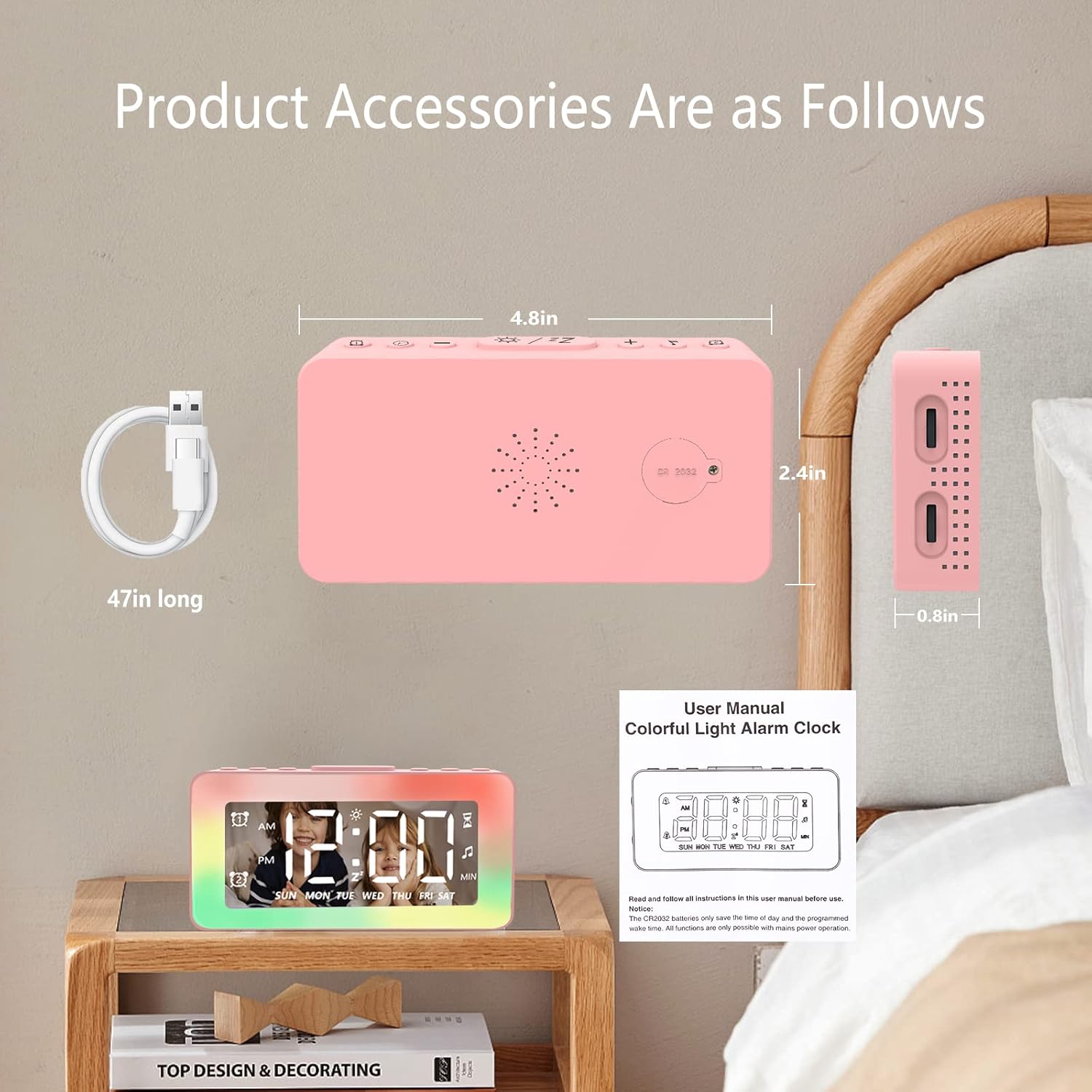
Image: The SPLITSKY NZFS Kids Alarm Clock, a USB-C power cable, and the user manual are included in the package.
3. Tuote ohiview
Familiarize yourself with the buttons and ports on your alarm clock:

Kuva: Yksityiskohtainen view of the alarm clock's top buttons and side ports, including Alarm 1, Time Setting, Light Minus/Settings, Snooze/Light Mode Switch, Light Plus/Setup, Music Switch, Alarm 2, Volume Setting, Time Brightness Setting, USB Output Charging Port, and Type-C Input Interface.
- Hälytys 1 -painike: Set and activate Alarm 1.
- Ajan asetuspainike: Säädä nykyinen aika.
- Light Minus / Settings Button: Decrease light brightness or navigate settings.
- Snooze / Light Mode Switch Button: Activate snooze, or cycle through light modes.
- Light Plus / Setup Button: Increase light brightness or confirm settings.
- Music Switch Button: Cycle through white noise sounds.
- Hälytys 2 -painike: Set and activate Alarm 2.
- Volume Setting Wheel (Side): Adjust alarm and white noise volume.
- Time Brightness Setting Wheel (Side): Säädä näytön kirkkautta.
- USB Output Charging Port (Side): Charge external devices.
- Type-C Input Interface (Side): Connect power cable to the alarm clock.
4. Asennus
4.1 Virtaliitäntä
- Connect the provided USB-C power cable to the Type-C Input Interface on the side of the alarm clock.
- Kytke USB-C-kaapelin toinen pää yhteensopivaan USB-virtalähteeseen (ei sisälly toimitukseen) tai USB-porttiin.
- Näyttö syttyy osoittaen, että kello on päällä.

Image: The SPLITSKY NZFS Kids Alarm Clock is shown powered on and connected via its USB-C port, also demonstrating its capability to charge a smartphone.
4.2 Battery Installation (Memory Backup)
The alarm clock includes a pre-installed CR2032 battery. This battery serves as a memory backup to retain time and alarm settings during a power outage or when the main power is disconnected. It does not power the clock for regular operation.
- If the battery needs replacement, locate the battery compartment on the back of the unit.
- Käytä pientä ruuvimeisseliä avaamaan lokero.
- Vaihda uuteen CR2032-paristoon varmistaen oikean napaisuuden.
- Sulje lokero kunnolla.
5. Käyttöohjeet
5.1 Setting the Time (12H/24H Format)
- Paina ja pidä painettuna Ajan asetuspainike until the hour digits begin to flash.
- Käytä Light Minus / Settings Button (alas) tai Light Plus / Setup Button (up) to adjust the hour.
- Paina Ajan asetuspainike again to move to minute adjustment. Adjust minutes using the Light Minus/Plus buttons.
- Paina Ajan asetuspainike a third time to select 12-hour or 24-hour format. Adjust using the Light Minus/Plus buttons.
- Paina Ajan asetuspainike vielä kerran vahvistaaksesi ja poistuaksesi ajan asetustilasta.
5.2 Setting Alarms (Dual Alarm, Daily/Weekday/Weekend Mode)
The clock supports two independent alarms (Alarm 1 and Alarm 2).
- Paina ja pidä painettuna Hälytys 1 -painike (Hälytys 1:lle) tai Hälytys 2 -painike (herätykselle 2), kunnes hälytyksen tuntinumerot vilkkuvat.
- Käytä Light Minus / Settings Button or Light Plus / Setup Button säätääksesi kellonajan.
- Press the respective Alarm Button again to move to minute adjustment. Adjust minutes using the Light Minus/Plus buttons.
- Press the respective Alarm Button again to select the alarm mode:
- Päivittäinen tila: Hälytys soi joka päivä.
- Weekday Mode: Hälytys soi maanantaista perjantaihin.
- Viikonlopputila: Hälytys soi lauantaina ja sunnuntaina.
- Press the respective Alarm Button once more to confirm and exit alarm setting mode.
- Voit ottaa hälytyksen käyttöön/poistaa sen käytöstä painamalla lyhyesti Hälytys 1 -painike or Hälytys 2 -painikeHälytyskuvake ilmestyy/häviää näytöltä.
5.3 Torkku -toiminto
When an alarm sounds, tap the Snooze / Light Mode Switch Button on top to activate snooze. The alarm will pause for 9 minutes and then sound again. This can be repeated multiple times.
5.4 Night Light (8 Modes RGB, 10-level dimming)
The alarm clock features 6 solid color lights and 2 ambient colorful lights.
- Paina lyhyesti Snooze / Light Mode Switch Button to turn on the night light and cycle through the 8 color modes.
- To adjust the brightness (10 levels), use the Light Minus / Settings Button or Light Plus / Setup Button while the night light is active.
- To turn off the night light, continue pressing the Snooze / Light Mode Switch Button kunnes valo sammuu.

Image: Multiple SPLITSKY NZFS Kids Alarm Clocks are shown, each displaying a different color from the 8 available RGB night light modes.
5.5 White Noise Sleep Aid (8 Sounds)
The clock offers 8 soothing sounds to aid sleep.
- Paina lyhyesti Musiikin kytkinpainike to turn on the white noise and cycle through the available sounds.
- To adjust the volume (16 levels), use the Volume Setting Wheel on the side of the clock.
- To turn off the white noise, continue pressing the Musiikin kytkinpainike until the sound stops.

Image: The SPLITSKY NZFS Kids Alarm Clock is displayed on a bedside table, with icons illustrating the various white noise options such as rain, cicadas, piano, bonfire, waves, birdsong, and church bells.
5.6 Sleep Timer (10-120 minutes)
The sleep timer allows you to set a duration for the white noise and/or night light to play before automatically turning off.
- While white noise or night light is active, press and hold the Musiikin kytkinpainike (for white noise timer) or Snooze / Light Mode Switch Button (for light timer).
- Käytä Light Minus / Settings Button or Light Plus / Setup Button to select the desired timer duration (10, 20, 30, 60, 90, 120 minutes).
- Press the respective button again to confirm the timer setting. The timer icon will appear on the display.
5.7 Näytön kirkkauden säätö
Säädä LED-aikanäytön kirkkautta käyttämällä Time Brightness Setting Wheel on the side of the clock.
5.8 USB-latausporttia
The USB output charging port on the side of the alarm clock can be used to charge other small electronic devices, such as smartphones. Connect your device's charging cable to this port.
6. Huolto
6.1 Puhdistus
- Varmista, että laite on irrotettu pistorasiasta ennen puhdistamista.
- Pyyhi pinta pehmeällä, kuivalla liinalla.
- Älä käytä hankaavia puhdistusaineita, liuottimia tai kemiallisia suihkeita.
6.2 Varastointi
When not in use for extended periods, store the alarm clock in a cool, dry place, away from direct sunlight and extreme temperatures.
7. Vianmääritys
If you encounter issues with your SPLITSKY NZFS Kids Alarm Clock, refer to the table below for common problems and solutions.
| Ongelma | Mahdollinen syy | Ratkaisu |
|---|---|---|
| Kellonäyttö on pois päältä tai himmeä. | Not connected to power; Time brightness set too low. | Ensure USB-C cable is securely connected to a power source. Adjust the Time Brightness Setting Wheel. |
| Hälytys ei soi. | Alarm not activated; Alarm volume too low. | Check if the alarm icon is displayed. If not, short press the respective Alarm Button to activate. Adjust the Volume Setting Wheel. |
| Time/settings reset after power disconnection. | CR2032 backup battery is depleted or missing. | Replace the CR2032 battery in the battery compartment. |
| Night light or white noise not working. | Function not activated; Sleep timer active. | Paina lyhyesti Snooze / Light Mode Switch Button or Musiikin kytkinpainike to activate. Check if a sleep timer is set. |
8. Tekniset tiedot
| Ominaisuus | Yksityiskohta |
|---|---|
| Merkki | SPLITSKY |
| Mallinumero | NZFS |
| Näytön tyyppi | Digitaalinen LED |
| Tuotteen mitat | 3.17"W x 3.17"H (approximately 8.05 cm W x 8.05 cm H) |
| Tuotteen paino | 8.1 unssia (noin 230 grammaa) |
| Virtalähde | Corded Electric (USB-C), Battery Powered (CR2032 for memory) |
| Yövalotilat | 8 (6 solid colors, 2 ambient colorful) with 10-level dimming |
| White Noise Sounds | 8 rauhoittavaa ääntä |
| Hälytysäänet | 7 wake-up alarm tones with 16-level volume control |
| Hälytysominaisuudet | Dual Alarm, Daily/Weekday/Weekend modes, 9-minute Snooze |
| Ajastintoiminto | 10-120 minute sleep timer for sounds and lights |
| Yhteydet | USB-C Input, USB-A Output (for charging external devices) |
| Materiaali | Akryylinitriilibutadieenistyreeni |
9. Takuu ja tuki
9.1 Takuutiedot
Please refer to the warranty information provided at the time of purchase or contact your retailer for details regarding the product warranty. Keep your proof of purchase for any warranty claims.
9.2 Asiakastuki
For technical assistance, troubleshooting beyond this manual, or general inquiries, please contact the seller through the platform where you purchased the product. Provide your order number and a detailed description of the issue for prompt support.