
Johdanto
This manual provides detailed instructions for the installation, operation, and maintenance of your LeeKooLuu K10 License Plate Camera. The K10 camera is designed to be compatible with the LeeKooLuu LK10 system, serving as a reliable rear-view camera for enhanced visibility and safety. Please read this manual thoroughly before installation and use to ensure proper functionality and longevity of the product.
Tuote loppuview
The LeeKooLuu K10 is a compact license plate camera engineered for seamless integration with the LK10 wireless system. It features a wide-angle lens to provide a broad view of the area behind your vehicle, assisting with parking and reversing maneuvers. The camera is designed for outdoor use, offering durability and consistent performance.
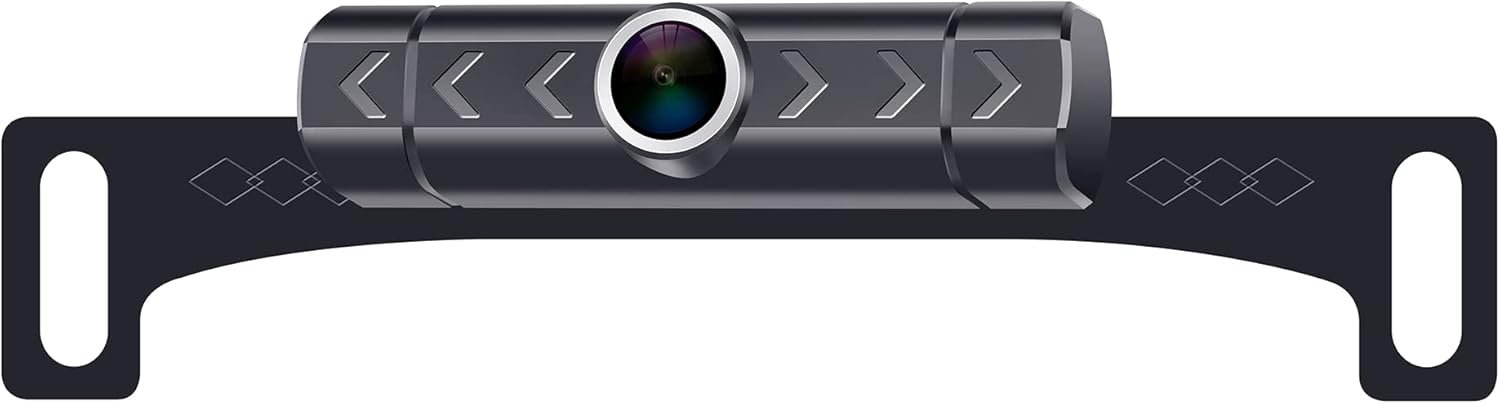
Image showing the LeeKooLuu K10 license plate camera. The camera unit is centrally mounted on a black bracket designed to attach behind a vehicle's license plate. The camera lens is prominent in the center, surrounded by a silver ring. The bracket features decorative diamond patterns and mounting holes on either side.
Tekniset tiedot
| Tuotteen mitat | 9.2 x 4.1 x 1.9 tuumaa |
| Tuotteen paino | 7.4 unssia |
| Muut näytön ominaisuudet | Langaton |
| Asennustyyppi | Pinta-asennus |
| Voitage | 12 volttia |
| Optinen anturitekniikka | CMOS |
| Linssin tyyppi | Laaja kulma |
| Todellinen kulma View | 150 astetta |
| Liittimen tyyppi | RCA |
| Optisen anturin koko | 1/3 tuumaa |
Asennus ja asennus
Follow these general steps for installing the LeeKooLuu K10 License Plate Camera. For specific vehicle requirements, consult your vehicle's manual or a professional installer.
- Valmistele kiinnityspaikka: Ensure the area around your vehicle's license plate is clean and free from obstructions.
- Kiinnitä kamera: Position the K10 camera bracket behind your vehicle's license plate. Secure it using the existing license plate screws or additional hardware if necessary. Ensure the camera lens has a clear, unobstructed view.
- Liitä virta: Connect the camera's power cable to your vehicle's reverse light circuit. This typically involves connecting the red wire to the positive (+) wire of the reverse light and the black wire to a ground point or the negative (-) wire. This ensures the camera powers on automatically when the vehicle is in reverse.
- Liitä videosignaali: The K10 camera uses a wireless transmitter to send video signals. Ensure the wireless transmitter is properly connected to the camera and receives power.
- Pair with LK10 Monitor: Refer to your LK10 monitor's instruction manual for specific pairing procedures. Generally, you will need to power on the monitor, select the camera input, and initiate a pairing process.
- Testauksen toiminnallisuus: With the vehicle in reverse (engine off, parking brake engaged for safety), check the LK10 monitor to confirm that the camera feed is displayed clearly. Adjust the camera angle if needed.
Käyttöohjeet
Once properly installed and paired with your LeeKooLuu LK10 monitor, operating the K10 camera is straightforward:
- Engage Reverse Gear: When you shift your vehicle into reverse, the K10 camera will automatically power on (if wired to the reverse lights) and transmit its video feed.
- View on Monitor: The LK10 monitor will automatically display the camera's view, mikä antaa selkeän kuvan ajoneuvosi takana olevasta alueesta.
- Utilize Parking Lines: If your LK10 monitor or camera system supports parking guidelines, use them to assist with judging distances while reversing.
- Disengage Reverse Gear: When you shift out of reverse, the camera will power off, and the monitor will return to its previous display mode.
Huolto
To ensure optimal performance and longevity of your LeeKooLuu K10 camera, follow these maintenance guidelines:
- Puhdista linssi: Puhdista kameran linssi säännöllisesti pehmeällä,amp liinalla lian, pölyn tai vesitahrojen poistamiseksi, jotka saattavat tukkia viewVältä hankaavia puhdistusaineita.
- Tarkista liitännät: Periodically inspect all power and signal connections to ensure they are secure and free from corrosion.
- Tarkista asennus: Verify that the camera and its bracket remain securely mounted to the license plate. Tighten any loose screws if necessary.
- Vältä korkeapainepesua: When washing your vehicle, avoid directing high-pressure water jets directly at the camera to prevent water ingress.
Vianetsintä
If you encounter issues with your LeeKooLuu K10 camera, refer to the following common problems and solutions:
| Ongelma | Mahdollinen syy | Ratkaisu |
|---|---|---|
| Ei kuvaa näytössä |
|
|
| Kuva on epäselvä tai epäselvä |
|
|
| Image flickers or cuts out |
|
|
If these steps do not resolve the issue, please contact LeeKooLuu customer support for further assistance.
Takuu ja tuki
LeeKooLuu products are designed for reliability and performance. For information regarding warranty coverage, technical support, or replacement parts, please refer to the warranty card included with your original purchase or visit the official LeeKooLuu website. When contacting support, please have your product model (K10) and purchase details readily available.