
1. Tuote ohiview
The Cudy GS108D is an 8-port Gigabit Ethernet Network Switch designed for expanding your network connectivity. It offers high-speed data transfer for devices such as computers, IPTVs, printers, NAS, game consoles, and routers. Featuring a plug-and-play design, fanless operation, and energy-efficient technology, this switch provides a reliable and quiet solution for both home and office networks.

Kuva: Edessä view of the Cudy GS108D switch, highlighting its 8 Gigabit Ethernet ports and LED indicators.
Tärkeimmät ominaisuudet:
- 8 Gigabit Ethernet -porttia: Provides high-speed wired connections for multiple devices.
- Plug and Play: Requires no software installation or configuration for immediate use.
- Tuulettimeton muotoilu: Ensures quiet operation, suitable for any environment.
- Energiatehokas: Compliant with IEEE802.3az standard, saving power when ports are idle.
- Monipuolinen asennus: Supports both desktop placement and wall mounting.
2. Pakkauksen sisältö
Varmista, että paketti sisältää seuraavat kohteet:
- Cudy GS108D 8-Port Gigabit Ethernet Network Switch
- Virtalähde
- Käyttöohje (tämä asiakirja)
- Ethernet Cable (may vary by region/package)

Image: Contents of the Cudy GS108D package, showing the switch, power adapter, and an Ethernet cable.
3. Fyysinen kuvaus
Etupaneeli:
The front panel features eight 10/100/1000 Mbps RJ45 ports. Each port has an associated LED indicator to show link/activity status.
- Virran merkkivalo: Ilmaisee kytkimen virtatilan.
- Link/Act-LEDit (1–8):
- Tasainen vihreä: A device is connected and the link is active.
- Vilkkuva vihreä: Dataa lähetetään tai vastaanotetaan portin kautta.
- Pois: No device is connected or the link is inactive.

Kuva: Yksityiskohtainen view of the Cudy GS108D's front panel, showing the 8 RJ45 ports and their corresponding LED indicators.
Takapaneeli:
Takapaneelissa on tyypillisesti virransyöttöportti.
Mitat:
The compact design of the GS108D allows for flexible placement. Approximate dimensions are 138mm (5.43") L x 61.5mm (2.42") W x 24mm (0.94") H.
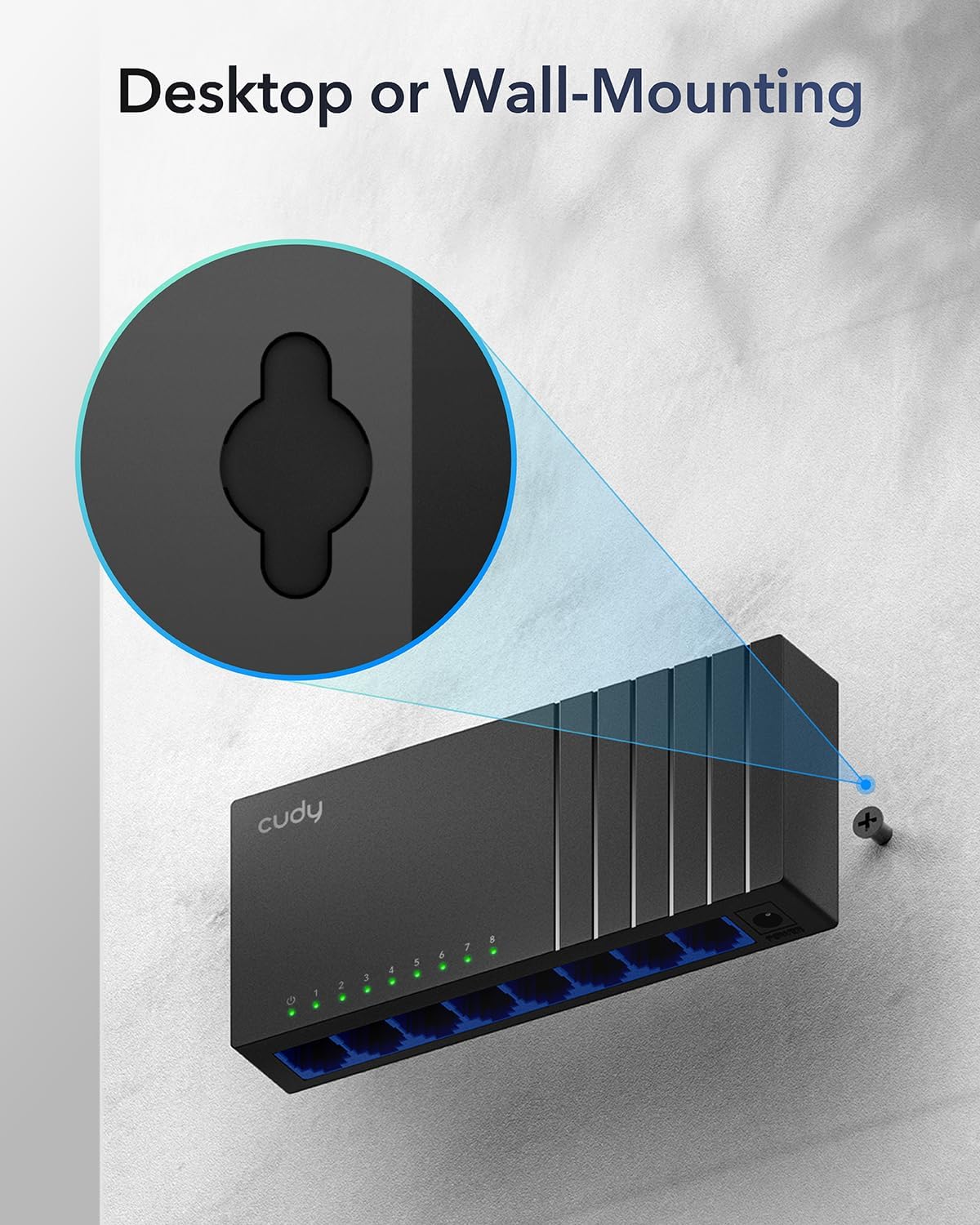
Image: The Cudy GS108D switch with its compact dimensions clearly indicated.
4. Asennusohjeet
The Cudy GS108D switch is designed for simple plug-and-play installation. No complex configuration is required.
Vaihe 1: Virtaliitäntä
- Connect one end of the provided power adapter to the power port on the rear panel of the GS108D switch.
- Kytke virtalähteen toinen pää tavalliseen pistorasiaan.
- Varmista, että etupaneelin virran merkkivalo palaa, mikä osoittaa, että kytkin saa virtaa.

Image: The Cudy GS108D switch with its power adapter connected and ready for use.
Vaihe 2: Laitteen yhdistäminen
- Connect your network devices (e.g., computer, router, NAS, game console) to any of the 8 RJ45 ports on the front panel using standard Ethernet cables (Cat5e or higher recommended for Gigabit speeds).
- Ensure the Link/Act LED for each connected port illuminates, indicating a successful connection. If the LED is flashing, data is being transmitted.

Image: A laptop being connected to the Cudy GS108D switch with an Ethernet cable, demonstrating a typical setup.
Vaihe 3: Asennusvaihtoehdot
The GS108D supports both desktop placement and wall mounting.
- Työpöydän sijoittelu: Aseta kytkin vain tasaiselle ja vakaalle alustalle.
- Seinäasennus: The switch features mounting slots on its underside. Use appropriate screws (not included) to secure the switch to a wall.

Image: The Cudy GS108D switch shown with its wall-mounting slots, illustrating how it can be securely attached to a wall.
5. Käyttöohjeet
Once connected, the Cudy GS108D operates automatically without further user intervention.
Automaattinen neuvottelu
Each port on the switch automatically detects the network speed (10/100/1000 Mbps) and duplex mode (Half/Full Duplex) of the connected device and adjusts accordingly for optimal performance.
Liikenteen optimointi
The switch features a 4 Mbit packet buffer to ensure stable and efficient data forwarding, reducing packet loss and improving overall network performance, especially during high traffic loads.
Energy Efficiency (IEEE 802.3az)
The GS108D incorporates energy-efficient Ethernet technology. It automatically adjusts power consumption based on cable length and network traffic, reducing energy usage when ports are idle or when connected devices are turned off.

Image: Visual representation of the power-saving feature, showing reduced energy consumption when ports are idle.
Pitkän matkan lähetys
The switch supports long-distance Ethernet cable runs, allowing for reliable data transmission up to 170 meters (557 feet) with Cat5e or higher Ethernet cables.

Image: Illustration of the Cudy GS108D's capability for long-distance transmission, up to 170 meters, requiring Cat5e or higher cables.
6. Huolto
To ensure optimal performance and longevity of your Cudy GS108D switch, follow these maintenance guidelines:
- Sijoitus: Aseta kytkin viileään ja kuivaan paikkaan, poissa suorasta auringonvalosta, lämmönlähteistä ja liiallisesta kosteudesta. Varmista riittävä ilmanvaihto laitteen ympärillä.
- Puhdistus: Puhdista kytkimen ulkopinta pehmeällä, kuivalla liinalla. Älä käytä nestemäisiä tai aerosolipuhdistusaineita.
- Teho: Use only the provided power adapter. Disconnect the power adapter during electrical storms or when unused for long periods.
- johdot: Ensure all Ethernet cables are securely connected and free from damage.
7. Vianmääritys
If you encounter issues with your Cudy GS108D switch, refer to the following common troubleshooting steps:
Ei Virtaa
- Varmista, että virtalähde on kytketty kunnolla sekä kytkimeen että toimivaan pistorasiaan.
- Tarkista pistorasian toiminta kytkemällä siihen toinen laite.
- Verify that the Power LED on the switch is illuminated. If not, try a different power outlet.
Ei linkkiä/toimintaa portissa
- Varmista, että Ethernet-kaapeli on kytketty kunnolla sekä kytkimen porttiin että liitettyyn laitteeseen.
- Kokeile käyttää toista Ethernet-kaapelia kaapelivaurioiden poissulkemiseksi.
- Liitä laite kytkimen toiseen porttiin.
- Verify that the connected device (e.g., computer, router) is powered on and its network adapter is enabled.
- If connecting to a router, ensure the router's port is active.
Hidas verkon nopeus
- Ensure you are using Cat5e or higher Ethernet cables for Gigabit speeds. Older Cat5 cables may limit speed.
- Check the Link/Act LED for the port. A solid green light indicates a Gigabit connection. If it's amber or off, there might be a speed mismatch or connection issue.
- Verify that the connected devices also support Gigabit Ethernet.
- Reduce network congestion by limiting simultaneous high-bandwidth activities.
8. Tekniset tiedot
| Ominaisuus | Kuvaus |
|---|---|
| Merkki | Cudy |
| Mallinumero | GS108D |
| Porttien määrä | 8 |
| Käyttöliittymä | RJ45 |
| Tiedonsiirtonopeus | 1000 megabittiä sekunnissa (gigabitti) |
| Kytkimen tyyppi | Ethernet Switch |
| Yhteensopivat laitteet | Camera, Desktop, Laptop, Router |
| Voitage | 28 volttia (virtalähteen tulo) |
| Käyttölämpötila | 40°F - 104°F (4.4°C - 40°C) |
| Kotelon materiaalityyppi | Muovi |
| Tuotteen mitat (P x L x K) | 7.87" x 5.91" x 5.91" (Product packaging dimensions, actual device is smaller) |
| Tuotteen paino | 200 grammaa |
9. Takuu ja tuki
Takuutiedot:
The Cudy GS108D 8-Port Gigabit Ethernet Network Switch comes with a 2 vuoden takuu from the date of purchase. Please retain your proof of purchase for warranty claims. This warranty covers defects in materials and workmanship under normal use.
Tekninen tuki:
For technical assistance, troubleshooting, or further inquiries, please visit the official Cudy website or contact Cudy customer support. Cudy is committed to delivering high-performance, user-friendly communication technology and provides resources to help you with your product.
Löydät usein tukiresursseja, usein kysyttyjä kysymyksiä ja yhteystietoja osoitteesta Cudy Store on Amazon or the main Cudy websivusto.