
Johdanto
This manual provides essential instructions for the proper setup, operation, and maintenance of your GRIPX Digital Commercial Price Scale. Please read this manual thoroughly before using the scale to ensure optimal performance and longevity. This scale is designed for general weighing purposes and is not certified for trade or legal-for-trade applications.
Tuote loppuview
The GRIPX Digital Commercial Price Scale features a stainless steel platform, a green backlight LCD display for both operator and customer, and a keypad for easy operation. It is capable of weighing items up to 66 lbs (30 kg) with a division of 0.1 lbs (50 g).

Image: GRIPX Digital Commercial Price Scale displaying weight, unit price, and total.

Image: Operator and Customer Displays for simultaneous viewing.
Asennus
Purkaminen: Carefully remove all components from the packaging. Inspect the scale for any signs of damage. Retain packaging for future transport or storage.
Alustan sijoittelu: Place the stainless steel weighing platform securely onto the scale base. Ensure it sits flat and is stable.

Image: Stainless steel weighing platform.
Akun asennus: Locate the battery compartment on the underside of the scale. Open the compartment cover and insert three (3) D-size batteries, ensuring correct polarity (+/-). Close the cover securely.

Image: D-size batteries for power.

Image: Battery compartment.
Virta päälle: Locate the rocker power switch on the underside of the scale. Flip the switch to the 'ON' position. The display will illuminate.

Image: Power rocker switch.
Sijoitus: Place the scale on a firm, level, and stable surface to ensure accurate readings.
Toiminta
Virta päälle/pois: Use the rocker switch on the underside of the scale to turn the unit on or off.
Asteikon nollaus: After powering on, if the display does not show '0.000', press the Nolla button to reset the scale to zero. This ensures accurate measurements.
Taaratoiminto: To weigh items in a container without including the container's weight:
- Aseta tyhjä säiliö punnitusalustalle.
- Paina Taara -painiketta. Näyttö palautuu arvoon '0.000'.
- Lisää punnittavat tuotteet astiaan. Näytössä näkyy vain tuotteiden nettopaino.
Punnituskohteet: Place the item(s) directly on the stainless steel platform or in a tared container. The weight will be displayed on both the operator and customer screens.
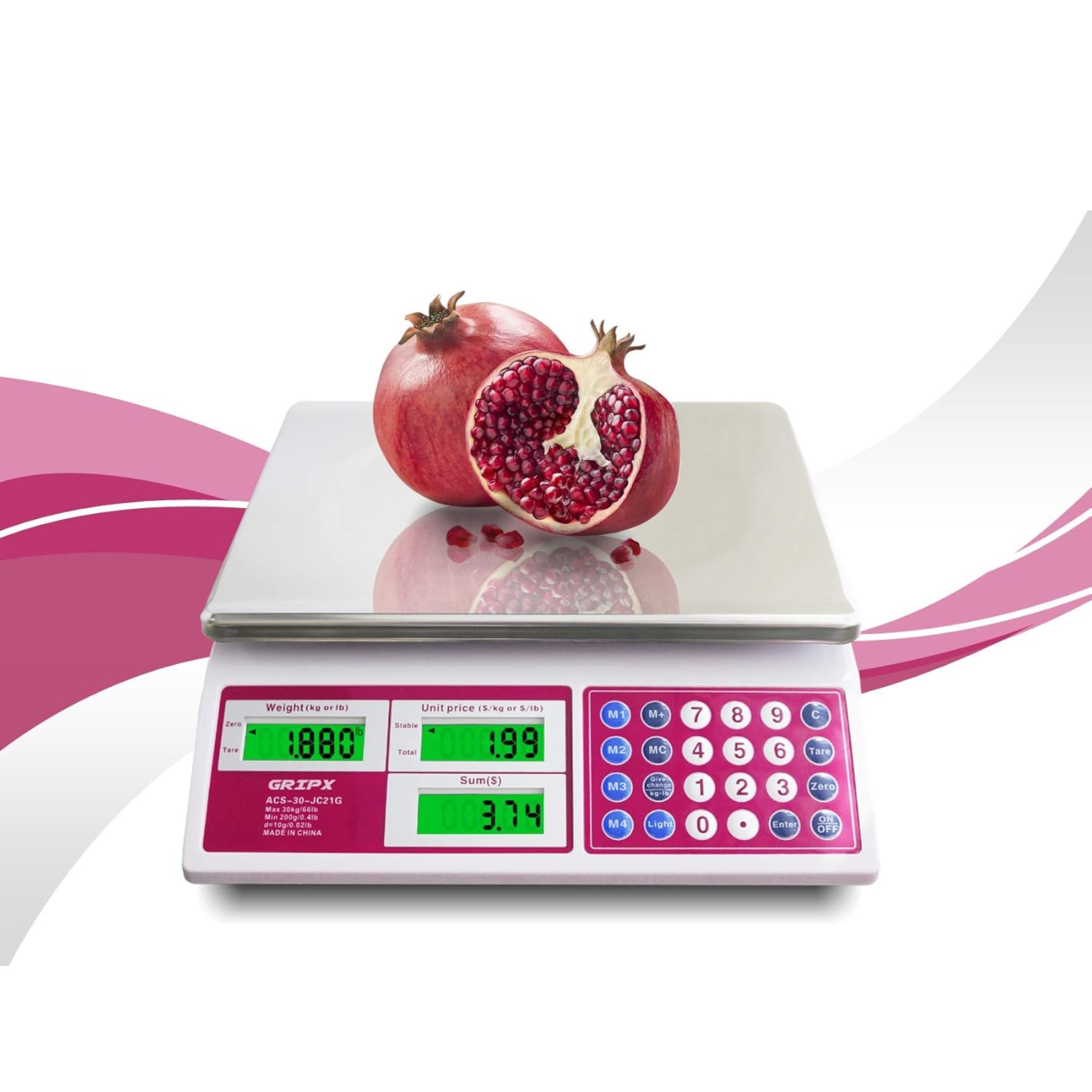
Image: Weighing a pomegranate on the scale.
Unit Price Input:
- With an item on the scale, use the numeric keypad (0-9) to enter the desired unit price (e.g., 1.99 for $1.99 per lb/kg).
- The scale will automatically calculate and display the total price based on the weight and entered unit price.
Memory Functions (M1-M4, MC, M+): These buttons allow you to store frequently used unit prices for quick recall. Refer to the keypad for specific memory locations (M1-M4) and functions (MC for Memory Clear, M+ for Memory Plus/Store).
Yksikön muunnos (kg/lb): Paina Kevyt button to toggle between kilograms (kg) and pounds (lb) display units.

Image: Display showing both kg and lb units.
Taustavalon ohjaus: The Kevyt button also controls the green backlight for the LCD display, enhancing visibility in various lighting conditions.
Huolto
Puhdistus: The stainless steel platform is easy to clean. Wipe it with a damp cloth and mild detergent. Avoid using abrasive cleaners, harsh chemicals, or immersing the scale in water, as this can damage electronic components.
Akun vaihto: When the low power indicator ('Lo') appears on the display, replace all three D-size batteries promptly to ensure continued accurate operation.
Varastointi: Store the scale in a dry, cool environment away from direct sunlight and extreme temperatures.
Vianetsintä
Ei näyttöä / Vaaka ei käynnisty:
- Ensure the rocker power switch on the underside is in the 'ON' position.
- Check that the D-size batteries are correctly installed with proper polarity.
- Replace batteries if they are depleted.
'Lo' Indicator: This indicates low battery power. Replace the D-size batteries.
'O-Ld' Indicator: This indicates the scale is overloaded. Remove items exceeding the maximum capacity of 66 lbs (30 kg).
Epätarkkoja lukemia:
- Varmista, että vaaka on tasaisella, vakaalla ja vaakasuoralla alustalla.
- Check for any obstructions under or around the weighing platform.
- Paina Nolla button before weighing.
- Vältä vaa'an sijoittamista voimakkaiden sähkömagneettisten kenttien tai tärisevien laitteiden lähelle.
Important Note on Usage: This GRIPX Digital Commercial Price Scale is intended for general purpose weighing. It is not NTEP certified and therefore cannot be legally used for commercial trade transactions where certified scales are required (e.g., selling goods by weight at a farmers market or retail store). Use for personal or non-trade commercial applications only.
Tekniset tiedot
| Merkki | GRIPX |
| Mallinumero | ACS-30-JC21G-UK |
| Kapasiteetti | 66 lbs (30 kg) |
| Division | 0.1 lbs (50 g) |
| Alustan materiaali | Ruostumaton teräs |
| Näytön tyyppi | Green Backlight LCD (Operator and Customer) |
| Virtalähde | 3 x 1.5V D-size batteries (AC adapter port available, adapter not included) |
| Arvioidut mitat (P x L x K) | 13.2 x 11.8 x 4.3 tuumaa (33.5 cm x 30 cm x 11 cm) |

Image: Scale dimensions.
Takuu ja tuki
For product support, troubleshooting assistance, or warranty inquiries, please contact the retailer or manufacturer directly. Information regarding optional protection plans may be available from your point of purchase.