
Johdanto
Thank you for choosing the Baseus Super Energy Pro 1600A Car Jump Starter. This device is designed to provide a reliable and powerful solution for starting vehicles with dead batteries, and also functions as a portable power bank. Please read this manual thoroughly before use to ensure safe and proper operation. Keep this manual for future reference.
Turvallisuustiedot
- Always read the vehicle's owner's manual before attempting to jump start it.
- Älä yritä käynnistää jäätynyttä akkua.
- Varmista riittävä ilmanvaihto laitetta käytettäessä.
- Pidä laite poissa lasten ja lemmikkien ulottuvilta.
- Älä altista laitetta sateelle tai äärimmäisille lämpötiloille.
- Vältä hyppyjohtimen oikosulkua.amps. Do not connect the red and black clamps yhdessä.
- If the device or cables are damaged, do not use them. Contact support.
- Liitä aina johtoamps oikeisiin akun napoihin (punainen positiiviseen, musta negatiiviseen).
- Remove the jump starter immediately after the vehicle starts.
Pakkauksen sisältö
Varmista, että pakkauksessasi on kaikki tarvittavat osat:
- Baseus Super Energy Pro Car Jump Starter Unit
- Älykkäät käynnistyskaapelit Cl:lläamps
- USB-C latauskaapeli
- Käyttöopas (tämä asiakirja)
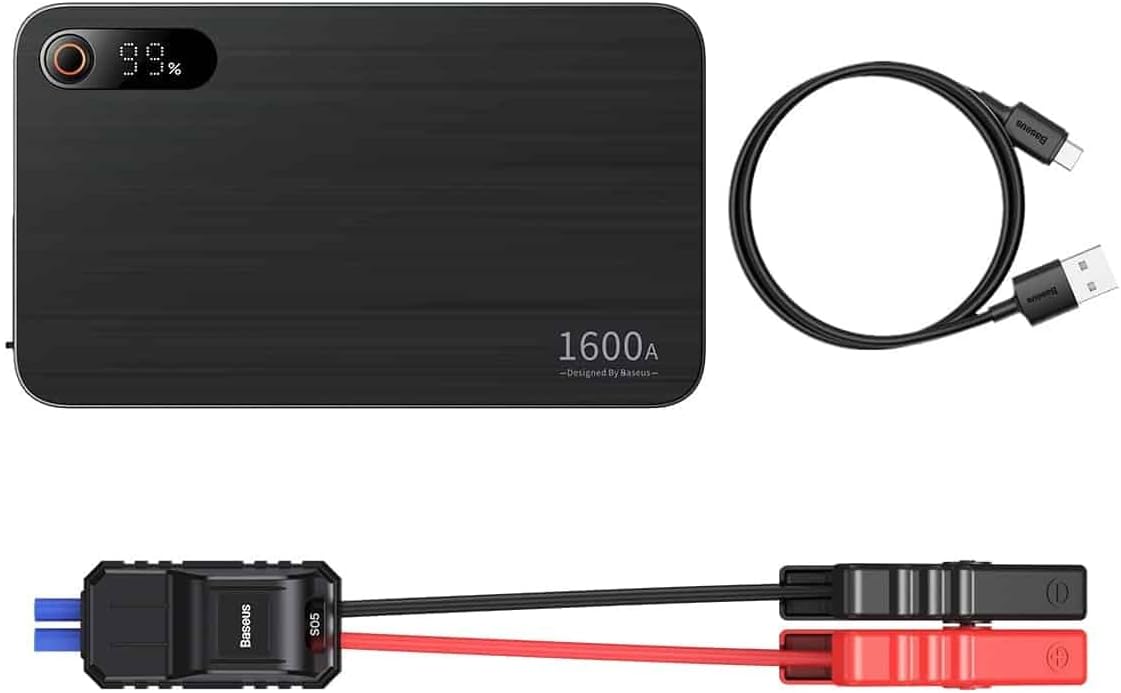
Image: Contents of the Baseus Super Energy Pro Car Jump Starter package, showing the main unit, smart jumper cables, and a USB-C charging cable.
Tuote loppuview
Familiarize yourself with the components of your Baseus Super Energy Pro Car Jump Starter:
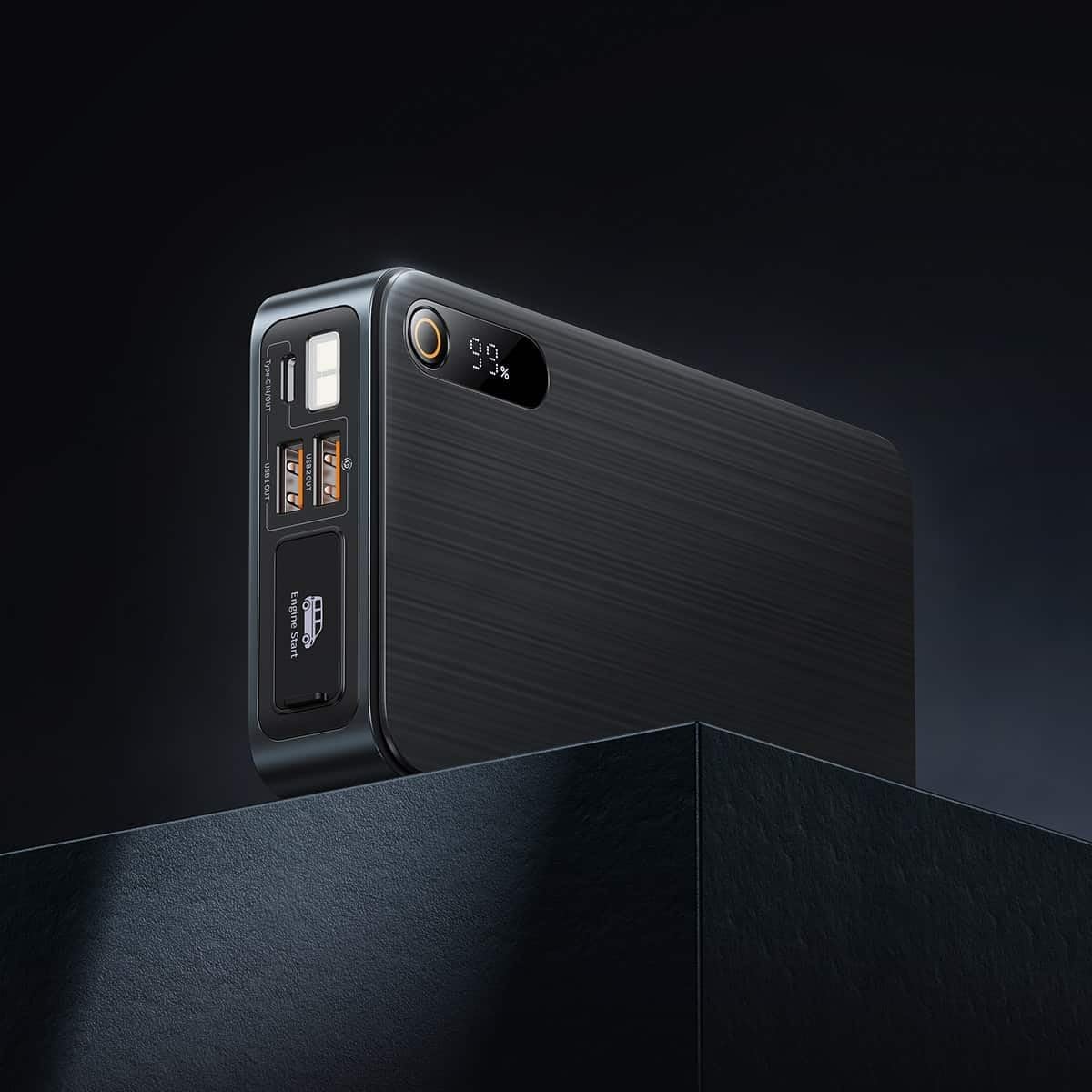
Image: Close-up of the jump starter's side panel, highlighting the various ports and the digital display.
- Digitaalinen näyttö: Näyttää jäljellä olevan akun prosentintage.
- Virtapainike: Activates the device and turns on the LED light.
- USB-A-lähtöportit: For charging external devices like smartphones or tablets.
- C-tyypin tulo-/lähtöportti: Used for charging the jump starter itself or charging other devices.
- Moottorin käynnistysportti: Erillinen portti älykkäiden käynnistyskaapeleiden kytkemistä varten.
- LED-taskulamppu: Tarjoaa valaistuksen pimeässä ympäristössä.

Image: The Baseus Super Energy Pro Car Jump Starter unit, displaying its digital battery indicator.
Laitteen lataaminen
Before first use, fully charge the Baseus Super Energy Pro Car Jump Starter. It is recommended to keep the device charged above 50% for optimal performance and longevity.
- Connect the provided USB-C charging cable to the Type-C port on the jump starter.
- Connect the other end of the USB-C cable to a suitable USB power adapter (not included).
- The digital display will show the charging progress. The device is fully charged when the display shows 100%.
Setup for Jump Starting
Ensure your vehicle is in Park (P) or Neutral (N) and the parking brake is engaged. Turn off all vehicle accessories (headlights, radio, air conditioning).
- Varmista, että apukäynnistyslaitteessa on riittävästi virtaa (vähintään 50 %).
- Connect the blue end of the smart jumper cables into the Engine Start port on the jump starter. Ensure it is firmly seated.
Käyttöohjeet (apukäynnistys)
Noudata näitä ohjeita huolellisesti käynnistääksesi ajoneuvosi apukaapeleilla:
- Liitä punainen Clamp: Kiinnitä punainen (+) clamp of the jumper cables to the positive (+) terminal of your vehicle's dead battery.
- Liitä musta Clamp: Kiinnitä musta (-) clamp of the jumper cables to the negative (-) terminal of your vehicle's dead battery.
- Tarkista ilmaisin: Observe the indicator light on the smart jumper cable. A solid green light indicates a correct connection and that the device is ready to start. If it's red or flashing, check connections or refer to troubleshooting.
- Käynnistä ajoneuvo: Once the indicator is green, start your vehicle's engine.
- Irrota käynnistyskaapelit: As soon as the engine starts, immediately remove the blue plug of the jumper cables from the jump starter.
- Irrota Clamps: Irrota sitten musta (-) napaamp ajoneuvon akusta, jota seuraa punainen (+) -merkkivaloamp.
Allow your vehicle's engine to run for at least 20-30 minutes to recharge its battery.
Huolto
- Varastointi: Store the jump starter in a cool, dry place, away from direct sunlight and moisture.
- Lataus: For optimal battery life, recharge the device every 3-6 months, even if not in use.
- Puhdistus: Puhdista laite pehmeällä, kuivalla liinalla. Älä käytä voimakkaita kemikaaleja tai hankaavia materiaaleja.
- Akun hävittäminen: Do not dispose of the device in household waste. Follow local regulations for proper disposal of lithium-ion batteries.
Vianetsintä
| Ongelma | Mahdollinen syy | Ratkaisu |
|---|---|---|
| Ajoneuvo ei käynnisty | Apukäynnistysakun varaus on heikko. Väärä kaapeliliitäntä. Auton akku on pahasti vaurioitunut. | Lataa käynnistin uudelleen. Tarkista clamp connections to battery terminals. Ota yhteyttä ammattitaitoiseen mekaanikkoon. |
| Apukäynnistin ei lataudu | Latauskaapeli tai -sovitin viallinen. Type-C port damaged. | Kokeile toista USB-C-kaapelia ja virtalähdettä. Ota yhteyttä asiakastukeen. |
| Smart cable indicator is red/flashing | Käänteinen napaisuus. Oikosulku havaittu. Ylivirta/ylivoltage. | Irrota ja kytke uudelleen clamps correctly (red to +, black to -). Varmista, että clampeivät kosketa toisiaan. Disconnect and try again after a few minutes. If problem persists, contact support. |
Tekniset tiedot
| Ominaisuus | Yksityiskohta |
|---|---|
| Merkki | Baseus |
| Mallinumero | CGNL070001 |
| Huippuvirta | 1600 A |
| Akun koostumus | Litium-ioni |
| Ajoneuvopalvelun tyyppi | Auto |
| Tuotteen mitat (P x L x K) | 10 x 5 x 1.27 cm |
| Tuotteen paino | 920 g |
| Tulo/lähtö | USB-A Output, Type-C Input/Output |
Takuu ja tuki
For warranty information or technical support, please refer to the warranty card included with your product or contact the retailer where you purchased the device. You may also visit the official Baseus websivustolta lisätietoja ja yhteystietoja varten.