
1. Johdanto
Kiitos ostoksestasiasing the LFF LDR113-EU Kitchen Radio. This manual provides essential information for the safe and efficient operation of your device. Please read it thoroughly before use and retain it for future reference.
The LFF LDR113-EU is a versatile kitchen radio featuring DAB+, FM, and Bluetooth connectivity. It includes dual alarms, a sleep timer, and 60 station presets, designed for both tabletop use and under-cabinet mounting.
2. Turvallisuustiedot
- Virtalähde: Käytä ainoastaan laitteen mukana toimitettua virtalähdettä. Varmista, että äänenvoimakkuus ontage vastaa paikallista virtalähdettäsi.
- Vesi ja kosteus: Do not expose the device to water, rain, or excessive moisture. Avoid placing liquids near the radio.
- Ilmanvaihto: Varmista laitteen ympärillä oleva riittävä ilmanvaihto. Älä tuki tuuletusaukkoja.
- Lämpö: Pidä laite poissa lämmönlähteistä, kuten pattereista, lämmitysvastuksista, liesistä tai muista lämpöä tuottavista laitteista.
- Puhdistus: Irrota virtajohto pistorasiasta ennen puhdistamista. Käytä pehmeää, kuivaa liinaa. Älä käytä nestemäisiä puhdistusaineita tai aerosolipuhdistusaineita.
- Huolto: Älä yritä huoltaa tätä tuotetta itse. Anna kaikki huoltotoimenpiteet pätevän huoltohenkilöstön tehtäväksi.
- Sijoitus: Place the radio on a stable, level surface or mount it securely according to the instructions.
3. Pakkauksen sisältö
Tarkista, että pakkauksessa on kaikki tarvittavat osat:
- LFF LDR113-EU Kitchen Radio
- Virtalähde
- Mounting Kit (screws, spacers, mounting template)
- Käyttöopas (tämä asiakirja)
4. Tuote ohiview
Tutustu radion osiin ja säätimiin.

Kuva 4.1: Edessä view of the LFF LDR113-EU Kitchen Radio, showing the LCD display on the left, control buttons in the center, and a large rotary knob on the right. The buttons include power, mode, menu, info, preset, timer/sleep, and navigation arrows. The rotary knob is for volume and selection.

Kuva 4.2: Diagram illustrating the key features of the LFF Kitchen Radio, including DAB/DAB+ radio, FM radio, two alarms, sleep timer, Bluetooth connectivity, and 60 station presets.
4.1. Ohjaimet ja näyttö
- LCD värinäyttö: Shows current mode, station information, time, and settings.
- Virtapainike: Kytkee radion päälle/pois.
- Tilapainike: Switches between DAB+, FM, and Bluetooth modes.
- Valikko/Tiedot-painike: Accesses menu options or displays station information.
- Esiasetuspainikkeet (1–5): Quick access to saved stations.
- Ajastin/unipainike: Asettaa uniajastimen tai herätystoiminnot.
- Navigointipainikkeet (ylös/alas/vasemmalle/oikealle): Navigates through menus and station lists.
- Pyöritettävä nuppi (Äänenvoimakkuus/Enter): Adjusts volume, scrolls through options, and confirms selections.
5. Asennus
5.1. Virtaliitäntä
- Connect the power adapter to the DC IN port on the back of the radio.
- Liitä verkkolaite pistorasiaan.
- Radio käynnistyy tai siirtyy valmiustilaan.
5.2. Initial Scan (DAB+ and FM)
Upon first power-on, the radio will typically perform an automatic scan for DAB+ and FM stations. If not, follow these steps:
- Paina tila -painiketta valitaksesi DAB+- tai FM-tilan.
- For DAB+, the radio will usually initiate a full scan automatically. If not, navigate to the 'Full Scan' option in the DAB+ menu and press the rotary knob to confirm.
- For FM, navigate to the 'Auto Scan' option in the FM menu and press the rotary knob to confirm.
- The radio will search for available stations and store them.

Kuva 5.1: The LFF Kitchen Radio's LCD color screen displaying the main menu with icons for Digital Radio (DAB+), FM Radio, and Bluetooth, indicating available modes.
6. Käyttöohjeet
6.1. Virta päälle/pois
Paina Tehoa button to turn the radio on or off (standby mode).
6.2. Tilan valinta
Paina tila -painiketta toistuvasti selataksesi DAB+-, FM- ja Bluetooth-tilojen välillä.
6.3. DAB+-radion käyttö
- In DAB+ mode, use the Ylös/alas navigation buttons or the rotary knob to browse available stations.
- Valitse asema painamalla pyörivää nuppia.
- Paina Valikko/Tiedot to view aseman tiedot (esim. ohjelmatyyppi, signaalin voimakkuus).
6.4. FM-radion käyttö
- Käytä FM-tilassa Ylös/alas navigation buttons to tune to stations manually.
- Paina ja pidä painettuna Ylös/alas buttons for automatic station seeking.
- Paina Valikko/Tiedot to view aseman tiedot.
6.5. Bluetooth-yhteys
Connect your smartphone or other Bluetooth-enabled device to the radio.
- Paina tila button to select Bluetooth mode. The display will show 'Bluetooth Pairing'.
- Ota Bluetooth käyttöön mobiililaitteellasi ja etsi käytettävissä olevia laitteita.
- Select 'LFF LDR113-EU' from the list of devices.
- Once connected, the radio display will show 'Bluetooth Connected'. You can now play audio from your device through the radio.
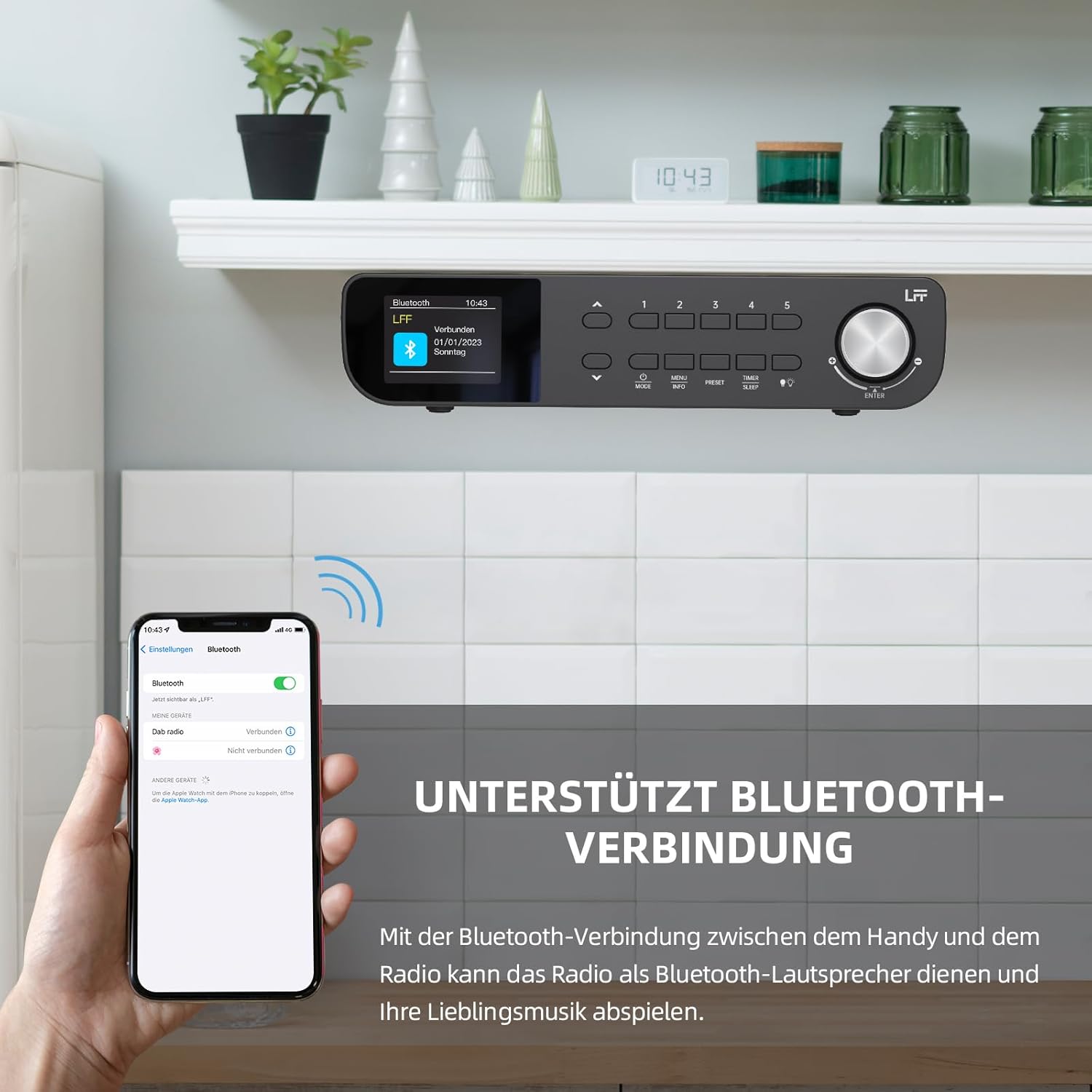
Kuva 6.1: The LFF Kitchen Radio displaying a successful Bluetooth connection, with a smartphone screen showing the radio as a connected device.

Kuva 6.2: Lähikuva view of the radio's display indicating 'LFF' and 'Connected' under the Bluetooth menu, confirming a successful pairing.
6.6. Hälytysten asettaminen
Radiossa on kaksi erillistä herätyskelloa.
- Paina Ajastin/lepotila button repeatedly until 'Alarm 1' or 'Alarm 2' appears.
- Use the navigation buttons and rotary knob to set the alarm time, source (DAB+, FM, or Buzzer), and frequency (daily, weekdays, weekends, once).
- Confirm settings by pressing the rotary knob.

Kuva 6.3: Close-up of the radio's display showing the current time and options to activate or deactivate Alarm 1 and Alarm 2.
6.7. Uniajastin
Uniajastin mahdollistaa radion automaattisen sammumisen asetetun ajan kuluttua.
- Paina Ajastin/lepotila button repeatedly until 'Sleep Timer' appears.
- Use the navigation buttons or rotary knob to select the desired sleep duration (e.g., 15, 30, 60 minutes).
- Vahvista painamalla kiertonuppia.

Kuva 6.4: Close-up of the radio's display showing the 'Sleep Timer' setting, with an option to set the duration, for example, to 30 minutes.
6.8. Esiasetukset
Save up to 60 favorite stations for quick access.
- Esiasetuksen tallentaminen: Viritä halutulle asemalle. Pidä painettuna jotakin Esiasetus (1–5) buttons until 'Preset Saved' appears. For additional presets, use the 'Preset Store' option in the menu.
- Esiasetuksen palauttaminen: Paina lyhyesti jotakin Esiasetus (1–5) buttons. For other presets, navigate to 'Preset Recall' in the menu.
6.9. LED-valo
The radio includes an integrated LED light, useful for illuminating the area below if mounted under a cabinet.
- Paina Kevyt button (if available, or navigate through menu) to turn the LED light on or off.

Kuva 6.5: The LFF Kitchen Radio mounted under a kitchen cabinet, with its integrated LED light providing illumination to the countertop below.
6.10. Näytön kirkkaus
Adjust the display backlight brightness to suit your environment.
- Access the 'Display' or 'Settings' menu.
- Select 'Brightness' and choose from High, Medium, or Low settings.

Kuva 6.6: A visual comparison of the LFF Kitchen Radio's display at three different backlight brightness levels: High, Medium, and Low, demonstrating the adjustable visibility.
7. Asennusohjeet
The LFF LDR113-EU Kitchen Radio offers flexible placement options: tabletop or under-cabinet mounting.
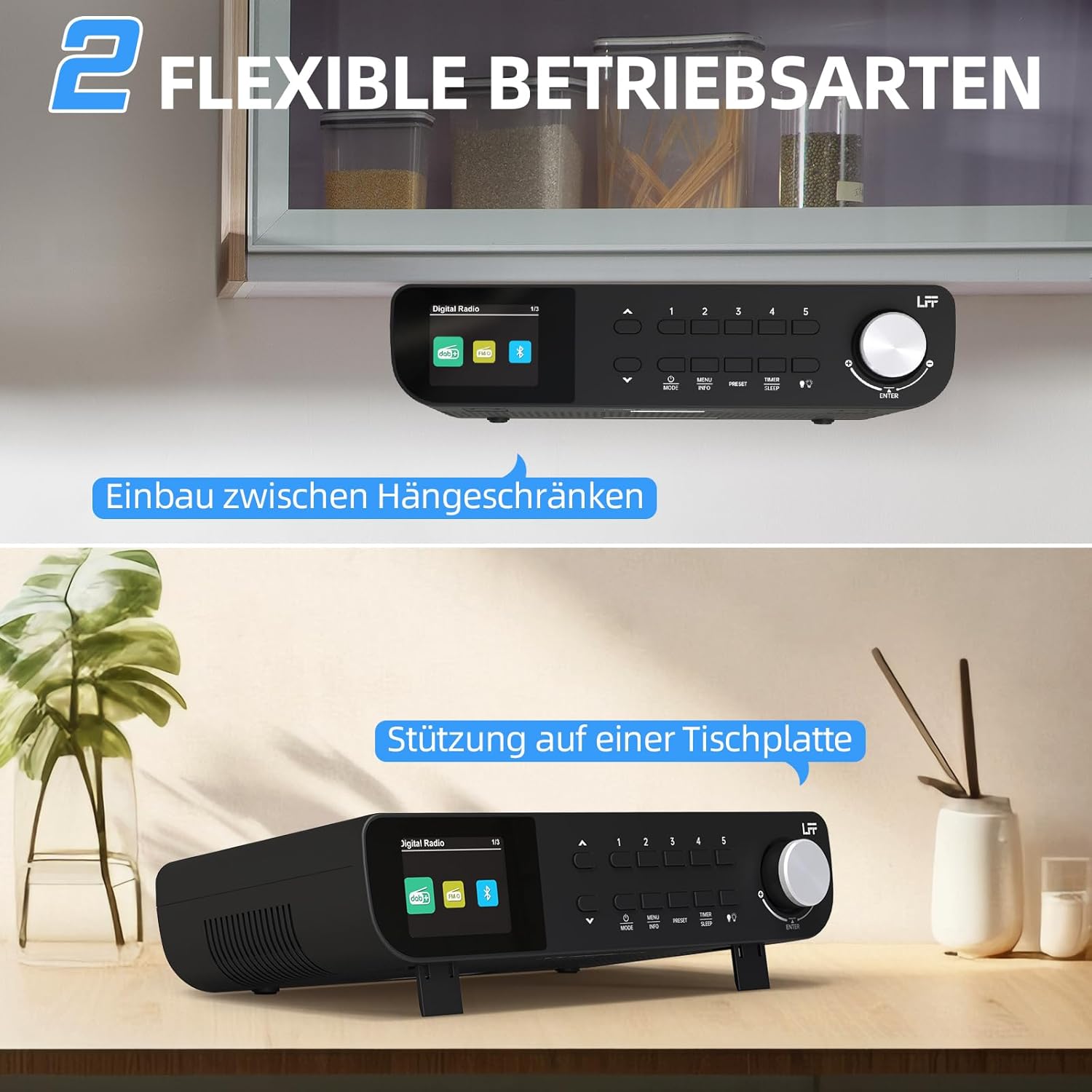
Kuva 7.1: The LFF Kitchen Radio displayed in two common installation scenarios: mounted underneath a kitchen cabinet and placed freestanding on a tabletop.
7.1. Pöytäsijoitus
Simply place the radio on a stable, flat surface. Ensure it is not near the edge to prevent accidental falls.
7.2. Under-Cabinet Mounting
For under-cabinet installation, use the provided mounting kit.
- Valmistele sijainti: Choose a suitable location under a kitchen cabinet, ensuring there is enough space and access to a power outlet.
- Merkitse porausreiät: Use the provided mounting template to mark the drill holes on the underside of the cabinet.
- Poraa ohjausreiät: Poraa ohjausreiät merkittyihin kohtiin.
- Attach Mounting Plate (if applicable): Some models may include a separate mounting plate. Attach this to the cabinet using the screws.
- Radion kiinnittäminen: Align the radio with the mounting holes or plate and secure it using the provided screws. Ensure it is firmly attached.
- Liitä virta: Kytke virtalähde.

Kuva 7.2: Detailed diagram showing the steps for under-cabinet mounting, including measuring distances (e.g., 58mm) and securing the radio with screws.
8. Huolto
- Puhdistus: To clean the radio, disconnect it from the power supply. Use a soft, dry, lint-free cloth. Do not use abrasive cleaners, waxes, or solvents.
- Antenni: Ensure the antenna is extended for optimal reception in DAB+ and FM modes. Handle it gently to avoid damage.
- Varastointi: Jos radiota säilytetään pitkään, irrota se virtalähteestä ja säilytä sitä viileässä ja kuivassa paikassa.
9. Vianmääritys
| Ongelma | Mahdollinen syy | Ratkaisu |
|---|---|---|
| Ei virtaa | Virtasovitin ei ole kytketty tai pistorasia on viallinen. | Tarkista virtaliitäntä. Kokeile toista pistorasiaa. |
| Huono DAB+/FM-vastaanotto | Antennia ei ole vedetty ulos, signaali on heikko tai häiriöitä on. | Fully extend the antenna. Reposition the radio. Perform a full scan. |
| Bluetooth ei muodosta yhteyttä | Radio not in pairing mode, device too far, or already connected to another device. | Ensure radio is in Bluetooth mode. Move device closer. Disconnect from other devices. |
| Ei ääntä | Volume too low, mute activated, or incorrect mode. | Increase volume. Check if mute is active. Ensure correct mode (DAB+, FM, Bluetooth). |
| Näyttö ei toimi | Brightness too low or device malfunction. | Adjust display brightness. If problem persists, contact support. |
10. Tekniset tiedot

Kuva 10.1: Diagram showing the dimensions of the LFF Kitchen Radio: 250mm length, 146mm width, and 55mm height.
| Ominaisuus | Yksityiskohta |
|---|---|
| Merkki | LFF:n laajennus |
| Mallinumero | LDR113-EU |
| Väri | Musta |
| Yhteydet | Bluetooth |
| Viritystekniikka | DAB Plus, FM |
| Virtalähde | Sähkökaapeli |
| Taajuus | 108 MHz (FM-enintään) |
| Mitat (P x L x K) | 250mm x 146mm x 55mm |
| Esiasetukset | 60 |
| Näyttö | LCD-värinäyttö |
| Erikoisominaisuudet | Dual Alarms, Sleep Timer, Under-cabinet mounting option, LED Light |
11. Takuu ja tuki
This product comes with a standard manufacturer's warranty. Please refer to the warranty card included in your package for specific terms and conditions. For technical support, troubleshooting assistance, or warranty claims, please contact your retailer or the LFF customer service department.