
1. Johdanto
The Cooler Master Synk X is an ergonomic real-time tactile immersion chair designed to enhance your entertainment experience. It converts sound waves into vibrations, providing tactile feedback for games, movies, and music. This manual provides essential information for the safe and efficient use of your Synk X chair.

Figure 1.1: Cooler Master Synk X Immersive Chair
2. Turvallisuustiedot
Please read all safety instructions carefully before using the Synk X chair. Failure to follow these instructions may result in injury or damage to the product.
- Painorajoitus: This product has a maximum weight recommendation of 275 pounds (125 kg). Exceeding this limit could result in damage to the chair or pose a risk of injury.
- Virtalähde: Käytä lataamiseen ainoastaan mukana toimitettua virtalähdettä.
- Sijoitus: Ensure the chair is placed on a stable, level surface. Avoid placing it near heat sources or in direct sunlight.
- Puhdistus: Refer to the maintenance section for proper cleaning procedures. Do not use abrasive cleaners or immerse electrical components in water.
- Lapset: Keep children and pets away from the chair during operation and assembly.
- Muutokset: Do not attempt to modify or disassemble the chair. Unauthorized modifications may void the warranty and pose safety risks.
3. Pakkauksen sisältö
Varmista, että pakkauksessasi on kaikki alla luetellut tuotteet:
- Synk X Chair (Seat and Backrest)
- Tuolin tukikohta
- Kaasunnostin sylinteri
- 5 pyörää
- Rinnetyyny
- Käsinojat (2)
- Virtalähde
- Bluetooth Transceiver (optional accessory)
- Auxiliary Cables
- Tarvikesarja (ruuvit, aluslevyt, kuusiokoloavain)
- Käyttöopas
Video 3.1: Laatikon avaaminen ja siitä eteenpäinview mukana tulevista komponenteista.
4. Asennus
Follow these steps to assemble your Cooler Master Synk X chair:
- Kiinnitä pyörät alustaan: Insert each of the five caster wheels into the openings at the ends of the chair base until they click securely into place.
- Aseta kaasunostin: Aseta kaasunostimen sylinteri tuolin jalustan keskireikään.
- Kiinnitä käsinojat: Secure the armrests to the underside of the seat using the provided screws from the hardware kit. Ensure they are firmly attached.
- Yhdistä istuin kaasujousitukseen: Carefully align the central mechanism on the underside of the seat with the top of the gas lift cylinder and press down firmly until the seat is securely seated.
- Kiinnitä selkänoja: Connect the backrest to the seat assembly using the remaining screws. Ensure all connections are tight.
- Kytke kaapelit: Locate the internal cables for the haptic system and RGB lighting. Connect them according to the diagrams in the included user manual.
- Kiinnitä lannetyyny: Position the lumbar pillow on the backrest for ergonomic support.
Video 4.1: Visual guide for chair assembly.

Figure 4.1: Fully assembled Cooler Master Synk X chair.
5. Käyttöohjeet
The Synk X chair features an intuitive control panel for managing its functions.
5.1 Ohjauspaneeli ohiview

Kuva 5.1: Yksityiskohtainen view ohjauspaneelista.
- DC 19 V IN: Power input for charging the chair's internal battery. A full charge takes approximately 6 hours and provides 4 hours of battery life.
- Akun tilan ilmaisimet: LEDs display the current battery charge level.
- AUX IN: 3.5mm auxiliary input for wired audio sources.
- Pariliitospainike: Initiates Bluetooth pairing mode for wireless audio connections.
- Valitse painike: Cycles through different audio input modes (AUX, Bluetooth, 5.8G).
- Kuulokeliitäntä: 3.5mm output for connecting wired headphones.
- Äänenvoimakkuuden säätimet: Adjust master volume and headphone volume.
- Vibration Level Knob: Controls the intensity of the tactile feedback.
- ARGB Button: Cycles through various RGB lighting modes and colors.
- Virtapainike: Turns the chair on or off.
Video 5.1: Demonstration of the control panel functions.
5.2 Tactile Immersion
The Synk X converts audio signals into real-time vibrations, providing a dynamic tactile experience. Adjust the 'Vibration Level' knob to customize the intensity.
Video 5.2: Demonstration of the chair's vibration mode with a bowl of water.
5.3 RGB-valaistus
The chair features customizable RGB lighting on the backrest. Press the 'ARGB' button on the control panel to cycle through various lighting effects and colors.

Figure 5.2: RGB lighting on the Synk X chair.
Video 5.3: Demonstration of RGB lighting modes.
5.4 Ergonomiset säädöt
The Synk X chair offers multiple adjustments for personalized comfort:
- Istuimen korkeus: Use the lever located under the seat to adjust the chair's height.
- Kallistuskulma: The backrest can recline up to 135 degrees. Use the recline lever to find your preferred angle.
- Retractable Leg Rest: Pull out the leg rest from under the seat for extended comfort.
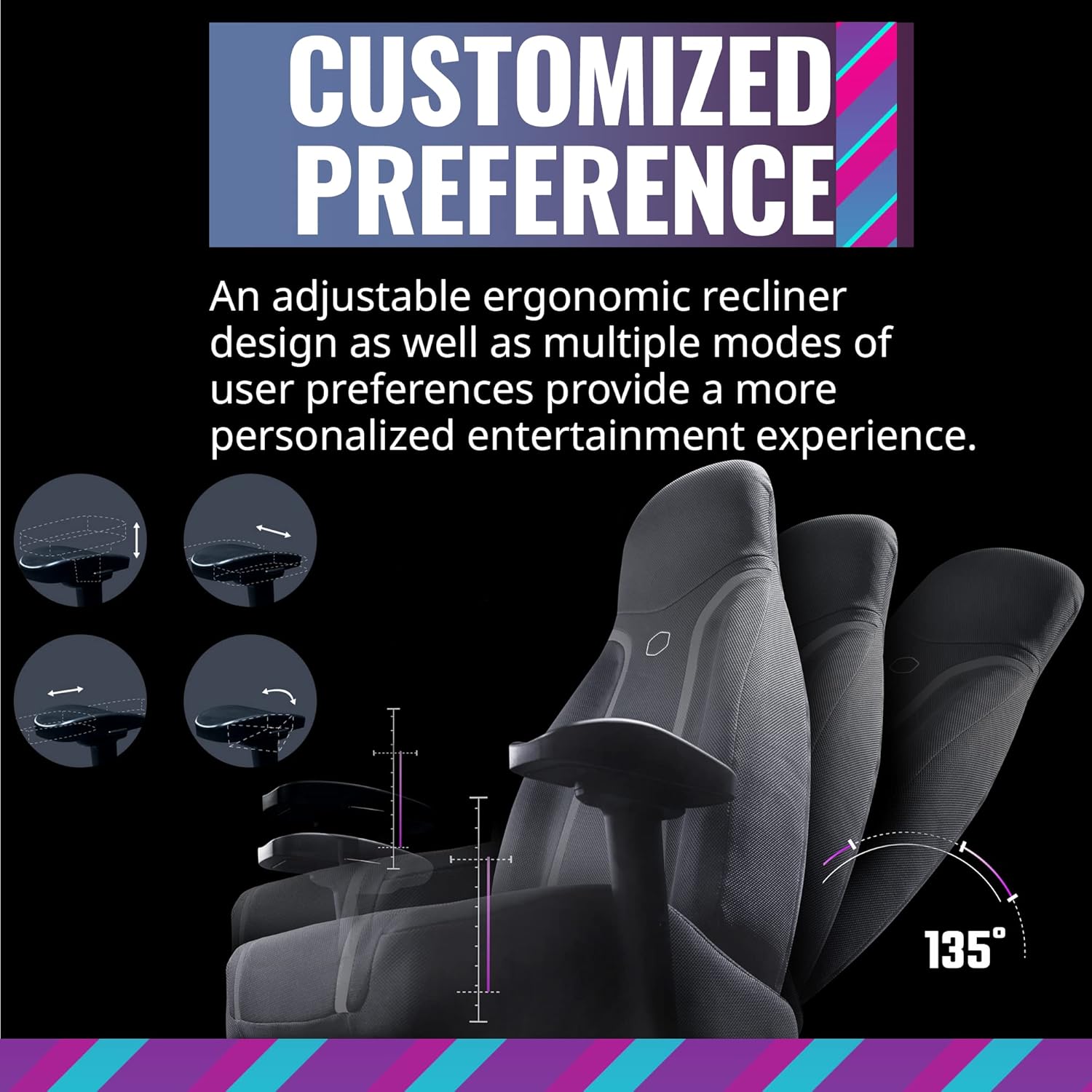
Figure 5.3: Ergonomic adjustments including recline and leg rest.
6. Huolto
Proper care will extend the life of your Synk X chair:
- Puhdistus: Pyyhi puhtaaksi mainoksellaamp kangas. Älä käytä voimakkaita kemikaaleja tai hankaavia materiaaleja.
- Roiskeet: Jos ainetta roiskuu, pyyhi alue välittömästi puhtaalla, kuivalla liinalla.
- Tuolin siirtäminen: When moving the chair, lift it rather than dragging it to prevent damage to the base and floor.
- Varastointi: Säilytä tuolia viileässä, kuivassa paikassa, poissa suorasta auringonvalosta ja äärimmäisistä lämpötiloista.
7. Vianmääritys
If you encounter issues with your Synk X chair, refer to the following common problems and solutions:
| Ongelma | Mahdollinen syy | Ratkaisu |
|---|---|---|
| No power/Chair not turning on | Battery is depleted; Power adapter not connected; Power button not pressed. | Connect the power adapter and charge the chair. Ensure the power button is pressed firmly. |
| No tactile feedback/vibration | Vibration level set too low; Audio source not connected or playing; Cables are loose. | Increase the vibration level using the knob. Verify the audio source is connected and playing. Check all internal cable connections. |
| Bluetooth-pariliitosongelmat | Chair not in pairing mode; Device too far; Interference. | Press the pairing button on the control panel. Ensure your device is within range. Reduce interference from other wireless devices. |
| RGB-valo ei toimi | Lighting off; Cable connection loose. | Press the ARGB button to cycle through modes. Check the RGB cable connection. |
| Tuoli tuntuu epävakaalta tai heiluvalta | Löysät ruuvit; Epätasainen lattia. | Tarkista ja kiristä kaikki kokoonpanoruuvit. Varmista, että tuoli on tasaisella ja vaakasuoralla alustalla. |
8. Tekniset tiedot
- Merkki: Viileämpi mestari
- Mallin nimi: Synk X
- Tuotteen mallinumero: IXC-SX1-I-US1
- Väri: Kuun harmaa
- Materiaali: Polykarbonaatti
- Tuotteen paino: 80.8 puntaa (36.74 kg)
- Tuotteen mitat (PxLxK): 22 x 26.25 x 37 tuumaa
- Enimmäispainon suositus: 275 puntaa (125 kg)
- Taustan tyyli: Avaa Takaisin
- Erikoisominaisuus: Ergonomic, Rolling, Tactile Immersion
- Suositellut käyttötavat: Pelaaminen
- Makuuasennon määrä: More than one (up to 135 degrees)
- Liitettävyys: Bluetooth, AUX, 5.8G (with optional transceiver)
- Akun kesto: Noin 4 tuntia täydellä latauksella
- Latausaika: Noin 6 tuntia
9. Takuu ja tuki
For warranty information and customer support, please refer to the official Cooler Master websivustolta tai ota yhteyttä heidän asiakaspalveluunsa. Säilytä ostokuitti ostotodistuksena takuuvaatimuksia varten.
Online-tuki: Visit the Cooler Master support page for FAQs, drivers, and contact options.
Yhteystiedot: Refer to the Cooler Master websivustolta alueelliset yhteystiedot.