
Johdanto
This manual provides essential information for the safe and efficient use of your ONN 42-Inch Full HD LED Smart TV, Model 100018254. Please read these instructions thoroughly before operating your television and retain them for future reference.
Mitä laatikossa on
Varmista, että kaikki osat ovat mukana ennen asennuksen jatkamista.
- ONN 42-Inch Full HD LED Smart TV
- Kaukosäädin
- TV-taso (2 kpl)
- TV-jalustan ruuvit
- Virtajohto
- Pikaopas (ei sisälly tähän käyttöoppaaseen)

Kuva: Edessä view of the ONN 42-inch Smart TV displaying the Roku TV home screen with various streaming app icons like Netflix, Disney+, Apple TV, Hulu, Peacock, and Roku Channel. The TV is black with slim bezels and two stand feet.
Asennus
1. TV-jalustan kiinnittäminen
- Aseta televisio varovasti näyttö alaspäin pehmeälle ja puhtaalle alustalle vaurioiden välttämiseksi.
- Kohdista jokainen jalustan osa television pohjassa oleviin vastaaviin ruuvinreikiin.
- Kiinnitä jokainen jalustan osa mukana toimitetuilla ruuveilla. Varmista, että ne on kiristetty tiukasti.

Image: A diagram illustrating the dimensions of the ONN 42-inch TV, showing its width as 43 inches and height as 37 inches when placed on its stand.
2. Seinäkiinnitys (valinnainen)
This TV is compatible with VESA standard wall mounts. Refer to your wall mount's instructions for proper installation. Ensure the wall mount can support the weight of the television.

Kuva: Takaosa view of the ONN 42-inch TV, highlighting the VESA mounting screw holes in a square pattern and various input ports on the side and bottom right.
3. Laitteiden liittäminen
Liitä ulkoiset laitteet, kuten kaapelivastaanottimet, pelikonsolit tai Blu-ray-soittimet, television tuloliitäntöihin.
- HDMI: For high-definition audio and video. Use an HDMI cable to connect devices like set-top boxes, game consoles, or streaming sticks.
- USB: USB-tallennuslaitteiden liittämiseen median toistamista varten files.
- Wi-Fi: For internet connectivity to access smart TV features and streaming services.
4. Ensimmäinen käynnistys ja asennustoiminto
- Kytke virtajohto televisioon ja sitten pistorasiaan.
- Paina kaukosäätimen tai itse television virtapainiketta.
- Follow the on-screen instructions to complete the initial setup, including language selection, network connection (Wi-Fi), channel scanning, and linking to your Roku account (if applicable).
Television käyttö
1. Kaukosäädinview
Kaukosäätimellä voit navigoida television käyttöliittymässä ja hallita erilaisia toimintoja.
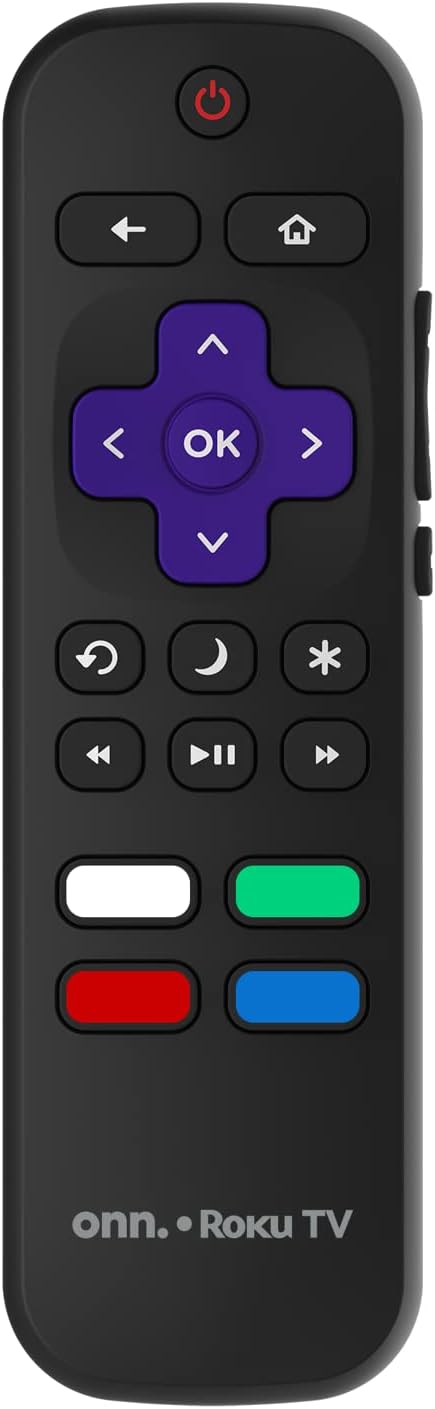
Image: The ONN Roku TV remote control, featuring a power button, directional pad, OK button, home button, back button, volume controls, and dedicated buttons for popular streaming services.
- Virtapainike: Kytkee television päälle tai pois päältä.
- Directional Pad (D-Pad) & OK: Navigoi valikoissa ja vahvistaa valinnat.
- Koti näppäin: Palaa Roku TV:n aloitusnäyttöön.
- Takaisin-painike: Palaa edelliseen näyttöön tai valikkoon.
- Äänenvoimakkuus ylös/alas: Säätää äänenvoimakkuutta.
- Mykistyspainike: Mykistää tai poistaa mykistyksen.
- Kanava ylös/alas: Changes channels (for antenna/cable inputs).
- Omistetut sovelluspainikkeet: Quick access to popular streaming services like Netflix, Hulu, etc.
2. Älytelevision ominaisuudet
Your ONN Smart TV provides access to a wide range of streaming content and smart functionalities.
- Suoratoistopalvelut: Access pre-installed apps like Netflix, YouTube, and many more through the Roku Channel Store.
- Ääniohjaus: Compatible with Alexa and Google Assistant for hands-free control (requires a separate compatible voice assistant device).
- Automaattiset ohjelmistopäivitykset: The TV will automatically update its software when connected to the internet, ensuring you have the latest features and security.
3. Tulon valinta
To switch between connected devices (e.g., cable box, game console), use the Syöte button on your remote or select the desired input from the Roku TV home screen.
4. Kuva- ja ääniasetukset
Access the TV's settings menu to customize picture and sound preferences. Navigate to Asetukset > TV-kuvan asetukset or Asetukset> Ääni to adjust options like brightness, contrast, color, sound mode, and equalizer settings.
Huolto
1. Näytön puhdistaminen
- Always turn off the TV and unplug it before cleaning.
- Käytä pehmeää, nukkaamatonta liinaa, joka on hieman kostutettuampvedellä tai erikoisnäytönpuhdistusaineella.
- Älä suihkuta puhdistusainetta suoraan näytölle. Levitä sitä ensin liinaan.
- Vältä hankaavien puhdistusaineiden, alkoholin, bentseenin tai ohentimien käyttöä, sillä ne voivat vahingoittaa näyttöä.
2. Ohjelmistopäivitykset
Ensure your TV is connected to the internet to receive automatic software updates. These updates improve performance, add features, and enhance security. You can manually check for updates in the Asetukset > Järjestelmä > Järjestelmäpäivitys valikosta.
Vianetsintä
Jos televisiossasi on ongelmia, katso seuraavia yleisiä ratkaisuja:
Ei Virtaa
- Tarkista, että virtajohto on kytketty kunnolla sekä televisioon että pistorasiaan.
- Varmista, että pistorasia toimii, kytkemällä siihen toinen laite.
- Kokeile painaa television virtapainiketta, äläkä pelkästään kaukosäätimen virtapainiketta.
Ei kuvaa / Vääristynyt kuva
- Varmista, että oikea tulolähde on valittu (esim. HDMI 1, HDMI 2).
- Tarkista kaikki television ja ulkoisten laitteiden väliset kaapeliliitännät.
- Kokeile eri HDMI-kaapelia, jos mahdollista.
- Adjust picture settings (brightness, contrast) in the TV menu.
Ei ääntä / Hiljainen ääni
- Check if the TV is muted or if the volume is turned down.
- Ensure external audio devices (soundbars, receivers) are properly connected and powered on.
- Tarkista ääniasetukset television valikosta.
Verkkoyhteysongelmat
- Verify your Wi-Fi router is powered on and functioning.
- Käynnistä reititin ja modeemi uudelleen.
- Siirry osoitteeseen Asetukset > Verkko > Tarkista yhteys on your TV to diagnose the issue.
- Varmista, että annat oikean Wi-Fi-salasanan.
Tekniset tiedot
| Ominaisuus | Yksityiskohta |
|---|---|
| Mallinumero | 100018254 |
| Näytön koko | 42 tuumaa |
| Näyttötekniikka | LED |
| Resoluutio | 1080p (Full HD) |
| Päivitystaajuus | 60 Hz |
| Yhteydet | USB, Wi-Fi |
| Tuetut Internet-palvelut | Netflix, YouTube (and others via Roku platform) |
| Valvontamenetelmä | Voice (via Alexa & Google Assistant compatible devices), Remote Control |
| Asennustyyppi | Seinäkiinnitys (VESA-yhteensopiva) |
| Väri | Musta |
| UPC | 671227025567 |

Image: Energy Guide label for Television Model 100018254, indicating an estimated yearly energy cost of $11 based on 12 cents per kWh and 5 hours use per day.
Takuu ja tuki
For warranty information and technical support, please refer to the documentation included with your purchase or visit the official ONN support websivusto. Säilytä ostokuitti takuuvaatimuksia varten.