
1. Johdanto
Thank you for choosing the Outwell Arctic Chill 50L Portable Refrigerator. This manual provides essential information for the safe and efficient operation, maintenance, and troubleshooting of your new appliance. Please read it thoroughly before first use and keep it for future reference.
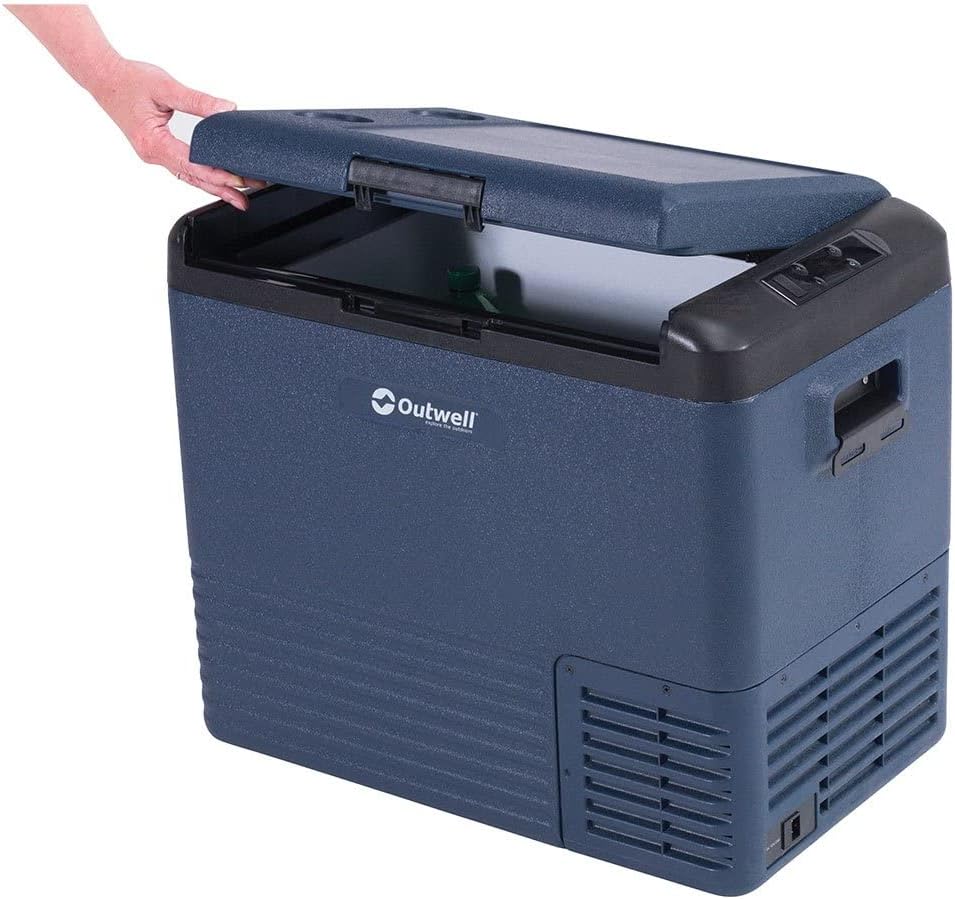
This image displays the Outwell Arctic Chill 50L portable refrigerator in a dark blue color, with its lid partially open, revealing the spacious interior suitable for storing food and beverages.
2. Turvallisuusohjeet
- Varmista virtalähteen voltage vastaa laitteen arvokilpeä.
- Do not operate the refrigerator if the power cord is damaged. Contact qualified service personnel.
- Pidä tuuletusaukot poissa esteistä.
- Älä käytä sähkölaitteita elintarvikkeiden säilytyslokeroiden sisällä, elleivät ne ole valmistajan suosittelemia.
- Vältä jääkaapin sijoittamista suoraan auringonvaloon tai lämmönlähteiden lähelle.
- Tätä laitetta ei ole tarkoitettu henkilöiden (mukaan lukien lapset) käytettäväksi, joilla on alentuneet fyysiset, sensoriset tai henkiset kyvyt tai joilla ei ole kokemusta ja tietoa, ellei heidän turvallisuudestaan vastaava henkilö ole valvonut tai opastanut laitteen käyttöä.
- Lapsia tulee valvoa sen varmistamiseksi, etteivät he leiki laitteella.
3. Pakkauksen sisältö
Tarkista, että kaikki osat ovat mukana ja hyvässä kunnossa:
- Outwell Arctic Chill 50L Portable Refrigerator Unit
- Verkkolaite (230 V)
- DC Power Cable (12V)
- Käyttöopas

This image illustrates the power accessories included with the refrigerator, featuring an AC adapter for household outlets and a 12V DC cable for vehicle power sources, ensuring versatile connectivity.
4. Asennus
4.1 Pakkauksesta purkaminen
- Remove all packaging materials and inspect the refrigerator for any damage.
- Puhdista sisältä ja ulkoa mainoksellaamp liinalla ennen ensimmäistä käyttöä.
- Place the refrigerator on a stable, level surface, ensuring adequate ventilation around all sides.
4.2 Virran kytkeminen
The Arctic Chill 50L can be powered by either 12V DC (car/vehicle) or 230V AC (household mains).
- For 12V DC: Connect the DC power cable to the refrigerator's DC input port and then to your vehicle's 12V socket.
- For 230V AC: Connect the AC power adapter to the refrigerator's AC input port, then plug the adapter into a standard 230V wall outlet.
Varmista, että virtaliitäntä on tukevasti kiinni ennen laitteen käynnistämistä.
5. Käyttöohjeet
5.1 Ohjauspaneeli ohiview

This close-up image highlights the digital control panel of the refrigerator, showing temperature display, battery indicator, and buttons for adjusting settings like ECO mode.
Ohjauspaneelissa on digitaalinen näyttö ja useita käyttöpainikkeita:
- Virtapainike: Kytkee laitteen päälle/pois.
- Lämpötilan säätöpainikkeet (+/-): Nostaa tai laskee tavoitelämpötilaa.
- Tilapainike: Cycles through cooling modes (e.g., ECO, MAX).
- Näyttö: Shows current temperature, battery level, and selected mode.
5.2 Lämpötilan asetus
- Käynnistä jääkaappi painamalla virtapainiketta.
- Use the '+' or '-' buttons to set your desired temperature. The display will show the target temperature briefly, then revert to the current internal temperature.
5.3 jäähdytystilaa
- MAX-tila: Tarjoaa maksimaalisen jäähdytystehon nopeaan lämpötilan alentamiseen.
- ECO-tila: Optimizes power consumption for energy efficiency, suitable for maintaining temperature over longer periods.
Press the Mode button to switch between available cooling modes.
5.4 Smartphone App Connectivity
The Outwell Arctic Chill 50L may feature Bluetooth connectivity, allowing you to control and monitor the refrigerator via a dedicated smartphone app.
- Download the 'Outwell Arctic Cooler' app from your device's app store.
- Varmista, että Bluetooth on käytössä älypuhelimellasi.
- Follow the in-app instructions to pair your refrigerator.

This image shows a user interacting with the Outwell Arctic Cooler mobile application on a smartphone, which allows for remote control and monitoring of the refrigerator's temperature and settings.
6. Huolto
6.1 Puhdistus
- Irrota aina virta ennen puhdistamista.
- Puhdista sisä- ja ulkopinnat mainoksellaamp liinalla ja miedolla pesuaineella.
- Älä käytä hankaavia puhdistusaineita tai vahvoja kemikaaleja.
- Varmista, että laite on täysin kuiva ennen virran kytkemistä uudelleen.
6.2 Varastointi
When not in use for extended periods, ensure the refrigerator is clean, dry, and stored in a well-ventilated area. Leave the lid slightly ajar to prevent odors and mildew.
7. Vianmääritys
| Ongelma | Mahdollinen syy | Ratkaisu |
|---|---|---|
| Jääkaappi ei käynnisty | No power supply; Damaged power cord; Blown fuse (vehicle) | Check power connection; Try a different outlet/socket; Inspect power cord; Check vehicle fuse. |
| Riittämätön jäähdytys | Ventilation blocked; Door not sealed properly; Ambient temperature too high; Overloaded with warm items | Clear vents; Ensure lid is closed tightly; Move to a cooler location; Allow time for cooling. |
| Epätavallinen melu | Laite ei ole vaakasuorassa; Tuuletin on estynyt | Place on a level surface; Check for debris near the fan. |
8. Tekniset tiedot
| Ominaisuus | Yksityiskohta |
|---|---|
| Merkki | Outwell |
| Mallin nimi | Arctic Chill 50L |
| Mallinumero | 590205 |
| Kapasiteetti | 50 litraa |
| Virransyöttö | 12V DC / 230V AC |
| Väri | Harmaa |
| Materiaali (ulkopinta) | Polyesteri |
| Eristysmateriaali | Polyvinyylikloridi |
| Tuotteen paino | 2.7 kiloa |
| Erikoisominaisuus | Helppo käyttää |
9. Takuu ja tuki
For warranty information and technical support, please refer to the warranty card included with your product or visit the official Outwell websivusto. Säilytä ostokuittisi mahdollisten takuuvaatimusten varalta.