
1. Johdanto
The UDIAG CR800 is a versatile 2-in-1 diagnostic tool designed for automotive enthusiasts and professionals. It combines a comprehensive OBD2 scanner with a 6V/12V battery tester, enabling users to diagnose vehicle issues, check engine light codes, monitor battery health, and perform various system tests. This manual provides detailed instructions for the proper use and maintenance of your CR800 device.

Image 1.1: The UDIAG CR800 device and its packaging, highlighting its dual functionality as an OBD2 scanner and battery tester.
2. Tärkeimmät ominaisuudet
- Full 10 OBDII Modes Supported: Read/erase fault codes, view freeze frame data, I/M readiness status (emissions), display live data stream by both text & graph, live data stream merge graph, O₂ sensor test, advanced on-board monitoring test, EVAP system test, retrieve vehicle information (VIN, CIN & CVN), etc.
- Laaja yhteensopivuus: Works on most vehicles sold in America/Europe/Asia with models produced after 1996, supporting almost all OBDII protocols - CAN (Controller Area Network), ISO14230-4 KWP200 (5BPS & FAST), ISO9141-2, J1850 PWM & VPW. Supports 8 languages.
- Three Popular Hot Keys Design: I/M Readiness Key for smog pre-inspection test, VIN Hotkey for quick protocol scan and VIN retrieval, and DTC Hotkey for immediate access to stored DTCs.
- Value-Added Battery Monitoring & Report Printing Function: Reaaliaikainen voltage display to monitor vehicle battery condition and support for diagnosis report printing via PC.
- Convenient and Comfortable Handheld Design: Unique patented non-slip shell design with a 2.8-inch TFT true color screen. Green-Yellow-Red Lights and built-in speakers indicate readiness status.
- Elinikäinen ilmainen päivitys: Software updates are free and easily performed via PC or laptop.

Kuva 2.1: ohiview of the advanced OBDII functions supported by the CR800, including reading codes, erasing codes, I/M readiness, and live data stream.

Image 2.2: Illustration of the three dedicated hotkeys (I/M, VIN, DTC) for quick and convenient operation.
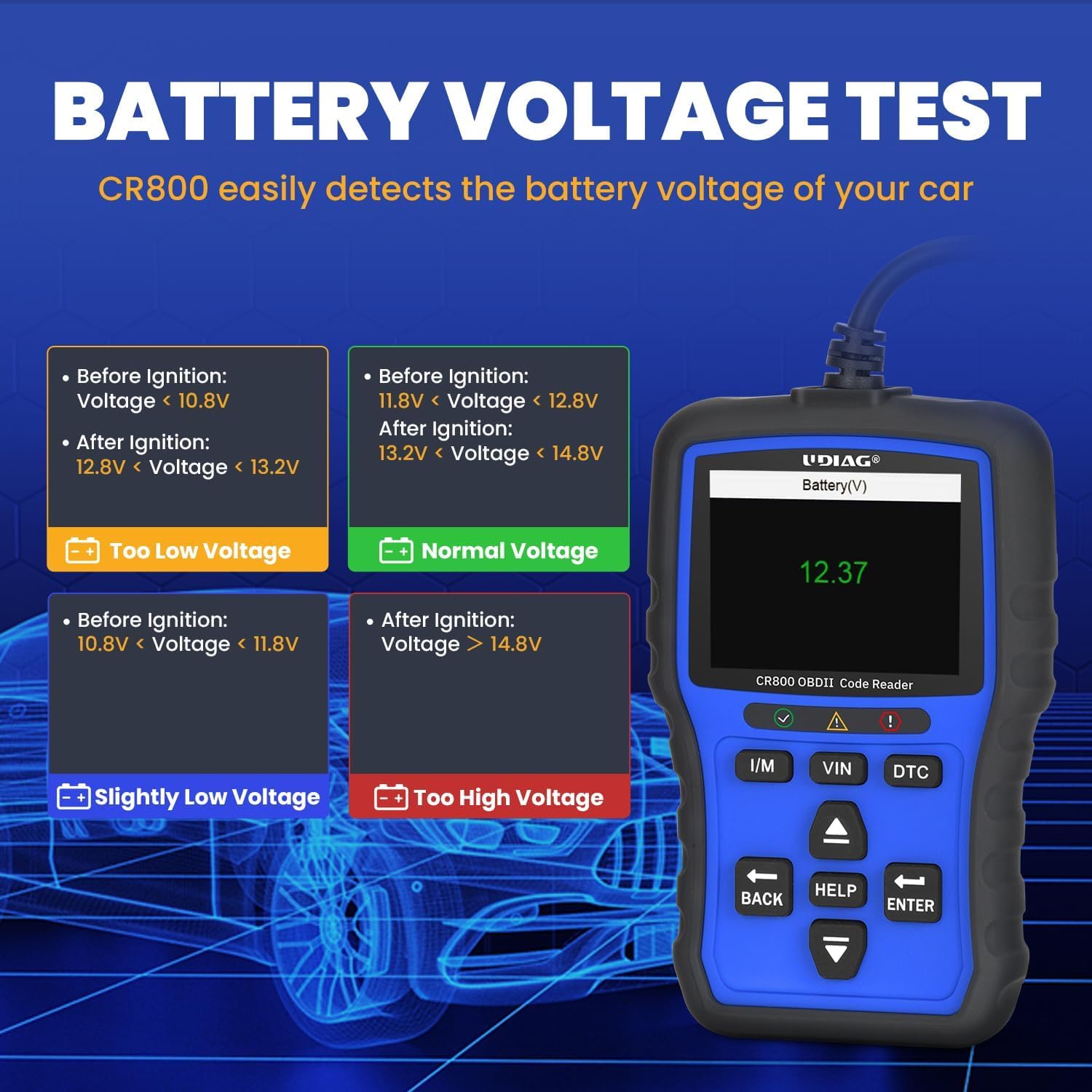
Image 2.3: Display showing the battery voltage test results and interpretation of different voltage tasot.

Image 2.4: A map illustrating the wide range of car brands from USA, Europe, and Asia supported by the CR800 scanner.
3. Asennus
3.1 Aloitusopas
Follow these steps to set up and begin using your UDIAG CR800:
- Yhdistä ajoneuvoon: Locate your vehicle's 16-pin OBDII Data Link Connector (DLC). This is typically found under the dashboard on the driver's side. Connect the CR800's OBDII cable to the vehicle's DLC.
- Virta päälle: The CR800 is powered directly from the vehicle's DLC, requiring no external battery. Once connected, ensure the vehicle's ignition is in the "ON" position (engine can be off). The device will automatically power on.
- Alustava tiedonanto: The device will automatically initiate communication with the vehicle's onboard computer. Allow a few moments for the connection to establish.

Image 3.1: The CR800 device with its 95cm cable, demonstrating its ample length for convenient connection to the vehicle's OBDII port.
4. Käyttöohjeet
4.1 OBDII Diagnostic Functions
The CR800 provides comprehensive OBDII diagnostic capabilities:
- Reading and Erasing-koodit:
Navigate to the "OBDII/EOBD" menu. Select "Read Codes" to display current, pending, and permanent Diagnostic Trouble Codes (DTCs). To clear codes, select "Erase Codes" and confirm the action when prompted. This will turn off the Check Engine Light (MIL) after the underlying repairs have been completed.

Image 4.1: The process of clearing a warning light using the CR800 after a problem has been resolved.
- Live-datavirta:
Valitse "Live-tiedot" view real-time parameters from the vehicle's sensors. Data can be displayed in text or graph format, allowing for detailed analysis of engine performance, sensor readings, and other critical information. The device supports merging graphs for comparative analysis.

Kuva 4.2: Esim.amples of live data stream and freeze frame data displays on the CR800, useful for pinpointing vehicle issues.
- I/M-valmiustila:
Use the dedicated "I/M" hotkey to quickly check the readiness status of emission-related monitors. Green indicates ready, yellow indicates pending, and red indicates not ready. This function is crucial for determining if the vehicle is ready for a smog test.

Image 4.3: The I/M Readiness key provides a quick and easy way to check emission monitor status for pre-inspection tests.
- VIN Hotkey:
Press the "VIN" hotkey for one-click retrieval of the vehicle's Vehicle Identification Number. This eliminates the need for manual navigation through menus.

Image 4.4: The VIN hotkey allows for quick retrieval of the vehicle's identification number.
- DTC-haku:
Use the "DTC" hotkey to access the built-in DTC library. Enter a code to view its definition, providing immediate insight into the nature of the fault without needing external resources.

Image 4.5: The DTC Lookup feature allows users to quickly find definitions for diagnostic trouble codes.
4.2 Akun testaustoiminto
The CR800 includes a dedicated battery testing feature:
- Reaaliaikainen Voltage Näyttö:
Select "Battery" from the main menu to monitor the vehicle's battery voltage in real-time. This function helps assess battery health and prevent unexpected starting issues by providing timely information on battery condition.
Image 4.6: The CR800's display showing real-time battery voltage, indicating the current state of the vehicle's battery.
4.3 lisätoimintoja
- Tulostustiedot:
The CR800 supports printing diagnostic reports via a PC connection. Connect the device to a computer using a USB cable and follow the instructions on the UDIAG website for software installation and printing. This allows for detailed record-keeping of diagnostic sessions.

Image 4.7: The CR800 connected to a laptop and printer, demonstrating its data upgrade and report printing capabilities.
- Ohjelmistopäivitys:
The CR800 offers lifetime free software updates to ensure compatibility with new vehicle models and diagnostic protocols. Visit the official UDIAG websivusto (www.udiagtech.com) to download the latest firmware and update the device via your PC. This process keeps your scanner up-to-date with the latest diagnostic advancements.

Kuva 4.8: Kattava yleiskatsausview of the UDIAG CR800's enhanced features, including the lifetime free update option.
5. Huolto
5.1 Hoito ja säilytys
To ensure the longevity and optimal performance of your UDIAG CR800, follow these maintenance guidelines:
- Puhdistus: Pidä laite puhtaana pyyhkimällä se pehmeällä, kuivalla liinalla. Vältä hankaavien puhdistusaineiden tai liuottimien käyttöä.
- Ympäristöolosuhteet: Vältä laitteen altistamista äärimmäisille lämpötiloille, korkealle kosteudelle tai suoralle auringonvalolle pitkiä aikoja.
- Varastointi: Store the device in a dry, safe place when not in use, preferably in its original packaging or a protective case.
- Näytön suojakalvo: The screen comes with a tightly-fitting screen protector. If any scratches are found on the screen, gently peel off the screen protector from the upper left or upper right corner.
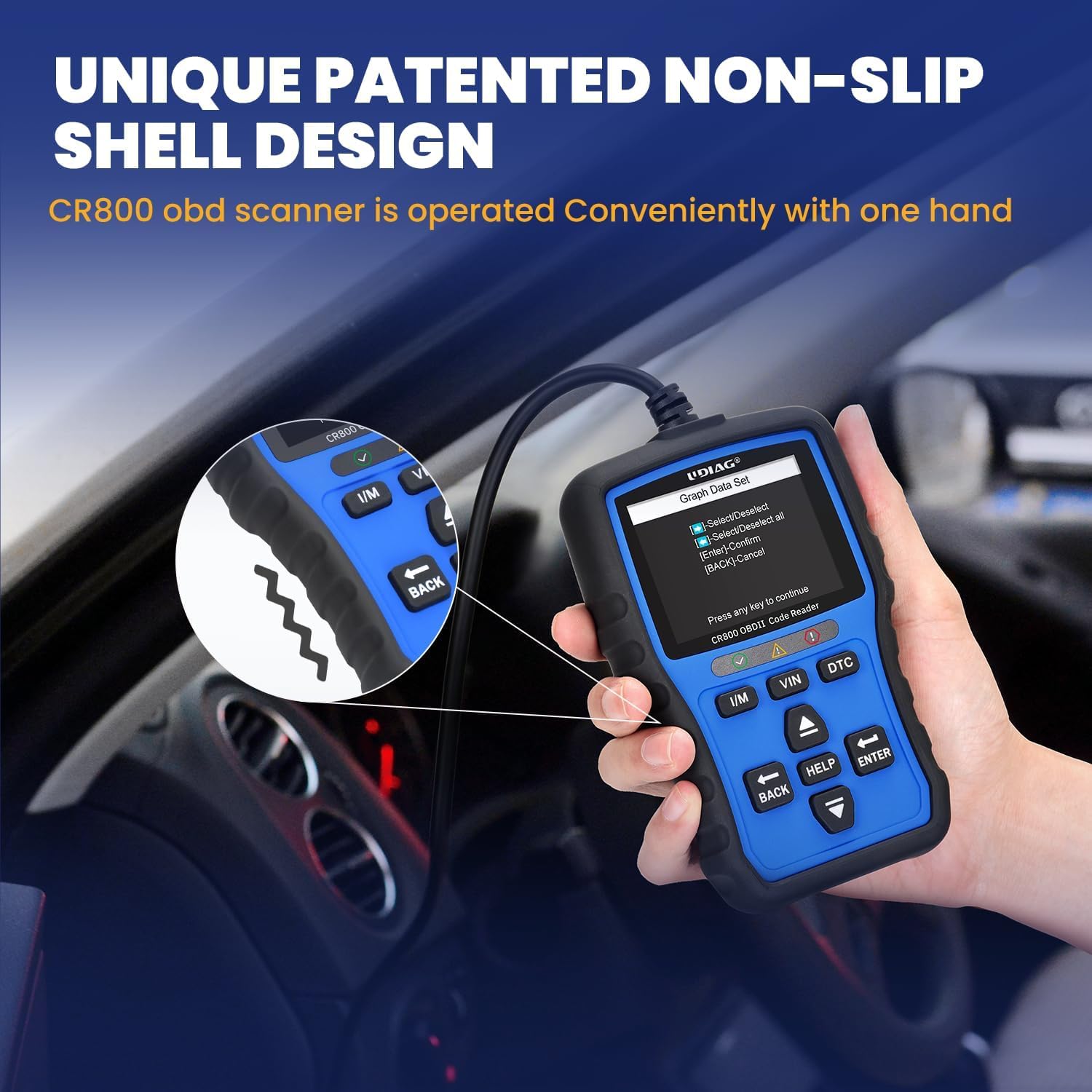
Image 5.1: The unique patented non-slip shell design of the CR800, which also contributes to its durability and ease of handling.
6. Vianmääritys
6.1 Yleiset ongelmat ja ratkaisut
If you encounter any issues while using your CR800, refer to the table below for common problems and their solutions:
| Ongelma | Mahdollinen syy | Ratkaisu |
|---|---|---|
| Laite ei käynnisty | Not properly connected to vehicle's DLC; Vehicle battery too low | Ensure the OBDII cable is securely connected to the vehicle's DLC; Check vehicle battery voltage to ensure it is sufficient (8-18V). |
| Viestintävirhe ajoneuvon kanssa | Incorrect protocol; Vehicle not OBDII compliant; Faulty connection | Verify vehicle compatibility (most vehicles post-1996 are OBDII compliant); Check the cable connection for looseness or damage; Try the device on another OBDII-compliant vehicle to rule out device malfunction. |
| Cannot clear codes | Underlying fault still present; Ignition not ON | The Check Engine Light will remain on if the underlying vehicle fault has not been repaired. Address the vehicle issue first. Ensure the vehicle's ignition is in the "ON" position. |
| Screen appears scratched | Suojakalvo edelleen paikallaan | The screen is shipped with a protective film. Gently peel off the screen protector from one of the corners (upper left or upper right). |
7. Tekniset tiedot
7.1 Tekniset tiedot
- Näyttö: 2.8-inch TFT True Color Screen
- Näytön resoluutio: 320x240 pikseliä
- Käyttö Voltage: 8-18V (provided by vehicle's DLC)
- Käyttöjärjestelmä: Sulautettu järjestelmä
- Liitettävyys: Standard OBDII 16-pin connector, USB port for PC connection
- Tuotteen mitat: Noin 14.48 x 9.19 x 3 cm (5.7 x 3.62 x 1.18 tuumaa)
- Tuotteen paino: Noin 250 g (0.55 lbs)
- Tuetut protokollat: CAN (Controller Area Network), ISO14230-4 KWP2000 (5BPS & FAST), ISO9141-2, J1850 PWM & VPW
- Erikoisominaisuudet: 2-in-1 OBD2 & 12V Battery Test, DTC Look Up Hot Key, I/M Readiness Hot Key, VIN Hot Key, Live Data Stream (text & graph), Data Record & Playback, Report Printing.
8. Takuu ja tuki
8.1 Tuotetuki
UDIAG is committed to providing high-quality products and excellent customer service. Your satisfaction is our priority.
- For any questions, concerns, or technical assistance, please contact UDIAG customer service.
- Elinikäiset ilmaiset ohjelmistopäivitykset: Ensure your CR800 is always up-to-date by visiting the official UDIAG website for free software downloads: www.udiagtech.com.
Valmistaja: UDIAG
Liikepaikka: www.udiagtech.com