
1. Johdanto
This manual provides detailed instructions for the installation, operation, and maintenance of your TP-Link Deco X50-Outdoor AX3000 Whole Home Mesh WiFi 6 Unit. The Deco X50-Outdoor is designed to extend your mesh WiFi network to outdoor and indoor spaces, providing robust and stable wireless connectivity. Please read this manual thoroughly before using the device to ensure proper setup and optimal performance.
2. Turvallisuustiedot
Noudata aina näitä perusturvallisuusohjeita tulipalon, sähköiskun ja loukkaantumisen riskin vähentämiseksi:
- Älä altista tätä laitetta vedelle tai kosteudelle.
- Älä yritä purkaa, korjata tai muokata laitetta.
- Käytä vain laitteen mukana toimitettua virtalähdettä.
- Varmista, että laite on asennettu vakaalle paikalle, jotta se ei putoa.
- Pidä laite poissa lämmönlähteistä ja suorasta auringonpaisteesta.
- For outdoor installation, ensure all cable connections are properly sealed to prevent water ingress.
3. Pakkauksen sisältö
Varmista, että paketti sisältää seuraavat kohteet:
- 1 x TP-Link Deco X50-Outdoor Unit
- 1 x virtalähde
- 1 x Ethernet-kaapeli
- Mounting Kit (includes mounting bracket, screws, and wall plugs)
- Pika-asennusopas

Image: The retail packaging for the TP-Link Deco X50-Outdoor unit, showing the device and its key features.
4. Tuote ohiview
The Deco X50-Outdoor is a cylindrical, white unit designed for both outdoor and indoor use. It features an IP65 rating for waterproof and dustproof protection, making it suitable for various weather conditions.
4.1 Laitteen asettelu

Kuva: Edessä view of the TP-Link Deco X50-Outdoor unit, showcasing its sleek, cylindrical design and 'deco outdoor' branding.

Image: The bottom of the Deco X50-Outdoor unit, revealing the port cover and the attachment point for the mounting bracket.
4.2 Portit ja painikkeet
Under the protective cover at the bottom of the unit, you will find the following:
- PoE -portti: Used for Power over Ethernet (PoE) connection, providing both power and data through a single Ethernet cable.
- LAN-portit (2): For connecting wired devices or for backhaul connection to other Deco units.
- Virtaportti: For connecting the included power adapter when not using PoE.
- Reset-painike: A small button to reset the device to factory settings.

Kuva: Lähikuva view of the PoE and AC power supply ports located at the base of the Deco X50-Outdoor unit, with labels indicating their functions.
5. Asennus
Follow these steps to set up your Deco X50-Outdoor unit. It is recommended to use the TP-Link Deco app for a guided setup process.
5.1 Lataa Deco-sovellus
- Scan the QR code in the Quick Installation Guide or search for "TP-Link Deco" in the App Store or Google Play.
- Lataa ja asenna Deco-sovellus älypuhelimeesi tai tablet-laitteeseen.
5.2 Fyysinen asennus
The Deco X50-Outdoor can be mounted on a pole, wall, or placed on a tabletop.
- Valitse sijainti: Select a location that provides optimal WiFi coverage and is within range of your existing Deco network (if extending). For outdoor use, ensure it's protected from direct impact and accessible for power/Ethernet.
- Asennus:
- Napakiinnitys: Use the provided straps to secure the mounting bracket to a pole.
- Seinäkiinnitys: Drill holes, insert wall plugs, and screw the mounting bracket to the wall.
- Pöytälevy: Simply place the unit on a flat, stable surface.
- Liitä virta:
- Virtalähteen käyttö: Connect the provided power adapter to the power port and plug it into an electrical outlet.
- PoE:n käyttö: Connect an Ethernet cable from a PoE-enabled switch or injector to the PoE port on the Deco unit.
- Connect to Existing Network (Optional): If you are using the Deco X50-Outdoor as a satellite unit, it will connect wirelessly to your main Deco unit. For a wired backhaul, connect an Ethernet cable from one of the LAN ports to your main Deco unit or network switch.

Image: The Deco X50-Outdoor unit securely mounted on an outdoor pole, demonstrating a typical installation scenario.
5.3 Sovellusohjattu asennus
- Avaa Deco-sovellus ja kirjaudu sisään TP-Link-tunnuksellasi. Jos sinulla ei ole tiliä, luo sellainen.
- Tap the "+" icon in the top right corner to add a new Deco unit.
- Select your Deco model (X50-Outdoor) and follow the on-screen instructions to complete the setup. The app will guide you through connecting the unit and integrating it into your existing Deco mesh network.
6. Käyttö
Once set up, your Deco X50-Outdoor unit will automatically integrate into your mesh network, providing seamless WiFi coverage. You can manage your network using the TP-Link Deco app.
6.1 Deco App Features
The Deco app allows you to:
- View kytkettyjä laitteita ja niiden tilaa.
- Ota vierasverkko käyttöön.
- Hallitse lapsilukkoja.
- Priorisoi laitteita optimaalisen suorituskyvyn (QoS) saavuttamiseksi.
- Access HomeShield Security features.
- Päivitä laiteohjelmisto.
- Monitor network health and usage.
6.2 LED-ilmaisimen tila
The LED on your Deco unit indicates its status:
- Tasainen vihreä: Deco toimii moitteettomasti.
- Vilkkuva vihreä: Deco käynnistyy.
- Tasainen punainen: Decolla on ongelma (esim. ei internetyhteyttä).
- Sykkivä punainen: Deco on irrotettu Deco-pääyksiköstä.
- Tasainen sininen: Deco on valmis asennettavaksi.
- Sykkivä sininen: Deco is pairing via Bluetooth.
7. Huolto
Regular maintenance ensures the longevity and optimal performance of your Deco X50-Outdoor unit.
7.1 laiteohjelmistopäivitystä
Keep your Deco's firmware updated to benefit from the latest features, security enhancements, and bug fixes. You can check for and install updates via the Deco app.
7.2 Puhdistus
Wipe the device with a soft, dry cloth. Do not use liquid cleaners or chemical sprays.
7.3 Ympäristönäkökohdat
Despite its outdoor rating, avoid placing the unit in locations where it is constantly submerged in water or exposed to extreme physical impact.
8. Vianmääritys
If you encounter issues with your Deco X50-Outdoor, try the following solutions:
8.1 Ei Internet-yhteyttä
- Check the LED status. If solid red, ensure your main Deco unit has an internet connection.
- Verify that the Ethernet cable (if used) is securely connected.
- Restart your modem, main Deco unit, and then the X50-Outdoor unit.
8.2 Deco X50-Outdoor Disconnected
- Ensure the unit is within range of your main Deco or another satellite Deco.
- Tarkista virtaliitäntä.
- Try relocating the unit to a closer position to the main Deco.
8.3 Hidas WiFi-nopeus
- Ensure the unit is placed in an open area, free from obstructions.
- Tarkista laiteohjelmistopäivitykset.
- Suorita verkon optimointitesti Deco-sovelluksella.
8.4 Tehdasasetusten palautus
If issues persist, you may need to perform a factory reset. With the Deco unit powered on, use a pin to press and hold the Reset button until the LED turns solid red (approximately 1 second), then release. The unit will restart with factory default settings.
9. Tekniset tiedot
Technical details for the TP-Link Deco X50-Outdoor unit:
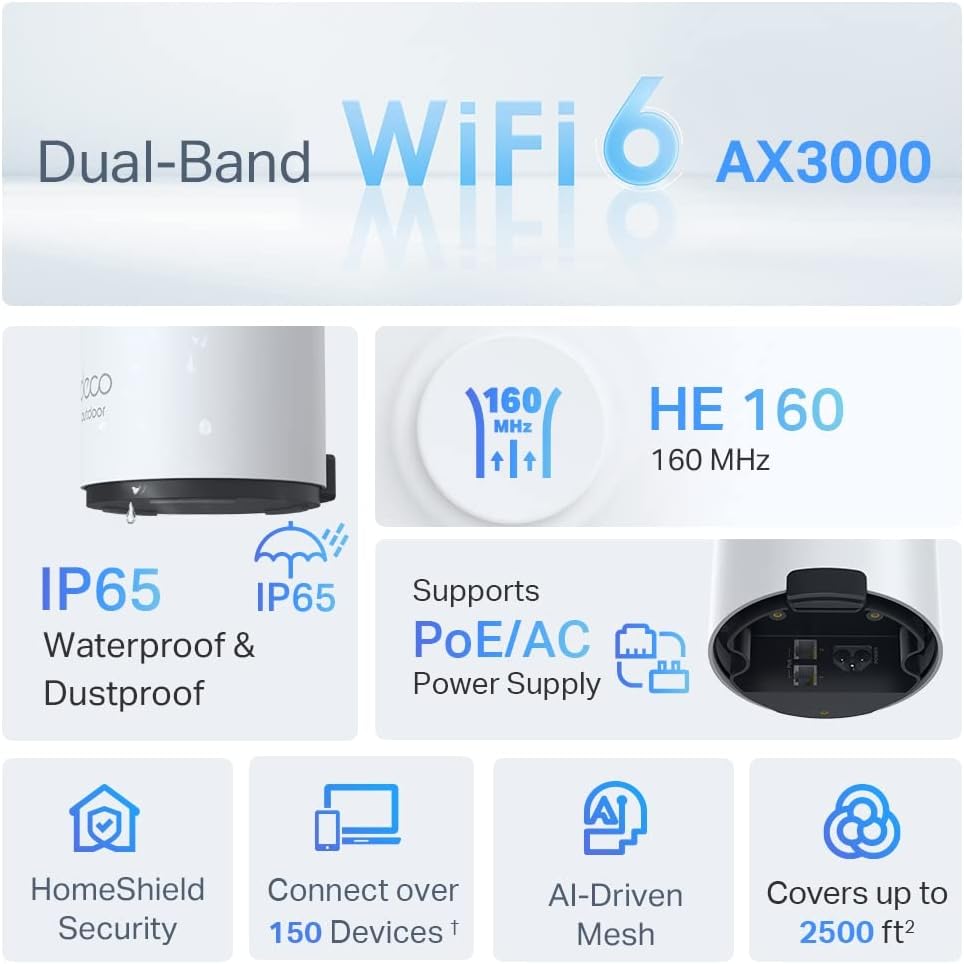
Image: An infographic highlighting key features of the Deco X50-Outdoor, including Dual-Band WiFi 6, AX3000 speeds, IP65 rating, PoE/AC power support, HomeShield Security, support for over 150 devices, AI-Driven Mesh, and up to 2500 sq ft coverage.
| Ominaisuus | Yksityiskohta |
|---|---|
| Mallin nimi | AX3000 Outdoor Whole Home Mesh WiFi 6 Unit |
| Langaton standardi | Wi-Fi 6 (802.11ax) |
| Taajuuskaistaluokka | Kaksikaistainen |
| Tiedonsiirtonopeus | Jopa 2402 Mbps (5 GHz) + 574 Mbps (2.4 GHz) |
| Liitettävyysalue | Up to 2000 Square Feet (per unit) |
| Portit | 2 x Gigabit Ethernet Ports (Auto-sensing WAN/LAN) |
| Virtalähde | PoE (802.3at) or AC Power Adapter (240V AC) |
| Säänkestävyys | IP65 (vedenpitävä ja pölytiivis) |
| Suojausprotokolla | WPA, WPA2, WPA3 |
| Valvontamenetelmä | TP-Link Deco App |
| Tuotteen paino | 0.9 kiloa |
10. Takuu ja tuki
Takuutietoja ja teknistä tukea varten katso TP-Linkin virallinen sivusto. websivustolla tai ota yhteyttä heidän asiakaspalveluunsa.
- TP-Linkin virallinen Websivusto: www.tp-link.com
- Tekninen tuki: Käy TP-Linkin tukiosiossa websivusto, jossa on usein kysyttyjä kysymyksiä, vianetsintäoppaita ja yhteystietoja.