
PPLEE CR1002M
PPLEE 5-in-1 White Noise Machine User Manual
Model: CR1002M
Johdanto
Thank you for choosing the PPLEE 5-in-1 White Noise Machine. This versatile device combines a white noise machine with 42 soothing sounds, a high-fidelity Bluetooth speaker, a dual digital alarm clock, a multi-color night light, and a convenient charging station. Designed to enhance your sleep quality, relaxation, and daily routine, this manual provides detailed instructions for setup, operation, and maintenance.

Figure 1: PPLEE 5-in-1 White Noise Machine Overview
Mitä laatikossa on
- 1 x PPLEE Bluetooth Noise Machine Alarm Clock
- 1 x 5V 2A Power Adapter and Cord
- 1 x Käyttöohje
Asennusopas
1. Virtaliitäntä
Connect the provided 5V 2A power adapter to the DC jack on the back of the device and plug it into a standard electrical outlet. The device will power on automatically.
2. Battery Installation (Memory Function)
For memory function and to retain time/alarm settings during power outages, install 1 CR2032 battery (not included) into the battery compartment on the bottom of the unit. This battery does not power the main functions of the device, only the memory backup.
3. Ajan asettaminen
- Press and hold the 'TIME SET' button (usually labeled 'HOUR' or 'MIN' with a clock icon) until the hour display flashes.
- Use the 'HOUR' and 'MIN' buttons to adjust the time.
- Vahvista ja poistu ajan asetustilasta painamalla uudelleen 'TIME SET' -painiketta.
- To switch between 12-hour and 24-hour format, press the '12/24H' button.
Käyttöohjeet
Äänikoneen toiminta
The device offers 42 natural soothing sounds across four categories: white noise, fan sounds, lullabies, and nature sounds.
- Äänien valinta: Press the 'SOUND' button (often represented by a music note or sound wave icon) to cycle through the available sound categories and individual sounds.
- Äänenvoimakkuuden säätö: Use the 'VOL+' and 'VOL-' buttons to adjust the volume across 16 levels.
- Uniajastin: Press the 'TIMER' button repeatedly to set an automatic shut-off timer for 15, 30, 60, 90, 120, 180, or 480 minutes. The display will show the selected time. To cancel the timer, press the 'TIMER' button until 'OFF' or no timer duration is displayed.

Figure 2: Sound Selection and Timer Functions
Bluetooth-kaiuttimen toiminta
Connect your smartphone or tablet wirelessly to play your favorite audio.
- Pariliitos: Press the 'MODE' button until the Bluetooth icon appears on the display and starts flashing. On your device, enable Bluetooth and select 'CR1002M' (or similar) from the list of available devices. The icon will become solid when paired.
- Äänen toistaminen: Once paired, play audio from your connected device. Use the 'PREV', 'PLAY/PAUSE', and 'NEXT' buttons on the machine to control playback, or control directly from your device.
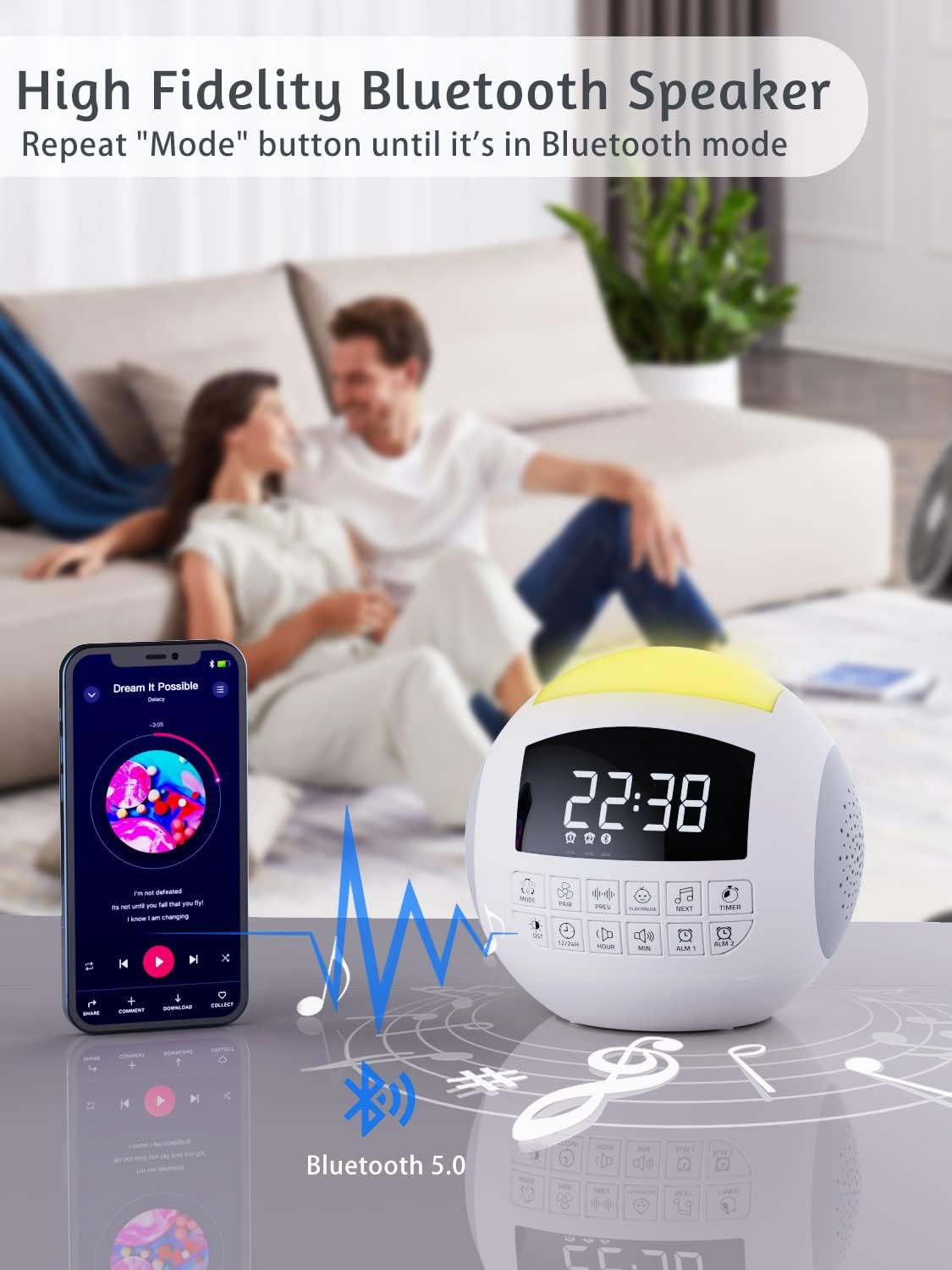
Kuva 3: Bluetooth-yhteys
Herätyskellon toiminta
The device features dual alarms with customizable sounds and snooze functionality.
- Hälytysten asettaminen: Press and hold 'ALARM 1' or 'ALARM 2' button until the alarm time flashes. Use 'HOUR' and 'MIN' buttons to set the desired alarm time. Press the alarm button again to confirm.
- Hälytysäänen valitseminen: After setting the time, press the alarm button again to select from 9 different alarm sounds.
- Hälytyksen aktivointi/deaktivointi: Press the 'ALARM 1' or 'ALARM 2' button briefly to toggle the alarm on or off. An alarm icon will appear on the display when active.
- Torkkutoiminto: When the alarm sounds, press the large 'SNOOZE' button on top to temporarily silence it for 9 minutes.

Figure 4: Dual Alarm Clock Settings
Yövalon toiminta
The integrated night light offers 7 colors and adjustable brightness.
- Värien vaihtaminen: Press the 'LIGHT' button (often represented by a light bulb icon) to cycle through the 7 solid colors and a gradient color mode.
- Kirkkauden säätö: Press and hold the 'LIGHT' button to adjust the brightness level (5 levels available).

Figure 5: 7-Color Night Light with Brightness Control
Lataustoiminto
The device includes a Type-C charging port for the unit itself and dual USB-A ports for charging external devices.
- Laitteen lataus: The unit is powered via its Type-C port using the provided adapter.
- External Device Charging: Connect your smartphone, tablet, or other USB-powered devices to the dual USB-A ports on the back of the unit to charge them.

Figure 6: Charging Ports for External Devices
Muistitoiminto
The memory function ensures that your time and alarm settings are retained even if the main power is interrupted, thanks to the installed CR2032 battery.

Figure 7: Memory Function with Battery Backup
Huolto
- Puhdistus: Pyyhi laite pehmeällä, kuivalla liinalla. Älä käytä nestemäisiä puhdistusaineita tai hankaavia aineita.
- Varastointi: Säilytä laitetta viileässä ja kuivassa paikassa, kun sitä ei käytetä pitkään aikaan.
- Akun vaihto: Replace the CR2032 battery annually or if memory function fails.
Vianetsintä
| Ongelma | Mahdollinen syy | Ratkaisu |
|---|---|---|
| Laite ei käynnisty. | Virtasovitin ei ole kytketty tai pistorasia on viallinen. | Ensure adapter is securely plugged into device and a working outlet. |
| Ei ääntä tai äänenvoimakkuus on alhainen. | Volume too low or incorrect sound selected. | Increase volume using 'VOL+' button. Cycle through sounds to ensure one is playing. |
| Bluetooth-yhteyttä ei muodosteta. | Laite ei ole pariliitostilassa tai on liian kaukana lähteestä. | Ensure device is in Bluetooth pairing mode (flashing icon). Move source closer. Try re-pairing. |
| Hälytys ei soi. | Herätys ei ole aktivoitu tai äänenvoimakkuus on liian alhainen. | Check if alarm icon is displayed. Increase alarm volume. Verify alarm time is set correctly. |
| Aika/asetukset nollataan virrankatkaisun jälkeentage. | CR2032 battery is dead or not installed. | Install or replace the CR2032 battery. |
Tekniset tiedot
| Ominaisuus | Yksityiskohta |
|---|---|
| Tuotteen mitat | 5.32 x 5.95 x 6.1 tuumaa |
| Tuotteen paino | 1.39 kiloa |
| Mallinumero | CR1002M |
| Väri | Valkoinen |
| Virtalähde | AC Powered (with CR2032 battery backup for memory) |
| Musiikkikappaleet | 42 (White Noise, Fan, Lullabies, Nature Sounds) |
| Yövalon värit | 7 Colors + Gradient |
| Äänenvoimakkuustasot | 16 |
| Kirkkaustasot | 5 |
| Ajastimet | 15, 30, 60, 90, 120, 180, 480 minuuttia |
| Hälytysäänet | 9 |
| Latausportit | Kaksois-USB-A |
Takuu ja tuki
PPLEE products are designed for reliability and performance. For warranty information or technical support, please refer to the contact details provided with your purchase or visit the official PPLEE website. A digital version of this user manual is also available for download at https://manuals.plus/m/f23b430e063d58de8cd25ce8d0ed17a6ff4bc5a117e3aca8867779d575e1b4e3.
Ask a question about this manual
Ask about setup, troubleshooting, compatibility, parts, safety, or missing instructions. Manuals+ will review the question and use this page’s manual context to help answer it.