
1. Turvallisuustiedot
Please read this manual carefully before using the camera to ensure safe and proper operation. Keep this manual for future reference.
- Älä altista kameraa vedelle tai kosteudelle.
- Vältä kameran pudottamista tai sen altistamista voimakkaille iskuille.
- Älä yritä purkaa tai muokata kameraa. Korjaukset saa suorittaa vain pätevä henkilöstö.
- Keep the camera away from direct sunlight and high temperatures.
- Use only the specified battery type and charging cable.
- Hävitä paristot asianmukaisesti paikallisten määräysten mukaisesti.
- Clean the camera lens and screen with a soft, dry cloth.
2. Pakkauksen sisältö
Varmista, että pakkauksessasi on kaikki alla luetellut tuotteet:
- Andoer Digital Camera Body
- Litium-akku (3.7 V 550 mAh)
- USB-latauskaapeli
- Carry Bag
- Käyttöopas (tämä asiakirja)

Image: Contents of the Andoer Digital Camera package, showing the camera, wrist strap, USB charging cable, carry bag, and user manual.
3. Tuote ohiview
3.1 Edessä View

Kuva: Edessä view of the Andoer Digital Camera, displaying the lens, built-in flash, and indicating 2.7" TFT screen and 18 Megapixels.
3.2 Taka View (Display and Controls)
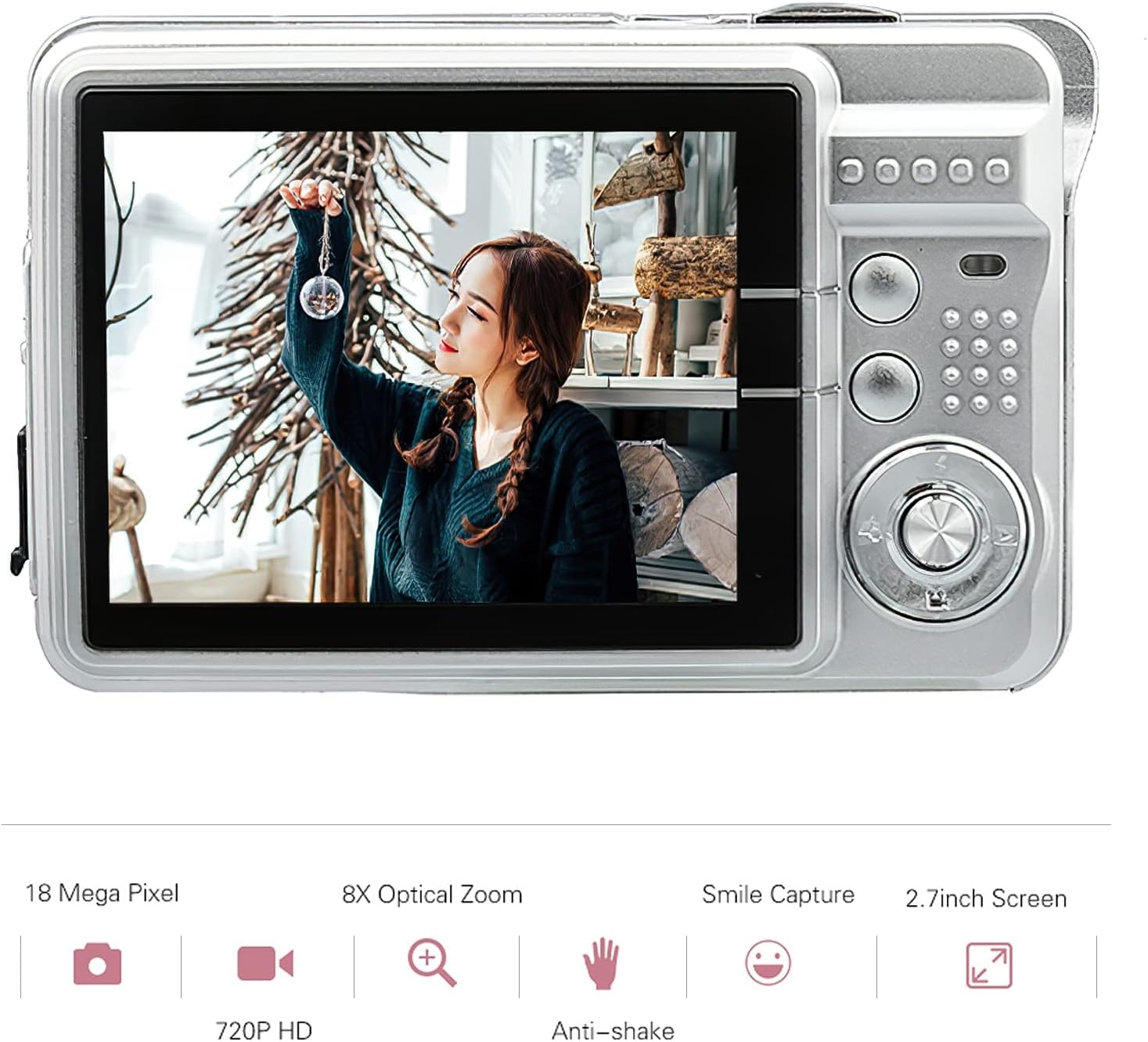
Kuva: Takaosa view of the Andoer Digital Camera, featuring the 2.7-inch TFT display and various control buttons on the right side.
The camera features a 2.7-inch TFT display for viewing photos and videos, along with intuitive controls for navigation and settings adjustment.
4. Asennus
4.1 Akun lataaminen
- Avaa kameran sivussa olevan akkulokeron kansi.
- Insert the provided Lithium battery (3.7V 550mAh) into the compartment, ensuring correct polarity.
- Sulje paristolokeron kansi kunnolla.
- Connect the camera to a USB power source (e.g., computer, USB wall adapter) using the supplied USB charging cable.
- Latauksen merkkivalo syttyy. Lataus on valmis, kun valo sammuu tai sen väri muuttuu (katso akun tila kameran näytöltä).
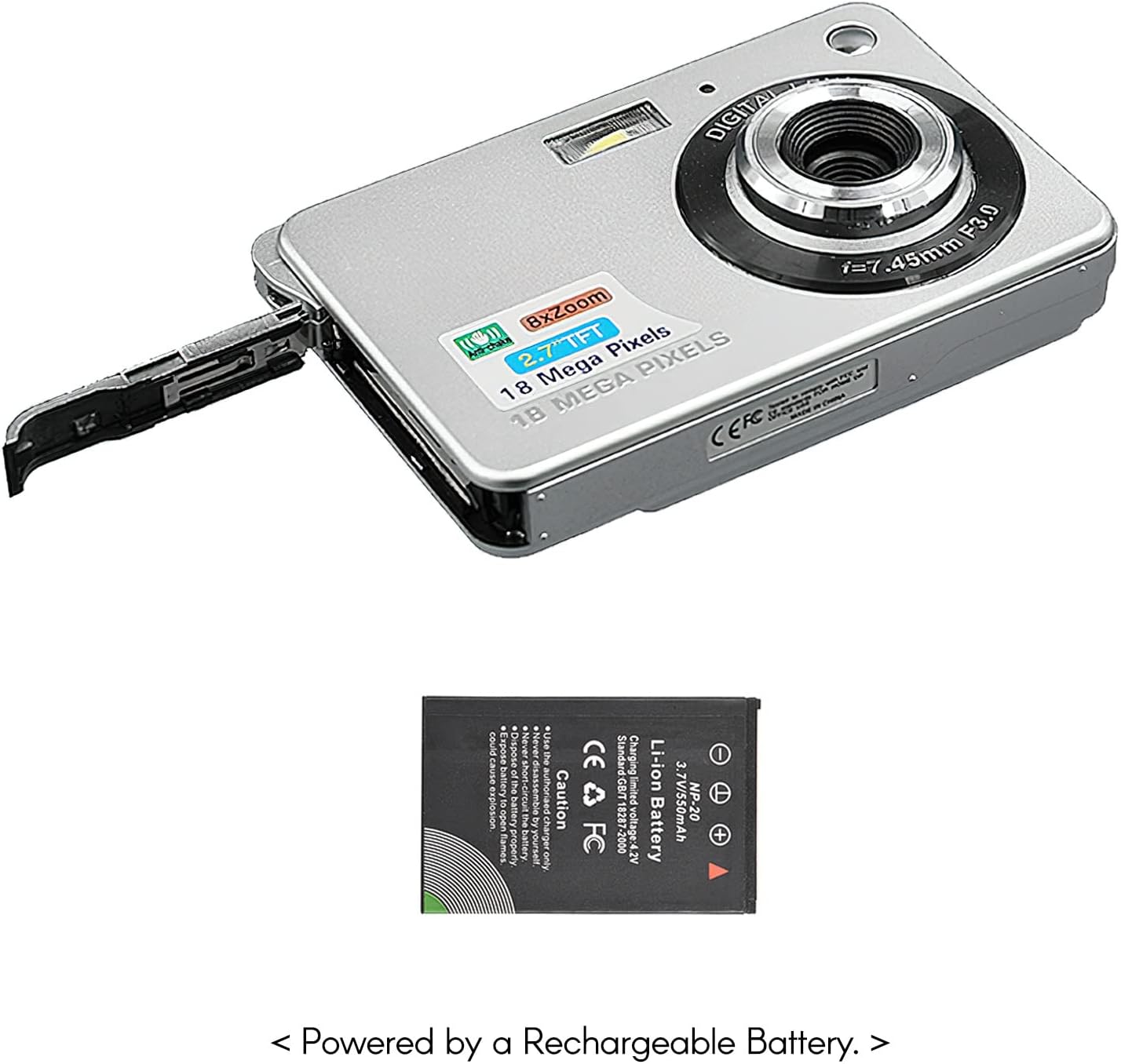
Kuva: Sivu view of the camera with the battery compartment open, illustrating how to insert the rechargeable lithium battery.
4.2 Inserting a Memory Card (Not Included)
This camera supports SD memory cards up to 32GB. A memory card is required to save photos and videos.
- Paikanna muistikorttipaikka, joka on yleensä akkulokeron lähellä.
- Aseta SD-kortti metallikontaktit alaspäin (tai korttipaikan lähellä olevan kaavion osoittamalla tavalla), kunnes se napsahtaa paikalleen.
- Irrota kortti painamalla sitä varovasti sisäänpäin, kunnes se ponnahtaa ulos.
5. Käyttöohjeet
5.1 Virran kytkeminen päälle/pois
Press and hold the Power button (usually located on the top or side) to turn the camera on or off.
5.2 Valokuvien ottaminen
- Kytke kamera päälle.
- Frame your shot using the 2.7-inch TFT display.
- Press the Shutter button (typically on top) halfway down to focus, then press fully to capture the image.

Image: The camera's screen showing a captured image, demonstrating the 18 Megapixel photo capability.
5.3 Videoiden tallentaminen
- Kytke kamera päälle.
- Switch to video recording mode (usually via a mode button or menu option).
- Press the Record button (often marked with a red dot) to start recording. Press again to stop.

Image: The camera's screen displaying a video playback, illustrating its 720P high-definition video recording function.
5.4 Digitaalinen zoom
The camera features 8X digital zoom. Use the zoom buttons (often labeled 'W' for Wide and 'T' for Telephoto) to adjust the zoom level.

Image: A visual representation of the 8x digital zoom capability, showing a scene at 1x magnification and then zoomed in at 8x.
5.5 Navigointi valikossa
Press the 'Menu' button to access camera settings. Use the directional buttons to navigate and the 'OK' or 'Set' button to confirm selections. Available settings include:
- Itselaukaisin: Off/ 2 sec/ 5 sec/ 10 sec
- Altistuminen: EV-3 to EV+3
- Valkotasapaino: Auto/ Daylight/ Cloudy/ Incandescent/ Fluorescent
- Kohtaustilat: Auto/ Night Portrait/ Night Scenery/ Portrait/ Scenery/ Sport/ Party/ Beach/ High sensitivity
- Muita ominaisuuksia: Anti-Shake, Face Detect, Smile Capture
6. Huolto
6.1 Kameran puhdistaminen
- Puhdista kameran runko pehmeällä, nukkaamattomalla liinalla.
- Käytä linssin ja näytön puhdistukseen tarvittaessa erityistä linssinpuhdistusliinaa ja liuosta. Vältä hankaavia materiaaleja.
- Do not use organic solvents to clean the camera.
6.2 Akun hoito
- Lataa akku täyteen ennen ensimmäistä käyttöä.
- Jos kameraa ei käytetä pitkään aikaan, poista akku.
- Säilytä akut viileässä, kuivassa paikassa.
7. Vianmääritys
| Ongelma | Mahdollinen syy | Ratkaisu |
|---|---|---|
| Kamera ei käynnisty. | Akku on tyhjä tai se on asetettu väärin paikalleen. | Lataa akku. Varmista, että akku on asetettu paikalleen oikean napaisuuden mukaisesti. |
| Ei voi ottaa valokuvia/tallentaa videoita. | Muistikorttia ei ole asetettu tai kortti on täynnä/vioittunut. | Aseta yhteensopiva SD-kortti. Poista tarpeettomat filetai alusta kortti (tämä poistaa kaikki tiedot). |
| Kuvat ovat epäselviä. | Objektiivi on likainen, valo on riittämätön tai kamera tärisee. | Clean the lens. Use the flash in low light. Hold the camera steady or use anti-shake feature. |
| Kamera jumiutuu tai lakkaa reagoimasta. | Väliaikainen ohjelmistohäiriö. | Irrota akku ja aseta se takaisin kameran nollaamiseksi. |
8. Tekniset tiedot
| Ominaisuus | Yksityiskohta |
|---|---|
| Malli | IAT4319650447530BC |
| Kuvan anturi | CMOS anturi |
| Näyttö | 2.7 tuuman TFT LCD |
| Valokuvan resoluutio | Jopa 18 megapikseliä |
| Videon resoluutio | 1280x720 (720P), 720x480, 640x480 (VGA), 320x240 (QVGA) |
| Digitaalinen zoom | 8X |
| Kuvanvakautus | Digitaalinen Anti-Shake |
| Altistuksen kompensointi | EV-3 to EV+3 |
| Valkotasapaino | Auto/ Daylight/ Cloudy/ Incandescent/ Fluorescent |
| File Muoto | JPEG (Photo), AVI (Video) |
| Tallennusvälineet | SD-kortti (jopa 32 Gt, ei sisälly toimitukseen) |
| Virtalähde | 1 * Lithium battery (3.7V 550mAh) |
| Tuettu järjestelmä | Windows XP, VISTA, WIN7, MAC |
| Tuotteen koko | 9 * 6 * 2 cm / 3.5 * 2.4 * 0.8 tuumaa |
| Tuotteen paino | 90g / 3.2oz |
9. Takuu ja tuki
Andoer products are designed and manufactured to the highest quality standards. For warranty information and customer support, please refer to the documentation provided at the time of purchase or visit the official Andoer websivusto.
If you encounter any issues not covered in this manual, please contact Andoer customer service for assistance.
Huomautus: Tekniset tiedot voivat muuttua ilman ennakkoilmoitusta.