
1. Johdanto
Thank you for choosing the XTRONS TIX125L 10.1-inch Android 12 Car Stereo. This advanced multimedia system features an Octa-core processor, 8GB RAM, 128GB ROM, built-in GPS, Wi-Fi, 4G connectivity, Apple CarPlay, Android Auto, and a Digital Sound Processor (DSP). Its rotatable QLED display offers a versatile and intuitive user experience. This manual provides essential information for installation, operation, maintenance, and troubleshooting to ensure optimal performance and user satisfaction.
2. Turvallisuustiedot
- Ammattimainen asennussuositus: Auton sähköjärjestelmien monimutkaisuuden vuoksi ammattimaisen asennuksen tekeminen on erittäin suositeltavaa, jotta laite tai ajoneuvo ei vahingoitu.
- Virtalähde: Varmista, että laite on kytketty 12 V:n tasavirtalähteeseen, jossa on negatiivinen maadoitus. Väärä äänenvoimakkuustagvoi aiheuttaa vahinkoa.
- Johdotus: Follow all wiring diagrams carefully. Improper wiring can lead to malfunctions, electrical shorts, or fire.
- Ajoturvallisuus: Älä käytä laitetta tavalla, joka häiritsee ajamista. Aseta aina liikenneturvallisuus etusijalle.
- Lämpötila: Vältä laitteen altistamista äärimmäisille lämpötiloille tai suoralle auringonvalolle pitkiä aikoja.
- Kosteus: Pidä laite kuivana. Kosteus voi aiheuttaa vaurioita.
- Ilmanvaihto: Varmista riittävä ilmanvaihto laitteen ympärillä ylikuumenemisen estämiseksi.
3. Pakkauksen sisältö
Tarkista pakettisi sisältö alla olevaa luetteloa vasten:
- XTRONS TIX125L Main Head Unit
- Virtajohtosarja
- RCA Output/Input Cables
- GPS antenni
- USB-kaapelit (x2)
- 4G LTE -antenni
- Mounting Brackets (x2 pairs)
- Ruuvit
- Ulkoinen mikrofoni
- Käyttöopas (tämä asiakirja)

Kuva 3.1: Mukana toimitetut lisävarusteet ja pääyksikkö.
4. Asennus ja asennus
This section provides general guidelines for installing your XTRONS TIX125L car stereo. For specific vehicle models, additional adapters or professional assistance may be required.
4.1 Asennusta edeltävät vaiheet
- Irrota akku: Ennen käynnistämistä irrota ajoneuvosi akun negatiivinen napa oikosulun välttämiseksi.
- Poista vanha yksikkö: Irrota varovasti nykyinen autostereosi kojelaudasta.
- Tarkista johdotus: Identify the vehicle's wiring harness. You may need a vehicle-specific adapter harness (not included) to connect to the XTRONS unit.
4.2 Johdotusliitännät
- Virtajohtosarja: Connect the provided power wiring harness to the unit and then to your vehicle's wiring. Ensure all connections (power, ground, ACC, illumination) are correct.
- GPS-antenni: Kytke GPS-antenni ja asenna se paikkaan, jossa on esteetön valo. view taivaasta (esim. kojelaudalla tai tuulilasin alla).
- 4G LTE Antenna: Connect the 4G LTE antenna for cellular data connectivity.
- Wi-Fi-antenni: The unit has a built-in Wi-Fi module. Ensure no obstructions block its signal.
- USB-kaapelit: Route the USB cables to an accessible location (e.g., glove compartment) for connecting USB drives or smartphones.
- Ulkoinen mikrofoni: Connect the external microphone for improved call quality during Bluetooth hands-free operation. Position it near the driver.
- RCA-kaapelit: Liitä RCA-kaapelit ulkoisia laitteita varten amplisävahvistimia, subwoofereita tai lisävideotuloja/-lähtöjä tarpeen mukaan.
- Valinnaiset liitännät: Connect optional accessories such as a rear-view camera, DVR camera, DAB+ box, or TPMS kit according to their respective manuals.
4.3 Laitteen asennus
- Pääyksikön kiinnittäminen: Use the provided mounting brackets and screws to secure the main unit into the dashboard opening.
- Näytön säätö: The 10.1-inch display is rotatable and adjustable. Position it for optimal viewing angle and accessibility.
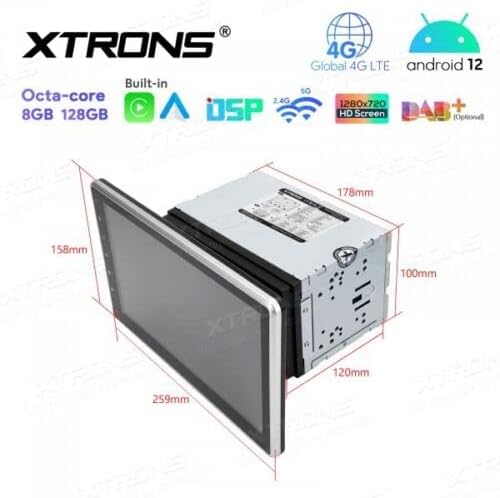
Figure 4.1: Unit dimensions for installation planning.
4.4 Asennuksen jälkeiset toimet
- Liitä akku uudelleen: Kytke ajoneuvosi akun negatiivinen napa takaisin.
- Ensimmäinen käynnistys: Turn on the vehicle ignition and power on the stereo.
- Testitoiminnot: Verify all functions, including audio, radio, GPS, Bluetooth, and touchscreen responsiveness.
5. Käyttöohjeet
This section details the operation of the XTRONS TIX125L car stereo's various features.
5.1 Peruskäyttö
- Virta päälle/pois: Paina ja pidä virtapainiketta (yleensä etupaneelissa) painettuna kytkeäksesi laitteen päälle tai pois päältä. Lyhyt painallus yleensä mykistää/poistaa mykistyksen.
- Kosketusnäytön käyttöliittymä: Navigate the Android 12 interface by tapping, swiping, and pinching on the capacitive touchscreen.
- Äänenvoimakkuuden säätö: Säädä äänenvoimakkuutta fyysisillä painikkeilla tai näytön säätimillä.
- Aloitusnäyttö: The main screen provides access to frequently used applications and widgets.

Figure 5.1: Main user interface with navigation and media playback.
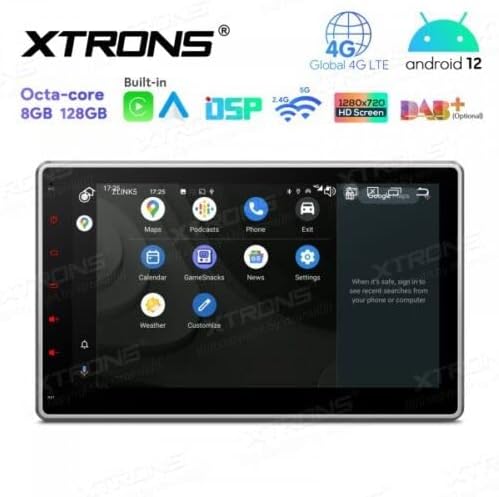
Figure 5.2: Android app drawer with various applications.
5.2 GPS-navigointi
The unit comes with a built-in GPS module. You can use pre-installed navigation apps or download others from the Google Play Store.
- GPS-antenni: Varmista, että GPS-antenni on kytketty oikein ja että sillä on esteetön yhteys. view taivaasta tarkkaa paikannusta varten.
- Karttapäivitykset: Keep your navigation maps updated for the best routing experience.
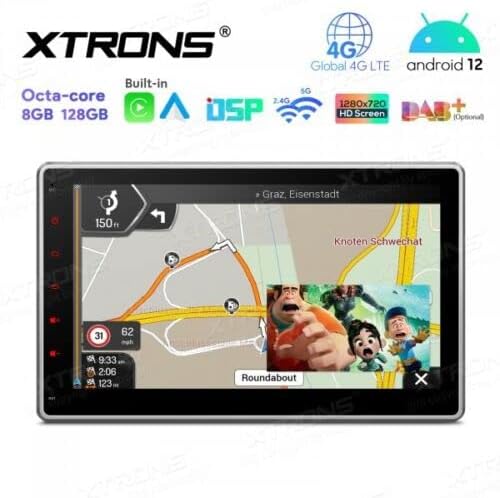
Figure 5.3: Navigation interface with split-screen functionality.
5.3 Bluetooth 5.0
Yhdistä älypuhelimesi Bluetoothin kautta handsfree-puheluita ja äänen suoratoistoa varten.
- Pariliitos: Siirry laitteen ja puhelimesi Bluetooth-asetuksiin. Etsi available devices and select the XTRONS unit to pair.
- Handsfree-puhelut: Soita ja vastaanota puheluita suoraan laitteen näytöltä. Käytä ulkoista mikrofonia selkeään äänensiirtoon.
- Äänen suoratoisto: Play music from your phone through the car stereo speakers.
5.4 Wi-Fi- ja 4G-yhteydet
Access the internet and online services using Wi-Fi or a 4G SIM card.
- Wi-Fi: Connect to a Wi-Fi hotspot (e.g., from your phone or home network) via the Wi-Fi settings.
- 4G LTE: Insert a compatible 4G SIM card into the designated slot (if available) and connect the 4G antenna for mobile data access.
5.5 Apple CarPlay / Android Auto
Integrate your smartphone for a safer and smarter driving experience.
- Yhteys: Connect your iPhone or Android phone via USB or wirelessly (if supported by your phone and the unit's software).
- Ominaisuudet: Access navigation, music, messages, and other compatible apps directly on the stereo display.

Figure 5.4: Apple CarPlay / Android Auto interface.
5.6 Digitaalinen ääniprosessori (DSP)
Customize your audio experience with the built-in DSP.
- Taajuuskorjain: Adjust frequency bands to fine-tune the sound output to your preference.
- Äänitehosteet: Explore various sound presets and effects.
5.7 Näytön peilaus
Display your smartphone's screen directly on the car stereo.
- Yhteys: Follow the instructions within the Screen Mirroring app on the unit to connect your phone (usually via Wi-Fi or USB).
5.8 USB/SD-toisto
Pelaa mediaa fileUSB-asemilta tai SD-korteilta.
- USB-portit: Connect USB flash drives (up to 128GB) to the provided USB ports.
- SD-korttipaikka: Insert an SD card (up to 64GB) into the designated slot.
- Mediasoitin: Use the built-in media player app to browse and play audio or video files.
5.9 Radio (FM/AM, DAB+)
Kuuntele suosikkiradioasemiasi.
- FM/AM: Use the radio app to scan for stations, save presets, and switch between FM and AM bands.
- DAB+ (digitaalinen äänilähetys): This feature requires an optional DAB+ receiver box (not included). Once connected, you can enjoy higher quality digital radio broadcasts.
5.10 Ohjauspyörän säätimet
Control the stereo using your vehicle's steering wheel buttons.
- Kokoonpano: This feature typically requires a vehicle-specific CAN-Bus adapter (not included) and configuration within the unit's settings.
5.11 Rear Camera and DVR Input
Enhance driving safety with optional camera systems.
- Takakamera: Liitä valinnainen takapaneeliview camera. The display will automatically switch to the camera view kun ajoneuvo on peruutusvaihteella.
- DVR-kamera: Connect an optional DVR (Digital Video Recorder) camera to record your driving.
5.12 TPMS-tuki
Monitor your tire pressure with an optional TPMS (Tire Pressure Monitoring System) kit.
- Yhteys: This feature requires an optional TPMS kit (not included). Once connected, tire pressure data will be displayed on the unit.
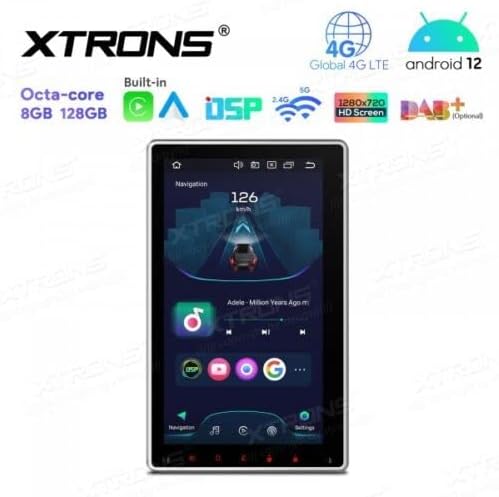
Figure 5.5: Vertical screen orientation for navigation.
6. Huolto
Asianmukainen huolto varmistaa autostereosi pitkän käyttöiän ja optimaalisen suorituskyvyn.
- Näytön puhdistaminen: Pyyhi kosketusnäyttö varovasti pehmeällä, nukkaamattomalla liinalla. Pinttyneisiin tahroihin hankaa kevyesti.ampKostuta liina vedellä tai näytönpuhdistusaineella. Vältä voimakkaita kemikaaleja.
- Yleinen puhdistus: Keep the unit and surrounding area free from dust and debris.
- Ohjelmistopäivitykset: Tarkista säännöllisesti XTRONSin virallinen website for available software or firmware updates to improve performance and add new features. Follow update instructions carefully.
7. Vianmääritys
If you encounter issues with your XTRONS TIX125L, refer to the following common problems and solutions.
| Ongelma | Mahdollinen syy | Ratkaisu |
|---|---|---|
| Yksikkö ei käynnisty. | Ei virtaliitäntää, palanut sulake, väärä johdotus. | Check power wiring, vehicle fuse box, and the unit's fuse. Ensure battery is connected. |
| Ei ääntä. | Volume muted, incorrect audio source, speaker wiring issues. | Check volume level, ensure correct audio source is selected. Verify speaker connections. |
| Poor GPS signal or no signal. | GPS antenna not connected, antenna obstructed, faulty antenna. | Ensure GPS antenna is securely connected and mounted in a clear location. Replace antenna if necessary. |
| Bluetooth-yhteysongelmat. | Laite ei ole pariliitostilassa, häiriö, virheellinen pariliitosprosessi. | Varmista, että molemmat laitteet ovat pariliitostilassa. Poista aiemmat pariliitokset ja yritä uudelleen. Siirry lähemmäs laitetta. |
| Kosketusnäyttö ei reagoi. | Software glitch, screen dirty, hardware issue. | Restart the unit. Clean the screen. If problem persists, contact support. |
| Apps crash or freeze. | Insufficient memory, software bug, incompatible app. | Close background apps. Clear app cache. Update software if available. Uninstall and reinstall problematic apps. |
Jos ongelma jatkuu näiden ratkaisujen kokeilemisen jälkeen, ota yhteyttä XTRONSin asiakastukeen saadaksesi lisäapua.
8. Tekniset tiedot
Below are the technical specifications for the XTRONS TIX125L car stereo:
- Merkki: XTRONS
- Malli: TIX125L
- Näytön koko: 10.1 tuumaa
- Näyttötyyppi: QLED, Capacitive Touchscreen, LED
- Käyttöjärjestelmä: Android 12
- Prosessori: Kahdeksanytiminen
- RAM: 8GB
- ROM: 128GB (Expandable via USB/SD)
- Liitettävyys: Bluetooth 5.0, USB, Wi-Fi, 4G LTE (SIM card reader included)
- Navigointi: Built-in GPS (Supports various map types)
- Erikoisominaisuudet: Apple CarPlay, Android Auto, Digital Sound Processor (DSP), Screen Mirroring, Rotatable Display, Equalizer
- Tuettu tallennustila: USB (jopa 128 Gt), SD (jopa 64 Gt)
- Valvontamenetelmä: Kosketusnäyttö
- Asennustyyppi: Kojelautaan
- Yhteensopiva ajoneuvotyyppi: Motorcycle (Note: Product description states 'Motocicletta', but typically these units are for cars. Please verify compatibility with your specific vehicle.)
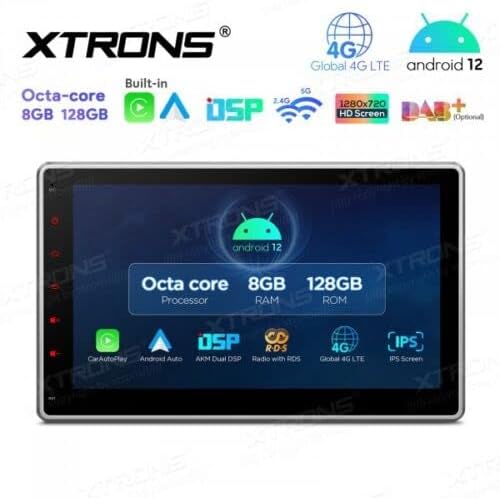
Figure 8.1: Key features and specifications overview.
9. Takuu ja tuki
Takuutiedot löytyvät tuotteen mukana toimitetusta takuukortista tai käymällä XTRONSin virallisella verkkosivustolla. website. If you require technical assistance, have questions about installation, or need troubleshooting beyond what is covered in this manual, please contact XTRONS customer support. Have your product model number (TIX125L) and purchase details ready when contacting support.
XTRONSin virallinen Websivusto: www.xtrons.com (Please verify the exact support contact details on their websivusto.)