

1. Johdanto
This manual provides essential information for the safe and efficient operation of your Sygonix Built-in Thermostat SY-5044424. This device is designed as a built-in solution for regulating and monitoring heat generators within heating, climate, and ventilation technology systems. Please read these instructions thoroughly before installation and use, and retain them for future reference.
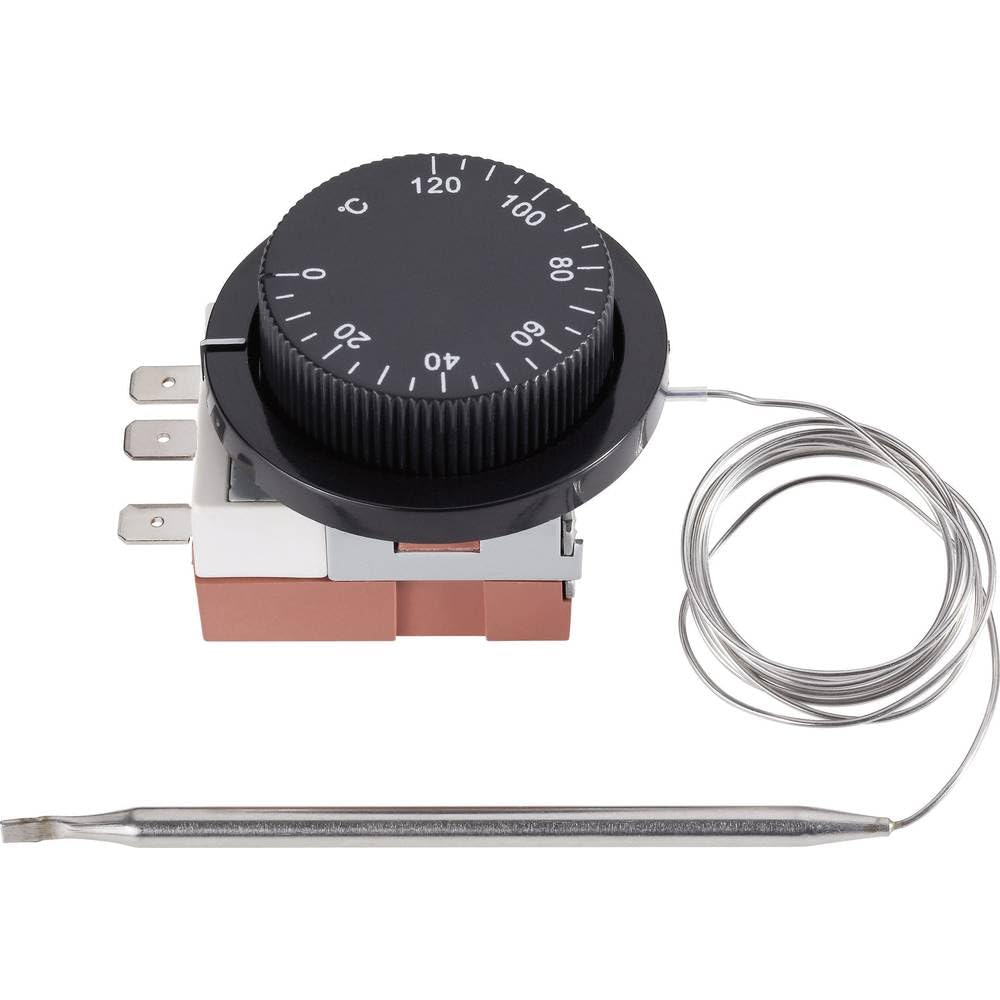
Image 1.1: The Sygonix Built-in Thermostat SY-5044424. This image shows the compact design of the thermostat, ready for integration into a control panel or wall unit.
2. Turvallisuusohjeet
Varoitus: Näiden turvallisuusohjeiden noudattamatta jättäminen voi aiheuttaa tulipalon, sähköiskun, loukkaantumisen tai tuotteen tai omaisuuden vaurioitumisen.
- Asennuksen saa suorittaa vain pätevä sähköasentaja kaikkien paikallisten ja kansallisten sähkömääräysten mukaisesti.
- Varmista, että virtalähde on irrotettu ennen asennusta, huoltoa tai vianmääritystä.
- Älä altista laitetta kosteudelle, äärimmäisille lämpötiloille tai suoralle auringonvalolle.
- Älä yritä muokata tai korjata laitetta itse. Ota yhteyttä pätevään huoltohenkilöstöön.
- Pidä pakkausmateriaalit poissa lasten ulottuvilta.
3. Tuotteen ominaisuudet
- Setting range: 0 - 120 °C
- Switching differential: 3 ± 1.5 °C
- Sisäänrakennettu muotoilu saumattoman integroinnin takaamiseksi
- Suitable for heating, climate, and ventilation systems
- Remote control capability (via RF connectivity)
4. Asennus ja asennus
The Sygonix Built-in Thermostat is designed for integration into existing control systems or panels. Professional installation is highly recommended.
4.1. Asennusta edeltävät tarkastukset
- Verify that the power supply matches the thermostat's requirements (230V).
- Ensure the installation location is free from excessive vibration, moisture, and direct heat sources.
- Confirm that all necessary mounting hardware is available.
4.2. Johdotus
- Katkaise virta: Turn off the main power supply to the circuit where the thermostat will be installed. Use a voltagtesteri varmistaaksesi, että virta on katkaistu.
- Asennus: Secure the thermostat in its designated built-in location using the provided mounting hardware.
- Kytke johdot: Follow the wiring diagram provided with the product packaging. Connect the power input, load output, and sensor wires to the appropriate terminals. Ensure all connections are secure.
- Anturin sijoitus: Position the temperature sensor in an area that accurately reflects the ambient temperature to be controlled, away from drafts or direct heat sources.
- Palauta virta: Kun kaikki liitännät on varmistettu ja kiinnitetty, kytke virta takaisin piiriin.
5. Käyttöohjeet
The Sygonix Built-in Thermostat is designed for straightforward temperature control. Specific operation details may vary based on the integrated system and any connected remote control unit.
5.1. Ensimmäinen käynnistys
- Upon first power-on, the thermostat may display a default temperature or enter a calibration mode. Refer to the specific display indicators in your product packaging.
5.2. Lämpötilan asetus
- Use the integrated controls (if any) or a compatible remote control unit to adjust the desired temperature. The setting range is 0 to 120 °C.
- The thermostat will activate or deactivate the connected heating/cooling device to maintain the set temperature within the specified switching differential.
5.3. Kaukosäätimen toiminnallisuus
- The thermostat supports RF connectivity for remote control. Pair your compatible remote control or smart system according to its specific instructions.
- Ensure the remote control unit is within the effective range and has fresh batteries (if applicable).
6. Huolto
The Sygonix Built-in Thermostat requires minimal maintenance.
- Puhdistus: Gently wipe the surface of the thermostat with a soft, dry cloth. Do not use abrasive cleaners, solvents, or excessive moisture.
- Säännölliset tarkastukset: Periodically inspect the wiring connections for any signs of wear or damage. Ensure the temperature sensor is clean and unobstructed.
- Tehosykli: If the device behaves unexpectedly, try disconnecting and reconnecting the power supply for a few minutes.
7. Vianmääritys
Jos termostaatissasi on ongelmia, katso seuraavat yleiset ongelmat ja ratkaisut:
| Ongelma | Mahdollinen syy | Ratkaisu |
|---|---|---|
| Termostaatti ei käynnisty | Ei virtalähdettä; väärä johdotus | Check circuit breaker; verify wiring connections (ensure power is off first). |
| Väärät lämpötilalukemat | Sensor obstructed or misplaced; faulty sensor | Ensure sensor is clean and in an appropriate location; contact support if suspected faulty. |
| Heating/cooling device not responding | Incorrect wiring; thermostat setting issue; device malfunction | Verify wiring; check thermostat settings; test the heating/cooling device independently. |
| Kaukosäädin ei toimi | Remote not paired; batteries low; out of range | Pair remote as per its instructions; replace batteries; ensure remote is within RF range. |
Jos ongelma jatkuu näiden ratkaisujen kokeilemisen jälkeen, ota yhteyttä asiakastukeen.
8. Tekniset tiedot
| Ominaisuus | Yksityiskohta |
|---|---|
| Merkki | Sygonix |
| Mallinumero | SY-5044424 |
| Väri | Musta |
| Tuotteen mitat | 7 x 5 x 18 cm; 14 kg (tai 17 S x 6 L x 5 K cm) |
| Kapasiteetti | 10 litraa |
| Teho/Voltage | 280 |
| Voitage | 230 V |
| Melutaso | 1 desibeliä |
| Erikoisominaisuudet | Kaukosäädin |
| Valmistaja | Sygonix |
| Tuotenumero | SY-5044424 |
| ASIN | B0BPX282HB |
| Ohjaimen tyyppi | Kädessä pidettävä ohjain |
| Tuotteen erityiskäyttö | Building heating and air conditioning |
| Lämpötilan säätimen tyyppi | Smart/Remote Control |
| Yhteystekniikka | RF |
| Mukana olevat komponentit | Asennuslaitteisto |
| Asetusalue | 0–120 °C |
| Differentiaalin vaihto | 3 ± 1.5 °C |
9. Takuu ja tuki
For warranty information and technical support, please refer to the documentation included with your purchase or visit the official Sygonix websivusto. Säilytä ostokuitti takuuvaatimuksia varten.