
1. Johdanto
This manual provides essential instructions for the safe and efficient operation of your Rigol DHO1074 Digital Oscilloscope. The DHO1074 is a 4-channel, 70 MHz digital oscilloscope featuring a 12-bit resolution and a 2 GSa/s real-time sample rate, designed for precise signal analysis in various applications. Please read this manual thoroughly before using the device to ensure proper functionality and to prevent damage.
2. Turvallisuustiedot
Noudata seuraavia turvaohjeita loukkaantumisten ja laitteen vaurioitumisen välttämiseksi:
- Use only the power cord specified for this instrument.
- Varmista, että laite on maadoitettu asianmukaisesti sähköiskun välttämiseksi.
- Älä käytä laitetta märässä tai kylmässäamp ehdot.
- Vältä käyttöä räjähdysvaarallisissa tiloissa.
- Do not remove the instrument cover. Refer servicing to qualified personnel.
- Use appropriate probes and accessories.
- Katkaise virta ennen puhdistusta.
3. Pakkauksen sisältö
Varmista, että pakkauksessasi on kaikki alla luetellut tuotteet:
- Rigol DHO1074 Digital Oscilloscope (1 unit)
- Virtajohto (1 kpl)
- Passive Probes (4 units, one for each channel)
- USB-kaapeli (1 kpl)
- Pikaopas (1 yksikkö)
- Resource CD (1 unit)
4. Asennus
4.1 Virran kytkeminen
- Varmista, että oskilloskoopin virtakytkin on OFF-asennossa.
- Kytke laitteen mukana toimitettu virtajohto oskilloskoopin takapaneelissa olevaan verkkovirtaliitäntään.
- Kytke virtajohdon toinen pää maadoitettuun pistorasiaan.
4.2 Antureiden kytkeminen
- Connect the BNC connector of a passive probe to one of the input channels (CH1, CH2, CH3, or CH4) on the front panel.
- Attach the probe ground clip to a common ground point in your circuit.
- Kytke mittapää piirin mittauspisteeseen.
- For accurate measurements, compensate the probe before use. Refer to the "Probe Compensation" section in the full user manual for detailed instructions.
4.3 Ensimmäinen käynnistys
- Press the power switch on the front panel to turn on the oscilloscope.
- The instrument will perform a self-test and display the startup screen.
- Once the main interface appears, the oscilloscope is ready for use.
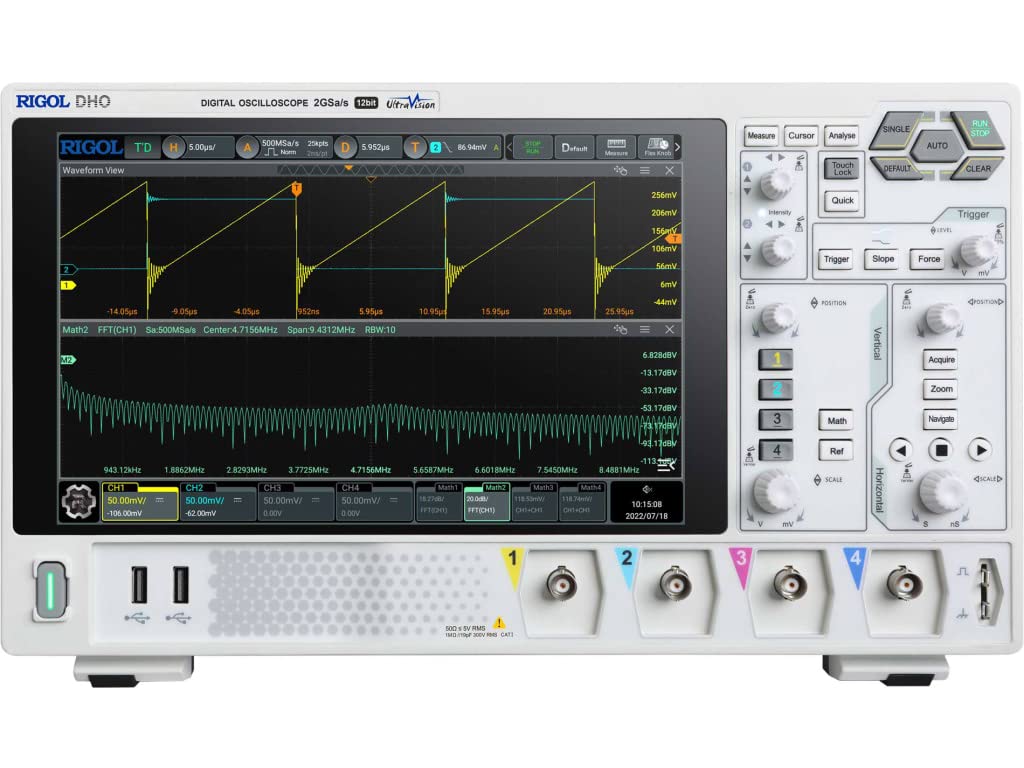
Kuva 4.1: Etuosa view of the Rigol DHO1074 Digital Oscilloscope, showing the display, control panel, and input channels.
5. Oskilloskoopin käyttö
The Rigol DHO1074 offers a user-friendly interface for capturing and analyzing waveforms. Key features include 4 analog channels, 70 MHz bandwidth, and a 12-bit vertical resolution for enhanced signal fidelity.
5.1 Basic Waveform Acquisition
- Virta päälle: Ensure the oscilloscope is powered on as described in Section 4.3.
- Yhdistä signaali: Connect your signal source to an input channel using a compensated probe.
- Automaattinen asennus: Paina AUTO button on the front panel. The oscilloscope will automatically adjust vertical, horizontal, and trigger settings to display a stable waveform.
- Manuaaliset säädöt:
- Käytä PYSTYSUORA knobs (VOLTS/DIV) to adjust the vertical scale (voltage per division) for each channel.
- Käytä VAAKAA knob (SEC/DIV) to adjust the horizontal scale (time per division).
- Käytä LAUKAISTA controls to set the trigger level and mode for stable waveform capture.
5.2 Lisäominaisuudet
- Korkea resoluutio: Benefit from the 12-bit vertical resolution, providing 16 times more quantization levels than standard 8-bit oscilloscopes, which improves measurement accuracy and reduces quantization noise.
- Deep Memory: The DHO1074 features a 50 Mpts maximum memory depth (expandable to 100 Mpts with option DHO1000-RLU-01), allowing for longer waveform captures at high sample hinnat.
- Serial Decoding: Standard serial decoding capabilities include SPI, I2C, RS232/UART, CAN, and LIN, simplifying the analysis of common serial bus communications.
- Mittaustoiminnot: Access various automatic measurement functions (e.g., Vpp, Vrms, Frequency, Period) via the MITATA valikosta.
- Matemaattiset funktiot: Utilize built-in math functions (e.g., Add, Subtract, Multiply, Divide, FFT) to perform waveform analysis.
6. Huolto
6.1 Laitteen puhdistaminen
- Irrota virtajohto aina ennen puhdistusta.
- Käytä pehmeää liinaa dampened with a mild detergent solution to clean the exterior surfaces.
- Do not use abrasive cleaners or solvents that could damage the plastic parts.
- Vältä nesteiden suihkuttamista suoraan instrumentille.
6.2 Varastointi
- Store the oscilloscope in a clean, dry environment, away from direct sunlight and extreme temperatures.
- Suojaa näyttöä naarmuilta.
6.3 Kalibrointi
For optimal performance and measurement accuracy, periodic calibration by qualified service personnel is recommended. Refer to Rigol's official support channels for calibration services.
7. Vianmääritys
| Ongelma | Mahdollinen syy | Ratkaisu |
|---|---|---|
| Ei virtaa, kun laite on päällä. | Power cord not connected; power outlet faulty; instrument fuse blown. | Check power cord connection; test power outlet; contact service for fuse replacement. |
| Ei aaltomuotoa näytössä. | Probe not connected; signal source off; vertical/horizontal scale incorrect; trigger not set correctly. | Verify probe connection; check signal source; adjust VOLTS/DIV and SEC/DIV; adjust trigger level or use AUTO button. |
| Unstable waveform. | Trigger settings incorrect; noisy signal. | Adjust trigger mode, source, and level; ensure proper grounding of the probe. |
| Incorrect measurements. | Probe compensation incorrect; wrong measurement settings. | Compensate probes; verify measurement parameters. |
If the problem persists after attempting these solutions, please contact Rigol customer support.
8. Tekniset tiedot
| Parametri | Arvo |
|---|---|
| Malli | DHO1074 |
| Kaistanleveys | 70 MHz |
| Analogiset kanavat | 4 |
| Pystysuora resoluutio | 12-bittinen |
| Max Sample Korko | 2 GSa/s (real-time) |
| Muistin syvyys | 50 Mpts (100 Mpts with DHO1000-RLU-01 option) |
| Serial Decoding | SPI, I2C, RS232/UART, CAN, LIN |
| Tuotteen mitat | 18 x 11 x 12 tuumaa |
| Tuotteen paino | 12 kiloa |
| Valmistaja | RIGOL TECHNOLOGIES USA INC |
9. Takuu ja tuki
Rigol products are designed for reliability and performance. This instrument is covered by a standard manufacturer's warranty. For specific warranty terms and conditions, please refer to the warranty card included with your product or visit the official Rigol websivusto.
For technical support, service, or inquiries regarding your Rigol DHO1074 Digital Oscilloscope, please contact Rigol Technologies USA Inc. customer service through their official websivustolla tai tuotedokumentaatiossa annetuissa yhteystiedoissa.
Verkkoresursseja ja lisädokumentaatiota voi olla saatavilla osoitteessa Rigol websivusto.