
Johdanto
The Zgrmbo 16-inch Digital Wall Clock is designed for clear visibility and ease of use, featuring a large display suitable for various environments such as living rooms, warehouses, shops, gyms, and offices. This clock provides time, date, day of the week, and indoor temperature, offering comprehensive information at a glance. Its large, clear jumbo digits ensure readability from a distance, making it ideal for all users, including seniors.
Key features include a remote control for convenient adjustments, adjustable brightness settings, and a versatile display that supports 12/24-hour time formats and Celsius/Fahrenheit temperature units. The clock also incorporates stopwatch and timer functions for various timing needs.

Image: The Zgrmbo 16-inch Digital Wall Clock displaying time, date, day of the week, and temperature, with its remote control in the foreground.

Image: Diagram illustrating the dimensions of the Zgrmbo 16-inch Digital Wall Clock (16.2 inches wide, 5.1 inches high) and icons representing its features: 16" Display, Custom Brightness, 12/24H Format, Week Display, Date Display, Remote Control, Indoor Temp(°C/°F), Timer, Time Memory, and 2 Alarm Clocks.
Pakkauksen sisältö
Please check the box carefully to ensure all components are present:
- Zgrmbo 16-inch Digital Wall Clock Unit
- Kaukosäädin
- 11.5 jalkaa USB-kaapeli
- 2 x CR2032 Batteries (for memory function)
- 2 x Non-trace Nails (for wall mounting)

Image: Diagram showing the contents of the product box, including the clock unit with hang holes, remote control, 11.5ft USB cable, 2 CR2032 batteries, and 2 non-trace nails.
Asennus
Virtaliitäntä
The Zgrmbo Digital Wall Clock operates solely when plugged into a power source. It requires a 5V/2A power adapter (not included) to be connected via the provided 11.5ft USB cable. Connect the USB cable to the clock and then to a suitable power adapter plugged into a wall outlet.
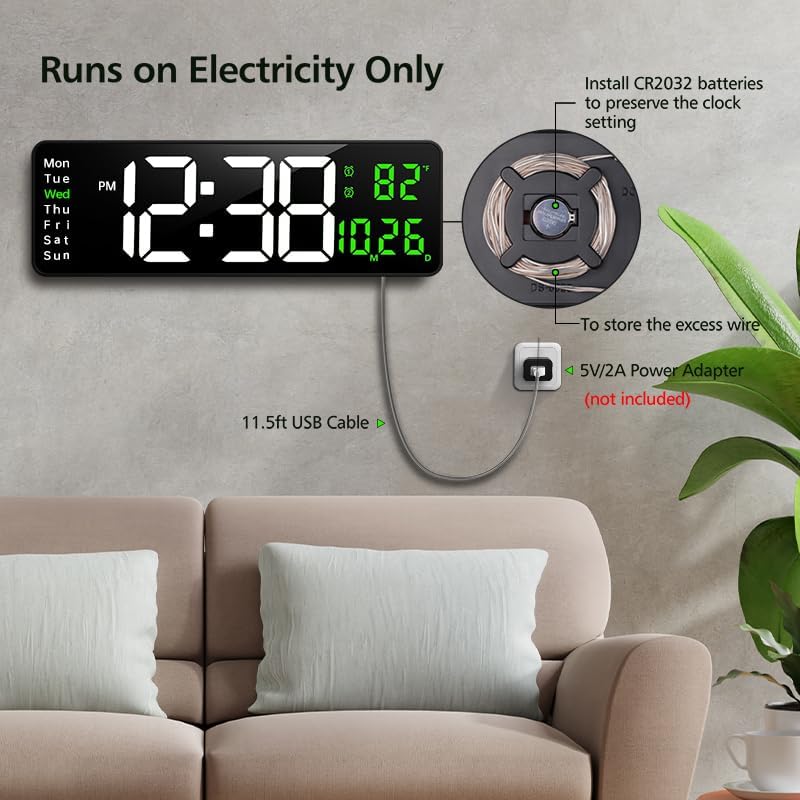
Image: The Zgrmbo Digital Wall Clock mounted on a wall, showing the 11.5ft USB cable connected to a power adapter (not included) plugged into a wall outlet. An illustration indicates the CR2032 battery compartment for preserving settings.
Battery Installation (Memory Function)
The clock uses 2 CR2032 batteries (included) to preserve time and settings during a power outage or when unplugged. These batteries do not power the display. Locate the battery compartment on the back of the clock, insert the CR2032 batteries with the correct polarity, and close the compartment.
Kellon asennus
The clock can be wall-mounted using the hang holes located on the back. Use the provided non-trace nails or appropriate wall anchors and screws suitable for your wall type to securely mount the clock. Ensure the clock is level before finalizing the installation.
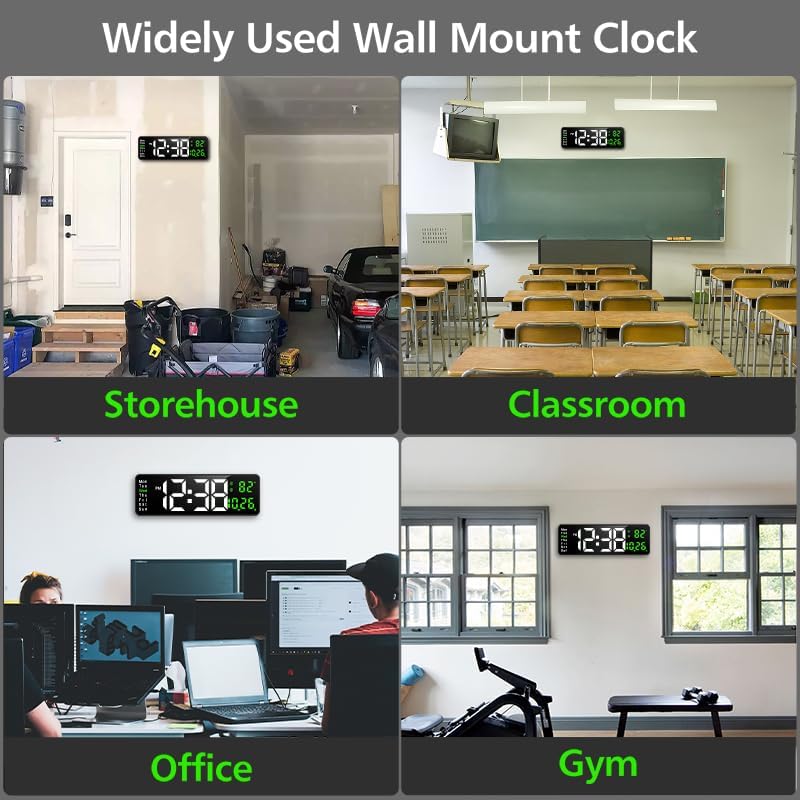
Image: Four panels showing the Zgrmbo Digital Wall Clock mounted in different environments: a storehouse, a classroom, an office, and a gym, demonstrating its versatility as a widely used wall mount clock.
Käyttöohjeet
All primary functions and settings of the Zgrmbo Digital Wall Clock can be conveniently controlled using the included remote control.

Image: A person using the remote control to adjust the Zgrmbo Digital Wall Clock, which is mounted on a wall above a sofa, illustrating the convenience of remote operation.
Kellonajan ja päivämäärän asettaminen
- Paina SARJA button on the remote control to enter time setting mode.
- Käytä UP ja ALAS arrows to adjust the hour, then press OK vahvistaaksesi.
- Toista minuuttien, vuoden, kuukauden ja päivän kohdalla.
- Paina SARJA uudelleen poistuaksesi asetustilasta.
12/24 tunnin muoto
Voit vaihtaa 12 tunnin ja 24 tunnin aikamuotojen välillä painamalla 12/24H kaukosäätimen painiketta.
Lämpötilanäyttö (Celsius/Fahrenheit)
The clock displays indoor temperature. To switch between Celsius (℃) and Fahrenheit (℉) units, press the ℃ / ℉ kaukosäätimen painiketta.
Kirkkauden säätäminen
The clock features a 10-level adjustable brightness display. You can manually set the brightness or enable auto-brightness mode.
- Manuaalinen säätö: Paina KIRKKAUS -painiketta kerran ja käytä sitten + or - buttons on the remote to cycle through 10 brightness levels.
- Automaattinen kirkkaus: Paina KIRKKAUS button twice. The clock will automatically adjust its display brightness based on ambient light conditions.

Image: Illustrations demonstrating the 10-level brightness adjustment feature of the Zgrmbo Digital Wall Clock, showing different display intensities from 100% to 20% and the auto-brightness mode.
Stopwatch and Timer Functions
The clock includes convenient stopwatch and timer functionalities:
- Sekuntikello: Paina SEKUNTIKELLO button on the remote to start/pause the stopwatch. Press again to reset.
- Ajastin: Paina AJASTIN button on the remote. Use the number buttons to set the desired countdown time, then press OK to start. Press AJASTIN again to pause/resume, or hold to reset.
Hälytysten asettaminen
The clock supports setting up to two alarms.
- Paina HÄLYTYS kaukosäätimen painiketta.
- Käytä UP ja ALAS arrows to select Alarm 1 or Alarm 2, then press OK.
- Adjust the alarm hour and minute using the UP ja ALAS arrows, pressing OK jokaisen jälkeen.
- Select the alarm duration or snooze interval if prompted.
- Paina HÄLYTYS again to activate/deactivate the set alarm. An alarm icon will appear on the display when active.
Huolto
To ensure the longevity and optimal performance of your Zgrmbo Digital Wall Clock, follow these simple maintenance guidelines:
- Puhdistus: Gently wipe the display and clock body with a soft, dry, lint-free cloth. Avoid using abrasive cleaners, solvents, or spray cleaners directly on the clock, as they may damage the surface or internal components.
- Akun vaihto: The CR2032 batteries for memory backup should be replaced periodically, typically every 1-2 years, or if you notice settings are not retained after a power interruption.
- Sijoitus: Avoid placing the clock in direct sunlight or near extreme heat sources, as this can affect the display's lifespan and temperature sensor accuracy.
Vianetsintä
| Ongelma | Mahdollinen syy | Ratkaisu |
|---|---|---|
| Kellon näyttö on pois päältä. | Ei kytketty pistorasiaan; virta pois päältätage; faulty power adapter/cable. | Ensure the USB cable is securely connected to the clock and a working power adapter. Check the power outlet. |
| Kaukosäädin ei toimi. | Batteries are dead or incorrectly inserted; remote not aimed at clock sensor; obstruction. | Replace remote control batteries (AAA, not CR2032). Ensure correct polarity. Point remote directly at the clock's sensor. Remove any obstructions between the remote and clock. |
| Settings (time/date) are lost after power off. | CR2032 backup batteries are dead or missing. | Install or replace the 2 CR2032 batteries in the battery compartment on the back of the clock. Ensure correct polarity. |
| Lämpötilalukema vaikuttaa epätarkalta. | Clock placed near heat/cold source; sensor obstruction. | Relocate the clock away from direct sunlight, heating vents, or air conditioning units. Ensure the sensor area on the clock is not covered. |
Tekniset tiedot
| Ominaisuus | Yksityiskohta |
|---|---|
| Malli | B0DMVC9Y6C |
| Merkki | Zgrmbo |
| Näytön tyyppi | Digitaalinen LED |
| Näytön koko | 16.2 tuumaa (lävistäjä) |
| Numeron korkeus | 4.25 inches (time digits) |
| Mitat | 38.61 x 3.81 x 12.95 cm (15.2 x 1.5 x 5.1 tuumaa) |
| Tuotteen paino | 689 g |
| Virtalähde | Corded Electric (USB cable, 5V/2A adapter not included) |
| Muistin akku | 2 x CR2032 (mukana) |
| Erikoisominaisuudet | Adjustable Brightness, Auto Dimmable, Calendar Display, Silent Clock, Remote Control, Indoor Temperature, Stopwatch, Timer, Alarm |
| Väri | Valkoinen & Vihreä |
Takuu ja tuki
For warranty information or technical support regarding your Zgrmbo 16-inch Digital Wall Clock, please refer to the contact details provided with your purchase or visit the official Zgrmbo websivusto. Säilytä ostokuitti ostotodistuksena mahdollisten takuuvaatimusten varalta.