
1. Johdanto
The SHANLING UA2 Plus is a compact and powerful portable USB DAC/AMP designed to enhance your audio experience across various devices. Featuring an ES9038Q2M DAC chip and dual RT6863 amplifier chips, it supports high-resolution audio up to 32bit/768kHz and DSD512. With both 3.5mm single-ended and 4.4mm balanced outputs, it offers versatile connectivity for a wide range of headphones. Its small size and robust build make it an ideal companion for on-the-go high-fidelity sound.
2. Pakkauksen sisältö
Valitse seuraavat kohdat rastittamalla ruutu:
- 1x SHANLING UA2 Plus Portable DAC/AMP
- 1x USB Type-C to C Data Cable
- 1x USB A to Type-C Adapter
- 1x-pikaopas
- 1x takuukortti

Image: Contents of the SHANLING UA2 Plus retail box, showing the device, cables, and manuals.
Video: An unboxing video of the SHANLING UA2 Plus USB DAC/AMP, demonstrating the contents of the package.
3. Tuote ohiview
Tärkeimmät ominaisuudet:
- DAC-siru: ES9038Q2M for high-fidelity audio conversion.
- Ampelävämpi: Dual RT6863 Amp chips for powerful and clean output.
- Korkearesoluutioinen ääni: Supports up to 32bit/768kHz and DSD512.
- Lähdöt: 3.5mm Single-Ended and 4.4mm Balanced headphone jacks.
- Lähtöteho: Up to 195mW@32Ω (Balanced) and 125mW@32Ω (Single-Ended).
- Yhteensopivuus: Android, iOS, Windows, Mac, Nintendo Switch.
- Siirrettävyys: Compact size (1.97x0.7x0.25 inches) and lightweight (10.6g).
- Sovelluksen hallinta: Customizable settings via the Eddict Player app.
- Tehotehokkuus: Optimized power consumption for extended battery life on connected devices.
- LED-ilmaisin: Displays current sampling rate and MQA status.
Komponentit ja säätimet:
The UA2 Plus features a minimalist design with essential controls and indicators.
- USB-C-portti: For data connection and power.
- Tilapainike: Used for various settings and UAC1.0 mode for Nintendo Switch.
- 3.5 mm:n yksipäinen lähtö: Vakiokuulokeliitäntä.
- 4.4mm tasapainotettu lähtö: For balanced headphones, offering higher power and improved sound quality.
- LED-ilmaisin: Located near the USB-C port, changes color to indicate sampling rate and MQA status.
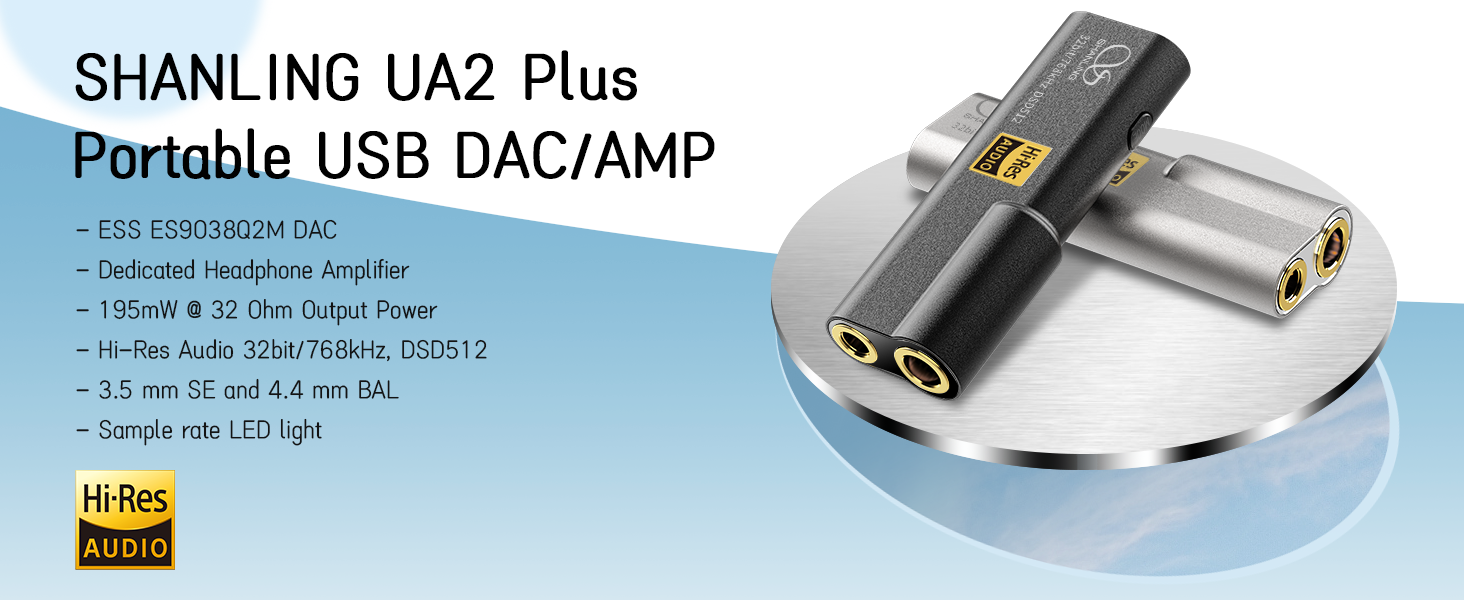
Kuva: Yliview of the SHANLING UA2 Plus highlighting its internal components and output capabilities.

Image: The LED indicator on the UA2 Plus, explaining the color codes for various sampling rates (Blue: 44.1/48 kHz, Green: 88.2/96 kHz, Yellow: 176.4/192 kHz, Purple: 352/384/705/768 kHz, White: DSD, Red: UAC1.0 mode).
4. Asennus
4.1 Laitteisiin yhdistäminen
The UA2 Plus is designed for plug-and-play operation with most compatible devices.
- Android-laitteet: Connect the UA2 Plus to your Android phone using the provided USB Type-C to C cable. Ensure your phone supports USB OTG audio output.
- iOS-laitteet: A special Lightning to USB-C cable (e.g., Shanling L3 cable) is required for iOS compatibility. Standard OTG cables are not compatible.
- Windows/Mac Computers: Use the provided USB Type-C to C cable and the USB A to Type-C adapter (if needed) to connect to your computer. Drivers may be required for Windows for optimal performance (download from SHANLING official websivusto).
- Nintendo Switch: Connect the UA2 Plus and press down the Mode switch while connecting to enable UAC1.0 mode for compatibility.

Image: The SHANLING UA2 Plus connected to a Nintendo Switch, illustrating its use for gaming.
4.2 App Control (Eddict Player)
The Eddict Player app allows for advanced control and customization of your UA2 Plus settings. Download the app from your device's official app store (Google Play Store for Android, App Store for iOS).
- Yhdistä: Ensure your UA2 Plus is connected to your device.
- Avaa sovellus: Launch the Eddict Player app.
- Access USB Control: Navigate to the USB Control section within the app.
- Select UA2 Plus: Choose your UA2 Plus from the list of connected devices.
- Mukauta: Adjust settings such as digital filters, gain, volume, and more.
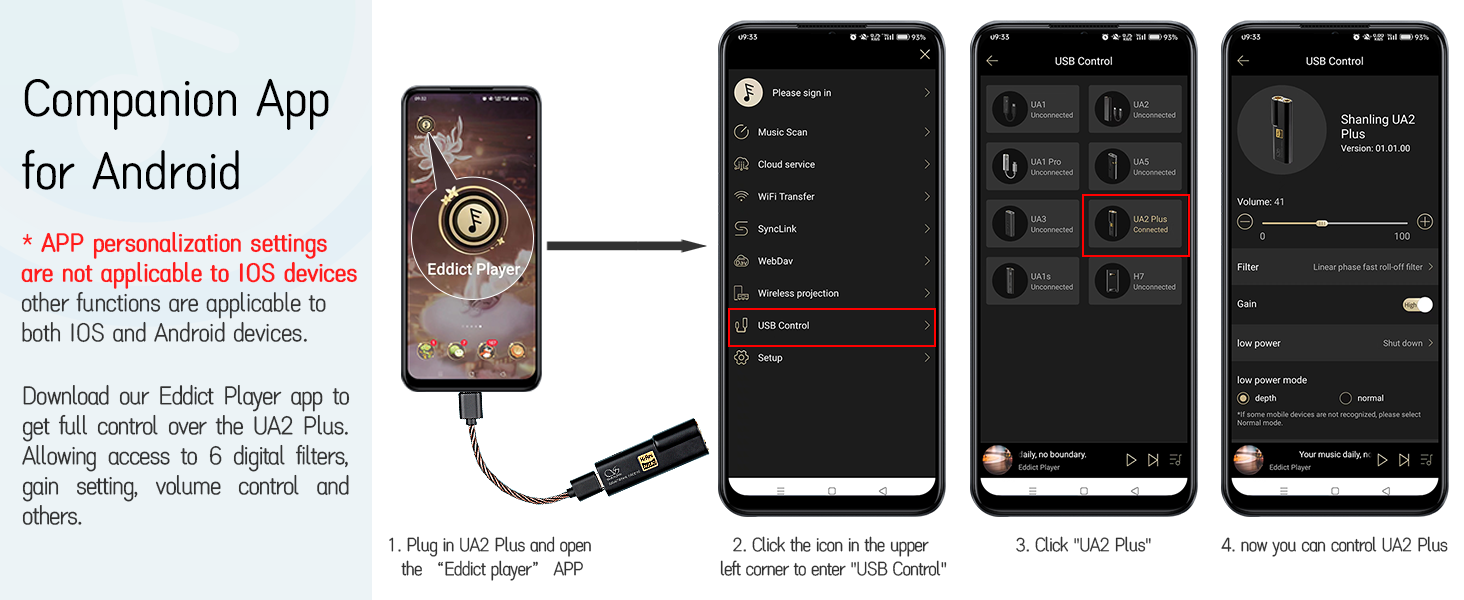
Image: A visual guide to using the Eddict Player app for controlling the UA2 Plus, showing the connection and settings interface.
Video: A tutorial demonstrating the SyncLink connection method for Android and iOS devices using the Eddict Player app, which is applicable to the UA2 Plus for app control.
5. Käyttöohjeet
5.1 Peruskäyttö
The UA2 Plus is designed for simple operation. Once connected to a compatible device, it will typically power on automatically.
- Äänenvoimakkuuden säätö: Volume is primarily controlled via the connected source device (phone, computer). The UA2 Plus acts as a high-quality audio output.
- Tilapainike: A short press of the 'MODE' button cycles through available digital filters. A long press (while connecting to Nintendo Switch) activates UAC1.0 mode.
5.2 LED-ilmaisimet
The LED indicator on the UA2 Plus provides visual feedback on the device's status:
- Sininen: 44.1 / 48 kHz sampling korko.
- Vihreä: 88.2 / 96 kHz sampling korko.
- Keltainen: 176.4 / 192 kHz sampling korko.
- Violetti: 352 / 384 / 705 / 768 kHzampling korko.
- Valkoinen: DSD 64 / 128 / 256 / 512 playback.
- Punainen: 44.1 / 48 kHz (Switch Mode / UAC1.0).

Image: The LED indicator on the UA2 Plus, detailing the color codes for various audio formats and modes.
6. Huolto
To ensure the longevity and optimal performance of your SHANLING UA2 Plus, please follow these maintenance guidelines:
- Puhdistus: Puhdista laite pehmeällä, kuivalla liinalla. Vältä voimakkaiden kemikaalien tai hankaavien materiaalien käyttöä.
- Varastointi: Säilytä laitetta viileässä, kuivassa paikassa, poissa suorasta auringonvalosta ja äärimmäisistä lämpötiloista.
- Suojaus: Avoid dropping the device or exposing it to excessive force, which could damage internal components or the glass panels.
- Kosteus: Pidä laite poissa vedestä ja korkeasta kosteudesta.
7. Vianmääritys
If you encounter any issues with your UA2 Plus, please refer to the following common troubleshooting steps:
- Ei ääntä:
- Ensure the UA2 Plus is securely connected to both the source device and headphones.
- Check the volume level on both the source device and within the Eddict Player app.
- Verify that the correct audio output is selected on your source device (e.g., 'SHANLING UA2 Plus' in sound settings).
- For iOS devices, confirm you are using a compatible Lightning to USB-C cable.
- Laitetta ei tunnisteta:
- Try reconnecting the device.
- Käynnistä lähdelaitteesi uudelleen.
- For Windows computers, ensure the necessary drivers are installed.
- For Nintendo Switch, ensure UAC1.0 mode is activated by pressing the Mode button during connection.
- Ajoittainen yhteys:
- Check the USB cable for damage and ensure it is firmly seated.
- Kokeile toista USB-porttia tai -kaapelia.
- Huono äänenlaatu:
- Varmista, että käytät korkealaatuista ääntä files.
- Tarkista kuulokkeiden liitännät ja varmista, että ne ovat kokonaan paikallaan.
- Adjust digital filter and gain settings in the Eddict Player app.
8. Tekniset tiedot
| Ominaisuus | Kuvaus |
|---|---|
| Mallin nimi | UA2 Plus |
| DAC-siru | ES9038Q2M |
| Amp Siru | Dual RT6863 |
| Hi-Res-tuki | 32bit/768kHz, DSD512 |
| Output Power (4.4mm BAL) | 195mW @ 32Ω |
| Output Power (3.5mm SE) | 125mW @ 32Ω |
| Signaali-kohinasuhde | Jopa 121dB |
| Kuulokkeet Jack | 3.5 mm Jack, 4.4 mm Balanced Jack |
| Yhteystekniikka | Langallinen (USB-C) |
| Yhteensopivat laitteet | Android, iOS, Windows, Mac, Nintendo Switch |
| Tuotteen paino | 10.6 g (0.37 unssia) |
| Materiaali | Metalli |
9. Takuu ja tuki
Your SHANLING UA2 Plus comes with a warranty card included in the package. Please refer to the warranty card for specific terms and conditions.
For further support, product updates, or to explore other SHANLING products, please visit the official SHANLING websivusto tai heidän Amazon-kauppansa:


