
1. Johdanto ja loppuview
This manual provides detailed instructions for the proper setup, operation, and maintenance of your Techbee TE02 Indoor Digital Electrical Outlet Timer Plug. This device is designed to automate the power supply to your electrical appliances, offering convenience, energy savings, and enhanced home security through its programmable features.
The Techbee TE02 timer plug features a large, easy-to-read display and intuitive controls, allowing for precise scheduling of up to 20 ON/OFF programs per day. It also includes advanced functions such as a countdown timer and a random ON/OFF mode for vacation security. Its built-in battery ensures that your programmed settings are retained even during power outages.
2. Tuotteen ominaisuudet
- Extensive Programming: Supports up to 20 weekly ON-OFF timing programs for flexible scheduling.
- Laskuritoiminto: Allows for precise delay ON/OFF timing, from 1 second up to 99 hours, 59 minutes, and 59 seconds.
- Anti-theft Random Mode: Activates lights or other appliances at varying times to simulate occupancy, deterring potential intruders.
- Käyttäjäystävällinen näyttö: Features a large screen for clear visibility of digits and numbers.
- Voima Outage Suojaus: Equipped with a built-in NiMH 1.2V battery to retain programmed settings for over 30 days during power interruptions.
- Versatile Time Format: Interchangeable 12-hour (AM/PM) and 24-hour formats.
- Maadoitettu pistorasia: Designed with a 3-prong plug and socket for safe use with a wide range of appliances.
- Hiljainen toiminta: Operates completely silently, making it suitable for home use.
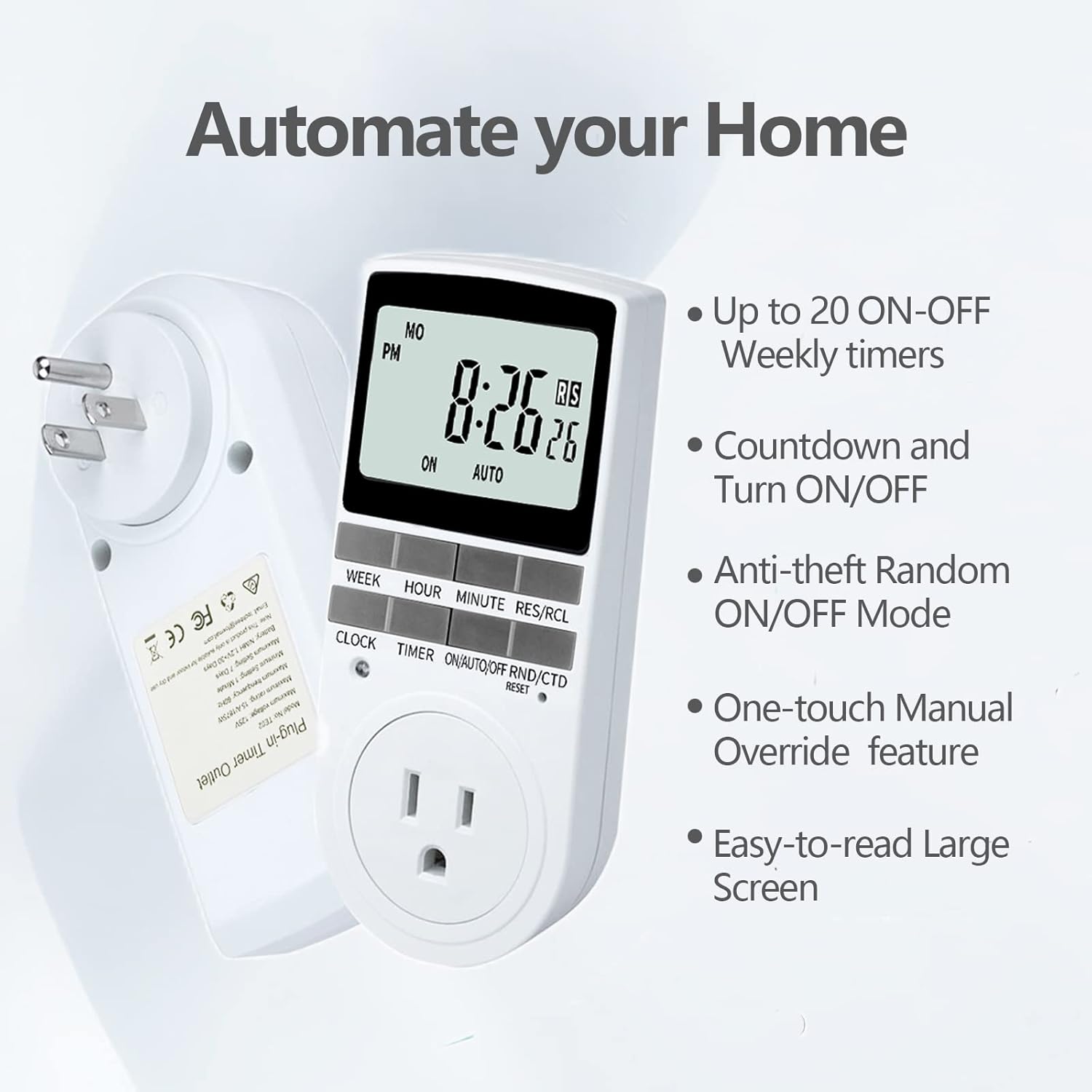
Figure 2.1: Key features of the Techbee TE02 Digital Timer Plug.
3. Tekniset tiedot
| Erittely | Arvo |
|---|---|
| Mallinumero | TE02 |
| Suurin tilavuustage | 125V |
| Maksimiluokitus | 15 A / 1875 W |
| Maksimitaajuus | 60 Hz |
| Minimum Setting Interval | 1 Minute (1 second for countdown) |
| Maximum Setting Duration | 7 päivää |
| Akun tyyppi | NiMH 1.2V (retains settings >30 days) |
| Asetusten määrä | 20 ON-OFF programs |

Figure 3.1: Technical data and features as displayed on the product packaging.
4. Asennus
Before initial use, it is recommended to plug the timer into a live outlet for at least 30 minutes to charge the internal battery. This ensures that the timer retains its settings even if unplugged or during a power outage.
- Unpack the timer plug and included instruction manual.
- Locate a standard 125V grounded electrical outlet.
- Plug the Techbee TE02 timer directly into the wall outlet. The display should illuminate.
- Paina RESET button (usually a small recessed button) using a non-metallic pointed object (like a pen tip) to clear all previous settings and ensure proper function.
- Proceed to set the current time and day as described in the 'Operating Instructions' section.

Figure 4.1: The Techbee TE02 Digital Timer Plug ready for setup.
Video 4.1: Ylilyöntiview of the Techbee TE02 timer plug, including unboxing and initial setup steps.
5. Käyttöohjeet
5.1. Nykyisen kellonajan ja päivämäärän asettaminen
- Paina KELLO -painiketta. Näytössä näkyy nykyinen aika.
- Kun pidät KELLO -painiketta, paina VIIKKO asettaaksesi kuluvan päivän (MA, TI, KE, TO, PE, LA, SU).
- Kun pidät KELLO -painiketta, paina TUNNIN asettaaksesi nykyisen tunnin (12 tunnin tai 24 tunnin muoto).
- Kun pidät KELLO -painiketta, paina MINUUTI asettaaksesi nykyisen minuutin.
- Vapauta KELLO -näppäintä tallentaaksesi asetukset.
5.2. Programming ON/OFF Times (Up to 20 Programs)
- Paina AJASTIN -painiketta siirtyäksesi ohjelmointitilaan. Näytössä näkyy "1 ON".
- Paina VIIKKO to select the day(s) for this program (e.g., MO, TU, WE, TH, FR, SA, SU, or various combinations).
- Paina TUNNIN asettaaksesi halutun PÄÄLLE-ajan.
- Paina MINUUTI asettaaksesi halutun käynnistysminuutin.
- Paina AJASTIN uudelleen. Näytössä näkyy "1 OFF".
- Toista vaiheet 2–4 asettaaksesi halutun POIS-ajan tälle ohjelmalle.
- Jatka painamista AJASTIN to cycle through programs "2 ON", "2 OFF" up to "20 ON", "20 OFF", setting each as needed.
- Kun olet asettanut kaikki haluamasi ohjelmat, paina KELLO -painiketta poistuaksesi ohjelmointitilasta ja palataksesi nykyisen ajan näyttöön.

Figure 5.1: Programming the timer for daily routines.
5.3. Ajastintoiminto
The countdown function allows the timer to turn ON or OFF after a specified duration.
- Paina ON/AUTO/OFF RND/CTD button repeatedly until "CTD" appears on the display.
- Paina TUNNIN, MINUUTI, ja RES/RCL (for seconds) to set the desired countdown duration.
- Paina AJASTIN to start the countdown. The display will show the remaining time.
- Once the countdown reaches zero, the connected appliance will either turn ON or OFF, depending on its initial state.

Figure 5.2: Setting a countdown timer to turn an appliance ON or OFF.
5.4. Random Function (Anti-theft Mode)
The random function helps deter intruders by turning connected lights or appliances ON and OFF at irregular intervals.
- Paina ON/AUTO/OFF RND/CTD button repeatedly until "RND" appears on the display.
- The timer will now randomly turn the connected appliance ON and OFF within a set time window (typically 6 PM to 6 AM, but the Techbee TE02 offers random from any time).
- Deaktivoi painamalla ON/AUTO/OFF RND/CTD button again until "AUTO" or "ON"/"OFF" is displayed.

Figure 5.3: Utilizing the random function for home security.
5.5. Manuaaliohitus
You can manually switch the timer's output state without affecting the programmed settings.
- Paina ON/AUTO/OFF RND/CTD painiketta selataksesi tiloja: ON (aina päällä), AUTO (seuraa ohjelmia), POIS (always off), RND (random), CTD (countdown).
- Valitse ON or POIS for immediate control. The timer will remain in this state until manually changed or switched back to AUTO.
6. Huolto
- Puhdistus: Irrota ajastin pistorasiasta ennen puhdistamista. Pyyhi ulkopinta pehmeällä, kuivalla liinalla. Älä käytä nestemäisiä puhdistusaineita tai hankaavia aineita.
- Varastointi: If storing the timer for an extended period, ensure the internal battery is charged by plugging it in for a few hours every few months. Store in a cool, dry place away from direct sunlight and extreme temperatures.
- Akku: The internal NiMH battery is designed for long-term use and retains settings for over 30 days. It is not user-replaceable.
7. Vianmääritys
- Ajastimen näyttö on tyhjä:
- Varmista, että ajastin on kytketty tukevasti toimivaan pistorasiaan.
- The internal battery might be fully discharged. Plug the timer in for at least 30 minutes to charge it.
- Programs Not Activating:
- Varmista, että nykyinen aika ja päivä on asetettu oikein.
- Tarkista, että ajastin on päällä AUTO tila.
- Ensure the ON/OFF programs are set correctly and do not overlap in an unintended way.
- Confirm the connected appliance is functioning correctly and its power switch is in the ON position.
- Timer Not Responding to Buttons:
- Perform a full reset by pressing the RESET button with a pointed object. You will need to re-enter all settings after a reset.
- Appliance Does Not Turn ON/OFF with Countdown:
- Varmista, että ajastin on päällä CTD mode and the countdown duration is set.
- Verify the connected appliance is working and its power switch is ON.
8. Takuu ja tuki
For warranty information, technical support, or any inquiries regarding your Techbee TE02 Digital Timer Plug, please refer to the official documentation provided with your product or visit the official Techbee store.
Lisätietoja ja tukea tuotteesta löydät osoitteesta Techbee Store on Amazon.
A detailed PDF instruction manual is also available for download: Käyttöohjeet (PDF).