
1. Johdanto
Kiitos ostoksestasiasing the Ysametp 5G WiFi Bluetooth Projector. This device is designed to provide a high-quality home theater experience with its native 1080p Full HD resolution, 4K support, and integrated Android system. Please read this manual thoroughly before using the projector to ensure proper operation and to maximize its lifespan.
2. Turvallisuustiedot
Noudata seuraavia turvaohjeita projektorin vahingoittumisen estämiseksi ja käyttäjän turvallisuuden varmistamiseksi:
- Virtalähde: Use only the specified power adapter. Ensure the power outlet voltage vastaa projektorin vaatimuksia.
- Ilmanvaihto: Älä tuki tuuletusaukkoja. Varmista riittävä ilmankierto projektorin ympärillä ylikuumenemisen estämiseksi.
- Sijoitus: Aseta projektori vakaalle ja tasaiselle alustalle. Vältä sen sijoittamista suoraan auringonvaloon, lämmönlähteiden lähelle tai ympäristöihin, joissa on korkea kosteus tai pölyä.
- Puhdistus: Irrota virtajohto ennen puhdistamista. Käytä pehmeää, kuivaa liinaa. Älä käytä nestemäisiä tai aerosolipuhdistusaineita.
- Silmien suojaus: Älä katso suoraan projektorin linssiin, kunamp on päällä, sillä kirkas valo voi vahingoittaa silmiä.
- Korjaukset: Älä yritä korjata projektoria itse. Jätä kaikki huoltotyöt pätevän henkilöstön tehtäväksi.
3. Pakkauksen sisältö
Varmista, että pakkauksessa on kaikki tarvittavat osat:
- Ysametp 5G WiFi Bluetooth Projector (Model DE-M8-E-An)
- Kaukosäädin
- Power Cable (AC 220V with Schuko plug)
- HDMI kaapeli
- Käyttöopas
4. Tuote ohiview
Tutustu projektorin osiin ja liitäntöihin.
4.1 Edessä View

Kuva: Edessä view of the Ysametp Projector, highlighting the projection lens and side ventilation grilles.
4.2 Taka- ja sivuliitännät
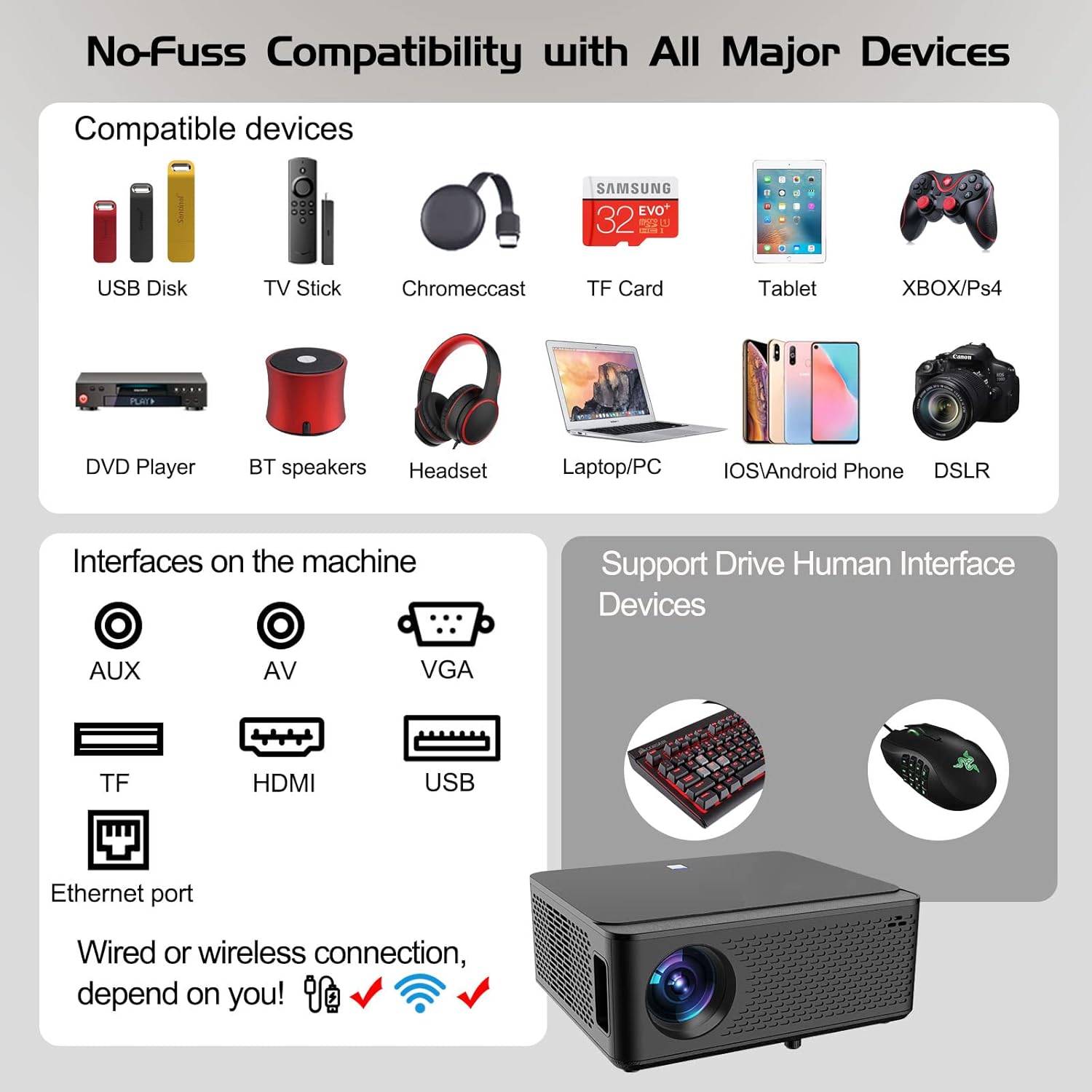
Image: Diagram illustrating the various input and output ports available on the Ysametp Projector, including USB, HDMI, AV, VGA, TF card slot, and Ethernet port.
The projector features a comprehensive set of ports for versatile connectivity:
- Ethernet-portti: Kiinteää internetyhteyttä varten.
- VGA-portti: For connecting to older computers.
- USB-A-portti: For connecting USB flash drives or external devices.
- HDMI-portti: For high-definition audio and video input from various sources.
- AV-tulo: For connecting analog audio/video devices.
- 3.5 mm äänilähtö: Ulkoisten kaiuttimien tai kuulokkeiden kytkemiseen.
- TF-korttipaikka: For reading media from Micro SD cards.
- Tehon syöttö: Verkkovirtakaapelin kytkemistä varten.
4.3 Yläohjaimet
The top of the projector includes a power button for basic on/off functionality. Further controls are available via the remote control and the on-screen display.
4.4 Tarkennuksen säätö
A mechanical focus adjustment screw is located on the side of the lens for manual image clarity control.
5. Asennus
5.1 Sijoitus
Position the projector on a stable surface. The projection distance will determine the screen size. For optimal viewing, ensure the projector is perpendicular to the projection surface.
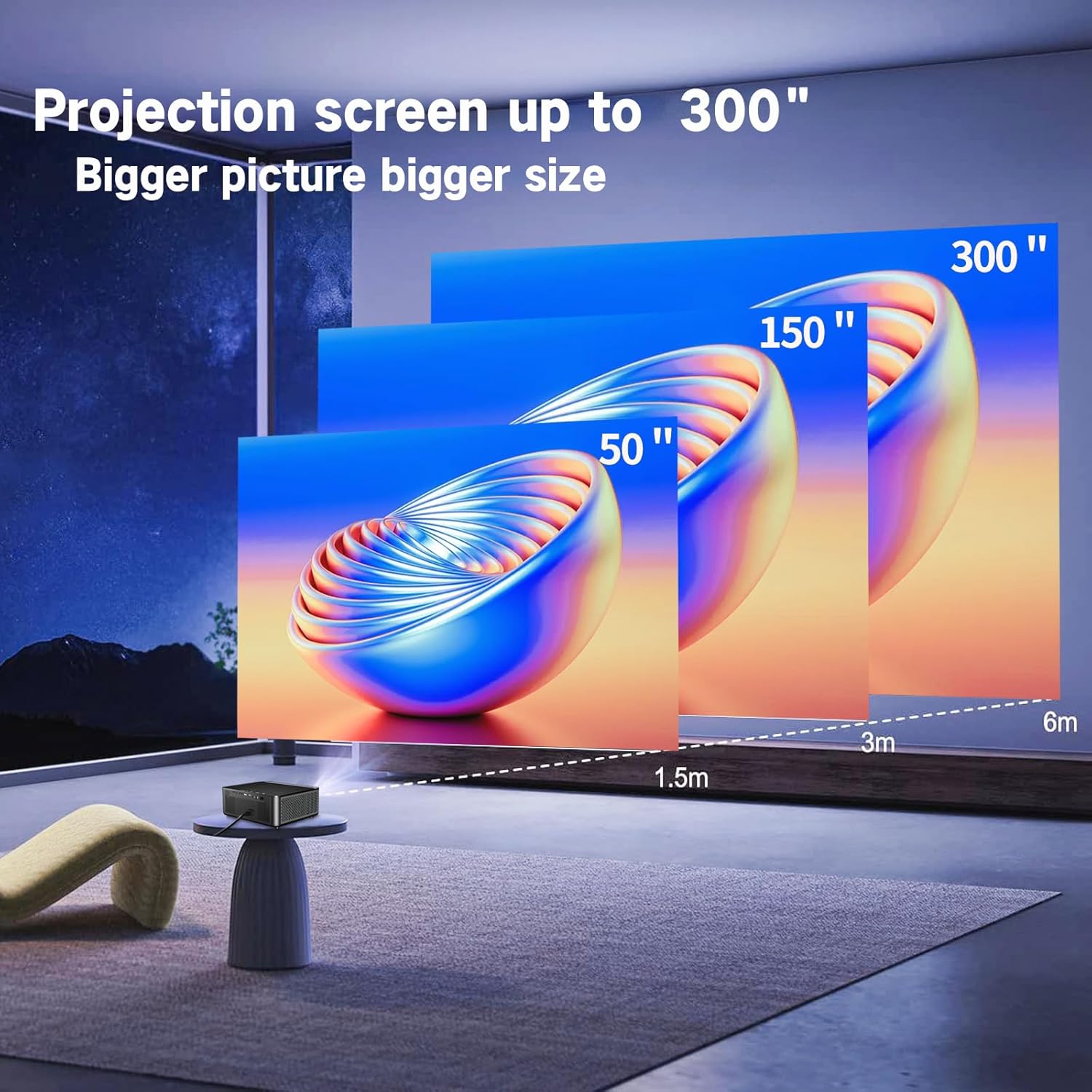
Image: Illustration demonstrating recommended projection distances for achieving screen sizes of 50, 150, and 300 inches.
5.2 Virtaliitäntä
- Liitä virtajohto projektorin virransyöttöön.
- Kytke virtajohdon toinen pää sopivaan pistorasiaan.
5.3 Ensimmäinen käynnistys
- Kytke laite päälle painamalla projektorin tai kaukosäätimen virtapainiketta.
- Allow a few moments for the projector to boot up.
5.4 Tarkennus ja trapetsivääristymän korjaus
After powering on, adjust the image for clarity and proper geometry:
- Painopiste: Rotate the mechanical focus adjustment screw near the lens until the image appears sharp and clear.
- Keystone-korjaus: If the projected image is trapezoidal (wider at the top or bottom), use the 4D keystone correction feature via the on-screen menu to adjust the image corners until it forms a perfect rectangle.

Image: Diagram showing how 4P/4D keystone correction can be used to adjust the corners of a projected image to achieve a rectangular shape.
6. Käyttöohjeet
6.1 Ulkoisten laitteiden liittäminen
The projector supports various connection methods:
- HDMI: Connect gaming consoles (PS4, Xbox), laptops, or other HDMI-enabled devices using an HDMI cable.
- USB: Insert a USB flash drive into the USB-A port to play media files suoraan.
- TF-kortti: Insert a Micro SD (TF) card into the TF card slot to access media.
- VGA/AV: Use these ports for older devices requiring analog connections.
- Bluetooth: Pair Bluetooth speakers or headphones for enhanced audio.

Image: The projector shown with various compatible devices, including laptops, smartphones, gaming consoles, USB drives, and external speakers, demonstrating its versatile connectivity.
6.2 Using the Integrated Android System
The projector comes with an integrated Android system, allowing access to a wide range of applications.

Image: The projector displaying its Android interface, featuring icons for popular streaming services and apps such as Netflix, YouTube, Prime Video, Hulu, Spotify, and TikTok.
- Verkkoyhteys: Connect the projector to your home Wi-Fi network via the settings menu or use an Ethernet cable for a wired connection.
- Sovelluksen käyttöoikeus: Navigate the Android interface using the remote control. You can download and install applications from the Google Play Store.
- Suoratoisto: Enjoy content from pre-installed or downloaded streaming services.
6.3 5G WiFi Screen Mirroring
Mirror your smartphone, tablet, or PC screen wirelessly to the projector.

Image: A family enjoying content mirrored from a smartphone onto the large projected screen, illustrating the 5G WiFi Screen Mirroring feature for iOS, Android, and Windows devices.
- Varmista, että sekä projektori että laitteesi on yhdistetty samaan 5G WiFi -verkkoon.
- Select the "Screen Mirroring" option on the projector's menu.
- On your smartphone/tablet/PC, activate its screen mirroring function (e.g., "Smart View" for Android, "AirPlay" for iOS, "Cast" for Windows).
- Select the projector from the list of available devices to establish the connection.
7. Huolto
7.1 Linssin puhdistaminen
Pyyhi projektorin linssi varovasti pehmeällä, nukkaamattomalla liinalla, joka on suunniteltu erityisesti optisille pinnoille. Älä käytä hankaavia puhdistusaineita tai liiallista voimaa.
7.2 Projektorin rungon puhdistaminen
Use a soft, dry cloth to clean the exterior of the projector. Avoid using harsh chemicals or solvents.
7.3 Optical Engine Protection
The projector features a full-sealed optical engine designed to prevent dust from entering the internal components, reducing the need for frequent internal cleaning and extending the device's lifespan.

Kuva: Sisäinen view diagram of the projector's full-sealed optical engine, highlighting its design to prevent dust from entering and affecting performance.
7.4Lamp Elämä
The projector utilizes advanced SmarEco technology to minimize energy consumption and extend the lamp's lifespan up to 60,000 hours, providing long-term reliability.

Kuva: Yksityiskohtainen kaavio, joka näyttääasing the projector's lamp technology, indicating a lifespan of over 30,000 hours.
8. Vianmääritys
Jos projektorin kanssa ilmenee ongelmia, katso seuraavat yleiset ongelmat ja ratkaisut:
| Ongelma | Mahdollinen syy | Ratkaisu |
|---|---|---|
| Ei kuvaa näytöllä. | Power cable loose; incorrect input source; device not connected. | Check power connections. Select correct input source (HDMI, AV, etc.). Ensure external device is powered on and connected properly. |
| Kuva on epäselvä. | Focus not adjusted; projector too far/close. | Adjust the focus ring on the lens. Ensure projector is within optimal projection distance. |
| Kuva on puolisuunnikkaan muotoinen. | Projektori ei ole kohtisuorassa valkokankaaseen nähden. | Use the 4D keystone correction feature in the settings menu to adjust the image shape. |
| Ei ääntä. | Volume too low; external audio device not connected; incorrect audio output selected. | Increase volume. Check external speaker/headphone connection. Ensure correct audio output is selected in settings. |
| Ei voi muodostaa yhteyttä Wi-Fi-verkkoon. | Väärä salasana; kantaman ulkopuolella; verkko-ongelma. | Verify WiFi password. Move projector closer to router. Restart router and projector. |
9. Tekniset tiedot
Key technical specifications for the Ysametp 5G WiFi Bluetooth Projector (Model DE-M8-E-An):
- Merkki: Ysametp
- Mallinumero: DE-M8-E-An
- Väri: Musta
- Tuotetyyppi: Kannettava projektori
- Yhteystekniikka: HDMI, USB, Wi-Fi (5G), Bluetooth
- Erikoisominaisuudet: Integrated WiFi, Android System, 4D Keystone Correction
- Yhteensopivat laitteet: Game Consoles, Speakers, Laptops, Smartphones, Tablets
- Näytön resoluutio: Alkuperäinen 1920 x 1080 (Full HD)
- Suurin näytön tarkkuus: 4096 x 2160 (4K Support)
- Näyttötyyppi: DLP
- Tuotteen mitat: 26 L x 23 L x 11 K senttimetriä
- Muototekijä: Kannettava
- Asennustyyppi: Pöytäkiinnitys
- Lamp Elinikä: Jopa 60,000 tuntia

Image: A visual comparison highlighting the projector's 20,000 Lumens brightness, Native 1080P resolution, and 4K support, contrasting it with a lower specification projector.
10. Takuu ja tuki
The Ysametp Projector comes with a 3-year service warranty. For technical support or warranty claims, please contact Ysametp customer service through your purchase platform or the official Ysametp websivusto.