
1. Johdanto ja turvallisuustiedot
This manual provides essential instructions for the safe and effective operation, maintenance, and troubleshooting of your VOLTCRAFT VC851 Digital Multimeter. Please read this manual thoroughly before using the device and keep it for future reference.
1.1 Yleiset turvallisuusvaroitukset
Always adhere to the following safety precautions to prevent electric shock, injury, or damage to the meter or equipment under test:
- The VOLTCRAFT VC851 is rated for CAT III 1000 V and CAT IV 600 V. Ensure you understand these categories and their implications for safe measurement.
- Älä käytä enempää kuin nimellistilavuustage, kuten mittariin on merkitty, liittimien väliin tai minkä tahansa liittimen ja maan väliin.
- Ole varovainen, kun työskentelet voltagyli 30 V AC RMS, 42 V huippu tai 60 V DC. Nämä jännitteettagse aiheuttaa sähköiskuvaaran.
- Tarkista ennen jokaista käyttökertaa, ettei mittausjohdoissa ole vaurioita eristeessä tai näkyviä metalliosia. Vaihda vaurioituneet johdot välittömästi.
- Ensure the rotary switch is in the correct position for the desired measurement before connecting the test leads to the circuit.
- Never use the meter if it appears damaged or if the case is open.
- Älä käytä mittaria räjähdysherkissä kaasu-, höyry- tai pölyympäristöissä.
- Irrota aina mittausjohdot piiristä ennen toiminnon tai mittausalueen vaihtamista.
- Vaihda paristo heti, kun heikon pariston ilmaisin tulee näkyviin, jotta lukemat ovat tarkkoja.
2. Tuote ohiview
The VOLTCRAFT VC851 is a versatile digital multimeter designed for precise electrical measurements. It features a 6000-count display, auto-ranging capabilities, and integrated flashlight and screen illumination for use in various environments.
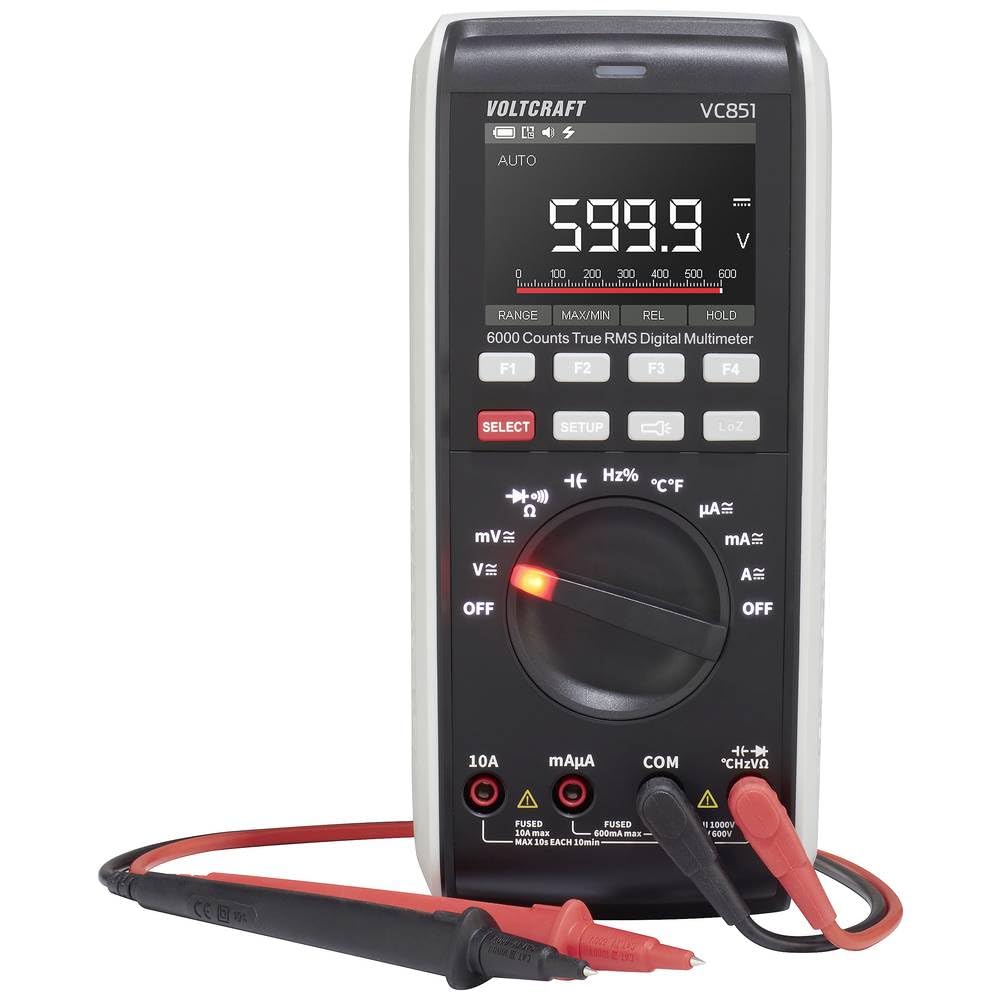
Kuva 2.1: Etuosa view of the VOLTCRAFT VC851 Digital Multimeter with connected test leads. This image shows the display, rotary dial, function buttons, and input jacks.

Kuva 2.2: Takaosa view of the VOLTCRAFT VC851 Digital Multimeter, illustrating the integrated test lead storage and kickstand.
3. Asennus ja käyttöönotto
3.1 Akun asennus
The VOLTCRAFT VC851 is powered by batteries. To install or replace batteries:
- Varmista, että yleismittari on sammutettu ja irrota kaikki mittausjohdot.
- Paikanna laitteen takaosassa oleva paristolokeron kansi.
- Avaa paristolokero ruuvimeisselillä.
- Aseta uudet paristot paikoilleen ja huomioi oikea napaisuus (+/-).
- Sulje paristolokeron kansi kunnolla.

Kuva 3.1: Takaosa view of the multimeter, highlighting the battery compartment for installation or replacement.
3.2 Mittausjohtojen kytkeminen
Mittausten valmistelu:
- Kytke musta mittausjohto "COM"-tuloliittimeen (yleinen).
- Kytke punainen mittausjohto mittausta varten sopivaan tuloliittimeen:
- "VΩHz" for voltage-, resistanssi-, taajuus-, kapasitanssi- ja dioditestaukset.
- "mAµA" for milliampere ja mikroampvirran mittaukset.
- "10A" for high current (up to 10A) measurements.

Figure 3.2: The multimeter with test leads properly connected to the input jacks, ready for use.
4. Käyttöohjeet
The VOLTCRAFT VC851 features a rotary dial for selecting primary measurement functions and buttons for secondary functions and settings.
4.1 Toiminnon valinta
Turn the central rotary dial to select the desired measurement function (e.g., V for voltage, A for current, Ω for resistance). The meter will automatically select the appropriate range (Auto-Range) for most measurements.
4.2 Mittaustilat
- Voitage (V~ / V-): Mittaa AC- tai DC-jännitettätage. Select the appropriate voltage range using the rotary dial.
- Current (A~ / A-): Measure AC or DC current. Ensure test leads are connected to the correct current input jacks (mAµA or 10A) and the rotary dial is set to the corresponding current range.
- Resistanssi (Ω): Measure resistance in ohms.
- Jatkuvuus: Test for continuity with an audible buzzer.
- Dioditesti: Test diodes for proper function.
- Kapasitanssi (F): Measure capacitance in farads.
- Taajuus (Hz): Measure frequency in hertz.
- Lämpötila (°C/°F): Measure temperature using the included temperature probe.
4.3 Erikoisominaisuudet
- Taskulamppu: Press the dedicated flashlight button to illuminate the work area.
- Näytön valaistus: The display features backlighting for improved visibility in low-light conditions.
- Tietojen pito: Paina "HOLD"-painiketta jäädyttääksesi nykyisen lukeman näytössä.
- Min/Max: Use the "MIN/MAX" function to record the minimum and maximum values during a measurement session.

Figure 4.1: The multimeter in use, demonstrating its application in an electrical panel for voltage or current checks.

Figure 4.2: The multimeter being used for precise measurements on a circuit board, showcasing its versatility for electronics work.
5. Huolto
Proper maintenance ensures the longevity and accuracy of your VOLTCRAFT VC851 Digital Multimeter.
5.1 Puhdistus
- Always turn off the meter and disconnect test leads before cleaning.
- Pyyhi kotelo mainoksellaamp liinalla ja miedolla pesuaineella. Älä käytä hankaavia aineita tai liuottimia.
- Ensure no moisture enters the case.
5.2 Pariston vaihto
Refer to Section 3.1 for detailed instructions on battery replacement. Replace batteries promptly when the low battery indicator appears to maintain measurement accuracy.
5.3 Sulakkeen vaihto
If the current measurement function stops working, the fuse may need replacement. Fuses are critical safety components. Always replace with a fuse of the specified type and rating.
- Varmista, että yleismittari on sammutettu ja irrota kaikki mittausjohdot.
- Avaa paristolokeron kansi (katso kohta 3.1).
- Irrota vanha sulake varovasti.
- Install a new fuse of the exact same type and rating. Refer to the specifications section for fuse details.
- Sulje paristolokeron kansi kunnolla.
6. Vianmääritys
If you encounter issues with your VOLTCRAFT VC851, consult the following table for common problems and solutions.
| Ongelma | Mahdollinen syy | Ratkaisu |
|---|---|---|
| Ei näyttöä tai himmeä näyttö | Paristot vähissä tai tyhjät | Vaihda paristot (katso kohta 3.1). |
| Väärät lukemat | Incorrect function/range selected; Damaged test leads; External interference | Verify rotary switch position; Inspect and replace test leads if damaged; Move away from strong electromagnetic fields. |
| Virran mittaus ei toimi | Blown fuse; Incorrect lead connection | Replace fuse (see Section 5.3); Ensure leads are in the correct current input jacks. |
| Näytössä näkyy "OL" (ylikuormitus) | Measurement exceeds selected range or meter's maximum capacity | Switch to a higher range if available, or ensure the measured value is within the meter's specifications. |
7. Tekniset tiedot
| Ominaisuus | Erittely |
|---|---|
| Mallinumero | VC-12884325 |
| Turvallisuusluokitus | CAT III 1000V, CAT IV 600V |
| Näyttömäärät | 6000 lasketaan |
| Rangeissa | Automaattinen alue |
| Toiminnot | AC/DC Voitage, AC/DC Current, Resistance, Continuity, Diode, Capacitance, Frequency, Temperature |
| Erikoisominaisuudet | Flashlight, Screen Illumination, Data Hold, Min/Max |
| Mitat (P x L x K) | 4.3 x 9.1 x 20 cm (1.7 x 3.6 x 7.9 tuumaa) |
| Paino | 430 grammaa (0.95 lbs) |
| Virtalähde | Akkukäyttöinen |
| Varaosien saatavuus | 1 vuosi |
8. Takuu ja tuki
VOLTCRAFT products are designed for reliability and performance. This product comes with a standard warranty. For specific warranty terms and conditions, please refer to the documentation included with your purchase or visit the official VOLTCRAFT websivusto.
Spare parts are available for 1 year from the date of purchase. For technical support, service, or inquiries regarding spare parts, please contact VOLTCRAFT customer service through their official channels.
Säilytä ostokuitti takuuvaatimuksia varten.