
Johdanto
Thank you for choosing the KAIWEETS VT500 Non-Contact Voltage Tester. This manual provides essential information for the safe and effective operation, maintenance, and troubleshooting of your device. Please read this manual thoroughly before use and retain it for future reference.

The KAIWEETS VT500 Non-Contact Voltage Tester, a versatile tool for electrical measurements.
Turvallisuustiedot
Always adhere to basic safety precautions when using electrical testing equipment to reduce the risk of fire, electric shock, and personal injury. This device is designed for professional and DIY use, but proper handling is crucial.
- Älä testaa voltage with gloves: For accurate readings and to ensure proper contact for certain functions, avoid wearing gloves during contact voltage mittaukset.
- Varmista, että laite on toimintakunnossa ennen jokaista käyttökertaa. Älä käytä laitetta, jos se on vaurioitunut.
- Älä ylitä suurinta nimellistilavuuttatage (300 V AC).
- Oleta aina, että virtapiirit ovat jännitteisiä, kunnes toisin todistetaan.
- Pidä laite poissa vedestä ja äärilämpötiloista.
- Vaihda paristot viipymättä, kun heikon pariston varoitusvalo tulee näkyviin.

Tarkkaa voltage readings and to avoid electric shock risks, always use the tester without gloves when performing contact measurements. The image shows the tester correctly detecting voltage when held by a bare hand, and incorrectly when held with a glove, emphasizing the importance of direct contact for certain functions.
Pakkauksen sisältö
Varmista avatessasi pakkauksen, että kaikki osat ovat mukana ja vahingoittumattomia:
- 1 x KAIWEETS VT500 Non-Contact Voltage Testaaja
- 1 x AAA-paristo
- 1 x Käyttöohje

The KAIWEETS VT500 Voltage Tester as it appears in its retail packaging.
Tuote loppuview
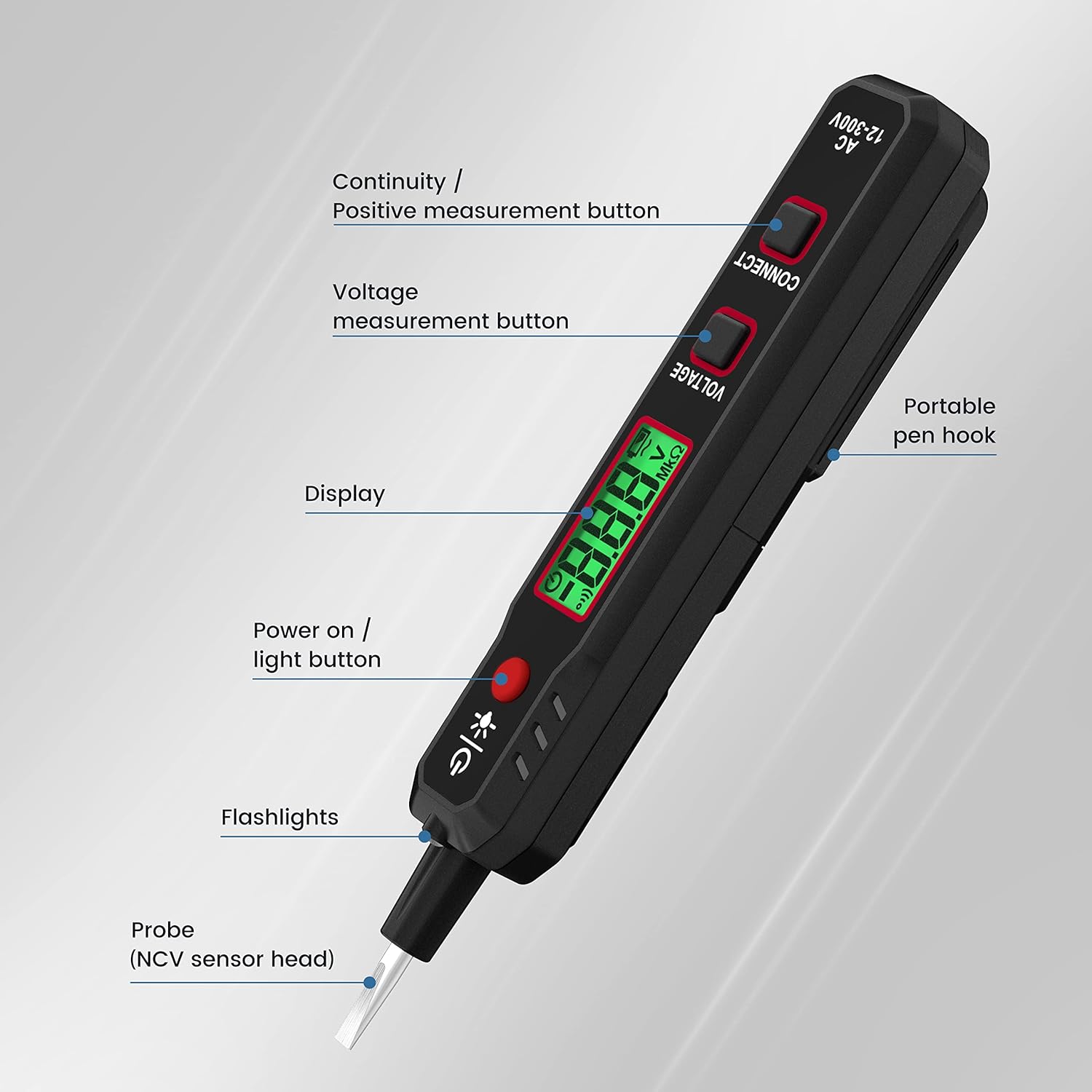
The KAIWEETS VT500 is a versatile electrical testing tool designed for safety and convenience. Key features include:
- Non-Contact Voltage (NCV) -havaitseminen: Quickly identifies live/neutral wires and cable breakpoints without direct contact.
- LCD Voltmeter: Provides contact voltage measurement from 12V to 300V AC, displayed on an easy-to-read LCD screen.
- Jatkuvuustesti: Detects cable breakpoints and verifies circuit continuity.
- Battery Polarity Test: Determines the polarity of batteries.
- Integroitu taskulamppu: Valaisee työalueet hämärässä.
- Ruuvimeisselin toiminto: The probe tip doubles as a flathead screwdriver for added utility.
- Kannettava muotoilu: Features a pen hook for easy carrying.

The KAIWEETS VT500 features a portable pen hook for easy carrying and accessibility.

The robust probe tip of the KAIWEETS VT500 can also be used as a screwdriver, adding to its utility.
Asennus
Akun asennus
- Paikanna laitteen takaosassa oleva paristolokeron kansi.
- Avaa kansi liu'uttamalla tai irrottamalla sen kiinnitys.
- Aseta yksi AAA-paristo paristolokeroon varmistaen oikean napaisuuden (+/-) lokeron sisällä olevien merkkien mukaisesti.
- Sulje paristolokeron kansi kunnolla.
Käyttöohjeet
1. Virta päälle/pois
- Paina Power On/Light button (red button with power symbol) to turn on the device.
- Laite sammuu automaattisesti, kun se on ollut käyttämättömänä 15 minuuttia akun käyttöiän säästämiseksi.

The KAIWEETS VT500 automatically powers off after 15 minutes of inactivity to conserve battery life.
2. Non-Contact Voltage (NCV) Tunnistus
- Hold the tester with the NCV sensor head (probe tip) near the wire or outlet you wish to test.
- Laite ilmoittaa AC-volyymin läsnäolostatage through visual (LEDs) and audible (buzzer) alerts.
- This mode is ideal for identifying live wires and detecting breakpoints in cables.
3. Live Wire Detection
- Insert the probe tip into the live terminal of an outlet or touch it to a live wire.
- The buzzer will alarm quickly, and the LED display will show 'HI' (High Voltagja).

The KAIWEETS VT500 indicating a live wire with 'HI' on its display and an audible alarm.
4. Voitage Mittaus (kontakti)
- Paina ja pidä painettuna Voitage mittauspainike.
- Touch the probe tip to the object to be measured (e.g., an outlet terminal).
- AC voltage value (12-300V) will be displayed on the LCD screen. The buzzer will also alarm quickly.

The KAIWEETS VT500 showing a contact voltage measurement of 228V on its LCD screen.
The KAIWEETS VT500 performing two functions: Live Wire detection (buzzer alarms, LED shows HI) and Contact Voltage Test (accurate readings, safety warning, buzzer alarms quickly).
5. Jatkuvuustesti
- Paina Continuity / Positive measurement button.
- Touch the probe tip to one end of the cable or circuit.
- If continuity is detected, the screen will display a continuity symbol and the buzzer will sound. This is useful for finding cable breakpoints.

The KAIWEETS VT500 indicating continuity with a specific symbol on its display and an audible buzzer.

The KAIWEETS VT500 identifying a breakpoint within an electrical cable, indicated by a change in detection.
6. Battery Polarity Test
- Paina Continuity / Positive measurement button.
- While touching the test probe to the positive terminal of the battery, hold the negative terminal with your other hand.
- If the polarity is correct, the screen will display '---P' and the buzzer will sound.

The KAIWEETS VT500 testing battery polarity. Touch the test probe to the positive terminal and hold the negative terminal with your other hand. If polarity is correct, the screen displays '---P' and a buzzer sounds.
7. Taskulampun toiminto
- Paina Power On/Light button briefly to activate the integrated flashlight.
- Sammuta taskulamppu painamalla sitä uudelleen.

The integrated flashlight of the KAIWEETS VT500 provides convenient illumination when working in dark environments.
Huolto
Akun vaihto
When the low battery indicator appears on the display, replace the AAA battery as described in the 'Battery Installation' section. Always use a fresh, high-quality AAA battery.
Puhdistus ja varastointi
- Puhdista laite mainoksellaamp liinalla ja miedolla pesuaineella. Älä käytä hankaavia puhdistusaineita tai liuottimia.
- Varmista, että laite on täysin kuiva ennen säilytystä.
- Säilytä testeri viileässä, kuivassa paikassa, poissa suorasta auringonvalosta ja äärimmäisistä lämpötiloista.
- Jos säilytät laitetta pitkään, poista paristo vuotojen estämiseksi.
Vianetsintä
| Ongelma | Mahdollinen syy | Ratkaisu |
|---|---|---|
| Laite ei käynnisty. | Tyhjä tai väärin asennettu akku. | Replace battery with a new AAA battery, ensuring correct polarity. |
| Epätarkka voltage lukemat. | Poor contact; testing with gloves; low battery. | Ensure firm contact with the conductor. Remove gloves for contact tests. Replace battery. |
| NCV detection is inconsistent. | Weak signal; interference; distance from source. | Move closer to the voltage source. Ensure no strong electromagnetic interference. |
| Buzzer does not sound. | Akun varaus vähissä; laitteen toimintahäiriö. | Replace battery. If problem persists, contact support. |
Tekniset tiedot
| Ominaisuus | Erittely |
|---|---|
| Mallinumero | VT500 |
| Merkki | KAIWEETS |
| AC Voitage-alue (kontakti) | 12 V - 300 V |
| Turvallisuuden noudattaminen | CAT.II 300V, CE, RoHS |
| Virtalähde | 1 x AAA-paristo (mukana) |
| Mitat (paketti) | 16 x 3.7 x 2.4 cm |
| Paino (pakkaus) | 70 grammaa |
| Väri | Musta |
| Ominaisuudet | NCV, Voltmeter, Continuity, Battery Polarity, Flashlight, Screwdriver Tip |
Takuu ja tuki
KAIWEETS products are designed and manufactured to high-quality standards. For warranty information, technical support, or service inquiries, please refer to the contact details provided on the KAIWEETS official website or your purchase documentation. Please have your model number (VT500) and purchase date available when contacting support.