
1. Johdanto
Thank you for choosing the iulock Keypad & Key Smart Door Lock, Model IU-30. This advanced door lock provides secure and convenient keyless entry for your home, office, or rental property. Designed for durability and ease of use, it offers multiple access options including keypad codes and traditional keys. This manual will guide you through the installation, setup, operation, and maintenance of your new smart door lock.

Figure 1: The iulock Keypad & Key Smart Door Lock in Matte Black.
2. Tuotteen ominaisuudet
The iulock IU-30 is engineered with a range of features to enhance security and convenience:
- Avaimeton sisäänkäynti: Supports up to 50 customizable 1-15 digit user codes for flexible access.
- Kestävä rakenne: Heavy-duty design with premium metal construction and plating finish for enhanced security and longevity.
- Säänkestävyys: IP65 rated for weather resistance, operating effectively in temperatures from -22°F to 176°F, suitable for outdoor use in various climates.
- Pitkä akun käyttöikä: Powered by 4 AAA batteries (not included) providing up to 18 months of use, with a low battery alarm for timely replacement.
- Varavoima: Features a Type-C USB backup port for emergency power in case batteries run out.
- Käyttäjäystävällinen näppäimistö: Clear numbers and soft backlight for day and night operation.
- Joustavat tilat: Includes Passage Mode (for unlocked access during specific times) and Silent Mode (to disable keypad beeps).
- Programmable Auto-Lock: Automatically locks the door after a set period, enhancing security.
- Anti-Peeping Code Protection: Sallii satunnaisten numeroiden syöttämisen ennen varsinaista koodia tai sen jälkeen koodin paljastumisen estämiseksi.
- Detachable Silicone Grip: Provides a more comfortable and secure hold on the knob.
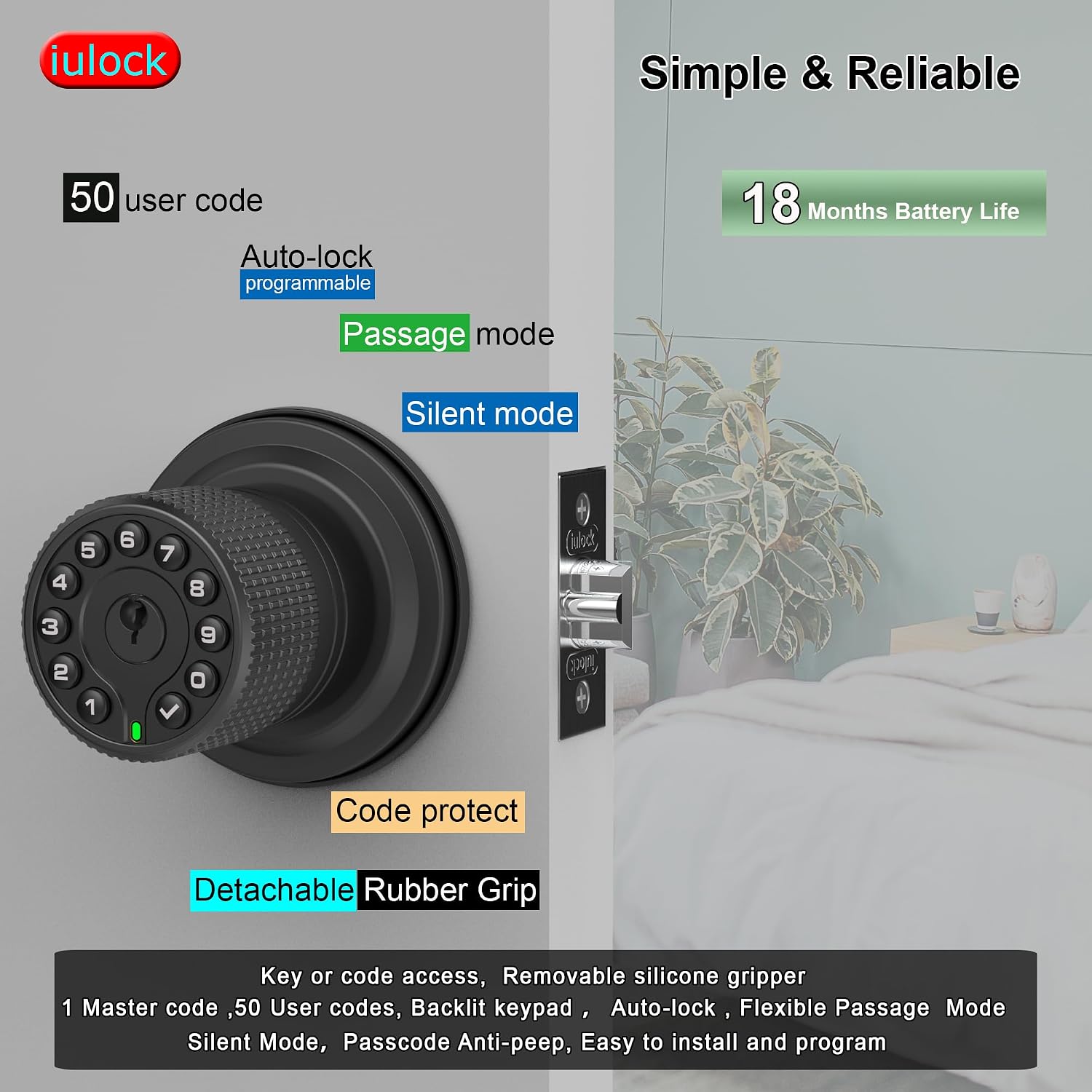
Kuva 2: Päättynytview of key features including user code capacity and battery life.

Kuva 3: Yksityiskohtainen view of the lock's internal structure, highlighting its robust design and waterproof features.
3. Mitä laatikossa on
Ennen asennuksen aloittamista tarkista, että kaikki osat ovat mukana:
- Keypad Door Knob Assembly (Exterior)
- Sisäpuolinen nuppikokoonpano
- Salpa pultti
- Lakkolevy
- Ruuvisarja
- Avaimet (2)
- Muovinen laatikko
- Rubber Grips (2)
- Rubber Seals (2)
- Ruuvimeisseli
Huomautus: Tarvitaan 4 AAA-paristoa, eivätkä ne sisälly pakkaukseen.

Figure 4: All components included in the iulock IU-30 package.
4. Asennus
The iulock IU-30 is designed for easy installation with just a screwdriver. It fits doors with a thickness of 1-3/8" to 2-1/2" and features an adjustable latch for 2-3/8" or 2-3/4" backsets. It is suitable for both left and right-handed doors.
4.1 Oven valmistelu
- Ensure your door meets the thickness requirements (1-3/8" to 2-1/2").
- Verify the backset measurement (distance from door edge to center of bore hole) is either 2-3/8" or 2-3/4". Adjust the latch if necessary.

Figure 5: Door thickness and latch adjustment guide.
4.2 Asennusvaiheet
- Install the Latch Bolt into the door edge, ensuring the bevel faces the door frame. Secure with screws.
- Insert the Exterior Keypad Knob Assembly through the door, aligning the spindle with the latch bolt. Ensure the rubber seal is properly seated against the door surface.
- Attach the Interior Knob Assembly, connecting the wires and aligning the mounting posts. Secure with the provided screws.
- Install the Strike Plate on the door frame, aligning it with the latch bolt.
- Test the lock's mechanical function before proceeding to programming.

Kuva 6: Visuaalinen opas asennusprosessiin.
5. Asennus ja ohjelmointi
After installation, you will need to program your lock. All programming is done directly on the keypad.
5.1 Initial Setup: Master Code
The first step is to set a Master Code. This code is used for all programming functions and should be kept confidential.
- Avaa paristokotelon kansi sisäpuolella olevasta nupista.
- Press the 'Program' button (usually located near the battery compartment).
- Enter your desired new Master Code (4-10 digits) on the keypad.
- Press the 'Lock' button (checkmark symbol) to confirm.
- The lock will beep and the keypad will flash to indicate successful programming.
5.2 Käyttäjäkoodien lisääminen
You can add up to 50 unique user codes for family members or guests.
- Paina 'Ohjelma'-painiketta.
- Enter your Master Code, then press the 'Lock' button.
- Press '1' (or the designated key for adding user codes).
- Enter the new User Code (4-10 digits).
- Press the 'Lock' button to confirm.
- Repeat for additional user codes.
5.3 Käyttäjäkoodien poistaminen
To remove a user code:
- Paina 'Ohjelma'-painiketta.
- Enter your Master Code, then press the 'Lock' button.
- Press '2' (or the designated key for deleting user codes).
- Syötä poistettava käyttäjätunnus.
- Press the 'Lock' button to confirm.
6. Lukon käyttö
6.1 Oven lukituksen avaaminen
- Koodin käyttäminen: Enter a valid user code or the Master Code, then press the 'Lock' button. The knob will unlock, allowing you to turn it to open the door.
- Avaimen käyttäminen: Työnnä fyysinen avain avaimenreikään ja käännä sitä avataksesi lukituksen.
6.2 Oven lukitseminen
- Manuaalinen lukitus: Press the 'Lock' button on the keypad. The door will lock immediately.
- Automaattinen lukitus: The lock will automatically re-lock after a programmed delay (default or user-defined).
6.3 Erikoistilat
- Kulkutila: To keep the door unlocked for continuous access, activate Passage Mode. This is useful for high-traffic periods. Refer to your programming instructions for activating and deactivating this mode.
- Hiljainen tila: To disable the keypad's beeping sounds during code entry, activate Silent Mode. This can be useful in quiet environments.
- Kurkistuksenestotoiminto: When entering your code, you can input random digits before or after your actual code. For exampJos koodisi on esimerkiksi 1234, voit syöttää 567123489. Lukko tunnistaa edelleen oikean sekvenssin pidemmästä merkkijonosta.
7. Huolto
7.1 Pariston vaihto
The lock requires 4 AAA alkaline batteries. When the battery is low, the lock will emit a low battery warning. Replace all four batteries promptly.
- Remove the battery cover on the interior knob.
- Poista vanhat paristot.
- Aseta neljä uutta AAA-alkaliparistoa paikoilleen varmistaen oikea napaisuus.
- Aseta akun kansi takaisin paikalleen.
Note: In case of complete battery depletion, use a Type-C USB cable to connect to the emergency power port on the exterior knob to temporarily power the lock and gain entry.
7.2 Puhdistus
Puhdista lukon ulkopinta pehmeällä,amp liinalla. Vältä hankaavien puhdistusaineiden tai liuottimien käyttöä, sillä ne voivat vahingoittaa pintakäsittelyä ja elektronisia komponentteja.
8. Vianmääritys
If you encounter issues with your iulock smart door lock, refer to the following common problems and solutions:
| Ongelma | Mahdollinen syy | Ratkaisu |
|---|---|---|
| Näppäimistö ei syty tai reagoi. | Tyhjät akut. | Replace all 4 AAA batteries. Use the USB-C backup power if needed to gain entry. |
| Lock does not unlock with a valid code. | Incorrect code entered; Lock is in a specific mode (e.g., Passage Mode off); Mechanical issue. | Ensure the correct code is entered followed by the 'Lock' button. Check if Passage Mode is active. Try using the physical key. |
| Auto-lock feature is not working. | Auto-lock is disabled or set to a long delay. | Refer to the programming instructions to enable or adjust the auto-lock delay. |
| Knob is difficult to turn or feels loose. | Improper installation; Loose screws. | Check all mounting screws and ensure they are tightened properly. Re-verify installation steps. |
| Keypad beeps are too loud or not present. | Silent Mode is enabled/disabled. | Refer to programming instructions to toggle Silent Mode on or off. |
9. Tekniset tiedot
| Ominaisuus | Yksityiskohta |
|---|---|
| Mallin nimi | IU-30 |
| Merkki | iulock |
| Lukon tyyppi | Näppäimistö |
| Materiaali | Rubber, Zinc Alloy |
| Väri | Matta Musta |
| Tuotteen mitat (P x L x K) | 7 x 4.5 x 3.1 tuumaa |
| Tuotteen paino | 2.29 kiloa |
| Oven paksuuden yhteensopivuus | 1-3/8" to 2-1/2" |
| Säädettävä salpa | 2-3/8" or 2-3/4" |
| Virtalähde | 4 AAA-paristoa (ei sisälly) |
| Akun kesto | Jopa 18 kuukautta |
| Käyttölämpötila | -22°F - 176°F |
| Vesitiivis luokitus | IP65 |
| Käyttäjäkoodin kapasiteetti | 1 Master Passcode, 50 User Passcodes |
| Koodin pituus | 1-15 numeroa |
| Hätävarmuuskopio | USB-C type backup |
10. Takuu ja tuki
10.1 Takuutiedot
iulock extends a lifetime limited mechanical and finish warranty and a one-year limited electronics warranty to the original consumer user ("Original User") of our iulock brand product ("Product") against defects in material and workmanship, as long as the Original User occupies the residential premises upon which the Product was originally installed. This warranty is subject to specific terms and conditions. For detailed warranty information and limitations, please refer to the official iulock websivusto osoitteessa www.iulock.com.
10.2 Asiakastuki
For any questions, technical assistance, or warranty claims, please contact iulock customer support. Refer to the contact information provided on the iulock website or your purchase documentation for the most current support channels. iulock offers 7x24 efficient service to assist you.