
1. Tuote ohiview
The Kuephom Portable CD Player (Model PM11-Black) is a versatile audio device designed for personal and multi-user listening. It features a built-in speaker, rechargeable battery, and anti-skip protection, making it suitable for various environments including home, car, and travel. The player supports multiple audio formats and offers adjustable playback speed for learning purposes.

Image 1.1: Kuephom Portable CD Player and accessories.
Tärkeimmät ominaisuudet:
- Ladattava akku: Integrated 1500mAh battery provides up to 8 hours of playback with earphones or 5 hours with the built-in speaker on a 4-hour charge.
- Sisäänrakennettu kaiutin: Allows direct listening without external headphones or speakers.
- Skip-suojaus: Ensures uninterrupted audio playback during movement or light shocks.
- Memory Playing: Resumes playback from the last played track when the device is turned on again.
- Laaja yhteensopivuus: Tukee CD-, CD-R-, CD-RW-, MP3- ja WMA-levyformaatteja.
- Useita yhteysvaihtoehtoja: Includes 3.5mm AUX input/output, USB port, and headphone jack.
- Säädettävä toistonopeus: Useful for language learning or musical practice.
2. Asennusopas
2.1 Laitteen lataaminen
Before initial use, fully charge the CD player. The device features a built-in rechargeable battery, eliminating the need for disposable AA batteries.
- Locate the charging port on the side of the CD player.
- Connect the provided USB charging cable to the player and a compatible USB power source (e.g., wall charger, power bank, car charger, computer USB port).
- Latauksen merkkivalo syttyy. Täysi lataus kestää yleensä noin 4 tuntia.

Image 2.1: Charging options for the CD player.
2.2 CD-levyn lataaminen
The CD player supports standard CD, CD-R, CD-RW, MP3, and WMA disc formats.
- Locate the 'OPEN' switch on the side of the player.
- Slide the switch to the 'OPEN' position to release the lid.
- Gently place the CD onto the central spindle with the label side facing up. Ensure the CD is securely seated.
- Sulje kansi tiiviisti, kunnes se napsahtaa paikalleen.
Video 2.2: Demonstrates the basic functions and usage scenarios of the Kuephom Portable CD Player, including loading a CD and identifying ports.
2.3 Ulkoisten laitteiden liittäminen
- Kuulokkeet: Plug the included earbuds or your preferred 3.5mm headphones into the headphone jack (blue port).
- AUX -liitäntä: Use the provided 3.5mm audio cable to connect the player's AUX port (green port) to external speakers or a car's AUX input.
- USB-toisto: Insert a USB flash drive into the USB port to play compatible audio files (MP3, WMA).

Image 2.3: Connecting the CD player to a car's audio system.
3. Käyttöohjeet
3.1 Virta päälle/pois
Locate the power switch on the side of the player. Slide it to the 'ON' position to power on the device. Slide it to 'OFF' to power off.
3.2 Toiston perussäätimet
The control panel on the top of the player features intuitive buttons:
- Toista/tauko (►▮): Paina aloittaaksesi tai keskeyttääksesi toiston.
- Edellinen kappale (◀◀): Press once to go to the beginning of the current track. Press twice to go to the previous track.
- Seuraava kappale (►►): Paina siirtyäksesi seuraavaan kappaleeseen.
- Äänenvoimakkuuden lisääminen (+): Lisää äänenvoimakkuutta.
- Äänenvoimakkuutta pienemmälle (-): Vähentää äänenvoimakkuutta.
3.3 Edistyneet toistotoiminnot
- Toista (REP): Cycles through repeat modes (e.g., repeat one, repeat all, random).
- Tila (MODE): Switches between different playback modes (e.g., CD, USB, AUX).
- A-B Repeat (A-B): Allows repeating a specific segment of audio.
- Ohjelma (OHJELMA): Enables programming a custom playback order for tracks.
- Speed Adjustment (SPEED +/-): Adjusts the playback speed, useful for language learning or transcribing audio.

Image 3.1: The adjustable playback speed feature is beneficial for learning.
3.4 Anti-Skip and Memory Functions
- Skip-suojaus: This function is automatically activated when the player is turned on, providing a buffer against minor shocks and vibrations to ensure continuous playback.
- Memory Playing: The device remembers the last played track and position, resuming from that point when powered on again.
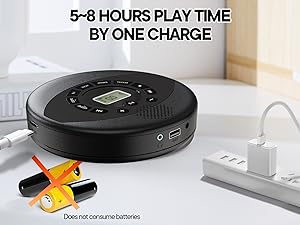
Image 3.2: Anti-shock protection for active use.
4. Huolto
4.1 Cleaning the CD Player
- Use a soft, dry cloth to clean the exterior of the player.
- For the lens, use a specialized CD lens cleaning kit. Do not touch the lens directly.
- Vältä hankaavien puhdistusaineiden tai liuottimien käyttöä.
4.2 Akun hoito
- Akun käyttöiän pidentämiseksi vältä akun usein tapahtuvaa täydellistä tyhjentymistä.
- Säilytä laitetta viileässä ja kuivassa paikassa, kun sitä ei käytetä pitkään aikaan.
- Charge the device at least once every three months if unused to prevent deep discharge.
4.3 CD-levyjen hoito
- Käsittele CD-levyjä reunoista välttääksesi sormenjälkiä ja naarmuja.
- Puhdista CD-levyt pehmeällä, nukkaamattomalla liinalla pyyhkimällä keskeltä ulospäin.
- Store CDs in their cases to protect them from dust and damage.
5. Vianmääritys
| Ongelma | Mahdollinen syy | Ratkaisu |
|---|---|---|
| Soitin ei käynnisty. | Akku on tyhjä. Virtakytkin on pois päältä. | Charge the battery. Ensure the power switch is in the 'ON' position. |
| Ei ääntä. | Volume is too low. Headphones/AUX cable not connected properly. CD/USB not playing. | Increase volume. Check connections. Ensure CD/USB is playing and not paused. |
| CD-levy hyppii tai ei soi. | CD is dirty or scratched. CD is not properly seated. Incorrect CD format. | Clean the CD. Re-seat the CD. Ensure the CD format (CD, CD-R, CD-RW, MP3, WMA) is supported. |
| USB-toisto ei toimi. | USB drive not properly inserted. Incompatible file muoto. | Ensure USB drive is fully inserted. Check if files are MP3 or WMA format. |
6. Tuotteen tekniset tiedot
| Ominaisuus | Yksityiskohta |
|---|---|
| Mallinumero | PM11-Black |
| Tuotteen mitat | 5.7 x 5.7 x 1.2 tuumaa |
| Tuotteen paino | 1.01 kiloa |
| Akun tyyppi | 1 litiumpolymeeriakku (mukana) |
| Yhteydet | Lisälaite, USB |
| Erikoisominaisuudet | Anti-Skip Protection, Portable, Programmable Memory, Rechargeable |
| Mukana olevat komponentit | CD player X 1, Earbuds X 1, Audio cable X 1, Charging cable X 1, Pouch X 1 |
| Tuetut muodot | CD, CD-R, CD-RW, MP3, WMA |
7. Takuu ja tuki
For warranty information and customer support, please contact Kuephom directly. Details regarding product warranty periods and service procedures are typically provided with your purchase documentation or can be found on the official Kuephom websivusto.
If you encounter any issues not covered in this manual, please reach out to Kuephom customer service for assistance.