
Pknight CR011R-3pin
Pknight CR011R-3pin ArtNet DMX Ethernet Lighting Controller Interface User Manual
Model: CR011R-3pin
1. Johdanto
This manual provides comprehensive instructions for the setup, operation, and maintenance of your Pknight CR011R-3pin ArtNet DMX Ethernet Lighting Controller Interface. This device facilitates bi-directional conversion between Art-Net and DMX512 protocols, offering a robust solution for professional lighting control applications.
2. Tuote ohiview
The Pknight CR011R-3pin is a compact and durable ArtNet DMX node designed for reliable performance in various lighting environments. It features an OLED display for direct configuration and supports versatile power options.

Kuva 1: Pknight CR011R-3pin ArtNet DMX Ethernet Lighting Controller Interface.
2.1 Tärkeimmät ominaisuudet
- Bi-directional ArtNet/DMX Conversion: Supports both Art-Net to DMX and DMX to Art-Net modes.
- OLED Control System: Onboard display and buttons for direct device configuration.
- Versatile Power Solution: Compatible with 5V DC input and USB Power Delivery (PD) via USB-C.
- Etämääritykset: Settings can be adjusted remotely using DMX Workshop software.
- Kestävä rakenne: Housed in a sturdy all-metal casing.
2.2 Laitteen osat

Kuva 2: Takaosa view of the CR011R-3pin showing DMX In/Out, Ethernet, and DC5V ports.
- Sininen LED -merkkivalo:
- Stays off: Standby mode, waiting for DMX (in/out).
- Stays on (no blinking): DMX-out mode, converts ArtNet to DMX output.
- Blinks continuously: DMX-in mode, converts DMX input to ArtNet.
- Female XLR Port (3-Pin): DMX input/output connection.
- RJ45 Port (ArtNet In/Out): Ethernet connection for Art-Net data.
- Green LED (left): Link LED.
- Green LED (right): Activity LED (blinks fast for data activity, off for no data).
- Virtaportti (tyyppi C): 5V DC power input. Compatible with USB PD and third-party USB-C cables.
3. Asennus
3.1 Virtaliitäntä
Connect the device to a 5V DC power source using the provided USB-C cable. The device supports USB Power Delivery (PD) and can be powered by 5V adapters, PC USB ports, or power banks.
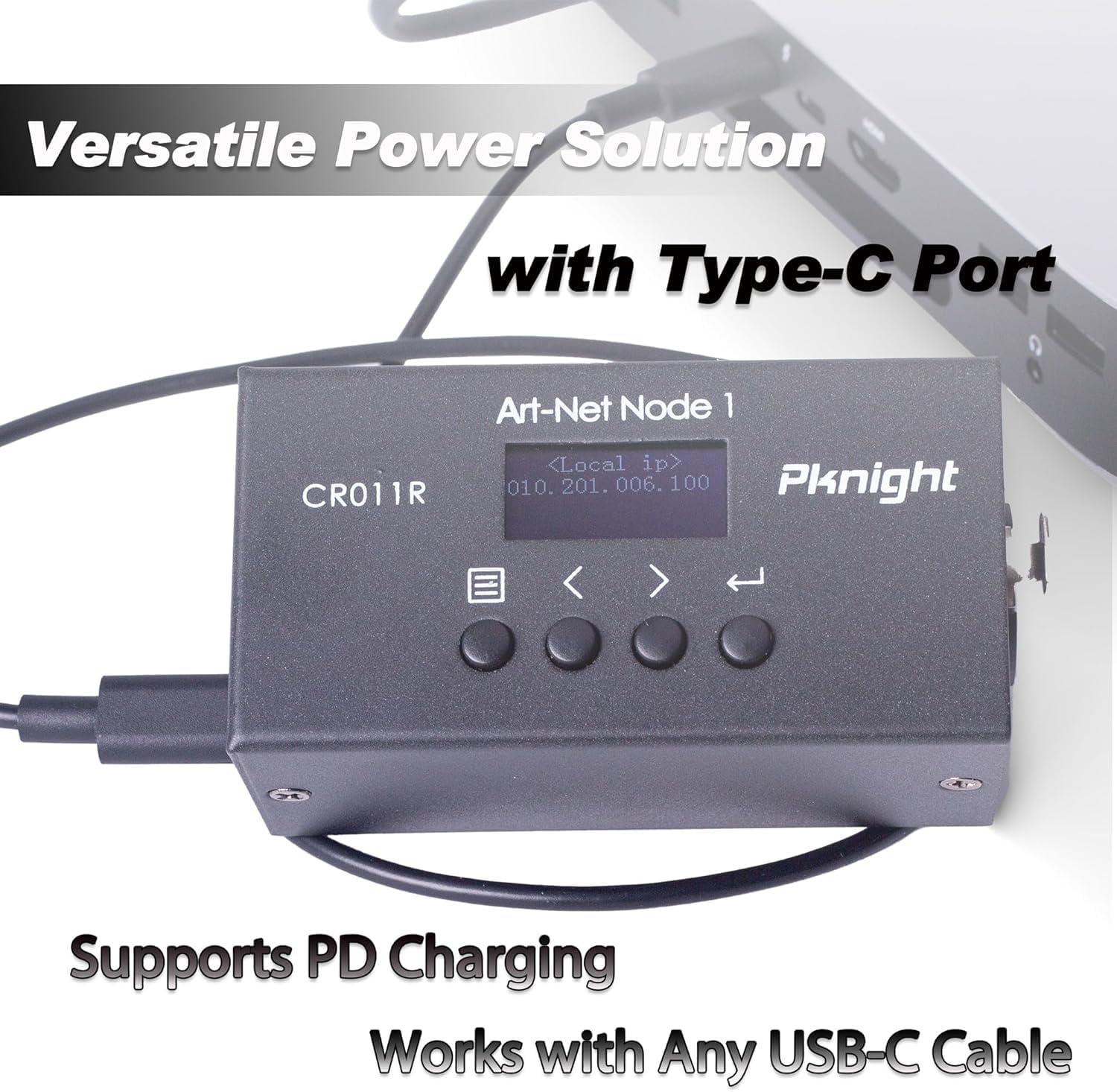
Kuva 3: Powering the CR011R-3pin via its USB-C port.
3.2 Verkkoyhteys
Connect the RJ45 Ethernet port to your network switch or directly to a computer using a standard Ethernet cable. Ensure your network settings are configured to allow Art-Net communication.
3.3 DMX-liitäntä
Connect your DMX lighting fixtures or DMX controller to the 3-pin XLR DMX In/Out port. The device will automatically detect the DMX signal direction based on its configured transmit mode.
4. Configuration (OLED Control System)
The CR011R-3pin features an OLED display and four function buttons for direct configuration without external software.

Kuva 4: OLED display and control buttons.
- OLED-näyttö: Näyttää nykyiset asetukset ja valikkovaihtoehdot.
- Valikkopainike: Used to switch between menu options.
- Backward or Minus Button: Navigates backward or decreases a selected parameter.
- Forward or Plus Button: Navigates forward or increases a selected parameter.
- Enter-painike: Clicks to choose a function or parameter. Press and hold for 3 seconds to submit changes.
4.1 Remote Configuration and Naming
You can remotely configure network parameters (IP address, subnet mask, net address, subnet address, port universe) and customize the startup display text using the DMX Workshop application.

Kuva 5: Customizing the device name using DMX Workshop.

Kuva 6: Diagram illustrating the configuration flow for network and Art-Net parameters.
5. Toimintatilat
The CR011R-3pin supports bi-directional operation, allowing it to function as both an ArtNet to DMX converter and a DMX to ArtNet converter.
5.1 ArtNet to DMX (DMX Output Mode)
In this mode, the device receives Art-Net data over Ethernet and converts it into DMX512 signals, which are then output through the 3-pin XLR port to control DMX-compatible lighting fixtures. The blue LED indicator will stay on (no blinking).
5.2 DMX to ArtNet (DMX Input Mode)
When configured for DMX input, the device receives DMX512 signals from a DMX controller via the 3-pin XLR port and converts them into Art-Net data, which is then transmitted over Ethernet. This allows DMX consoles to control Art-Net compatible software or devices. The blue LED indicator will blink continuously.
To switch to DMX input mode, set the 'Transmit mode' to 'artnet <- dmx' via the OLED display or DMX Workshop.

Kuva 7: Diagram illustrating DMX input mode, converting DMX to ArtNet for software control.
6. Sovellukset
The Pknight CR011R-3pin is suitable for a variety of professional lighting applications, including:
- Stage valaistuksen ohjaus
- Pixel LED installations
- Architectural decoration lighting
- Fixed lighting installations

Kuva 8: Visuaalinen esimerkkiamples of the CR011R-3pin in various lighting applications.
7. Tekniset tiedot
| Ominaisuus | Erittely |
|---|---|
| Mallinumero | CR011R-3pin |
| Tuotteen paino | 13.4 unssia |
| Tuotteen mitat | 4.53 x 2.76 x 2.36 tuumaa |
| DMX portit | 1 (3-pin XLR, bi-directional) |
| Ethernet-portit | 1 (RJ45, ArtNet In/Out) |
| Virransyöttö | 5V DC via USB-C (supports USB PD) |
| Ohjausliittymä | OLED display and 4 function buttons |
| Asunnon materiaali | Kokometalli |
8. Vianmääritys
- Ei DMX-lähtöä/-tuloa:
- Verify the 'Transmit mode' setting on the device or via DMX Workshop. Ensure it matches your intended operation (ArtNet to DMX or DMX to ArtNet).
- Tarkista DMX-kaapeliliitännät ja varmista, että ne ovat tukevasti kiinni.
- Confirm that the DMX universe setting on the device matches your lighting control software. Note that some software may label the first universe as '1' while the device may internally refer to it as '0'. Adjust accordingly.
- Ei verkkoyhteyttä:
- Ensure the Ethernet cable is properly connected and the green Link LED on the RJ45 port is illuminated.
- Check the IP address, subnet mask, and other network parameters configured on the device and your computer/network. Art-Net typically uses a specific IP range (e.g., 2.x.x.x or 10.x.x.x) and subnet mask (e.g., 255.0.0.0).
- If connecting directly to a computer, manually configure your computer's network adapter to be in the same IP range as the device.
- Confirm that your network allows UDP traffic on Art-Net's default port (6454).
- Laite ei käynnisty:
- Ensure the USB-C power cable is securely connected to both the device and a functional 5V power source.
- Kokeile toista USB-C-kaapelia ja virtalähdettä sulkeaksesi pois vialliset lisävarusteet.
9. Huolto
To ensure the longevity and optimal performance of your Pknight CR011R-3pin, follow these maintenance guidelines:
- Puhdistus: Puhdista laitteen ulkopinta pehmeällä, kuivalla liinalla. Vältä nestemäisten puhdistusaineiden tai liuottimien käyttöä, sillä ne voivat vahingoittaa pintakäsittelyä tai sisäisiä komponentteja.
- Varastointi: Kun laitetta ei käytetä, säilytä sitä viileässä, kuivassa paikassa suojassa suoralta auringonvalolta ja äärimmäisiltä lämpötiloilta.
- Kaapelin hallinta: Ensure all cables are routed properly to prevent strain on the connectors and accidental disconnections.
- Laiteohjelmistopäivitykset: Tarkista säännöllisesti valmistajan website for any available firmware updates to ensure the device has the latest features and bug fixes.
10. Takuu ja tuki
Pknight products are designed for reliability and performance. For specific warranty information, please refer to the warranty card included with your product or visit the official Pknight website. If you encounter any issues or require technical assistance, please contact Pknight customer support through their official channels.
Aiheeseen liittyvät asiakirjat - CR011R-3pin
 |
Pknight WIFI-DMX EasyNode -käyttöohje: Langaton DMX-ohjaus Kattava Pknight WIFI-DMX EasyNoden käyttöopas, jossa on yksityiskohtaiset tiedot langattoman DMX-valaistuksen ohjauksen asennuksesta, käytöstä, tiloista (Easylink, reititin) ja vianmäärityksestä. |
 |
Pknight CR011R Art-Net DMX512 -verkkomuuntimen käyttöohje Kattava käyttöopas Pknight CR011R:lle, kaksisuuntaiselle Art-Net–DMX512-verkkomuuntimelle. Opi asennuksesta, teknisistä tiedoista, OLED-ohjauksesta, etu-/takapaneelin ominaisuuksista, asetuksista, verkkoparametreista ja vianmäärityksestä. |
 |
Pknight CR011R Art-Net DMX512 -verkkomuuntimen käyttöohje Käyttöohje Pknight CR011R:lle, kaksisuuntaiselle Art-Net–DMX512-verkkomuuntimelle. Sisältää tekniset tiedot, asennuksen, asetukset, vianmäärityksen ja ominaisuudet, kuten "Nimeä kaverisi" -toiminnon ammattimaiseen valaistuksen ohjaukseen. |
 |
Tivoli VAST Cove Light - PALETTE: Specifications and Guide Detailed specifications, dimensions, accessories, and wiring diagrams for the Tivoli VAST Cove Light - PALETTE, an RGB+W LED cove lighting system with DMX/RDM control. |
 |
Tivoli VAST Cove -valaisin - PALETTE: Tuotetiedot ja opas Tivoli VAST Cove Light - PALETTE:n yksityiskohtaiset tekniset tiedot, ominaisuudet ja tilaustiedot. Kyseessä on RGB+W-pohjainen nurkkavalaistusratkaisu DMX/RDM-ohjauksella, saatavilla erilaisilla värillisillä värikoodeilla ja kokoonpanoilla. |
 |
Tivoli VAST Cove Light - PALETTE: RGB+W LED Specification and Control Guide Comprehensive specification guide for the Tivoli VAST Cove Light - PALETTE, detailing features, dimensions, order options, accessories, DMX control, network hardware, and commissioning services. |
Ask a question about this manual
Ask about setup, troubleshooting, compatibility, parts, safety, or missing instructions. Manuals+ will review the question and use this page’s manual context to help answer it.