
1. Johdanto
The Guardo Fit Coach Explore is an advanced activity tracker designed to monitor various aspects of your health and fitness. This manual provides essential information for setting up, operating, and maintaining your device to ensure optimal performance and longevity.
2. Pakkauksen sisältö
Varmista, että pakkauksessasi on kaikki tarvittavat osat:
- Guardo Fit Coach Explore Activity Tracker
- Latauskaapeli
- Käyttöopas (tämä asiakirja)
3. Asennus
3.1 Laitteen lataaminen
Before first use, fully charge your Guardo Fit Coach Explore. Connect the charging cable to the charging port on the back of the device and plug the other end into a USB power source (e.g., computer, USB wall adapter). The device will display a charging indicator.

Kuva: Takaosa view of the activity tracker highlighting the charging contacts and sensors, alongside a display showing blood pressure readings.
3.2 Sovelluksen asennus ja pariliitos
- Download the official Guardo Fit Coach app from your smartphone's app store (compatible with Android operating systems).
- Varmista, että Bluetooth on käytössä älypuhelimellasi.
- Avaa sovellus ja luo tili tai kirjaudu sisään noudattamalla näytön ohjeita.
- Valitse sovelluksesta 'Lisää laite' tai 'Yhdistä uusi laite'.
- The app will search for your Guardo Fit Coach Explore. Select your device from the list to initiate pairing.
- Confirm the pairing request on both your smartphone and the activity tracker if prompted.

Image: The activity tracker worn on a wrist, showing a watch face with icons for different applications, indicating smartphone connectivity.
4. Käyttöohjeet
4.1 Perusnavigointi
The Guardo Fit Coach Explore features a touchscreen display for interaction. Swipe left, right, up, or down to navigate through menus and features. Tap to select an option or confirm an action. The device may also have physical buttons for specific functions like power on/off or returning to the home screen.

Image: The activity tracker's display showing a customizable watch face with a unique spiral graphic.
4.2 Ilmoitusten vastaanottaminen
Once paired with your smartphone, the activity tracker can display notifications for incoming calls, messages, and app alerts. Ensure notification permissions are granted in your smartphone's settings and within the Guardo Fit Coach app.

Image: The activity tracker's screen showing an incoming call notification with the caller's number and options to answer or reject the call.
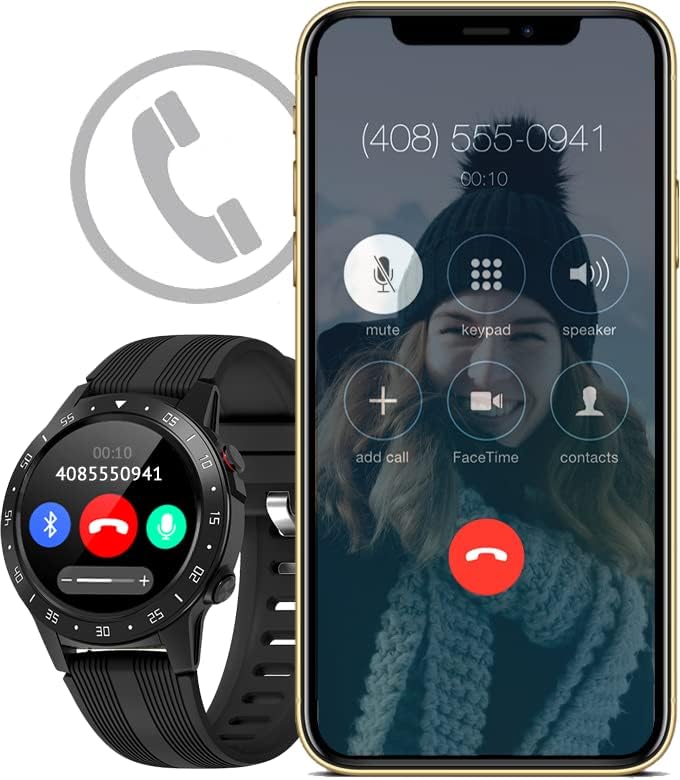
Image: The activity tracker and a smartphone side-by-side, both indicating an incoming call, demonstrating call notification synchronization.
4.3 Musiikin hallinta
Control music playback on your paired smartphone directly from your activity tracker. This feature allows you to play, pause, skip tracks, and adjust volume without needing to access your phone.

Image: The activity tracker and a smartphone displaying synchronized music playback interfaces, allowing remote control of audio.
5. Ominaisuudet
The Guardo Fit Coach Explore offers a range of features to support your active lifestyle:
- Multisport Tracker: Track various activities such as indoor and outdoor sports, cycling, and climbing.
- Custom Activity Tracking: Monitor specific activities with tailored settings.
- GPS: Built-in GPS for accurate tracking of routes and distances during outdoor activities.
- Sykemittari: Continuously monitor your heart rate.
- Verenpainemittari: Measure your blood pressure directly from the device.
- Ilmoitukset: Vastaanota ilmoituksia puheluista, viesteistä ja sovellusilmoituksista.
- Kompassi: Integrated digital compass for navigation.
- Kiihtyvyysanturi: Measures movement and activity.
- Korkeusmittari: Measures altitude, useful for hiking and climbing.
- Barometri: Measures atmospheric pressure, aiding in weather prediction and altitude accuracy.

Image: The activity tracker's display surrounded by icons symbolizing its diverse functionalities, including communication and utility features.

Image: The activity tracker's screen showing real-time GPS data, such as distance covered, pace, and heart rate, overlaid on a map.
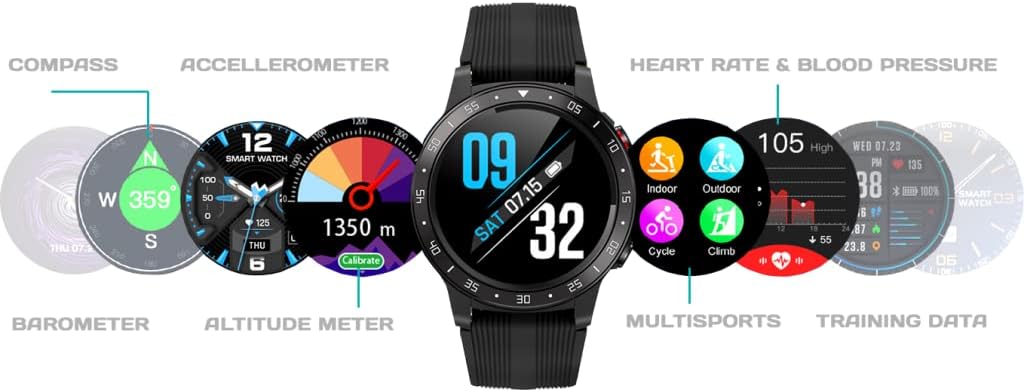
Kuva: Kattava view of the activity tracker's display, showcasing various data points from its integrated sensors, including environmental and health metrics.
6. Huolto
6.1 Puhdistus
Regularly clean your activity tracker to prevent skin irritation and maintain device functionality. Use a soft, damp, lint-free cloth to wipe the screen and strap. Avoid harsh chemicals or abrasive materials.
6.2 Akun hoito
To prolong battery life, avoid exposing the device to extreme temperatures. Charge the device regularly, but avoid leaving it fully charged or fully depleted for extended periods.
7. Vianmääritys
7.1 Laite ei käynnisty
- Varmista, että laite on ladattu täyteen. Liitä se laturiin vähintään 30 minuutiksi.
- Press and hold the power button (if applicable) for 10-15 seconds to attempt a forced restart.
7.2 Pariliitosongelmat
- Varmista, että Bluetooth on käytössä älypuhelimesi Bluetooth-toiminnolla ja että laite on kantaman sisällä.
- Restart both your smartphone and the activity tracker.
- Forget the device in your smartphone's Bluetooth settings and attempt to pair again through the Guardo Fit Coach app.
- Tarkista, onko sovellus päivitetty uusimpaan versioon.
7.3 Epätarkat lukemat
- Ensure the device is worn snugly on your wrist, about one finger's width above your wrist bone.
- Puhdista laitteen takana olevat anturit.
- Varmista GPS:n käyttöä varten, että olet avoimella alueella, jossa on esteetön valo. view taivaalta.
8. Tekniset tiedot
| Ominaisuus | Erittely |
|---|---|
| Merkki | pidän |
| Malli | Tutkia |
| Yhteensopivat laitteet | Smartphone (Android OS) |
| Näytön tyyppi | LCD |
| Näytön koko | 40 millimetriä |
| Langaton yhteys | Bluetooth |
| GPS | Sisäänrakennettu GPS |
| Syöttölaite | Mikrofoni, Kosketusnäyttö |
| Mukana ladattavat paristot | Kyllä |
| Erikoisominaisuudet | Custom activity tracking, Blood pressure monitor, GPS, Notifications, Multisport Tracker |
9. Turvallisuustiedot
- Älä yritä avata tai purkaa laitetta.
- Pidä laite poissa äärimmäisistä lämpötiloista, suorasta auringonvalosta ja kosteudesta.
- This device is not a medical instrument. The data provided is for reference only and should not be used for medical diagnosis or treatment.
- Consult your doctor before starting any new exercise regimen or if you have any health concerns.
- Hävitä laite ja sen akku paikallisten määräysten mukaisesti.